





Eddie Seelke
Members
-
Joined
-
Last visited
Everything posted by Eddie Seelke
-
Here is my diagnostics, in case it helps. media-diagnostics-20221021-0958.zip
-
I am having an issue with drives not spinning down if they were spun up manually. This started after upgrading to 6.11.1 If it is spun up by the system, it will spin down after timeout. But, the only way I have found so far to get the disk(s) to spin down if I manually spun it up is to reboot the server.
-
For those that are increasing a Windows 10/11 VM, you do not need to download a 3rd party partition utility. Windows comes with a built-in utility called diskpart that will delete the Recovery partition for you. It is not difficult to use. Open a command prompt as Administrator. Type diskpart and press Enter. Find the disk number for your OS, usually disk 0 with the command list disk. You will see at least one disk listed. Make sure to select the correct disk. Assuming your OS is Disk 0, enter command select disk 0. Now, we need to list the partitions. Enter the command list part. If you used the default setup when installing Windows you likely have 4 partitions and the Recovery partition is Partition 4. So select it with the command select partition 4. Now, to delete use the command delete partition override. Lastly, right-click the Start menu, and select Disk Management. You should be able to Extend Volume by right-clicking on the C partition. Follow the wizard to complete.
-
I have two linux VM's. I changed both to Spice to try it out. Spice would not connect when using a different port than 80 or 443. So, using port 88 would not connect. But, once I was able to view, I was presented with the following screens. I checked the boot manager and it is still set correctly. I changed back to VNC, but still getting the no boot errors.
-
Would it be possible to install wp cli inside the container?
-
Has anyone been able to get this working recently? I would love to be able to control my VM's in Home Assistant. But, every time I run this I lose access to my Unraid server. I tried changing the memory limit as above, but it didn't help.
-
I am having an issue and am at a loss on how to troubleshoot. If Unmanic is idle for a period and then detects a new file to process, it will just spin and spin on the first processing state. Currently, there are multiple files that were added 3 days ago and nothing is actually being processed. If I restart the docker though, it will complete the process on these files. So, how to I either resolve the issue or troubleshoot it? Thanks, Eddie
-
Does anyone know how to update ZT to 1.8.10 in this?
-
If I choose to encode audio using the AAC encoder, it shows as successful. But when playing on Plex in the Chrome browser it fails with the error "Error code: s3015 (Media)". It does play fine on a Chromecast though. Any ideas on how I can get it to play in Chrome as well?
-
Thanks for the reply. Is it possible to do that with unRAID running? My USB drive is plugged into the internal USB port. As for the IP, yes I am sure. It ran with the same configuration for two years, then I updated so I could get TPM. Oddly though, sometimes the forwarding does work. I just can't make it work consistently.
-
Hi, I have a major issue as explained here. Until this is resolved I am wondering how can I downgrade back to 6.9? I am currently running 6.10.0-rc4 and the only restore option is 6.10.0-rc3. Thanks, Eddie
-
Since I have updated to 6.10.0-rc4 I have been having sporadic issues with ports being forwarded to the Unraid server. I have verified that the issue is not with the ISP or the router. Presently, any port forwarded to the Unraid server will show as closed externally and anything relying on the port will fail. Ports currently being forwarded. 80 - traefik docker 443 - traefik docker 55415 - urbackup docker 32400 - Plex docker 51820 - Wireguard If I forward the ports to a different device or server, they work fine. If I change the docker from bridge to custom: br0 and use a different IP address, they work fine. But, any port going to the IP of the Unraid server fails. media-diagnostics-20220422-2327.zip
-
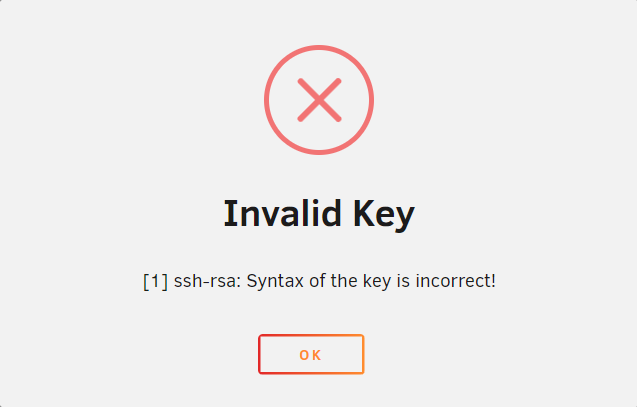
I removed the /boot/config/ssh folder and rebooted. When I try to add the key using the webui for the root user, I get the following error. The key is exactly as I would add to another system in the authorized_keys file, which does work.
-
Hello, I am using Putty to login via SSH using a key in order to avoid entering a password. However, I continue to receive the error "Server refused our key". I do have the correct key in /root/.ssh/authorized_keys and have verified it is correct, as well as deleting and re-adding. Still continue to get this error. Putty is also pointed to the correct ppk file. I am using the same setup on several other systems and they work fine. Any help is appreciated. Eddie
-
Still hoping to find a resolution.
-
Is anyone familiar with RedVex's Fog Poject docker? I have it running. Everything was great until it was rebooted. But, once the docker is restarted, it will not mount images anymore. It doesn't matter if I stop and the start or restart the container. Even I stop the array or reboot the Unraid server, it still will not mount images. However, if I delete the container and the container image and then re-create it, it will work all day. Just as long as I don't restart it. How can I fix this where it will work every time? Thanks
-
I had the same exact issue and after several weeks of trying to get it working I came across Tdarr. It's not as easy to setup, but hasn't crashed my system once. Not trying to knock Unmanic. Just saying there are other options.
-
Is it because I don't have GPU that Unmanic does not work?
-
Right after I posted last message, I changed the container to use the staging image. I didn't make any other changes. The webui will come up, but it will not scan for media. I even tried changing the option to scan on start and then restarted container, but still no scans.
-
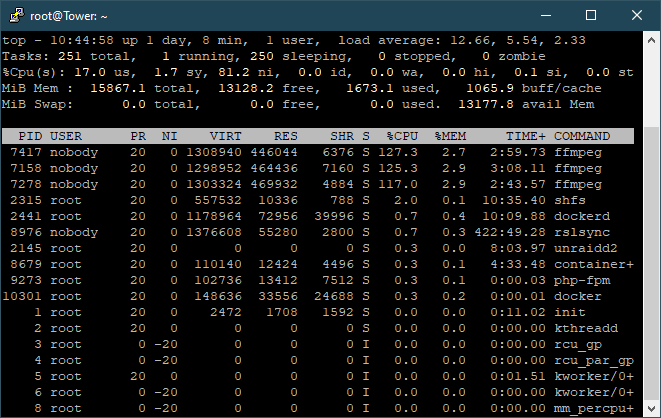
Ok, I started over completely from scratch. I created a new USB drive of Unraid 6.9.1. I setup the transcode share as requested above and installed only two docker apps, Resilio-Sync and Unmanic. I only started Resilio Sync until it synced all of my movies back over. This took almost 5 days. After sync finished, I started Unmanic at 12:42PM. I then accessed the webui and clicked on Rescan. It started three workers. One minute later I could no longer access webui. Right before webui stopped working I could see a process called unmanic in the screenshot above.
-
Well crud, that didn't fix it either. 😞
-
Ok, I deleted everything and started completely over. I created a share called transcode and chose Only for cache. I used all default settings except I did add "--cpus='.5'" under Extra Parameters. Unfortunately, it gave the same results as before. After a few minutes entire server became unresponsive and I had to kill all ffmpeg processes to get back to it. On the temp server, I also deleted everything, created a share called transcode (No cache in this server), and used only default settings. I hit scan in Unmanic. It started, but after a few minutes I could no longer access webui. I was trying to think of what may have changed as this did work a few days. I am thinking it stopped working when I upgraded Unraid to version 6.9.2. In fact, that's the only thing that changed on the temp server. I am downgrading the temp server and will post back the results. Thank you for your help!
-
I didn't create a share. I created a folder called .unmanic in /mnt/user using putty. The path is now /mnt/user/.unmanic/cache.
-
Ok, I made that change on my main server and everything became unresponsive after 10 minutes. Even Plex stopped working until I stopped Unamnic. I also changed this servers extra parameters to "--cpus='.25'", but it still crashed. I made your suggested change on the temp server as well. After about 5 minutes I could no longer access the webui. I then added the extra parameter of "--cpus='.9'" to this server and restarted. I still lost access to the webui after a few minutes. Am I doing something wrong? This worked for several days straight and then all of a sudden stopped working a couple of days ago. I may have added more apps to my main server, but I made no changes whatsoever on the temp server other than what was asked for here today.
-




