





devnet
Members
-
Joined
-
Last visited
Everything posted by devnet
-
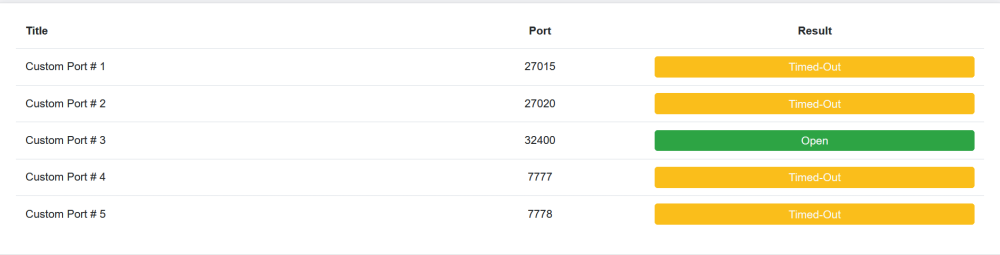
Wondering if this is still true for recent releases of Unraid? I'm up to date with current stable 6.11.3. Having an issue reaching ANY ports for Ark Survival container in bridge mode in spite of port forwarding them all from my router which is connected with IP passthrough on my AT&T modem. I know it's working (port forwarding and IP Passthrough) because my plex container in host mode is able to have 32400 port open and working on my router and is reachable from outside my network...the issue is, none of the Ark Survival ports on the container are responding. I may just not understand how bridge mode works in this instance...
-
I think either one of those approaches will work. If it were me, I'd do the first one.
-
I know this is an old topic and I'm resurrecting a zombie thread...but I just wanted to comment that it still works as of 5/18/2022 with the current up to date version of Unraid (6.9.2). I recently gutted my server and replaced the motherboard and CPU completely and added in an LSI 9211-8i (IT Mode) card. I then connected all the same hard drives up and powered things online and everything just connected and worked...all VM's, all docker containers, all arrays, all shares...they just worked. Anyway, just wanted to chime in and let folks know that the above method referenced by @lionelhutz (link directly below) worked like a charm. Drive order is irrelevant as serial number is used...so it doesn't matter what connection they are as long as they are connected.
-
When mine updated this morning..it pulled from: By: flippinturt/pihole-dot-doh
-
+1 I'd like this as well...it's something I used to do on vanilla Debian with docker.
-
Had the same issue here: I'd definitely get behind a solution on this as well. Previously, ASUS router was able to see Docker IP's running on macvlan with no issues on vanilla Debian. Side note: some of my containers actually register their DHCP address with my DHCP service external to Unraid...but only 3 containers total. The rest follow the behavior above of not registering with external DHCP. The containers that work are PiHole DOT-DOH, Whoogle, and The Lounge. Not sure why those are different than any other container...but they registered with my external DHCP service and I was able to reserve a permanent lease for them.
-
Hello all. Just put in an entire TP-Link Omada network complete with switches, AP's, Gateway and Controller. All things went without a hitch. I have created some VLANS but kept Unraid on my default admin network so it's able to communicate with everything. Here's the issue. I can get Unraid to register it's IP and I'm able to statically assign it in the Omada interface. However, only 5 out of my 11 containers register with Omada so I cannot assign static IP's on 6 of them. On the TPLink forums, I've posted topology, etc (hope this is ok to link here): https://community.tp-link.com/en/business/forum/topic/533610 And I'm at a loss for why some containers don't contact my DHCP server and tell it what their IP address is. Can anyone point me in the right direction? I'm just waiting for an IP conflict to take down my containers.
-
Ahh, I had the same problem as you but I had br0 interface instead of bridge that I was trying to get to work. Was told you had to set it up in bridged or no workie.
-
What network type are you using inside of the docker settings for the VPN versions?
-
In the standard pihole docker it's set as an environmental variable. Not sure if it is in this docker image: https://github.com/pi-hole/docker-pi-hole/tree/dev#environment-variables
-
As an FYI to anyone out there who has pkexec/polkit installed on their distribution of linux (perhaps in a VM) that hasn't been patched that has multiple users that you don't know/trust, you can fix the SUID-bit to prevent the exploit by chmod of the file: chmod 0755 /usr/bin/pkexec This prevents it from running as root when executed by a non-privileged user.
-
keep in mind, if you have 3 fans pulling...you might need at least one of them to PUSH. That's the ticket is getting enough to pull and enough to push to have good air exchange in the case. Here is a Youtube video of a channel I trust that talks about thermals and fan placement for your case:
-
Plenty of options for hardware fan controllers but I don't think you need one. Keep in mind that you set these items in BIOS for profiles...and generally, fans will increase their speed based on temperature automagically. I can tell you what I did to reduce my HD temperature. I bought a new case...a Fractal Design Node 804...this case splits the motherboard/CPU/GPU from the Hard disks. I then put in a bunch of HUGE fans...one pushes, one pulls...on the hard drive side. This causes all my air flow in the hard disk section to be segmented away from the CPU side....all of my disks dropped about 10 degrees. Larger fans (120mm or 140mm) push a bit more air at lower RPM's and in my case, it reduced the noise level of the server while dropping the temperature. I've never really had to worry about using a fan controller (hardware) outside of a gaming system...so if you're having issues, you should rethink your fan positions in your case. More than happy to help you should you need assistance with fan placement or recommendations. I don't think you need a fan controller...just better fan placement.
-
I think you were onto something with the cables...if you've made sure the attachment is clean and you still have issues, I'd replace the cables themselves and see if your issue persists. I've had something similar happen in a Gentoo install I had at work...similar error messages that you have inside your diagnostics. In my case, it was a loose SATA cable. I'm newer to unraid so I can't really answer the 'next steps' question. I'm sure there are others who know what should be done (at least I hope there are)
-
This is usually done with a hardware fan controller inside your motherboard or installed separately. The fan speed is not something controlled by the operating system in Linux (usually...there are specific use cases when a vendor provides a Linux installer for some fan controllers...those are rare and often times are for gaming). The plugin you installed is just to provide information to the dashboard of unraid (and bottom panel when loading into admin area). It doesn't provide control for the fans themselves.
-
No worries! I'll eventually get it tweaked the way I want it. The 'make it hard' part was me not using my open eye at 0241 in the morning when posting this. Should be a snap now that I look at it.
-
Something I consider weird is happening with this container. I had no issues setting it up and getting the logs to show that I was pulling an IP from NordVPN...and that everything looks good. So, I then tried assigning my own IP with br0. HOWEVER, upon doing so the WebUI won't load in Firefox/Chrome....states connection reset. The minute I switch it back to bridge, I can get to the WebUI. In the logs, everything looks good...connection to nordvpn is there, nordvpn IP is assigned...everything says it's starting up and operating correctly...but if I use br0 and custom IP, I can't hit the webUI even if the VPN connection is working. Switch to bridge and boom it works. @binhex is the above by design for unraid? I'd think we'd want to be able to assign an IP to this to use privoxy with in our LAN...in bridge mode that makes it a bit hard.
-
Resolved this myself. Here's what I had to do.... Turn off VM Service Turn off Docker Service Edit Network settings to NOT use my router first as a DNS server...changed to 1.1.1.1 and added my router second. Saved Turned on VM Service Turned on Docker Service Now the container pulls from the internet just fine...it seems it doesn't like using a router as a DNS server.
-
So just installed this after a fresh install of unraid 6.9.2 yesterday. I previously ran pihole doh on vanilla debian managing the container with portainer. I went to update gravity since there are -2 rules on the blocklist. The update times out and gives me the following error: [✗] DNS resolution is currently unavailable [✗] DNS resolution is not available Are there any changes I need to make to get this to work after installing it? Obviously, I changed things like IP and timezone appropriately before installing. EDIT: Searching has yeilded more information on this. It seems this container may not respect the DNS Settings from environment variables and add them to the resolv.conf file in the container. A quick investigation shows that resolv.conf contains 127.0.0.11...which obviously isn't an address we care about at all. So, it's looks like we'll have to manually add extra parameters for the resolv.conf so that it can resolve hostnames... I'm just not sure what to change it to yet...the bottom line is the container won't work out of the box without changing it.



