






itsalljustdata
Members
-
Joined
-
Last visited
Everything posted by itsalljustdata
-
Am doing something wrong - or is this behaving as desired? I ran a preclear on a disk (it's a 12TB Ironwolf Pro which has just been "retired" from being my Parity drive). 60hrs later (!), it's all done. Excellent... Tried to add the disk to the array, but it didn't appear in the dropdown. so i did a reboot. Added to the array and started it up *BUT* unraid is now running it's own clearing on the disk, so i've got about another 14 hrs to wait. I thought this PreClear meant that the disk could just add straight into the array?
-
run.Webui != "" && (run.Name != "Docker-WebUI" || run.Name != os.Getenv("HOST_CONTAINERNAME")) that's always going to display it isn't it (whenever the env var isn't Docker-WebUI)? run.Name != "Docker-WebUI" OR run.Name != EnvVar some logic along these lines would be better checkName = os.Getenv("HOST_CONTAINERNAME") if checkName is null then checkName = 'Docker-WebUI' if run.Webui != "" and run.Name != checkName then display it

-
sorry, i wasn't clear enough.... from 6.10-rc2 the HOST_CONTAINERNAME env variable is automatically assigned to ALL docker containers on creation, therefore you'll be able to change your code to look for that variable and exclude the value stored in there. this is an example of a "docker run" command generated now by 6.10 docker run -d --name='Docker-WebUI' --net='downloads' -e TZ="Australia/Perth" -e HOST_OS="Unraid" -e HOST_HOSTNAME="skynet" -e HOST_CONTAINERNAME="Docker-WebUI" -e 'CIRCLE'='no' -l net.unraid.docker.managed=dockerman -l net.unraid.docker.webui='http://[IP]:[PORT:8080]' -l net.unraid.docker.icon='https://raw.githubusercontent.com/Olprog59/unraid-templates/main/docker-webui/docker-webui.png' -p '1111:8080/tcp' -v '/var/run/docker.sock':'/var/run/docker.sock':'rw' -v '/var/local/emhttp/plugins/dynamix.docker.manager':'/data':'ro' 'olprog/unraid-docker-webui' the HOST_HOSTNAME and HOST_CONTAINERNAME environment variables are new as of 6.10-rc2. They help our containers be "self-aware" when they need to be!
-
Once you are on 6.10-rc2 (or newer) containers get created with an environment variable called HOST_CONTAINERNAME which contains the name of the container (Docker-WebUI if left unchanged). If you check for the existence of this env-var then you can remove the hard-coding for "Docker-WebUI"
-
Even alphabetically (case-insensitive!) sorted would be a start!
-
bloody foreigners, staying over there - not driving our trucks.... 🤣
-
Heat/Heat caused by CPU load could well be my issue too. Mine actually ran fine for a week, but none of my docker containers were running (different issue, don't ask!). I recreated them all on Friday
-
any progress on this? I'm seeing similar issues with a 5700G (different mobo). on 6.10.0-rc1 skynet-diagnostics-20210924-1400.zip
-
I see you've fixed the container now... Cheers!
-
Put a container onto a macvlan network, and assign it an IP in the LAN range. Or even have the docker network make a DHCP assignment. Here's a docker network inspect for my network [ { "Name": "br0", "Id": "6c8a8d37276c8d82f047ccfb156aba833629db9e2d166cb9e8229463aac1d6ac", "Created": "2021-09-06T08:38:55.45040253+08:00", "Scope": "local", "Driver": "macvlan", "EnableIPv6": false, "IPAM": { "Driver": "default", "Options": {}, "Config": [ { "Subnet": "10.1.0.0/22", "IPRange": "10.1.2.64/27", "Gateway": "10.1.2.1", "AuxiliaryAddresses": { "server": "10.1.2.2" } } ] }, "Internal": false, "Attachable": false, "Ingress": false, "ConfigFrom": { "Network": "" }, "ConfigOnly": false, "Containers": { "d84731c04a826aeaa63fa0e88e2582e9875de2292904acdfe96f1cb2bd2aca01": { "Name": "pihole", "EndpointID": "bd20b00120acf20bdb6d0e2a27056104f0ec05ae0437297e985f992b485c51a0", "MacAddress": "02:42:0a:01:02:03", "IPv4Address": "10.1.2.3/22", "IPv6Address": "" } }, "Options": { "parent": "br0" }, "Labels": {} } ] so you can see, i have a container called "pihole" which has a manually assigned 10.1.2.3 IP which is accessible on my LAN proper.
-
It doesn't take into account a container having its own IP address
-
Legend.... I was just cursing about that.....
-
Good old PEBKAC. They are the best solutions (when you eventually find them)....
-
Submitted a PR....
-
Because I was interested to have a play (and just for S&G), i've modded my /usr/local/emhttp/plugins/dynamix.docker.manager/include/Helpers.php file 274 // Add HOST_HOSTNAME variable 275 $Variables[] = 'HOST_HOSTNAME=$HOSTNAME'; 276 // Add HOST_CONTAINERNAME variable 277 $Variables[] = 'HOST_CONTAINERNAME='.escapeshellarg($xml['Name']); All seems to work fine Why would I want this, i hear you cry? Well, in my "Firefox" container the tab name being "Guacamole Client" gave me the poops (being polite!) - so I stuck the following in appdata/firefox/custom-cont-init.d/00.set.guac.page.title.sh filename="/gclient/rdp.ejs" echo echo ---------------------------------------------------------------------------------- echo echo "Set the Guacamole Client page title in \"${filename}\"" echo echo "Before" echo "------" grep "<title>" $filename sed -i "s+<title>Guacamole Client</title>+<title>${HOST_OS} ${HOST_HOSTNAME} ${HOST_CONTAINERNAME}</title>+g" $filename echo echo "After" echo "-----" grep "<title>" $filename echo echo ---------------------------------------------------------------------------------- echo so now my tab is titled "Unraid skynet firefox" - much more OCD friendly....
-
Very handily the docker code automatically creates a HOST_OS = "unraid" env var in each container, can we make it automatically create a HOST_HOSTNAME = $HOSTNAME (i.e. the unraid server's hostname) as well? and yes, i know i can just do it in "Extra Parameters" for each container - but it'd be handy to have it there automatically. -e HOST_HOSTNAME=$HOSTNAME making the container name available within all containers would probably be useful too.....
-
but surely RAID is a backup? yeah, i'll take a look at the files that are there. if it's all too hard i'll trash them - i'm pretty sure they are all downloaded media files anyway. I "normally" have a backup on a second unRAID server, but as "luck" would have it i've trashed it this week and haven't yet redone my backup of stuff I care about. It's all on Onedrive as well anyway
-
Oh FFS. now it's mounted OK. 26GB of data in "lost+found" for me to trawl through....
-
One of my data disks has decided not to mount. UNMOUNTABLE: NOT MOUNTED I've tried 1. Stopping the array. Removing the disk. Start the array. Stop the array. Add the disk back in again. Start the array, rebuild from parity. 24hrs later (once the rebuild has happened), still the same error. grrrrr. 2. xfs_repair (from the GUI so save any potential confusion) with the -L option Phase 1 - find and verify superblock... Phase 2 - using internal log - zero log... - scan filesystem freespace and inode maps... - found root inode chunk Phase 3 - for each AG... - scan and clear agi unlinked lists... - process known inodes and perform inode discovery... - agno = 0 - agno = 1 - agno = 2 - agno = 3 - agno = 4 - agno = 5 Metadata CRC error detected at 0x459c09, xfs_dir3_block block 0x280000010/0x1000 bad directory block magic # 0x1e0d0000 in block 0 for directory inode 10737418375 bad bestfree table in block 0 in directory inode 10737418375: repairing table Metadata CRC error detected at 0x459c09, xfs_dir3_block block 0x280000018/0x1000 bad directory block magic # 0xa770470 in block 0 for directory inode 10737418387 bad bestfree table in block 0 in directory inode 10737418387: repairing table - agno = 6 - agno = 7 Metadata CRC error detected at 0x45c929, xfs_dir3_data block 0x40/0x1000 bad directory block magic # 0xa770270 in block 0 for directory inode 15149353946 bad bestfree table in block 0 in directory inode 15149353946: repairing table - agno = 8 - agno = 9 - agno = 10 - process newly discovered inodes... Phase 4 - check for duplicate blocks... - setting up duplicate extent list... - check for inodes claiming duplicate blocks... - agno = 1 - agno = 3 - agno = 5 - agno = 2 - agno = 4 - agno = 7 - agno = 0 - agno = 6 bad directory block magic # 0x1e0d0000 in block 0 for directory inode 10737418375 bad bestfree table in block 0 in directory inode 10737418375: repairing table bad directory block magic # 0xa770470 in block 0 for directory inode 10737418387 bad bestfree table in block 0 in directory inode 10737418387: repairing table bad directory block magic # 0xa770270 in block 0 for directory inode 15149353946 - agno = 8 - agno = 9 - agno = 10 Phase 5 - rebuild AG headers and trees... - reset superblock... Phase 6 - check inode connectivity... - resetting contents of realtime bitmap and summary inodes - traversing filesystem ... bad directory block magic # 0x1e0d0000 for directory inode 10737418375 block 0: fixing magic # to 0x58444233 bad directory block magic # 0xa770470 for directory inode 10737418387 block 0: fixing magic # to 0x58444233 bad directory block magic # 0xa770270 for directory inode 15149353946 block 0: fixing magic # to 0x58444433 - traversal finished ... - moving disconnected inodes to lost+found ... Phase 7 - verify and correct link counts... Metadata corruption detected at 0x45c7c0, xfs_dir3_data block 0x40/0x1000 libxfs_bwrite: write verifier failed on xfs_dir3_data bno 0x40/0x1000 Metadata corruption detected at 0x459aa0, xfs_dir3_block block 0x280000010/0x1000 libxfs_bwrite: write verifier failed on xfs_dir3_block bno 0x280000010/0x1000 Metadata corruption detected at 0x459aa0, xfs_dir3_block block 0x280000018/0x1000 libxfs_bwrite: write verifier failed on xfs_dir3_block bno 0x280000018/0x1000 Maximum metadata LSN (8:2325105) is ahead of log (1:2). Format log to cycle 11. xfs_repair: Releasing dirty buffer to free list! xfs_repair: Releasing dirty buffer to free list! xfs_repair: Releasing dirty buffer to free list! xfs_repair: Refusing to write a corrupt buffer to the data device! xfs_repair: Lost a write to the data device! fatal error -- File system metadata writeout failed, err=117. Re-run xfs_repair. Bah.... Any more ideas? This is a brand new (22days Power On) 12TB Ironwolf Pro which is pretty much full. Diagnostics attached....... skynet-diagnostics-20210811-1952.zip
-
I'm pretty certain this is relating to my disk, rather than anything to do with the container - but can anyone shed any light on what this error actually means? From the log == Disk /dev/sdg has NOT been successfully precleared == Postread detected un-expected non-zero bytes on disk== == Ran 1 cycle == == Last Cycle's Zeroing time : 14:22:04 (154 MB/s) == Last Cycle's Total Time : 33:17:25 == == Total Elapsed Time 33:17:25 and from the noVNC window (line feeds added for my own sanity) 00000728FCD22FA0 - 58 00000728FCD22FA1 - F8 00000728FCD22FA2 - 15 00000728FCD22FA3 - 2C 00000728FCD22FA4 - 81 00000728FCD22FA5 - 88 00000728FCD22FA6 - FF 00000728FCD22FA7 - FF 0000072F9077CFA0 - 98 0000072F9077CFA1 - 59 command was... preclear_binhex.sh -A -W -f /dev/sdg
-
SATA tops out at 600mbs.... Presumably you mean PCIe Gen 3?
-
Surely the fact that it's a faster drive will be transparent to the OS? i.e. things will just be quicker - that being said, if the drive speed *is* currently a bottleneck, you'll just be moving the bottleneck somewhere else in the stack (albeit a wider necked bottle)
-
Yeah, I even went the "Turn it off an on again" trick with "Allow Remote Access" and that made no difference. It's odd, "My Servers" knows all about it (including its docker containers) so it's got some concept of what's going on EDIT - bloody typical.... it's started working now.....
-
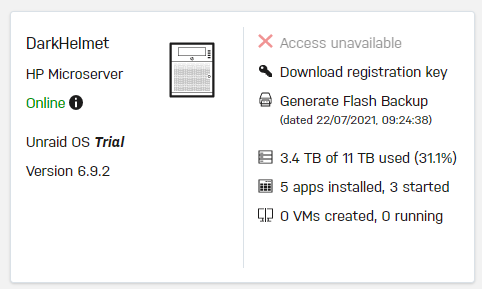
Any idea why a server would be showing as "Online" but not able to remote access? Its config is (seemingly) identical to my other server which is playing nicely. The only difference is that this one (as you can see) is still a trial version - is that a thing?
-
Because i'm a big fan of healthchecks in my docker containers. i've created a healthcheck script for my rsnapshot container i've got it located in /mnt/user/appdata/rsnapshot/healthcheck.sh and have set "Extra Parameters" in the template to --health-cmd /config/healthcheck.sh --health-interval 5m --health-retries 3 --health-start-period 1m --health-timeout 30s Now if my container is unhappy, it'll mark itself as such and the autoheal (willfarrell/autoheal:1.2.0) container i've got running will restart it automatically (which may or may not solve the cause of the unhealthiness) healthcheck.sh



