





FlyingTexan
Members
-
Joined
-
Last visited
Everything posted by FlyingTexan
-
I'm also unable to open my dockers into a web UI now. I'm unsure why.
-
System is acting wonky. Dockers were missing so rebooted then loaded the previous from the apps tab. Not sure what's going on. I find it odd that the drives were fine then there was a hardware reboot. I have a 14TB drive I can add to the system. If the two drives are failing is there a way to just remove them? I have 31TB of free space and the two drives equal to 16TB. tower-diagnostics-20220323-2242.zip
-
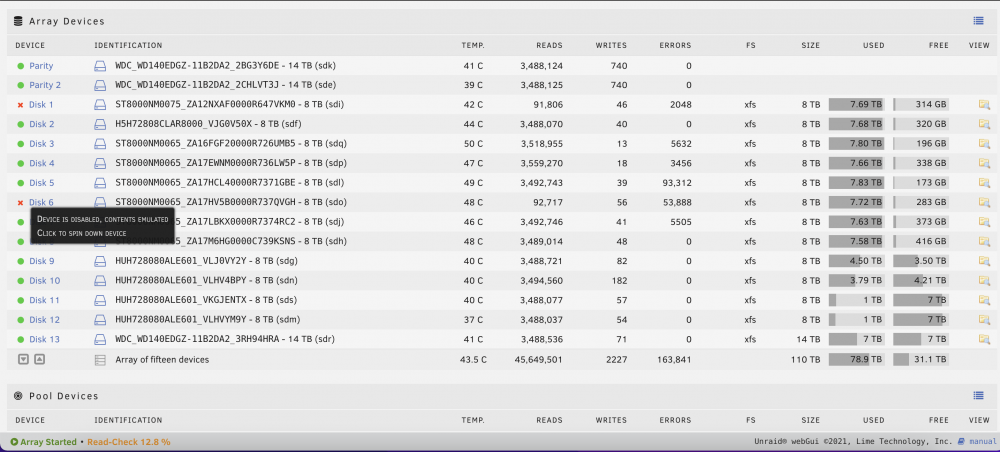
A transformer down the road blew and the house lost power. I had to manually turn the server off. Rebooted a few hours once power was restored and saw this for my drives. I'm running a scan now. Not sure if that will fix it or not. Is this normal after a power reboot? I do have a spare 14TB I was saving I could put in the server but it's going to be a PAIN to figure out which drive it is, if that's an issue.
-
First time trying to use this. I think anytime someone makes an app a howto link would be great. I'm not sure what I'm supposed to do if I use the same USB that's already in the system with an OS or if I want to use a secondary USB.
-
Ok. I just noticed the option to do and extended smart test and I’m doing that now.
-
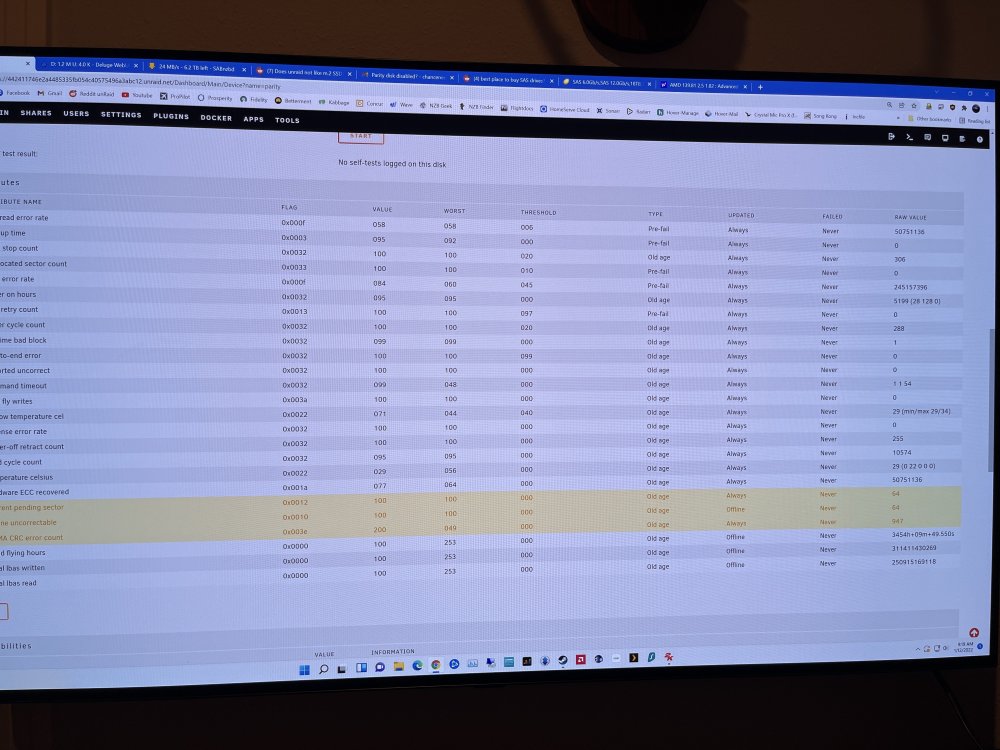
I’m a newbie so when you say SMART marks a drive as failing, where are you looking? Is it because they’re highlighted in yellow?
-
On the dashboard page for the failed parity drive the smart data under “failed” says never for everything. Sorry you caught me as I was using my phone and wanted to get this quickly lol
-
Ok. So is the drive failed now? I switched cases this past week and for a minute was using it to test something else and hadn't noticed any issues. Could I get this error due to a connection issue or is this real data showing it dying? Thank you for your help btw I don't know how you manage to do it. If you put a link up I'd buy you a beer.
-
Was running parity on a second drive I added and after running most the day and night this morning it gave the error that it's been disabled. Going to try and add it again and see what's going on. tower-diagnostics-20220112-0825.zip
-
This scared me enough. So how do I make a backup of all my docker setups and settings? If I have one of my SSD crash can I just replace it and load everything back as-is?
-
A little confused here. Even though it says it for a cache drive above you're saying that message shouldn't be there and nothing is wrong? *EDIT* Ok that's really weird I selected to unassign all devices then it let me reassign them with everything working correctly now. That's definitely something that should be put on the "to do" list.
-
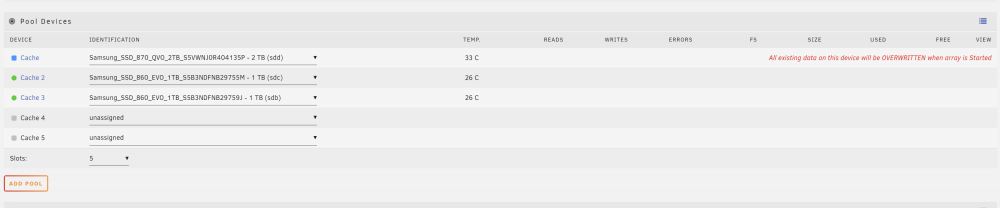
Moved the drive to a different SATA port and swapped out cables. I see it now however as you can see it's saying all existing data will be erased. Is there anyway around this? I don't want to have to setup every docker again On another note. I may or may not have done a backup somewhere. I did one recently before switching cases. Is that data stored on the USB for the docker settings? tower-diagnostics-20220111-0958.zip
-
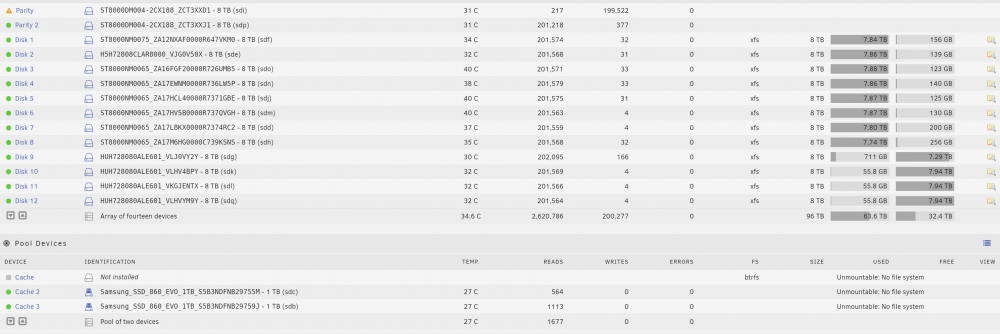
Had SABnzb going along with a few other dockers. Went to use my plex and it wouldn't connect. Confused I jumped onto my desktop to look at unraid and see the screenshot below. I had a 2TB SSD and 2x1TB SSD. Now just showing the 2x1TB. Did I lose everything related to dockers? It's like the other SSD just became unplugged. I don't want to mess with it until we get a game plan. Don't want to make anything worse. I had to follow a lot of guides to get those dockers setup and would hate to lose everything. Especially my radarr and sonarr configs. tower-diagnostics-20220110-2356.zip
-
Seems to be a lot of the same issues here but following what others have said. No matter what I've changed the webui automatically opens up to my SABnzb. I've deleted HOST PORT 3 and made a new one with port 9095. I've then gone and created a Variable where Key: WEBUI_PORT Value: 9095 No where on anything is there port 8080 yet this thing keeps opening to it. I'd like to fix this and move on with my life. What do I need to do?
-
So I'm not seeing any guides for this. I've downloaded the container and left everything default except /data I pointed to my /media/downloads folder. I put my VPN information in, select wireguard, then save everything. I then go and run the program (it doesn't) so it creates the directories needed. Then I place my VPN config file (for wireguard) into the folder. After this I start rtorrent and go to settings. I never seems to want to save any of my settings. There is no "Apply" option just an OK so I select it. Then I go and load a test torrent (Ubuntu iso). Now at the bottom I see a red stop sign saying my port is blocked. The download starts anyway but stays rather limited of around 1MB/sec. I also don't recognize the IP i'm looking at so I'm guessing that's my outside IP to the house. I have ATT and log into the BWG-210 router and go to port forwarding and open the ports 6500-6900. I think it's using port 6881. I assign that port to my tower but ATT's BWG only gives me the option of TDP, UDP, or TDP/UDP. Is this really causing a problem? I thought an open port was an open port? When I go back into rtorrent I'm not seeing any changes even though the gateway is showing the port as being open. I tried to change the port within rtorrent but again, nothing ever saves, and this is getting frustrating. What's going on and what do I need to do?
-
I like unraid and have my own specific uses for it and one thing I feel I should have more control over is the security of it. Can I change the security levels on it? I'd like to get rid of the 3 times and you're out login. This is really driving me mad. I fly for a living and on the move a lot. 90% of the time I access my unraid the information is already saved and it auto fills and lets me in. This time it didn't and did the 3 times you're out. Everything in my life has a password and login. You can say its for security but I call it a major annoyance I have to go through this and then deal with the fallout of me not being able to remember what it is because I don't use it that often. Right now I need access and having an issue getting it. And there's been ZERO, absolutely ZERO, attempts by anyone try and access it to delete or manage my plex setup. How can I go about changing these "security" features that only make my life with it more difficult? I'm willing to accept the consequences of me and only me ever accessing it. What does a 15 minute window even do? So if someone wanted in they go grab a coffee? I want that gone and I want the 3 time limit gone. If I have to sit here and guess for a bit that's for me to decide.
-
I'm setting up my Roon server. It's a music service that handles all your music catalogs for you. It creates a catalog reference file for all the music on your system and the app's speed is greatly increased if it can read that off your SSD vs HDD. What's the best way to go about this? Should I create one file, give it permission to sit on cache, then have it save that file to that directory?
-
I have an 11600k and back in May, I think, did the i915 hackjob to get hardware enabled transcoding with Plex. Is that still the best option? The i915 drivers are several years old so is there a different driver for the newer UHD graphics? Thought I saw new support in the upcoming unraid release.
-
I have this NZXT 750 watt PSU. Looking at its specs it shows 60amps on the 12v rail. With new expansion coming this next week my system will have the following. Intel i5-11600k 4x16GB DDR4 memory 2x512SSD 1x1TBSSD Asus Tuff mATX motherboard 3x120mm intake case fans (Rosewill 2500u case unsure of specs) 2x80mm Exhaust fans 1xBeQueit! Black CPU cooler (Forgot the name but has one fan) 15x8TB 5400rpm HDD of various eBay grabs 2x LSI 9211-8i cards Would my current PSU listed above have any issues running this? There will be no GPU added. I'm a fan of the PSU so would like to keep it but obviously stability is the issue.
-
Thank you for the heads up. I've LOVED using unraid but since I've already bought all the hardware (even though had bought unraid as well) I guess I have to consider seeing if it's possible to replicate the things I do in unraid (plex server, radarr/sonarr/sabnzbd, parity) in Ubuntu. Which I've never used and don't want to do but I don't know any other options right now.
-
Is there no means for me to implement the ubuntu driver into unraid? I've never used ubuntu for to keep the enclosure and my setup i may consider doing this.
-
So are we saying that my two options are to either switch to ubuntu or get rid of the expansion unit? No means to get this working for unraid?
-
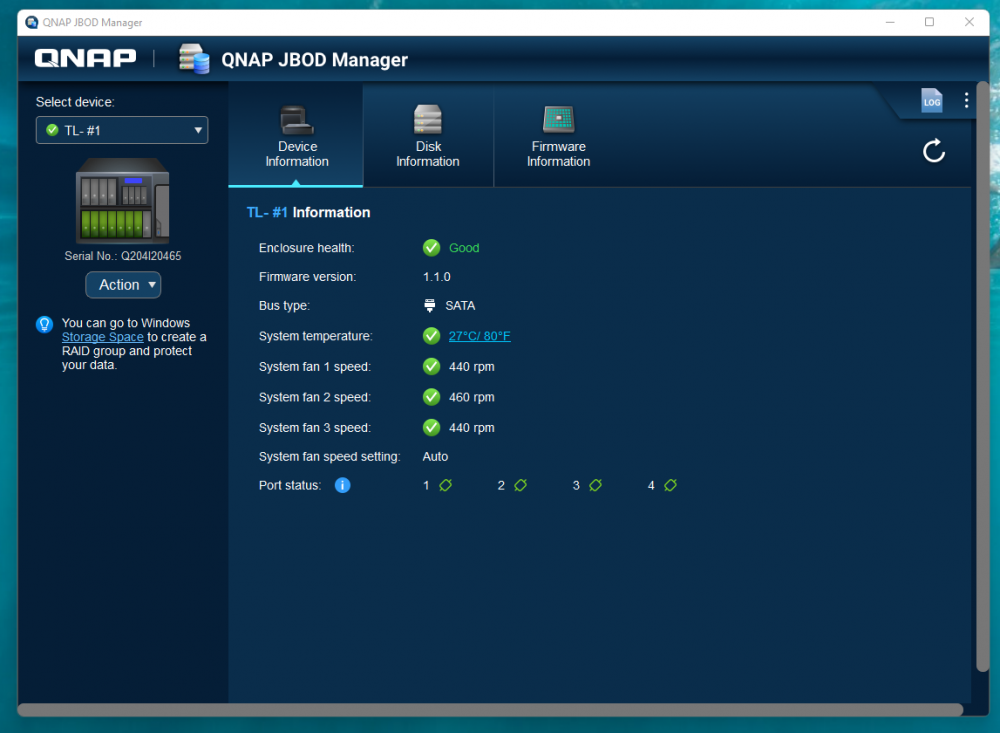
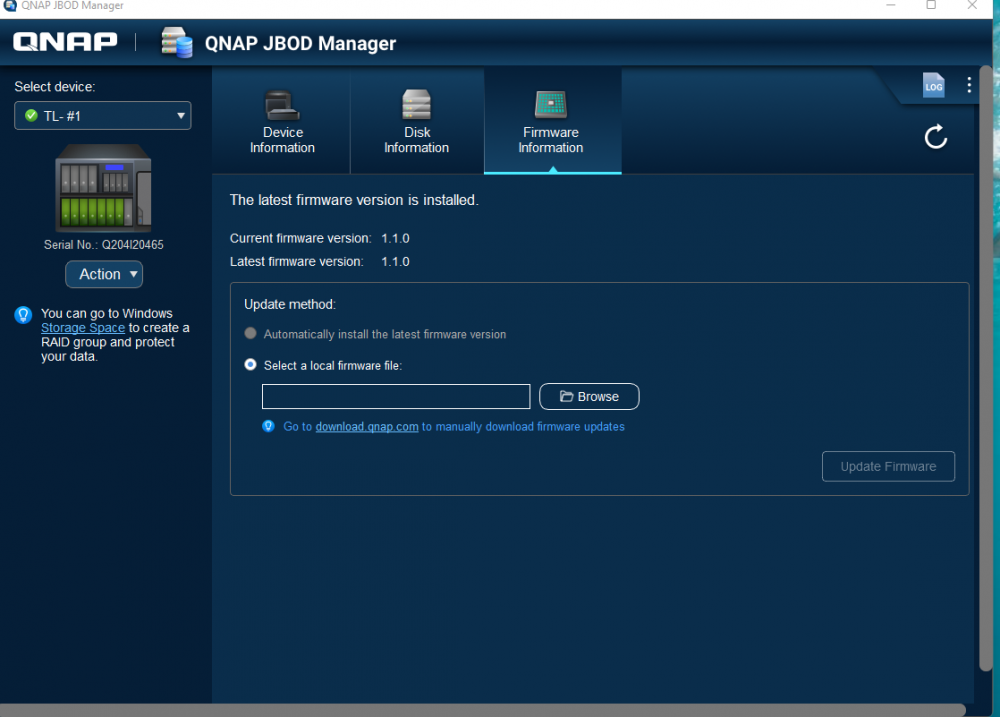
It appears to be detecting the drives all fine now and the firmware is the latest.
-
Yes I have the 1600es card. I'm guessing I should point out that if I'm having to ask these questions I've hit the end of my knowledge. Thank you very much for chiming in but what does that mean with it being Marvel based? Are we saying I'm not dead in the woods yet? I've just updated its firmware through my windows PC. Not sure what my options are next.
-
I've pulled the expansion card and connected it to my windows PC. The QNAP boots and starts beeping as it starts to test each cable connection. I'm now getting green lights on the drives. So the enclosure and the expansion card appear to be working now. The enclosure recognizes my desktop as the host device. Is there any reason this SHOULDN'T work with unraid? I had asked in the past before purchasing the device on the reddit and the response by the few was it shouldn't have any problems. Do we think there's a way to get this going? I'd hate to be out the $1k but it is what it is at this point. EDIT* Digging through their website they have driver software for windows and Ubuntu. Is there anyway to utilize an ubuntu driver for this?


