





FreeMan
Members
-
Joined
-
Last visited
Everything posted by FreeMan
-
Unfortunately, the automatic update system doesn't seem to be working. The docker is on 3.2.60.0. The dashboard says that 3.2.70 came out on Jan 19th, and now it says that 3.3.0 is the latest release. I'm running CA Auto-Update and I just did a manual check for updates, just to be sure. Could you give the nice folks at aur a poke to see if they can get an update out?
-
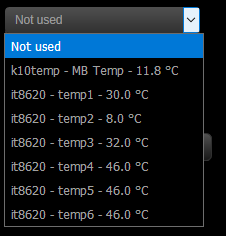
I've had System Temperature installed for quite some time, but I've never been 100% certain that it was working correctly for me. I'm working my way through resolving several minor setup issues, so now's the time to configure this properly. I do have perl installed via Nerd Tools. When I do a detect, it responds with "it87 k10temp". I hit Save, then looked at the Sensors section and it shows me all of 1 sensor found on my Gigabyte GA-F2A88XM-D3H MoBo. I hit Load Drivers, and now it shows me several temperature sensors with associated temps. I found this old (2014) page claiming that there isn't yet support for the IT8620E chipset in the IT87 driver. However, that seems to be out of date, since Sys Temp is finding 6 temperatures without me adding the "options it87 force_id=0x8728" line he calls for. I have, however, set up with his recommendation of CPU = temp3 and mobo = temp1. I also found this more recent (2016) post on askubuntu about a similar board (GA-78LMT-USB3) with a recommendation to edit grub and that it now shows many more sensors, including multiple fan speeds. Is there anything in the 2nd post that I may need to take into consideration for my setup? Since Sys Temp is now showing me 6 temperatures (currently ranging from 8° to 46°C), where do I go to find out what each of these 6 temps actually represent? (I'd like to confirm the first post's assertion of temp3 & temp1.) I've got 6 case fans and the CPU fan, yet there appears that I can only display 1 fan speed. Is it somehow possible to get more than 1 showing, and how do I know which is which? As I recall, all 6 case fans are actually plugged into one header (via splitters) that is controlled by the fan speed controller on the top of the case, so it does seem reasonable that there's only 1 case-speed being reported, but I'm reasonably confident that this controller doesn't also control the CPU fan, so it seems that I should see a 2nd fan speed. I notice that the temp & fan speed do not appear on the Dashboard for at least a minute after clicking the button, but they do appear on every other page of the WebGUI immediately on page load. Is that intentional, or is there something weird going on with my machine? On the dashboard, the fan0 speed is never in agreement with what's being displayed on the status bar with the temps. Is this where I'm getting my 2 different fan speeds that I was asking about previously? If so, how do I determine which is which? Thanks for the help, and thanks again to bonienl for all the great work that's been done on the WebGUI and all the tools you've integrated into it!
-
@ayrtoo - What Frederick said. Not only must your download client (NZB or torrent) put the files in /mnt/user/Torrents/Music, but it must name that location /downloads as well. If you're using, for example, the lsio nzbget docker, the path is mounted as /data, not /downloads and it won't work even if it's pointed exactly to /mnt/user/Torrents/Music. The downloader will tell lidarr to look for /data/folder, but lidarr doesn't know where to find /data, it only knows where to find /downloads. That one's bitten me several times.
-
Hey, @binhex, I'm back to be "that guy" again... Would you ask the guys at aur to update to build 281 or newer. That one takes care of a pretty ugly bug that makes working with album lists nearly impossible when lidarr is scanning the RSS feeds (which it seems to do constantly!) It seems that also incorporates an earlier change that cuts library scan times in half! Thanks!
-
I am using CA Backup - it never occurred to me to restore from there... I've never had issue enough to need to worry about backups until this recent spate of server crashes (see post in General Support thread). As I said, no major loss at this point.
-
Well... it was a nice thought. I deleted lidar.db* from my appdata/binhex-lidarr directory and now I'm starting from scratch with config and everything. Oh well, no worse off than if I'd deleted the entire directory, and I can simply copy config from radarr/sonarr.
-
Thank you sir! So, uh... since my server crashed yesterday and lidarr won't start due to a corrupted db file, I'm thinking the easiest thing to do is start over. (I only had about a dozen artists imported, no great loss.) Do I just delete appdata\binhex-lidarr to call it clean or can I just delete the db files? The crashes are an ongoing saga from the 6.4 (and now 6.4.1) upgrade and have nothing to do with the container.
-
@GeekMajic - Binhex has put together the container, but I'm not even sure if he runs the docker. I'd suggest contacting the devs at their support link on discord: https://discordapp.com/channels/297050658111094784/297050758656950272 I'm not sure if this will properly take you there, I'm not a big Discord user. There's a support link somewhere in lidarr itself - on the main settings page, I think.
-
Hey, @binhex, I hate to be "that guy", but... Qstick (one of the lidarr devs) recommended updating to see if it will fix the issues I'm having with library import. Any chance you might be able to do so? The container is currently on 0.2.0.224, but I can't identify exactly what the most recent build is over on GitHub. Thanks!
-
Gentlemen of a certain age ask questions like this. I find myself doing it often.
-
A) This latest version is now showing logs for me! B) Not really sure what I did, but I'm glad I could help. Thanks for your continuing hard work on this! Between this and OpenVPN-AS, I can keep an eye on my server where ever I am.
-
Genius! I'm only on my 2nd cup of coffee this morning, cut me some slack... And, that file was the cause of the error with restoring from the backup. Thanks @CHBMB!
-
This is more of a general *nix type of question, but since it's specifically related to my sonarr docker, I'll post it here. Tell me "begone with you" if this is too general... In the continuing saga of my 6.4 upgrade, my server crashed again yesterday (it had been nearly 2 weeks, but I think I may have a suspect plugin now!). When it came back up, everything was working except Sonarr. I am getting this error in the logs about a corrupt DB. I've followed the instructions in the link about exporting the DB to text then importing to a new DB. That hasn't worked. I've followed the instructions in the wiki about restoring a backup (thanks for the auto backup plugin, Squid!). That hasn't worked. Doing some additional digging, I opened an SSH session to the server (I'd been doing the deleting/copying/etc. via xplorer2 in Win10), and I find this: I don't believe I've ever seen a file listed with question marks in the access and ownership columns like that. `rm nzbdrone.db-shm` won't delete the file, it doesn't appear to Windows, so how do I delete this file. I believe that it may be the cause of my failed attempts to fix the issue.
-
Sorry, Juan, that still didn't fix it - exact same result as before. Thanks for the stab at it - if there's anything else I can provide to help solve the mystery, let me know.
-
In answer to your questions:
-
You're obviously working on it, but I thought I'd chime in that I'm having issues with this as well. By all appearances, it seems that the ControlR plugin starts. The app (Android) starts and works just fine except I cannot get logs. It had been working after I upgraded to 6.4, but then I was having all sorts of issues with my server rebooting every 4-20 hours. I uninstalled almost all plugins just to see if I could get it running stably. It's now been up for 6 days, so I'm adding plugins back in 1 at a time. The ControlR plugin was one that I did not uninstall, but now that I think about it, it seemed to stop working right after I uninstalled everything else. As I was typing this up, I thought maybe it was relying on something installed by NerdPack and that I'd uninstalled that. However, NP is still installed - these are the pieces I've got installed from it: mcelog-153-x86_64-1.txz perl-5.24.0-x86_64-1.txz python-2.7.14a-x86_64-1.txz screen-4.6.1s-x86_64-1.txz utempter-1.1.6-x86_64-2.txz A couple of items seem to have uninstalled themselves from NP when I upgraded, so maybe something is missing that ControlR needs? I followed the instructions to stop the plugin from the GUI and execute: cd /usr/local/emhttp/plugins/controlr ./controlr -certdir /boot/config/ssl/certs This is what I got in my SSH window: The TLS handshake errors showed up each time I did something in the ControlR app on my phone. I have not done anything with security on unRAID - I'm still running on port 80, I don't have any custom or manual certs. I'm leaving all that until after I get the server back to where it was and stable. If there's anything else I can do to help you debug, I'm more than willing to do so, just let me know.
-
Now that it's been a bit over a year... I bought 3 of those drive cages and installed them in my Zalman MS800 case. They were a tight fit to get into the case - I had to make sure that all of the regular drive supports were bent well out of the way. The drives were occasionally a bit snug going into the cages, but all in all, I'm quite happy with them. They're not hot swap, but since I installed everything, I've only had the case open once or twice for a dusting and didn't even power down for it, so I've had no issue with cabling. They don't come with a fan at all, so you're free to put whatever 120mm fan in there you'd like. Drive temps have definitely dropped as well. I previously had a home-made "cage" from 2 pieces of bent aluminum that held the drives and had some holes for a fan on the front. The drive temps are down for those 5 drives, as well as for the other drives that had been sitting in their original individual mounted bays. Of course, each set of 5 drives now has a fan blowing directly on them, where only the 5x3 set at the bottom of the case did before. For $120 for all three cages vs ~$100 per cage, I'm happy with these and they're suited to my needs. For those who swap drives more often, these probably wouldn't work since you've got to pull the entire set of 5 drives out to unscrew one, and that also means unplugging 10 cables (power & data x 5).
-
Fair enough. I'm not that familiar with how the whole process works - it just does (99.9% of the time). And for that, I'm grateful!
-
OK, so I was getting a bit snarky... So an update is pushed weekly whether there are changes or not? Obviously, with auto-update running -I never really noticed. Interesting...
-
The latest version showing on docker.hub is " 15.12.17: Fix continuation lines. " However today, (20 Jan 18), unRAID is showing me that there's an update available. Having been running the auto-update plugin, I'm pretty sure I picked up the 15.12.17 update. What's new?
-
After having been bitten by a number of recent updates (most painfully, unRAID 6.3.5 -> 6.4), I have uninstalled the auto-update plugin, and am reading through release notes before updating. There's an update available for sonarr, but the latest entry on the docker.hub page in versions is: " 15.12.17: Fix continuation lines. " I'm quite certain that 15 Dec '17 was well before the 6.4 update and I'd have slurped down that update automatically. What's up with this latest update?
-
Dang! missed that one. and that one.... maybe I should go back to sleep. Sorry @irandumi...
-
@irandumi - it's hard to tell from your port-forward screen shot, but it looks like you're not forwarding 443 to your unRAID server, but you are forwarding 8083(?) to 80. Try adding the 443 forward to 192.168.0.122 (?). (adjust the numbers as necessary - I'm squinting at a small, blurry screen shot and my eyes aren't quite as good as they used to be)
-
Try mapping the port to 444 or some other number. 6.4 runs the WebGUI on 443 now so you're trying to compete with the OS's main method of communicating with you. Don't forget to update your router's port-forwarding, too.
-
Look right at the bottom edge of the image you quoted...


