





TurboStreetCar
Members
-
Joined
Everything posted by TurboStreetCar
-
The terminal from the WebGui. I also noticed consoles opened from dockers in the docker tab also reset/reconnect often also. it appears my connection is being dropped for an instant. Never happened before update.
-
@VRx Im having a touch of difficulty. If i run Zabbix Agent, Server, and Web Interface all on host network, im all good. However, if i run them on Br0 network, i lose the ability to monitor my unraid network interface traffic. Using key net.if.in and net.if.out, i believe it monitors network interfaces listed in /proc/net/dev. When running agent on Br0, it appears, proc/net/dev is of the container, not the host system, and it doesnt appear that i can pass the host file to the container. Any chance i could get some help with that? Also, it doesnt seem that Agent, Server and Web Interface can be on the same Br0 IP address, even though there all using different ports.
-
Hello, ive found some info in adding the date to the deluged.log which i find useful in keeping track of when torrents are added/removed. If the docker is updated will this persist? Or will the update revert the log to time only? Id also like to somehow have the deluged.log be persistent, so new entries are appended, instead of the logfile being overwritten entirely on restart. Is this possible? Thanks, Dan
-
Bump this to the top, Really annoying when trying to do work in the terminal. It resets back to base folder and loses all information currently displayed. What can i check to try to find the fix? No issues before updating, so i dont believe its a hardware issue.
-
Hello, having an issue since updating to 6.10.3 where the terminal/console will blank and return to base directory randomly in a short period of time (30 seconds or so). Very briefly, like 1/100'th of a second it will flash disconnected. This wasn't the case before, I've had terminal windows open for hours and never disconnected. No errors in the log related to anything. Not sure what to start looking at to diagnose. Thanks, Dan
-
Maybe this was asked and answered but i cant seem to find it. Is there a way to have when torrents are added, completed, and deleted to a log file that will be saved through a power cycle, like in Appdata outside of the container?
-
Hello, im looking to add a user parameter to the agent docker aswell, by any chance did you figure out a way to insert it to the docker?
-
Hello, tried reinstalling, Still no luck. Trying to install and use on vlan network. Installation completes but all i get is "refused to connect". I CAN ping the address however. Is there anything special about the network that needs to be set up to use on a vlan? How would i change the site address to IP:Port-number? Do you mean in the network field? OR in the configuration somehow?
-
Hello, i seem to be having a similar problem. im using duckDNS, and if i go on my phone, (outside network) and enter my unraid public IP, with the port that is forwarded to the Nginx port, it works. But if i use the duckDNS address, i get a 502 gateway error. Any idea what im doing wrong? Thanks!
-
Is it possible to set this up using DuckDNS? Im a noob, and ive been trying to set up a proxy with DuckDNS and SSL, and i feel like my eyes are crossed now. Theres so many tutorials, and all the apps have changed over time.
-
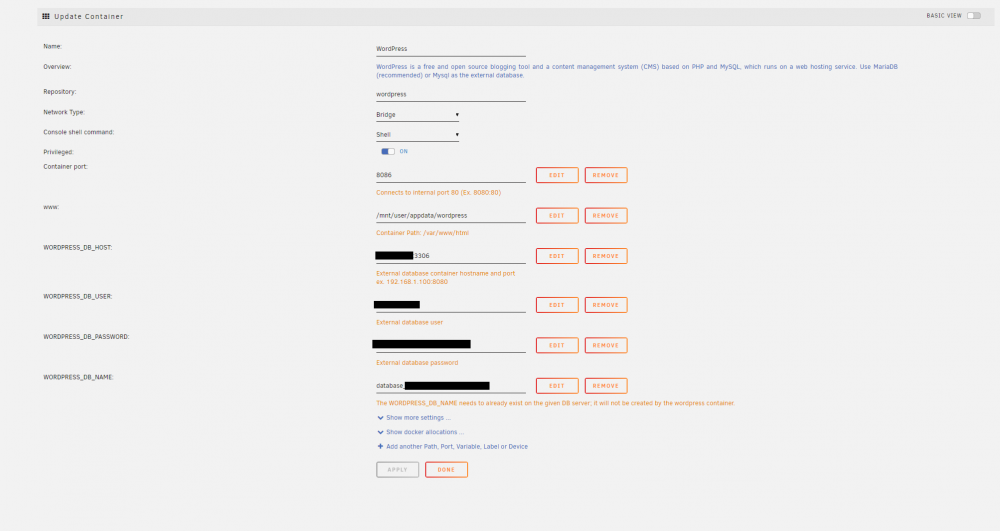
Hello, Im trying to use this for a private web server for my own uses within my LAN network. No outside www. needed. will be accessed by IP and Port when needed. I installed MariaDB, and went through the steps in the french walkthrough posted earlier. I also have a Unifi docker running (relevance next) After installing the wordpress docker, the webGUI takes me to the Unifi webGUI, easy enough, Unifi uses port 8080, change the port for wordpress....... I changed the Wordpress port to 8085, and when i manually navigate a web broswer to ip:8085, it cannot connect. I tried a few different ports from 8081-8090. Any tips? My setup is here:
-
Got it figured out, Thanks! Was really trying to do some funky stuff cause im OCD with how i want to do things. Ended up using WSL on my windows computers to use Rsync using SSH to sync files. Then ended up writing a windows form application, to run the WSL commands, and display the console text in text boxes. This way i can double click a shortcut, check whether or not i want to do a dry run, and just click start to sync the specific folders i want. Prolly WAY more trouble then it was really worth, but im SUPER pumped to have got it working, So easy now to keep things up to date.
-
Appreciate the reply, Forgive my noobness here. I run the keygen on my remote computer right? Then i run the second command on the unraid terminal?
-
Hello, I've been trying to figure this out for a little while now, but it seems with different versions of unraid, the methods of using SSH have changed a few times. the SSH Configuration Tool, that I've seen referenced, doesn't seem to exist anymore, and the help document doesn't get too far into detail on the setup using keys. I'm looking to simply run a command on my remote computer, to either run a script on the command line of my Unraid server, OR trigger a userScript to run, which ever is easier. The situation, is that i have files i would like to be able to sync to my server so i can access them from different computers. Id like to have an icon that will connect to the server and trigger a script that will run rSync. I CAN log into the webGUI and click run, but it would be more convenient to run this by double clicking an icon. I've successfully SSH'd into the server using Putty as well as plink, on command line, HOWEVER i know its generally bad practice to save username and passwords in a bash file, so i would like to use the authentication keys instead. But i cant figure out the current method of generating/using them. Any help would be much appreciated. Thanks, Dan
-
Yea i keep it both on my computer and on the array. I know the rule of thumb for backup is 3 Places, 2 Local, 1 remote. Currently I'm on 2 local and 3 copies. In my computer i have my main OS SSD, a second SSD for media files, and a 2TB HDD. I backup the media on the second SSD to the 2TB, then archive that to the array. I plan on removing most of the media from the SSD, and only keeping files I'm using for editing and such on the SSD to keep the drive free. The remainder will stay on the 2TB and Array. Its tough to keep up with a good place/method to keep all this stuff! I Feel like I do it one way, then I'm like "no wait, let me do it this way instead" a month later. Haha
-
Well, Currently i run the Script manually through the webGUI, So i would know not to run it if all my files were encrypted on my PC. If it were on a schedule, id set it most likely to monthly, which would hopefully give me time to stop it in the case of an attack. Although, if i were attacked within hours of the monthly schedule, i agree it wouldnt help much. I likely wont need to update the array for months at a time, So i think this method is pretty solid. No computer would have write access to the array, and all writing to the array would require root credentials. I think this is a pretty solid method. I could create a second copy in a second share on the array, and rotate the schedule monthly to alternately update the copies, but i think that would just be a waste for my use case. Thanks so much!
-
Appreciate the response, I've been doing some thinking and also some research on moving data from computers to the array in general and i believe (At least for my purposes) I've found a pretty secure way to do things. I've created a share where i would like to archive my files. I've set permissions to private and allowed read only access from my computers login credentials. I've also created a folder and named it "Sync" on my computers 2TB HDD. This is where i will keep a local copy of all my important files/folders on my computer for use, AND it will serve as a single location where i can pull from to update my archive on the unraid array. I've then used a plugin to create a network SMB share on unraid thats connected to the Sync folder on my computer, giving unraid Read Only access to that folder on my computer. I've written a script using rSync, that synchronizes the unraid array archive share, to the Sync folder on my computers HDD. So, My computer only has read access to the unraid server, AND and the unraid server only has read access to my computer. This is important because in this case, the server cannot make changes to my computer, and my computer cannot make changes to the server. Control of the files is done by adding, or deleting files from the Sync folder, and running the user script to sync the array to the computer using root credentials on the WebGUI, OR by using a schedule in the user script plugin. This leaves my files on the array easily accessible from windows, without leaving them exposed to write permissions. Does this sound like a pretty secure way of doing things? Anything i may possibly be overlooking?
-
Hello, New user here, and i was reading all around and got most of my questions answered. I set up a new server, Its for home use, basically long term storage of video files, computer backups, pictures, ect... Its made from an old computer i had laying around, I5 3740, 16gb ram, 2x 4Tb WD Blue drives. Was reading about ransomware, and really that is one of the few concerns i have about protecting the data in the server. My question is about access and users. If i set up two shares and two users. User1 has access to Share1 and User2 to Share2. Both shares are exported but hidden, and each share is configured secure, and to only allow read/write access by its one user. If User1 share is mapped to a computer, and that computer gets taken over by ransomware, I would imagine, because its mapped to User1 share, it will also get taken in the process. Is there any way for the ransomware to get into User2 share, being they are both contained on the same drives? OR is because its a separate share, with separate user rights, it will be protected? Thanks, Dan

