





wacko37
Members
-
Joined
-
Last visited
Everything posted by wacko37
-
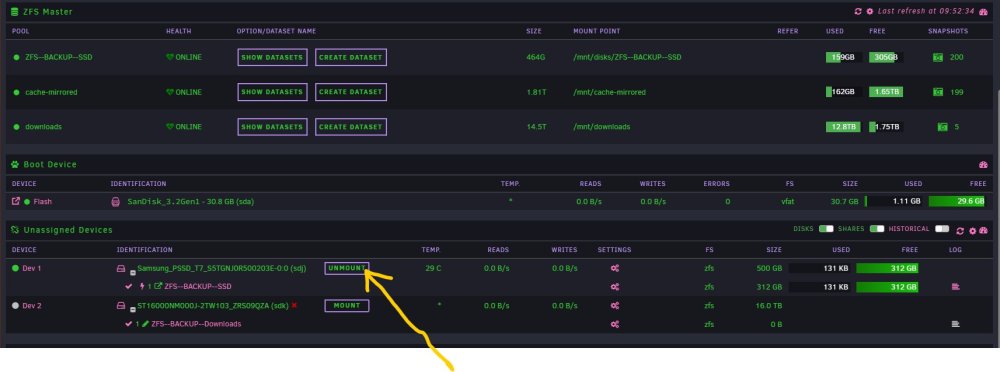
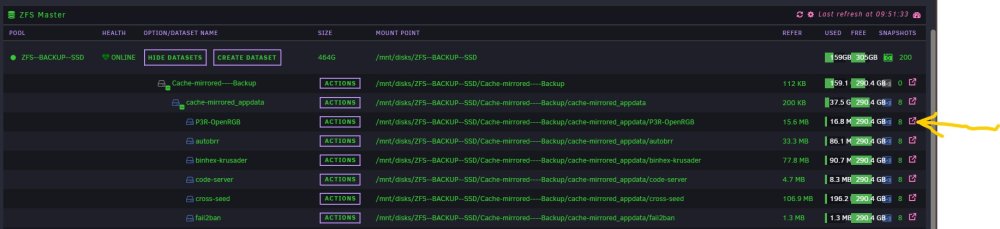
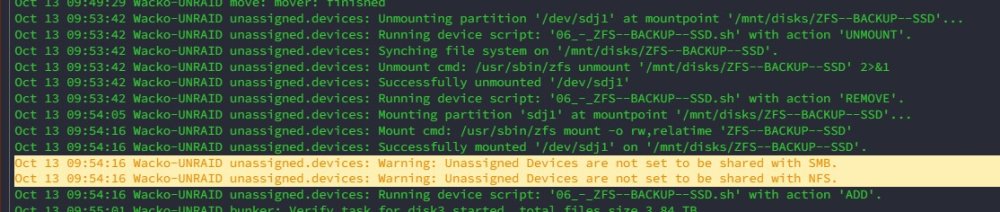
I guess the easiest way to explain is via screenshots. The mounted device below in UD is the offline ZFS backup ssd for my cache pool, which I mount periodical for ZFS replication. Once I attempt to view the contents of ZFS--BACKUP--SSD as per the screen grab below OR via UD "browse disk share" I get "invalid path" as per screenshot below If i run the "zfs mount -a" command, I can view all the contents in the datasets as per normal. Below is a screengrab of the syslog when ZFS--BACKUP--SSD is unmounted and then mounted.

-
Ok, I worked this 1 out and its definitely my lack of knowledge....again😒 Basically i was trying to clone to another ZFS pool on a spersarate drive, once I cloned to "pool_name/" on which the snapshot is actually stored on, it cloned just fine.
-
having an issue when trying to clone a snapshot, i get an error "operation not permitted", I suspect its my lack of knowledge on how to clone successfully. When i select "clone" I input "pool_name/test" for the destination dataset. Do I need to create "test" dataset prior?
-
Ok, maybe its my use case is the issue here. I have an offline ZFS drive I use for replication of my ZFS cache pool, up until now (zfs mount -a) I have not been able to view my contents on the offline drive after being mounted via UD. I can see it space used and the snapshots but not the contents, I get "Invalid Path" error, which makes total sense now that I know the ZFS pools are mounted during Unraid boot sequence. Should this not be the case?
-
"zfs mount -a" wow this has answered so much confusion as to why I cant view any of my UD mounted zfs drive contents! Thankyou I look forward to the official solution.
-
Sorry for the late reply, thankyou for the detailed response and your efforts in making the Mover auto-hashing possible.... this community is so blessed by the hard work of others. My main reason for asking when auto-hashing is generated is (from my limited understanding) if there where to be a risk of corruption it would be at its highest when doing that transfer. Meaning any transfer that would entail the exchange of a file between to locations/disks and most likely filesystems in my case ZFS to XFS. (or does ECC ram remove that risk altogether?) As all files being written the the main array would be via the cache (setup depending of course) It would be nice/peace of mind if the auto-hashing was to be done when the files are 1st written to the cache via the /mnt/user0/ folder structure. "user0" from my understanding is the temp folder on the cache prior to the Mover transfer to main array /mnt/user/, that way when DFI runs a verification is would be against checksums made prior to the mover transfer. Or maybe this is not at all possible due to my lack of knowledge. Either way I now know how it works atm and very grateful none the less
-
Just wondering when DFI builds its checksums for new files. Meaning are checksums generated when new files have been created in the cache pool or after Mover has transfered the new files to the main array? Thanks
-
@Vr2Io Attached is the script, it rsync's to external drive with --xattrs enabled, it then calls bunker to verify the files within sync folder. I have successfully tested this on an NTFS drive. 0_-_TestUSBNTFS_-_SYNC--VERIFY.sh
-
The script is now good enough for me to use, although its definitely not perfect, its doing what I require. Please use with caution as I have copied and pasted (hacked) quite a bit and edited where required to make it work. I am not trained in this field at all and its been a processes of trial and error. BIG thanks to @cholzer who made the original script, it was then perfected by @dlandon to function correctly within UD some time ago. Also thanks @Vr2Io@JonathanM for a push in the right direction and good advice, and lastly @bonienl for the DFI Plugin and Bunker! Hope this helps someone in the future Issues - 1 - logs to be available/visible in both the generated log file and within the UD "device Script Log" cant get both to work simulationally 2 - When the generated log file is opened/viewed for the first time an error is generated in the syslog UNRAID nginx: 2023/09/01 15:53:15 [error] 24436#24436: *1512682 open() "/usr/local/emhttp/plugins/dynamix.file.manager/javascript/ace/mode-log.js" failed (2: No such file or directory) while sending to client, client: [Redacted], server: [Redacted], request: "GET /plugins/dynamix.file.manager/javascript/ace/mode-log.js HTTP/2.0", host: "[Redacted]", referrer: "[Redacted] /Main/Browse?dir=%2Fmnt%2Fdisks%2FUSERS%2Fbunker-logs" Sep 1 15:53:28 Wacko-UNRAID bunker: verified 425 files from /mnt/disks/USERS/Test. Found: 0 mismatches, 0 corruptions. Duration: 00:01:06. Average speed: 119 MB/s 0_-_TestUSBNTFS_-_SYNC--VERIFY.sh
-
Its ok I got it - was trying to write the log in 2 places at the same time. All sorted for now...... I think.
-
AAAHHHHH...... now I understand your post. I worked out that the logs cannot be written in 2 places at once, once I removed ">> $LOGFILE" I indeed got Content within my desired log file. jesus.....so much time wasted and the answer was right there in front of me!
-
Ok - I've had some good success implementing this into an existing script and YES NTFS retains the extended attributes The last piece of this puzzle is getting a log file with content/info. This is my line of code for calling bunker: /usr/local/emhttp/plugins/dynamix.file.integrity/scripts/bunker -v -b3 -l -n "$dst_path" &>"$MOUNTPOINT"/bunker-logs/log.`date '+%Y_%m_%d__%H_%M_%S'`.txt >> $LOGFILE Now it does everything correctly, it verifies the required destination and creates a log file. BUT there is never any content / info within the log file. I've exhausted all avenues to try to get it to write the results but to no avail. I'm using Unassigned Devices to run the script and all the required information can be viewed in the UD "view device script log" Any help is greatly appreciated
-
Ok fixed that by repositioning the required code. Its working but I cant help but feel like its a messy hack of a script now (probably because I don't fully know what I'm doing) Still cant get the bunker log to write to the log file that it creates. 08.5-Test-Rsync.sh
-
Ok, I have advanced somewhat in other areas of this script. I want the ability to not Bunker verify if required, so I copied the on/off features for notifications in the script and implemented them for Bunker. And it works as desired. Now to further test the script I have added more test folders of different file formats and everything is working….somewhat, But bunkers is verifying all files after each rsync folder is executed, causing more verification than is required. (hope that makes sense) See logs and updated script attached. 08.4-Test-Rsync (1).sh 08.4-Test-Rsync.log.txt
-
Firstly, thankyou for your input. To answer your question..... I dont really know.... But I do know what I'm trying to achieve. I need the full Bunker Log to be generated on the destination in a log file preferable separate to the rsync log file, exactly like rsync logs are created via this script. This indeed logs the verification within UD "device Script Log" but does not generate a separate log file similar to what rsync generates. The Logs within UD is exactly what I require but in a log file.
-
Thankyou for this.
-
This has now been professionally resolved, big thanks to @JorgeB for pushing this to be investigated and another big thanks @dlandon for your amazing work, thanks lads for all that you do for us leechers!
-
Ok.... I'm very close to getting this to work thanks to your help and @SantyC93 previous posts. So..... good news is that NTFS can indeed retain the "extended attributes" via the ----xattrs rsync command. I created a test folder on a NTFS flash drive and manually ran the Bunker verification which completed correctly "/usr/local/emhttp/plugins/dynamix.file.integrity/scripts/bunker -v -l -n -b3 /mnt/user/**** " Brilliant now I know my use case will work! So I have an rsync script that I use in Unassigned Devices that @dlandon helped perfect. I'm currently hacking this script to included the verification after the rsync has been complete. I'm stuck with NO contents being provided in the logs. It creates the directory and file but no content. The "view device script log" in UD clearly shows the needed information (see attached) I have also attached the script for viewing, the relevant line is 109, any input would be greatly appreciated as this is all above my knowledge base..... but I'm so close....lol 08.3-Test-Rsync.log.txt 08.3-Test-Rsync.sh
-
Attached, hope it helps. syslog.txt
-
Firstly @Vr2Io thankyou for your time and expertise, (i've seen you reply to many of the questions in the DFI forum during my seach for answers) Reading through the quoted posts from DFI now, thanks. (none of my search words brough me to the post mentioned) I'm guessing your native language is not English but your doing a better job than me and that's all I speak....lol. Are you saying NTFS cannot hold the "extended attributes" or are you recommending I don't use Windows at all? I really do require this to work on NTFS, as this backup drive travels with me to work offshore and everything is Windows environment out there.Done!@dlandon I was asked to post my topic here so maybe it will help others and future development. Sadly I have no logs as I had to hard reboot a few times to problem solve this. Everything is now working 100% once I removed spaces from the zpool name and made sure the zPool & Top level dataset names were different. All explained here to the best of my understanding......which is not a lot....lolI have posted on the "DYNAMIX FILE INTEGRITY PLUGIN" thread but got no answers, But I feel the scope of this question is much larger than the plugin itself which is why I'm posting here. ZFS has got me asking so many questions about how I'm handling my data and utilising my hardware to the best of its ability. This has lead me down the path of using the DYNAMIX FILE INTEGRITY PLUGIN (DFI) to checksum my important data on my Unraid array and my offline backups (zfs is just not suitable for my home use case on main array) I believe I fully understand how DFI works, by applying a checksum to the extend attributes of each file. Verification involves crossing checking the actual file against this checksum on a defined schedule. Any discrepancies found will be notified. So.... if something gets corrupted I would need to manually replace the file from a backup. Now this is where I get stuck on how to proceed. How do I ensure my backups are not corrupted, during a rsync from and to Unraid? What I have been doing up until now is "rsync" every once in a while to an offline backup which is basically a large drive formatted in NTFS as I use only windows outside Unraid. This is done via "Unassigned Devices" "device script" and works flawlessly. But none of the backups are verified and I have no idea how to do this or proceed. I'm aware that rsync has "--checksum" command but that would doubling the checksums...correct? There is also the "--xattrs" command but will this transfer to NTFS intact and if so how would I then verify those checksums? DFI has a way to export the checksums via corz compatible files but they are grouped via disks and not via shares which makes it very hard, and doing a verification elsewhere is more risk and extra work. I greatly appreciate any help on how I can make this work or change altogether.@JorgeB Thankyou for your time - I've solved this 1, Basically it was due to bad naming of the zPool. I used spaces in name when formatting in Unassigned Devices, once mounted, Unraid placed underscores in place of the spaces which then lead to the issue of not being able to unmount with the error being "Cannot determine Pool Name" It also stopped the system from rebooting which resulted in a hard reset (i'm guessing due to the zfs pool hanging) Once I removed the spaces my next big mistake was naming the 1st dataset the same name as the zpool device, this lead to all the same issues I had before (unable to mount this time and again could not reboot, stuck on "syncing filesystem") Now that I named the zpool "ZFS--BACKUP--SSD" and my dataset to "Cache-mirrored----Backup" I can mount and unmount until the cows come home!




