





wacko37
Members
-
Joined
-
Last visited
Everything posted by wacko37
-
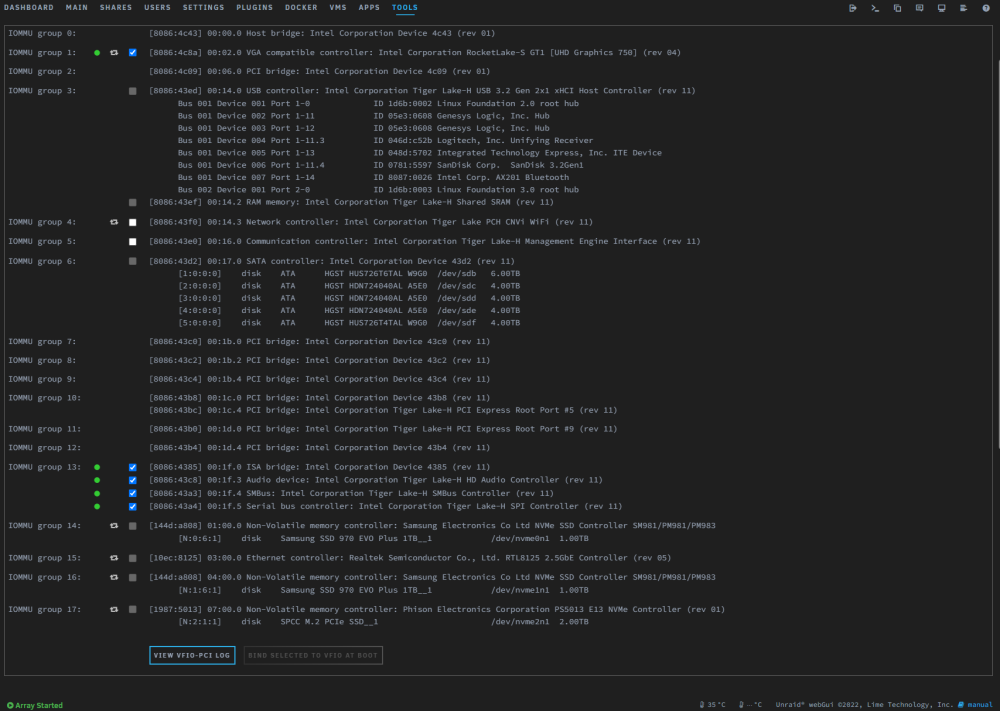
Thanks for the reply @ghost82 your help is much appreciated. Anyhow, please find attached a diagnostics zip as requested, also just to confirm audio is 00:1f.5 or .3? or have I picked that up wrong? wacko-unraid-diagnostics-20230209-1844.zip
-
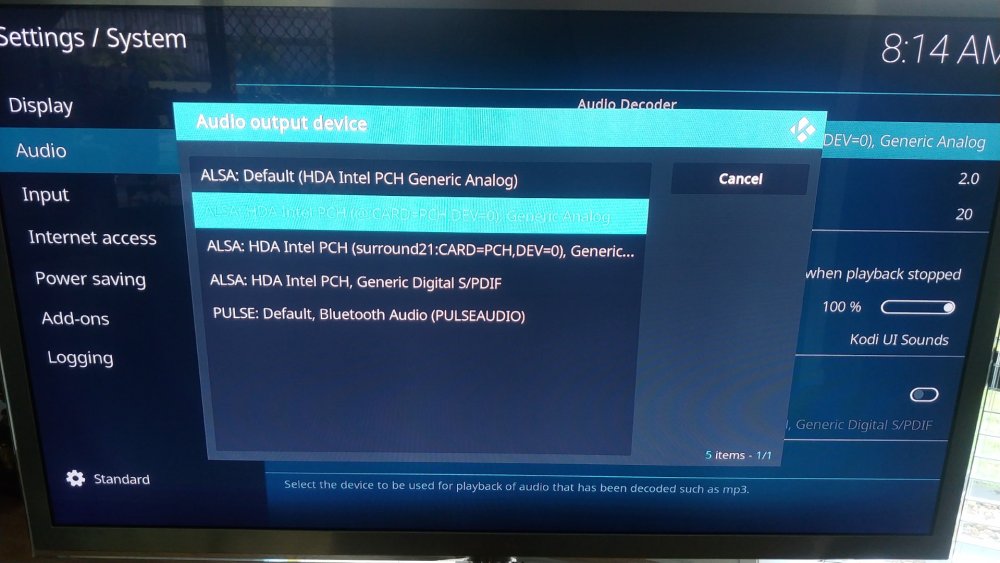
Thanks for the reply mate, just to confirm I can passthrough Video & onboard soundcard to the Libreelec VM fairly easily.... now that I know what to do. In the pic below I only have sound output options for the rear i/o, what I'm missing is the HDMI options, which I know works when running the same Libreelec os natively outside of Unraid. Is there something else I need to passthrough? EDIT: Also is it worth continuing this discussion over on the original thread (if there is discussion to be had)
-
Sadly feel the exact same way as @beetlebug515 right now, I've literally wasted days on this with ZERO! replies to my posts on the UNRAID forums. See here: And here: I wish I had half the knowledge you devs had....I'd be bloody dangerous! The only responses I got where from the Libreelec forum, after troubleshooting its clear its an issue within unraid passthrough, that's after 2 days of searching and testing! Then I decided to try a windows 11 VM to test if I could get HDMI audio or even a video from my iGPU......LOL I should have know better...... Microsoft! I could only get VNC graphics to work, then any time I updated a driver or windows update that required a reboot it corrupted windows and would no longer boot! If passthrough of an iGPU is so difficult why is it only now in this forum that I am hearing about? It should be noted very clearly within the unraid VM gui itself. Like so many other things, modern iGPU cannot boot in legacy mode (their push for everything UEFI), i spent a day alone pulling my hair out on this! @SpaceInvaderOne so many times you mention to boot only in legacy mode but never once have you mentioned that its not possible without a dGPU. Now my finding could be so untrue / false, but after days of trial and error "LEARNING" this is what I have found to be true from my perspective Now I cant believe I've just called out SpaceInvaderOne & All devs on this forum, I'm so bloody grateful for all the work that you do because none of this would be possible without your hard work. All i ask is if someone who has the knowledge / foresight can tell me if what I'm trying to achieve is even possible to save me from wasting anymore of my time on a feature that clearly is a beta at best!
-
PLEASE can someone confirm that it is possible to passthrough HDMI audio on a z590 MB / uhd 750 iGPU? (NO dGPU installed) I've literally spend days trying to passthrough HDMI audio to a Libreelec VM (LibreELEC-Generic.x86_64-10.95.0), I can passthrough the "Intel Corporation Tiger Lake-H HD Audio Controller" no problem but no HDMI audio see here: command from SSH in LE: aplay -l **** List of PLAYBACK Hardware Devices **** card 0: PCH [HDA Intel PCH], device 0: ALC1220 Analog [ALC1220 Analog] Subdevices: 1/1 Subdevice #0: subdevice #0 card 0: PCH [HDA Intel PCH], device 1: ALC1220 Digital [ALC1220 Digital] Subdevices: 1/1 Subdevice #0: subdevice #0 I have ran the LE natively on the same hardware outside of Unraid without any issues. Any help is much appreciated! Libreelec VM Log.txt
-
Still no joy on this at all, worth mentioning I've tried builds "LibreELEC-Generic.x86_64-10.95.0.img" & "LibreELEC-Generic.x86_64-11.0-nightly-20230204-7beffea.img" but to no avail. Sadly the Stable build "LibreELEC-Generic.x86_64-10.0.4.img.gz" is not compable with the 11th Gen CPU/iGPU. When I run the command: aplay -l **** List of PLAYBACK Hardware Devices **** card 0: PCH [HDA Intel PCH], device 0: ALC1220 Analog [ALC1220 Analog] Subdevices: 1/1 Subdevice #0: subdevice #0 card 0: PCH [HDA Intel PCH], device 1: ALC1220 Digital [ALC1220 Digital] Subdevices: 1/1 Subdevice #0: subdevice #0 Its as if the HDMI audio device is not being loaded/recognized at all, I can confirm that the iGPU HDMI audio is working correctly by running Windows 11 via USB and indeed sound workings via the HDMI. please can someone shed some light on this! UPDATE: Ok thanks to someone over at Libreelec, it was suggested to test an install of LE outside of Unraid, once tested everything worked 100% Sadly this now points to Unraid and how it is passing through audio to the VM.
-
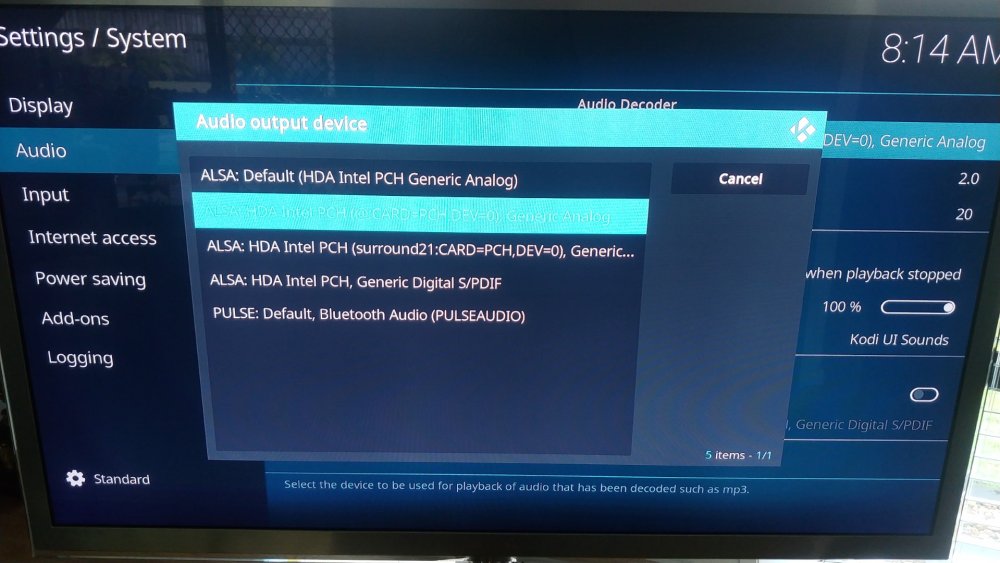
Hi All, So after 2 days straight of searching & trying to get my LibreELEC VM to work, I have no choice but to ask for help so I hope this makes sense as I'm pretty new to all this. I've manged to get both the Video & Audio passthrough to work from my Gigabyte z590 MB & i7 11700k CPU but the problem I'm having is that there is NO option within LibreELEC / Kodi to select a HDMI audio output. The only audio options that are working is via the i/o panel on the rear. I have tried multiple VM setups from Q35 / i440fx / OVMF / seabios but to no avail. Originally I could not get video to passthrough but a simple syslinux config input of "video=efifb:off" fixed that and stubbed Unraid from hogging the display port. Is it possible that unraid is hogging the HDMI Audio also? Can someone please point me in the right direction or is it even possible without some sort of driver?
-
Ok, I have just left a post on the form page, I will let him know you are here to assist.
-
Hi cholzer, as mentioned above your script is fulfilling my requirements, thank you,. I am however having a problem with how the script is executed. The problem arises when not utilizing the auto features of the script, and when trying to mount & view the contents of the device without triggering the script, as when the mount button is pressed it forces the script to run. After posting on the main UD to help resole the issue (see link below) it would seem the script is incorrect on how the manual trigger should be implemented, as one should be able to mount the device without trigger the script and then later manually trigger the script via the "lightning icon" Now I know you wrote the script to be automated and your use case was never built around the manually trigger, but you have mentioned in your description that all auto features can be disabled if required, which they can, but are resulting in a negative way. Sadly this is way above my skill set and understanding of scripting (which is copy & paste...lol) I hope maybe you can shed some light/expertise on how to best to rectify this, thanks Also help has been offered by @dlandon to help with any questions you may have (see in forum below)
-
OK, will do.
-
Yes tried that, and that lead to another issue and that lead to another..... a downward spiral. It would seem the script is suited more to an umounted drive rather than mounted. Its ok, the script is doing what i need, although my OCD would rather it work the way that you are intending (lightning icon), I must let it go and move on as I have no idea how it needs to be scripted.
-
I've exhausted my skill set on this (lol...ran out of random copying and pasting from other scripts etc) I can make it work via original script and then applying and removing it as required..... this will work for me. Thanks for your help and your time.
-
lol....I'm back, I keep getting and error after the "fi" Again I've attached the script to help #!/bin/bash PATH=/usr/local/sbin:/usr/sbin:/sbin:/usr/local/bin:/usr/bin:/bin ######## # SIMPLE MIRROR BACKUP / V01 - 2022-07-14 / by cholzer # This script is meant to be used in the script area of a disk inside the Unassigned Devices plugin ######## # I stitched together this backup script as I could not find a solution for my Offline Backups which are done onto hot-swapable disks. # With this script you can define multiple backup jobs - you get a notification for each important action. # # The whole backup process gets super easy if you choose to enable "automount" for the disk in Unassigned Devices and enable "unmount" in the config section below then . # Just plug in the disk and the script starts the backup and unmounts the disk once it is done so that you can safely unplug the disk. # ######## # Do your modifications below ######## # Here you can setup all your backup jobs. # The mountpoint of the disk you add this script to inside Unassigned Devices is automatically used as destination target. # You can set a subfolder per backup if you'd like to use one. # Use Unraids new file manager to find the exact source path (available in Unraid 6.10 and later) backup_jobs=( # sourcePath # destinationPath-Subfolder (/ for none) #jobName "/mnt/user/Multimedia/Music" "/" "Music" "/mnt/user/Multimedia/Pictures" "/" "Pictures" "/mnt/user/Multimedia/Videos" "/" "Videos" ) # Unmount the backup disk - (Will only be done if the backup was successful) unmount_after_backup=0 # Notifications: # You can disable notifications if you really want to. notifications=1 # rsync options which are used while creating the full and incremental backup rsync_options=( --human-readable # output numbers in a human-readable format --delete # when a file was deleted in source directory it will be delete in the destination directory too --exclude="[Tt][Ee][Mm][Pp]/" # exclude dirs with the name "temp" or "Temp" or "TEMP" --exclude="[Tt][Mm][Pp]/" # exclude dirs with the name "tmp" or "Tmp" or "TMP" --exclude="Cache/" # exclude dirs with the name "Cache" --exclude=".Recycle.Bin/" # exclude dirs with the name ".Recycle.Bin" ) #### # WARNING! DRAGONS BELOW! Do not change anything that comes next unless you know what you are doing! #### ## Available variables: # ACTION : if mounting, ADD; if unmounting, UNMOUNT; if unmounted, REMOVE; if error, ERROR_MOUNT, ERROR_UNMOUNT # DEVICE : partition device, e.g. /dev/sda1 # SERIAL : disk serial number # LABEL : partition label # LUKS : if the device is encrypted, this is the partition device, e.g. /dev/sda1 # FSTYPE : partition filesystem # MOUNTPOINT : where the partition is mounted # OWNER : "udev" if executed by UDEV, otherwise "user" # PROG_NAME : program name of this script # LOGFILE : log file for this script case $ACTION in 'ADD' ) if [ "$OWNER" = "udev" ]; then # do your hotplug stuff here sleep 1 else # do your user initiated stuff here exit fi # sync the file system to commit all writes to disk sync -f "$MOUNTPOINT" # notification if [ "$notifications" == 1 ]; then /usr/local/emhttp/webGui/scripts/notify -e "Unraid Server Notice" -s "Unassigned Devices" -d "Device mounted" -i "normal" fi ######## Lets run the Backup Job(s) # remove the trailing slash from the source and destination path should there be one remove_trailing_slash() { [[ "${1%?}" ]] && [[ "${1: -1}" == "/" ]] && echo "${1%?}" || echo "$1"; } # now lets loop through each individual backup job for i in "${!backup_jobs[@]}"; do case $(($i % 3)) in 0) src_path="${backup_jobs[i]}"; continue ;; 1) dst_path="$MOUNTPOINT${backup_jobs[i]}"; continue ;; 2) job_name="${backup_jobs[i]}" ;; esac # check user settings src_path=$(remove_trailing_slash "$src_path") dst_path=$(remove_trailing_slash "$dst_path") echo "Source Path is $src_path" "Destination Path is $dst_path" # Notification Backup Started if [ "$notifications" == 1 ]; then /usr/local/emhttp/webGui/scripts/notify -s "`hostname` Backup Job: "$job_name" started" -d "Sync started. `date`" fi # first we need to make sure that the log directory does exists, if it doesn't, create it if [ ! -d "$MOUNTPOINT"/rsync-logs/"$job_name"/ ]; then mkdir -p "$MOUNTPOINT"/rsync-logs/"$job_name"/; fi # Now lets run the actual backup job. # It does a mirror, which means that all changes including deletions are pushed from the source directory to the destination directory. # Folders named '.Recycle.Bin' are excluded rsync -av --log-file="$MOUNTPOINT"/rsync-logs/"$job_name"/log.`date '+%Y_%m_%d__%H_%M_%S'`.log --progress "${rsync_options[@]}" "$src_path" "$dst_path" # Notifications sync complete or error if [ "$notifications" == 1 ]; then latestRsyncLog=$(ls -tr "$MOUNTPOINT"/rsync-logs/"$job_name"/ |tail -1) if [ $? -eq 0 ] then /usr/local/emhttp/webGui/scripts/notify -s "`hostname` Backup Job: "$job_name" completed" -d "Sync okay! `date`" else /usr/local/emhttp/webGui/scripts/notify -s "`hostname` Backup Job: "$job_name" FAILED" -i "alert" -d "Sync ERROR! `date`" -m "`tail -5 "$MOUNTPOINT"/rsync-logs/"$job_name"/"$latestRsyncLog"`" fi fi done sleep 1 fi # unmount the backup disk once the rsync backup finished if [ "$unmount_after_backup" == 1 ]; then /usr/local/sbin/rc.unassigned umount $DEVICE fi ;; 'UNMOUNT' ) # do your stuff here # since we also get notified once the disk was unmounted, I commented this notification out # /usr/local/emhttp/webGui/scripts/notify -e "Unraid Server Notice" -s "Unassigned Devices" -d "Device unmounting" -i "normal" ;; 'REMOVE' ) # do your stuff here # notification if [ "$notifications" == 1 ]; then /usr/local/emhttp/webGui/scripts/notify -e "Unraid Server Notice" -s "Unassigned Devices" -d "Device unmounted" -i "normal" fi ;; 'ERROR_MOUNT' ) # do your stuff here # notification if [ "$notifications" == 1 ]; then /usr/local/emhttp/webGui/scripts/notify -e "Unraid Server Notice" -s "Unassigned Devices" -d "Error mounting device" -i "alert" fi ;; 'ERROR_UNMOUNT' ) # do your stuff here # notification if [ "$notifications" == 1 ]; then /usr/local/emhttp/webGui/scripts/notify -e "Unraid Server Notice" -s "Unassigned Devices" -d "Error unmounting device" -i "alert" fi ;; esac
-
Legend - thanks so much for your help and speedy replies.
-
TBH, I've overcome the 1st problem of not running the script or running the desired script when required, it was my lack of understand on how the profiles where being saved / deleted. Is it possible to stop an active / running script?
-
forgive as this is all new to me, I found a script that fitted my use case perfectly, the only way I have found to run the script is when i click the mount button, but sometime I require to mount the device without running the script. Am I totally missing something (most likely am) the script im using is as follows #!/bin/bash PATH=/usr/local/sbin:/usr/sbin:/sbin:/usr/local/bin:/usr/bin:/bin ######## # SIMPLE MIRROR BACKUP / V01 - 2022-07-14 / by cholzer # This script is meant to be used in the script area of a disk inside the Unassigned Devices plugin ######## # I stitched together this backup script as I could not find a solution for my Offline Backups which are done onto hot-swapable disks. # With this script you can define multiple backup jobs - you get a notification for each important action. # # The whole backup process gets super easy if you choose to enable "automount" for the disk in Unassigned Devices and enable "unmount" in the config section below then . # Just plug in the disk and the script starts the backup and unmounts the disk once it is done so that you can safely unplug the disk. # ######## # Do your modifications below ######## # Here you can setup all your backup jobs. # The mountpoint of the disk you add this script to inside Unassigned Devices is automatically used as destination target. # You can set a subfolder per backup if you'd like to use one. # Use Unraids new file manager to find the exact source path (available in Unraid 6.10 and later) backup_jobs=( # sourcePath # destinationPath-Subfolder (/ for none) #jobName "/mnt/user/Multimedia/Pictures" "/" "Pictures" ) # Unmount the backup disk - (Will only be done if the backup was successful) unmount_after_backup=0 # Notifications: # You can disable notifications if you really want to. notifications=1 # rsync options which are used while creating the full and incremental backup rsync_options=( --human-readable # output numbers in a human-readable format --delete # when a file was deleted in source directory it will be delete in the destination directory too --exclude="[Tt][Ee][Mm][Pp]/" # exclude dirs with the name "temp" or "Temp" or "TEMP" --exclude="[Tt][Mm][Pp]/" # exclude dirs with the name "tmp" or "Tmp" or "TMP" --exclude="Cache/" # exclude dirs with the name "Cache" --exclude=".Recycle.Bin/" # exclude dirs with the name ".Recycle.Bin" ) #### # WARNING! DRAGONS BELOW! Do not change anything that comes next unless you know what you are doing! #### ## Available variables: # ACTION : if mounting, ADD; if unmounting, UNMOUNT; if unmounted, REMOVE; if error, ERROR_MOUNT, ERROR_UNMOUNT # DEVICE : partition device, e.g. /dev/sda1 # SERIAL : disk serial number # LABEL : partition label # LUKS : if the device is encrypted, this is the partition device, e.g. /dev/sda1 # FSTYPE : partition filesystem # MOUNTPOINT : where the partition is mounted # OWNER : "udev" if executed by UDEV, otherwise "user" # PROG_NAME : program name of this script # LOGFILE : log file for this script case $ACTION in 'ADD' ) if [ "$OWNER" = "udev" ]; then # do your hotplug stuff here sleep 1 else # do your user initiated stuff here sleep 1 fi # sync the file system to commit all writes to disk sync -f "$MOUNTPOINT" # notification if [ "$notifications" == 1 ]; then /usr/local/emhttp/webGui/scripts/notify -e "Unraid Server Notice" -s "Unassigned Devices" -d "Device mounted" -i "normal" fi ######## Lets run the Backup Job(s) # remove the trailing slash from the source and destination path should there be one remove_trailing_slash() { [[ "${1%?}" ]] && [[ "${1: -1}" == "/" ]] && echo "${1%?}" || echo "$1"; } # now lets loop through each individual backup job for i in "${!backup_jobs[@]}"; do case $(($i % 3)) in 0) src_path="${backup_jobs[i]}"; continue ;; 1) dst_path="$MOUNTPOINT${backup_jobs[i]}"; continue ;; 2) job_name="${backup_jobs[i]}" ;; esac # check user settings src_path=$(remove_trailing_slash "$src_path") dst_path=$(remove_trailing_slash "$dst_path") echo "Source Path is $src_path" "Destination Path is $dst_path" # Notification Backup Started if [ "$notifications" == 1 ]; then /usr/local/emhttp/webGui/scripts/notify -s "`hostname` Backup Job: "$job_name" started" -d "Sync started. `date`" fi # first we need to make sure that the log directory does exists, if it doesn't, create it if [ ! -d "$MOUNTPOINT"/rsync-logs/"$job_name"/ ]; then mkdir -p "$MOUNTPOINT"/rsync-logs/"$job_name"/; fi # Now lets run the actual backup job. # It does a mirror, which means that all changes including deletions are pushed from the source directory to the destination directory. # Folders named '.Recycle.Bin' are excluded rsync -av --log-file="$MOUNTPOINT"/rsync-logs/"$job_name"/log.`date '+%Y_%m_%d__%H_%M_%S'`.log --progress "${rsync_options[@]}" "$src_path" "$dst_path" # Notifications sync complete or error if [ "$notifications" == 1 ]; then latestRsyncLog=$(ls -tr "$MOUNTPOINT"/rsync-logs/"$job_name"/ |tail -1) if [ $? -eq 0 ] then /usr/local/emhttp/webGui/scripts/notify -s "`hostname` Backup Job: "$job_name" completed" -d "Sync okay! `date`" else /usr/local/emhttp/webGui/scripts/notify -s "`hostname` Backup Job: "$job_name" FAILED" -i "alert" -d "Sync ERROR! `date`" -m "`tail -5 "$MOUNTPOINT"/rsync-logs/"$job_name"/"$latestRsyncLog"`" fi fi done sleep 1 fi # unmount the backup disk once the rsync backup finished if [ "$unmount_after_backup" == 1 ]; then /usr/local/sbin/rc.unassigned umount $DEVICE fi ;; 'UNMOUNT' ) # do your stuff here # since we also get notified once the disk was unmounted, I commented this notification out # /usr/local/emhttp/webGui/scripts/notify -e "Unraid Server Notice" -s "Unassigned Devices" -d "Device unmounting" -i "normal" ;; 'REMOVE' ) # do your stuff here # notification if [ "$notifications" == 1 ]; then /usr/local/emhttp/webGui/scripts/notify -e "Unraid Server Notice" -s "Unassigned Devices" -d "Device unmounted" -i "normal" fi ;; 'ERROR_MOUNT' ) # do your stuff here # notification if [ "$notifications" == 1 ]; then /usr/local/emhttp/webGui/scripts/notify -e "Unraid Server Notice" -s "Unassigned Devices" -d "Error mounting device" -i "alert" fi ;; 'ERROR_UNMOUNT' ) # do your stuff here # notification if [ "$notifications" == 1 ]; then /usr/local/emhttp/webGui/scripts/notify -e "Unraid Server Notice" -s "Unassigned Devices" -d "Error unmounting device" -i "alert" fi ;; esac
-
Thanks for the speed reply, I added the last to lines which where not present in the script "sleep 1 & fi" Device mounted fine without running the script, was meant to have an option to run the script prior to mounting?
-
To answer my 2nd question, I've realised i can save a Blank script and save it without overwriting my desired script, that was before I mount the device I can load and the saved blank script and load the desired script when required. Still it would be nice to have a quick "disable script" button beside the "mount" button
-
Firstly thanks to everyone for there efforts on making this ecosystem a reality, I'm a noob to Unraid but so glad I've left Qnap behind me. So I've searched for an answer to these to questions but to no avail, first being is there any way to abort / stop a script that is currently running (after I've pressed "MOUNT" and is showing "RUNNING") Which leads me top my next question, is there a way to "MOUNT" a device without running its attached script (I'm aware its possible to delete the script & save prior to mounting , but its a very round about way as I will need to copy the script back over) Would be nice to a have a disable script button Thanks
-
Mate! I just wanted to say THANKYOU SO SO MUCH for this script!!! I'm a noob at scripts/unraid and I've been pulling my hair out all day trying to get other scripts to fit my use case, which is exactly like yours. Thanks once again
-
@Kilrah So i found out how to bring back a minimized window, just hold in middle mouse button anywhere on the black screen and it will bring up all active windows, move mouse over the desired window and release.
-
Thanks @whipdancer for the replies, much appreciated. I've been looking at some old 2nd hand severs being sold locally for reasonable money, very temping but very old 7 to 8years. I feel like now is not a good time to be buying new computer components with the world being the way it is right now, every used parts can be pretty expensive. So maybe the old severs will tie me over until the world settles down? I might post back here when i find a suitable used server
-
Thanks for your reply @whipdancer much appreciated. AMD build so many years ago that would have been very experimental on unraid no? Please forgive me in advance as I'm not sure if its to much to ask if you or anyone else has a 2021 recommended parts list you would buy now that would fit my budget / needs. I ask myself if I had such knowledge would I be ok answering / providing said list, and while I feel like it wouldn't bother me to answer, I can see how 1 might consider it to be over stepping or just lazy on my part. I have literally spent 3 weeks (months to be honest on and off over the last year) trying to choose components etc, Trying to decide between AMD & Intel alone is an absolute nightmare considering how AMD is performing of late.
-
I'm sure this topic has been played out to death, but sadly the more I research the more overwhelmed I become, so much so I feel like purchasing another Qnap (even though I promised myself I would never buy Qnap or similar again) I'm very confident in building my own server and getting it up and running, I just need expert advise on what hardware to choose for my use basis. I've been running a Qnap 459 pro ii with 4 x 4tb in raid 5 for 9 years now, it has served me very well but I need more space and this device is no longer supported by Qnap and desperately needs updating both in hardware and software. I had considered utilizing unraid on this device, but from what I have learnt here, its time to upgrade. My requirements - 1 - A system that will last me 8 - 10 years and will run 24/7, so I believe I need server grade to even consider this. (so many system guides with gaming grade components) Would like to be future proofed somewhat, 10gbe LAN etc. 2 - My use basis - mainly as a file server for all the families personnel data & entertainment (movies, games, etc). I will definitely be utilising the dockers (10 or so) for Sonarr, Radarr, torrents etc. I would really like to use some VM's (1 or 2) for needs I'm unsure of yet. 3 - Space - 8 x H/S drive bays - I'd like to add-on to what I have already in 4tb drive increments (enterprise), reasons for this is time lost in rebuilds if a drive fails and $$$ of drives. I believe it would take me 8 - 10 years to double my space requirements as of now. 4 - Would like the headroom to game on the device down the track - It would never be my main gaming rig but would be nice for the kids to play on a LAN as they get older. 5 - Power - I want it to be as power efficient as possible, but I'm unsure if this is achievable if I want to game on this. 6 - Case / Form Factor - Flexible on form factor - Case is not needed as this will be a custom inbuilt system which I would love to share when completed 7 - $$$ around $1500 USD - like everyone as cheap as possible but not really interested in Used parts for the MB, RAM, CPU, but open to used parts for things like the LSI controller and H/S drive bays I look forward to any replies / advice, not very hopeful I will get any.... lol



