





wacko37
Members
-
Joined
-
Last visited
Everything posted by wacko37
-
Sorry for misinterpreting your reply, I will have to research further on this as I have no idea how to complete this successfully. Would it make much of a difference compared to what is working now? Im guessing speed and security?
-
Thankyou kindly for your reply and expertise, I've just completed a backup via SMB as I would do with my other PC's on the network, sadly don't have a spare NIC onhand to complete the vLan as you mentioned but that's a future upgrade I want to complete anyways down the track. So from my limited understanding data is now being sent out and received via the same ethernet port in my current setup, which is ok for me for now. Do you have any understanding why M-R was causing the virtioFS to disconnect?
-
OK anyone facing the same issue regarding Roblox on VM? I have successfully setup and tested Roblox via BlueStacks (Android Emulator), I know..... its the android version and not running natively on the VM, but I finally have Roblox working on my VM, which = Happy Kids!!!.....job done EDIT - NOPE this method is a failure, and sadly now worth implementing unless you have a huge amount of resources to passthrough to it - But I do have a fix
-
@mackid1993 Firstly thankyou for all that you do, you have made the virtioFS setup a breeze! In your comment you mentioned Macrium reflect, I'm currently trying to backup my VM to a folder that is mounted via your virtiofs script. The problem I'm having is the when Macrium attempts to write to the mapped drive it fails with "error - system cannot find the path specified" When I return to windows explorer the Mapped drive is no longer there. If a re-run the virtiofs script the drive reappears but fails again if trying to backup via Macrium. I can create and open files within the mapped drive as per normal but it seems Macrium cannot use the virtiofs mapped method. Can you share any knowledge on this, much apricated in advance?
-
It's nice to able to return the favour somewhat! Yes the windows android subsystem was pretty much useless as it relied on Amazon appstore which never seemed to have the apps I required.....lol I'm currently offshore for work, but looking forward to testing BlueStacks on the VM when I get back. Hopefully it allows 2 apps running at once ie: messenger for kids + Roblox = happy kids = happy dad!
-
@bmartino1 WOW - you have gone above and beyond here with your reply, I'm so grateful.... truely! You have saved me so much time and frustration of trying to make this work. I believe I fully understand you correctly now. If I was to get Roblox to work by bypassing the Roblox security blocks, it will only be a matter of time before I would end back where I started with NO Roblox. So I was thinking, I have BlueStacks setup on my main gaming PC so the kids can have "Messenger for Kids" while gaming. So in light of your opening reply, I will install BlueStacks on my Unraid Windows VM and then install android version of Roblox. This sounds much easier to implement that fighting a loosing battle with Roblox on VMs
-
@bmartino1 Once again, thankyou so much for your valued knowledge and answer. I will try all that you mentioned, I hope I can get this working so my kids stop hassling me about it.....😂
-
Thanks for the the detailed explanation regarding this. I've just setup my 1st Unraid gaming VM only to work out that Roblox is not launching at all, it opens a windows that instantly closes. Very annoying indeed. Can I ask is this method still working/relative or is Roblox on and Unraid VM a no go. Thanks.
-
Sorry for the late reply, forgot to subscribe to thread. Thankyou for your detailed response it's been very helpful. I do like the sound of manually copying as you mentioned, I have 2nd drive too, so I might backup to both drives via UD and run a script that also runs a bunker check on the transfered files. But all that efforts makes the defrag command sound much more simpler.
-
Sorry to quote such an old post, but I'm starting to see the effect of fragmentation on 1 of my drives 48%. And the most logical step to me as I always have a spare drive ready on hand is indeed to copy the contents over to the new drive. As mentioned before my biggest concern is messing thing up. What I was hoping to do is copy the contents of lets say Disk2 to the spare disk via Unassigned Devices, then stop the array and swap / assign the old drive out for the new. It all sounds to simple to be true, would this indeed work? Would it trigger a Parity-check etc?
-
Hi @m00nman, firstly thankyou so much for your original post and for all that you do, you have made this process so easy for the unexperienced. (me) I just setup my 1st proper Win 11 gaming VM, my system has a 11700k cpu, 32gb ram, RTX 2080ti and utilising my Unraid mirrored cache nvme drives for my storage within the domains share. I've done all that you have suggested including isolation of CPUs cores 4 to 7 & HT 12 to 15 (if i understand correctly 8 cores?) and 12gb of ram to the VM, my gpu is also bound to the VFIO for the VM only. So as per your quoted comment, I really am starting to see the negative affects on the server itself with half the CPU being lost to the VM. It only gets used for gaming on the weekends, so i would say 10% of the time, not a lot. Its not my main gaming rig for the big AAA games so I think I'm willing to sacrifice not having the cpu cores isolated for a loss in performance. So i have to ask what is the best way to proceed on that front? Do i just select the cores within the VM template (cpu pinning) or do I just select nothing and let unraid do its thing? Or, Does it make sense to Isolate CPU cores 6 to 7 & HT 14 to 15 (quarter of the CPU) and pin CPU cores 4 to 5 & HT 12 to 13 that way it will leave more left over for Unraid/dockeretc. So many options its hard to know the right path, I suppose that life in general....lol. Any advise is much appreciated, thanks
-
@dlandon Thanks for the update mate, Device Scripts are working as per normal.
-
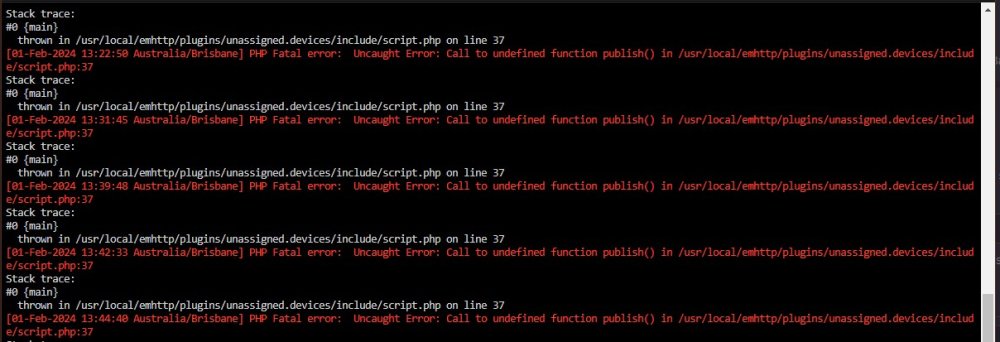
I have attached a screenshot of the PHP logs, hope it helps somewhat.
-
As always @dlandon thankyou for all that you do for the Unraid community. I never knew Tools->PHP existed until now.... Always learning. I look forward to the next release, thanks
-
Hi Community, Is anyone having issues running "device scripts" within UD, I have a series of scripts that I run regularly and have worked flawlessly until now. Now when I press the lightning symbol to run the script nothing happens, the script window comes up as per normal but it just goes straight to done with no other info. The logs are giving no info either (see attached screenshot) Also attached script for review. Any ideas? Has something changed of recent? 01_-_Multimedia_-_Films-Music-Books_-_SYNC--VERIFY.sh
.thumb.jpg.79b5a9cdf7b78fd105641210f9edd8b2.jpg)
-
Ok - I manually edited both files in the below locations to 0 6 */4 * * but to no avail. "config/plugins/dynamix.file.integrity/integrity-check.cron" & "config/plugins/dynamix.file.integrity/integrity-check.cron" Is what I'm trying to achieve possible
-
Hi All, I searched high and low for an answer but to no avail, basacially I would like a more custom cron schedule for DFI, what I want to do is 0 6 */4 * * which is on the 6th hour of every 4 days of a month run a check on a single disk. So there is no setting to do this via the Webui, so what I need to know is it safe to manually edit "/UNRAID Flash Dir/config/plugins/dynamix.file.integrity/integrity-check.cron" to reflect the above cron scheduale. Thanks
-
If anyone runs into this issue, 1 must run this command in Unraid console to make the zpool mountable in ZFS Master UNRAID:~# zpool upgrade (zpool name) The command will upgrade (downgrade really) the ZFS disk to the 6.12 ZFS features.
-
Absolute legend! - I'm back in business for now.....lol
-
Out of curiosity is there a way to downgrade UD to 2023-10.08 before the legacy update? This way I can continue until both plugins are compatible again/
-
@Iker Firstly as always I would like to thankyou for this great plugin and for all that you do for this great community. I have encountered an issue with a ZFS disk mounted via UD not showing up in ZFS Master. After a discussion with the UD developer @dlandon in the UD thread, it appears this is to do with ZFS compatibility in the upcoming Unraid 6.13 release, UD now accommodates for 6.13 when formatting a disk to ZFS rendering it unmountable in ZFS Master...... see below (p.s I hope i have relayed this information correctly, I apologise in advance if this isn't the case and would be due to a lack of understanding on my part)
-
Thanks for the speedy reply and as always a thorough explanation. TBH I have just realised how much continued work goes into maintaining such plugins/dockers. I can see you are always way ahead of the a-game (6.13) making sure the transition is a smooth 1. SO THANKYOU for all that you do...... can't say that enough. The change to ZFS has been a step learning curve for myself, now I'm somewhat worried about this new transition with 6.13. Will all existing Unraid ZFS pools be automatically upgraded with the new features when updating to 6.13, and any UD zfs disks would then require a manually update to be compatible. Will any data be lost during these upgrade?
-
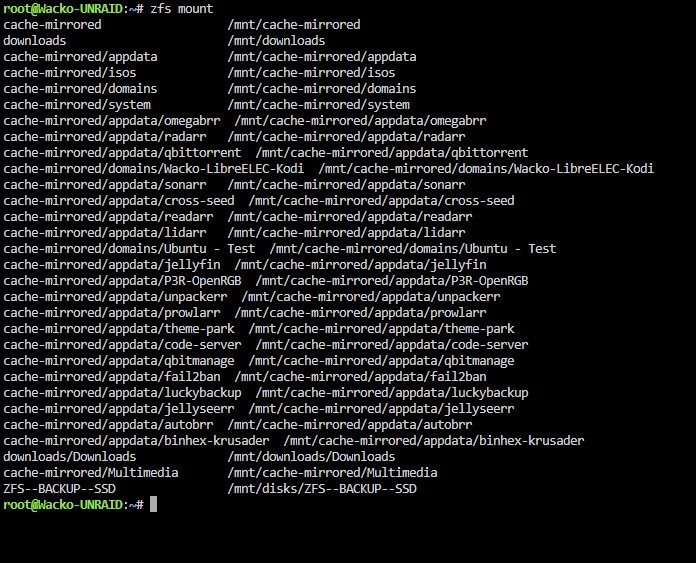
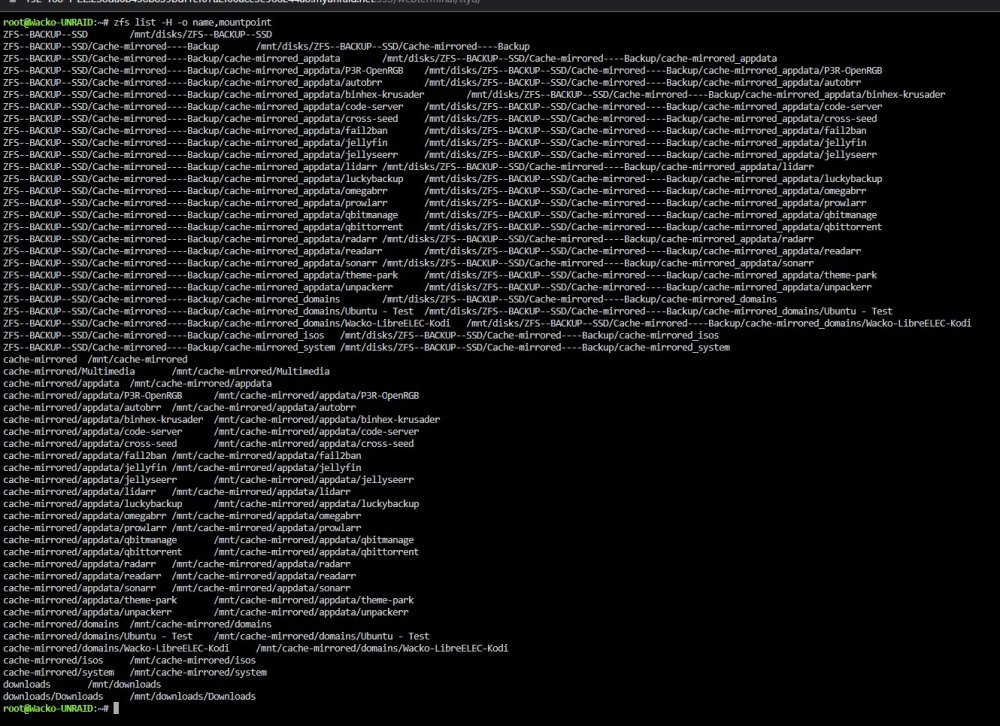
Hi All, @dlandon as always thankyou for all that you do mate! I've just formatted a new drive to zfs via UD, The new zfs device mounts fine with no errors in the logs but for some unknown reason I cannot see it in ZFS Master. I have other devices that where also formatted to ZFS via UD some months ago and they mount just fine and visible in ZFS Master. To further test I have just formatted a 2nd new drive to ZFS via UD and again this mounts ok without errors in logs but not visible in ZFS master..... weird Its as if UD is not formatting correctly or the pool name is not compliant with ZFS/Unraid, I tried multiple pool names the most simple being "test"
-
Thanks as always for your time and hard work.....legend!
-
As requested


.jpg.35da7852162e9170b4442e69d126650a.jpg)

