





sMACk
Members
-
Joined
-
Last visited
Everything posted by sMACk
-
just wanted to say these have all stopped appearing and I am seeing valid notifications, so thank you for your work!
-
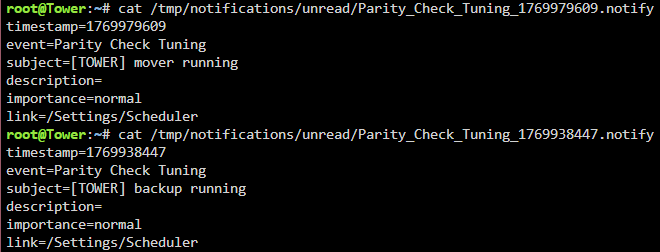
FYI, still seeing these notifications for the following events (so far) with nothing going on in the syslog around the same timestamps:
-
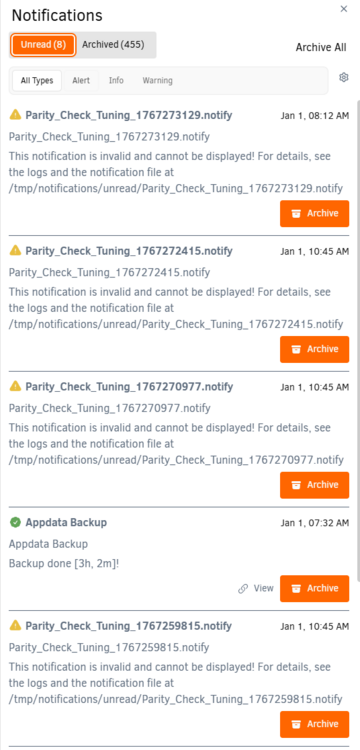
thank you for the update! I am still seeing the same invalid notifications. Hopefully the following is helpful in some manner! the notifications: from the log at the same time as the 8:12am notification, none of the others seem to correlate with anything in the log:

-
been seeing this for awhile and following this thread hoping for a resolution, any progress? thanks
-
Is this still being developed? +1 for Android please! Thanks
-
I believe it was, apologies for taking so long to respond!
-
i got everything up and running, but I always get an execution error when I try to stop the container. Any ideas? thanks
-
ok ill try that for now, thanks again!
-
thank you @JorgeB! Looks like its part of immich... and that docker is limited to 2G memory... so you think its running out of the 2G? In that case its not really a problem in the grander scheme...
-
Saw this yesterday after some issues due to a power fluctuation, needed to reboot anyways, so I did in order to get a fresh start hoping it would just go away. Its back! I also have a remote syslog. Anyways, diags attached, as always, your help is very much appreciated! tower-diagnostics-20240615-0935.zip
-
Dang, thats a bummer... Any idea for things I should/could try? Would erasing the bioses on the hbas help you think?
-
Maybe this is the wrong forum for this (I've also got on the hardware channel of unraid discord to see if anyone can help)... apologies if so I have 2 HBAs and a GPU in my server(see diags for more info!). I was unable to access my mobo bios when the HBAs were installed. Didn't want to erase the hba bios as I like it for debugging, so I wanted to disable CSM, use UEFI to boot and avoid loading their bioses at all. Without the HBAs installed, I got that all configured but I was getting a black screen on boot (hdmi plugged into GPU) but it was still booting. Switched to my onboard HDMI and tweaked BIOS to set cpu as primary monitor and everything was good. As soon as I installed my HBAs, I am back to a black screen. Everything works and is booting, but no video output on the attached monitor. And then..... One of my HBAs is attached to an SC200 that I also just installed. I had wired it redundantly which was causing duplicate drives to show up, so I shutdown to remove the redundant cable and when I booted, i got a POST screen (mobo logo). BUT it has some weird graphical distortion and then I never saw the unraid boot menu, black screen returned. This isn't a game breaker, but I would like to figure it out. Any help would be much appreciated! tower-diagnostics-20240301-1426.zip
-
any discussion on this issue and if it is actually related to this plugin? I am sufferring this issue and would like to keep the plugin, if possible! thanks
-
I am running into this issue regularly... I was fiddling with CPU isolation and pinning recently but can't think of anything else I changed that could be responsisble... anyone figure anything permanent out? update: remove GPUstatistics plugin as that was identified as a potential culprit by others, waiting to see if the issue is resolved...
-
realized I had my deluge docker pinned at an early 2.x version so just switched the repo to :latest and now my web ui is painfully slow. It seems to constantly be making requests for tracker icons, which fail, and then I guess requests for updating the UI, but they are all painfully slow and the UI loses connection very easily. Any ideas? thanks UPDATE: seems to have resolved itself either with the most recent update or just by itself! WOrks for me!
-
ok, will do, thank you very much @JorgeB!
-
oh actually, how can I fix the partitionlessness of my parity drive? By doing a parity sync after the data rebuild (for the same size drive i put in to replace the big drive I wanted to use for parity)?
-
NEVERMIND! Don't waste your time. I appreciate your help. I am going to be sensible and take the easy route!
-
this sounds very plausible... I had a situation I mishandled previously and definitely could have done that. Would you be able to instruct me on how to do that? I only have one free hard drive slot available which is currently occupied by the new big drive.
-
Hey all, I had a disk become disabled so I bought a new drive to replace it. New drive is larger than my largest/parity so I wanted to use the parity swap procedure. I followed the steps here (https://docs.unraid.net/unraid-os/manual/storage-management/#parity-swap), but when I try to execute step 14: The page reloads and nothing starts happening. In the server log I see the following: I would really like to use the parity swap if possible, but I guess I could do it piecemeal instead... diags are attached thank you for any help you can provide! tower-diagnostics-20231004-0933.zip

-
ok, appreciate the help!
-
not sure if I should keep waiting for feedback on the diagnostics or is it clearly a lost cause? apologies if this seems impatient, not sure how quickly these forum posts go stale. thanks for the help!
-
Diagnostics are attached. I never ran it without the -n flag as it never seemed to think it would be able to repair it. I can run xfs_repair again, but it takes a long time (5+ hours, maybe closer to 10) and its says something along the lines of: bad magic number no primary superblock looking for secondary superblock .... ( dots continue for hours) unable to find secondary superblock exiting please confirm if you would like me to rerun xfs_repair thank you! tower-diagnostics-20230326-1154.zip
-
It started when I got a notification that a disk (disk 7) had been disabled due to errors, I'm pretty sure it was right after several power outages. Its been over a week since it happened and I'm a little fuzzy on the exact order of events now, but where am I now is the disk is unmountable and I don't believe it is being emulated any longer as the status is green/normal. I haven't noticed any data loss, but I haven't checked everything to see if anything is missing. I can't confidently say in what order I did things, but I did run an extended smart test which seemed to complete successfully and I have run xfs_repair -vn on the disk in both the gui and cli while in maintenance mode using the /dev/md7 (or whatever it is) and it takes a VERY long time and is unable to find a valid primary or secondary superblock. A rebuild happened at one point. At this point, I have a replacement drive ready, but I would also like to recover the drive if possible. I don't really have anymore space in my chassis for another drive so I would have to physically swap the drive out to replace it. I want to make sure I have done everything I could before giving up on it. Apologies for not coming here sooner and, most likely, making this harder than it needs to be. Let me know what I can/should provide to help you understand the situation. Thank you for any help you can offer!



