





TimTheSettler
Members
-
Joined
-
Last visited
Everything posted by TimTheSettler
-
Sorry, that statement was poorly worded and was very generalized and I should explain it better. The onboard SATA ports are usually fine. In fact I use them for all my servers. However, it's possible that you have one of the following problems in which case a good onboard SATA controller card like the LSI models is better: The motherboard is old and uses older SATA standards. You're using an M2 SATA card which shares an onboard SATA port. The motherboard is cheap and uses a chipset that might not be recognized. The motherboard uses a chipset that only supports a limited number of SATA ports but the motherboard manufacturer has added more ports which use another controller chip. Some links... https://www.reddit.com/r/intel/comments/rxasm6/over_4_sata_ports_on_a_b660_motherboard/ https://www.msi.com/Motherboard/MAG-B660M-MORTAR-WIFI-DDR4/Specification https://ark.intel.com/content/www/us/en/ark/products/218832/intel-b660-chipset.html


-
Sounds good. It's basically the same as (but better than) my unRAID04 server. When you connect the HDD be conscious of which drive connects to which port. What I mean is that your parity drive should be the best and fastest of all the drives and have the most dedicated connection. Some people recommend avoiding the mobo SATA ports but I haven't seen any problem so maybe it's just that crapier mobos have poor SATA ports. Although the LSI card is nice and fast there's a post shown below where the speed drops when more drives are connected. Do the mobo SATA ports do the same thing? I'm not sure... I think your new mobo seems to be pretty nice.
-
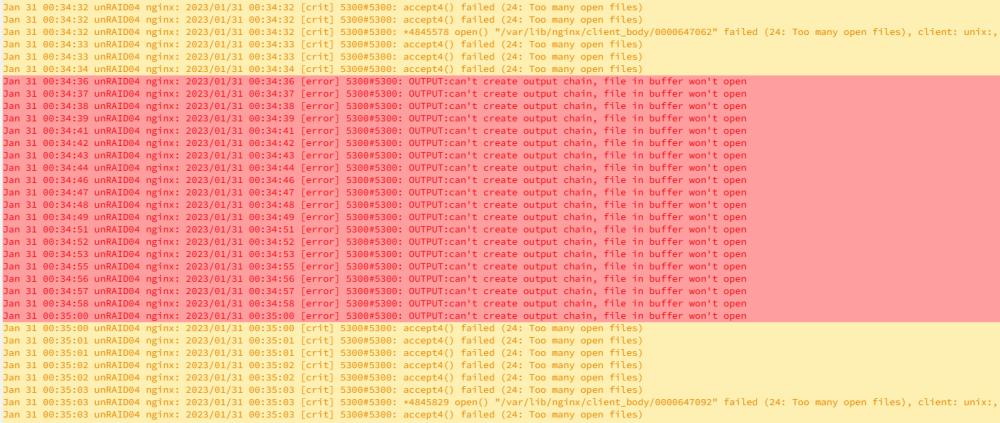
I usually use Firefox but I started to run into this problem (Dashboard empty - shows "Infinity") so I switched to Microsoft Edge for a few months. I have a Windows 10 Mini-PC with multiple browser windows open all the time (24/7). I use it like a status board where I can peek in from time to time to see how my servers are doing (Five servers; showing the Dashboard and Main windows from each server). Soon after using Edge I noticed that the Syslogs of all my servers were filling up with messages like the one below. Eventually the Syslog gets so full that you can't view it and then it maxes out at 100% at which point I have to reboot the machine. I realized that these messages are coming from the browser windows on the mini-PC that I have open all the time. I know this because it never happened before when I used Firefox and the servers are back to normal now that I use Firefox again (no more Edge). Has anyone else noticed this or is this just me somehow? The obvious "solution" here is to use Firefox or only view the servers from time to time or increase the max open files setting but none of those are real solutions. Something weird is happening with Microsoft Edge and unRAID.
-
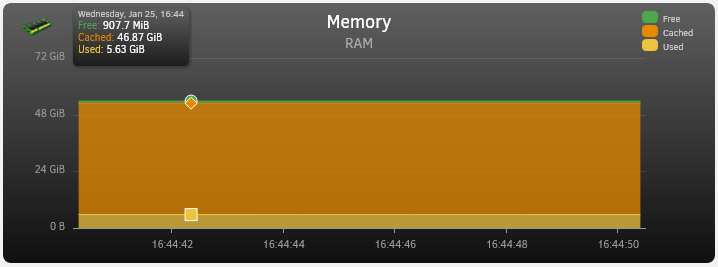
Yup, completely agree. So why do I have so much? Two reasons, the price is right (best cost per GB) and in the past 25 years I always regret not getting enough RAM. Sure, it's overkill at first but then there comes a point down the road when you wish you had more and then the cost is through the roof for the specific type you need. The screenshot below comes from one of my file servers. Main apps running on it are Plex and Syncthing.
-
Your proposed setup is very similar to the servers that I built. Be sure to get a UPS, a mobo with two M2 NVMe slots for a nice fast cache pool, and with 8 large drives I recommend that you use dual parity. Note that it takes a very long time to do a rebuild of a large drive. My 18TB drives took about 28 hours. The 10TB drives took about 13 hours. Below is a screenshot of a recent parity check (18TB). Clearing the drive (pre-clear), building a drive (rebuild of failed drive or initial build of parity), and the parity check shown below all take about the same amount of time. Also wanted to mention that the trial key is a good way to try it out without committing but I think you'll like it.

-
My unRAID01 server is in one location and my unRAID02 server is in another location. I use Wireguard to connect the two servers together. All good. If the router at the unRAID01 location (router01) goes down and comes back up or if the router at the unRAID02 location (router02) goes down and comes back up the tunnel becomes disconnected. It doesn't matter which router goes down, the tunnel is disconnected. So, if router01 goes down the tunnel is lost but if I jiggle the tunnel (deactivate it and then reactivate it) the tunnel reconnects and life goes on. Likewise, if router02 goes down and if I jiggle the tunnel (deactivate/reactivate) it comes back. Unfortunately I'm not a Linux guy which is why I like unRAID. I don't really need to be a Linux guy for it to all work. But, I was hoping that someone here might be able to create an "auto-jiggler" script. A script that can be scheduled to check if a tunnel is active and if it's not then deactivate and reactivate the tunnel. Any takers?
-
You're like me before I started. I had hardware lying around as well as planned to buy some stuff but I wasn't sure what to do. Now that I've been using unRAID the best thing is to build your system and then simply download the OS to a USB and plug it into that system. Just start using it! You have a 30-day trial and if you find that the CPU is not fast enough or the GPU or network card is not quite working right or if you need more memory then upgrade or swap those things out. unRAID doesn't care about the hardware. In fact I completely swapped out the mobo, CPU, and memory in one of my systems. The only things I kept were the HDDs and the system looked just like it did before except that it was now faster and had more memory. A few things to note. The 2.5G network card is useless unless you have a 2.5G switch and Cat6A cables. The source, target, and medium must all support the minimum speed you are looking for. Many people here have lots of 4TB and occasionally 8TB drives. I can only assume that they all bought these a few years ago because the best bang for your buck right now is about 14TB. I just hopped on Amazon to compare prices and I see 8TB for $190 and 14TB for $230. Almost twice the space for $40 more and usually the larger drives are faster.
-
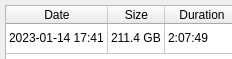
Some results following the completion of the archive process. Originally 212GB. Compressed and deduplicated down to 211.4GB
-
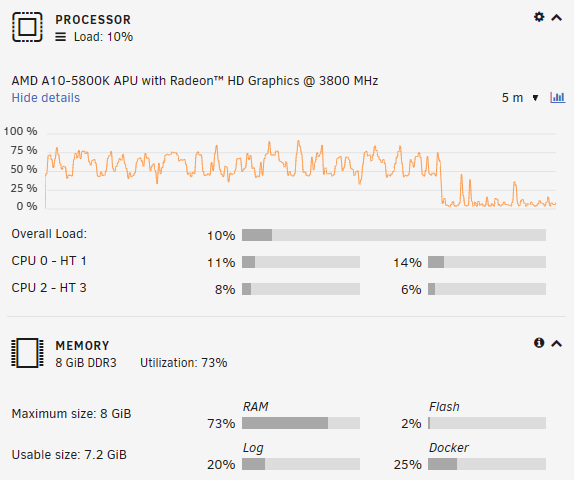
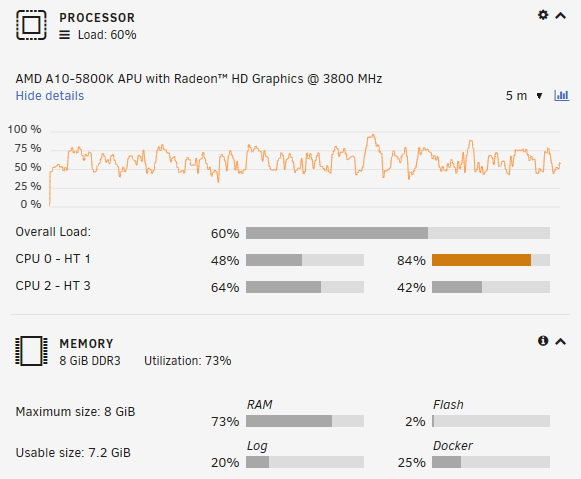
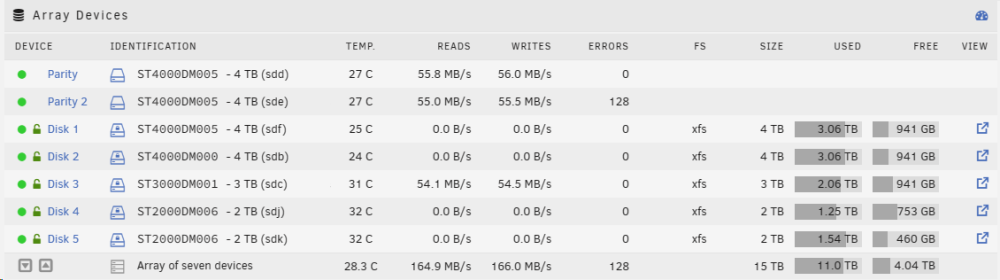
I use Vorta (Borg) so I can't really give you a proper comparison of Duplicacy. Borg was recommended to me by a Linux friend who uses it at work to back up their servers. It's free which is nice but I also like paid apps because it guarantees that the app will be supported and updated regularly. Anyway, I installed Vorta on my test server which is an old machine with an old CPU and old hard drives that I used to use as offline backups (similar to what ConnorVT does today). The screenshots below were taken during the backup process (back up 212GB from a folder on that machine to another folder on that same machine). They show that the backup software doesn't really tax the system. It's been running for about 30 minutes now and it's about 25% done. If your CPU is about as powerful as mine on this server (my test server - which is using an AMD A10-5800K CPU) then you should be ok. However, one of the things that I like about unRAID is that you can change the hardware. For example, I had an old system lying around and I tried to use it but it was too slow (Core2Duo). The CPU was always at 50% even though nothing was running. I went out and bought a new mobo, CPU, and memory and installed it all into the old box and hooked up the hard drives. Turned on the machine and unRAID picked up where it left off (Upgrading hardware in an existing set-up). So my recommendation here is to build a system with what you already have and then upgrade the different parts as needed once you see it in action. Ignore the errors you see for the Parity 2 drive which is slowly starting to fail but still works ok.
-
I used to do what ConnorVT does today and it's an easy, effective, and relatively cheap way to keep backups. But, as he points out, you'll need to decide what to back up. If you do the external storage thing then you'll be limited by the size of that external storage. You're concerned about the CPU but the bottleneck you should be worried about is the hard drive speeds and and the network (if that's involved). It took me a couple days to create the initial backup of my movies and TV shows (about 16TB).
-
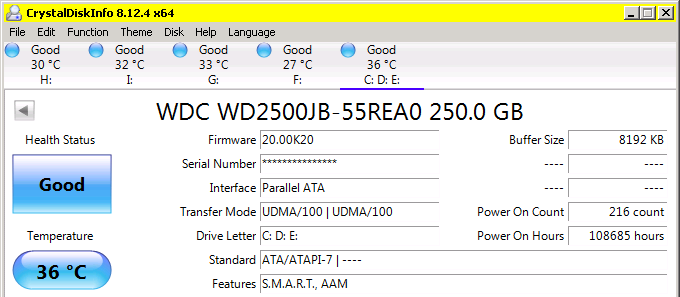
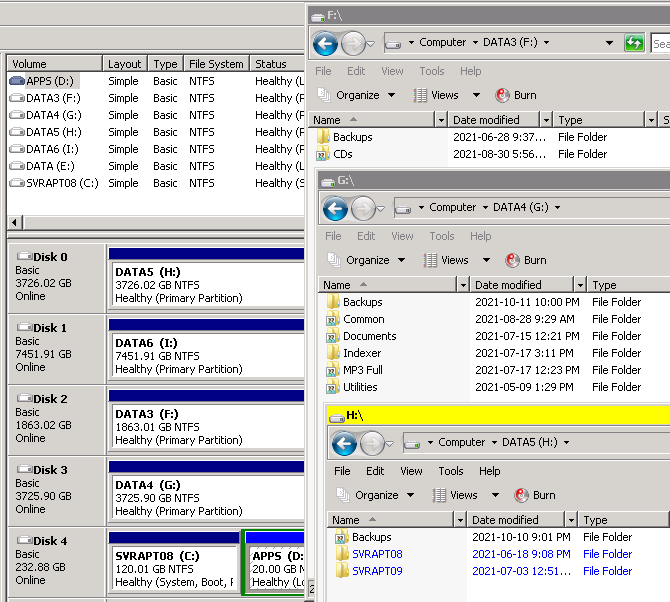
As I mention above, a backup only makes sense if it's an offsite backup (replication) or to be used as a snapshot. In either case the backup should be a separate machine (even better if it's off-site). Back in the day I would have a Windows machine with a hard drive (C drive) and then when that got full I would buy another hard drive (D drive). Eventually the machine would have three or four hard drives (or more) but each drive was independent and could fail. The screenshot below is an example of this machine that I still have (it's an old machine as you can see from the number of hours that the C drive has been active). You shouldn't do it this way anymore. Now, with unRAID, all those hard drives are seen as one big drive (from a file system point of view). If one drive fails then you can buy a new drive and replace it without losing the data on that drive. Here's what you should do at the very least. Put all three hard drives into the one computer. The biggest and fastest hard drive would be the parity drive. The other two are just regular drives. This all becomes your "array". Create a folder/share on your array. This is where your data will reside. Create another folder called "Archive". Install the Vorta docker and create an archive using Vorta. The source of the archive will be your data share and the target will be your Archive folder. Alternately you can point the backup target to a cloud location.
-
Jonathan is assuming that your backup is used to back up the 2 HDD you mention. Is that your intention here? One HDD to back up the other two HDD? We can help with the right setup if we know what your concern is. Possible failure scenarios and solutions: HDD fails --> Use parity. If a HDD fails you replace it with a new one without data loss. Hardware fails --> Build a new machine and plug in the OS USB and the HDD into the new system. Location compromised (fire or theft) --> Have an offsite duplicate machine. Use syncthing to duplicate data between machines. Data compromised (accidental deletion or Ransomware) --> Back up data to a separate machine (Duplicati or Borg) using snapshots. Computer or HDD stolen --> Use encrypted drives (see compromised location above so that the system can be replaced).
-
Yes, I use dockers to add media to those shares/folders and then Plex (or other things) can access those same files. One place to store all the data. As for the Windows VM, that's how I would expect it to work although I don't have any Windows VMs. I haven't really found a good use for them yet. I needed a media machine (like the one in my diagram) and I found it much easier to buy a mini-PC like the one below and just connect it to my TV using the HDMI. Mine is the AWOW AK-34. These things use very little power and yet pack a good punch. I play music using Winamp, watch movies using VLC, and browse the web (Youtube, check email, etc.). Those mini-PCs can handle all that. https://awowtech.com/collections/mini-pc
-
Hopefully you'll get some other comments from other people because my comments here are just my opinions. The mobo looks good. As a bare minimum this is what I generally look for today: At least two M2 slots. At least six SATA ports (more preferred). Extra and fast PCIe expansion ports (in case you want to use a SATA/SAS expansion card). Intel LAN. As for the CPU I usually narrow my choices down to a half dozen or so that will cover my basic needs and then I price compare them by finding out their benchmark numbers like the link below. I then take that number and divide it by the cost. The CPU that gives me the best bang for my buck is the one that I buy. https://www.cpubenchmark.net/cpu.php?cpu=Intel+Core+i5-12400&id=4677 Plex runs nicely on my file servers which use a ASUS PRO B460M-C mobo with an Intel i3-10100 CPU. Although I don't run much on those machines they are definitely underutilized. Your choices here should be just fine.
-
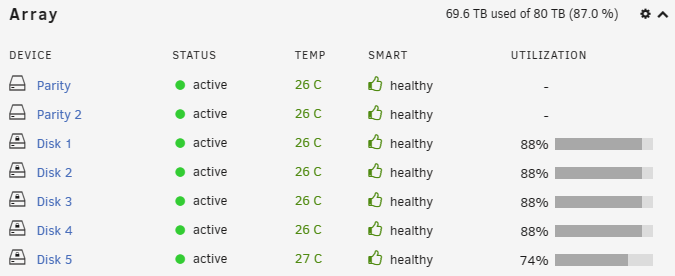
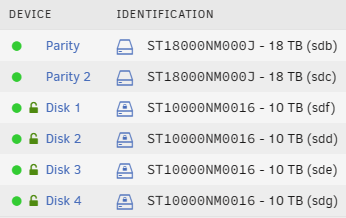
Or user dupeguru to find duplicates that you can get rid of. I have the same problem on my backup server. I threw in an 8TB drive and used dupeguru to help manage the space. Eventually I'll add a couple more 18TB drives to that array. The sweet spot for drives right now is 16TB or 18TB. You'll get the best bang for your buck there and the newer drives are faster. I recommend that you splurge on a couple of those, add them as your parity drives, and then move the old parity drives to the array. That will give you space and it will speed up the array since the parity drives can be a bottleneck and now you'll have faster parity drives. This is what I've actually done with my file servers as you can see below.
-
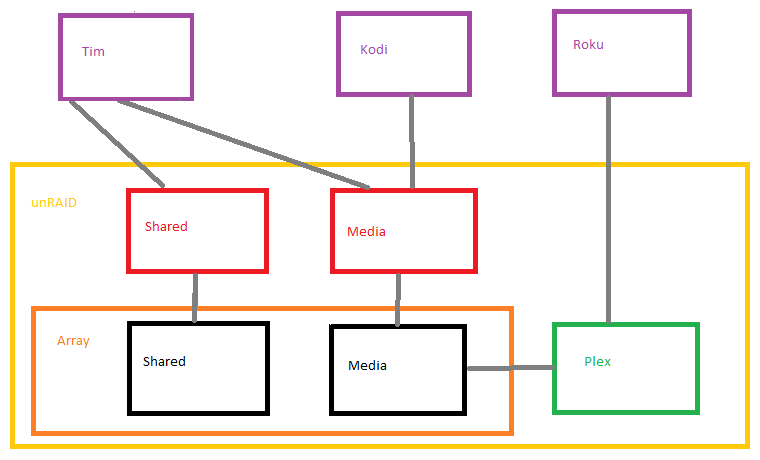
When you set up unRAID your hard drives become one massive pool of disk space. You then split up this pool by going into the OS and creating directories or I prefer to create a user share. A user share is a directory but it can be exposed as a shared directory and you can limit access to that directory. In Windows you would create a folder and then share it and give access to the users of that server. In unRAID you create the user share which becomes a folder but is also shared. You then create users in unRAID and give them access to this share. Once the share is there you can easily use Windows to manage the share by creating more folders and adding files. A docker or VM is similar to a program you install in Windows but it has one huge difference. The docker/VM is an isolated container so whatever is running inside only has access to what you give to it. When you set up the docker you tell it what directory it has access to. In the following diagram I have my unRAID server with two user shares that are also folders on the array. I have a user called "Tim" using a Windows computer who can access both the Shared and Media shares on the unRAID server (SMB shares). I also have a media computer/device with Kodi or VLC which has access to only the Media share. Lastly, I have a Roku device which has the Plex app and can see the Plex docker (via the port that Plex uses) on the unRAID server.
-
Thank you for nitpicking. I edited my article a bit to reflect the proper numbers.
-
I find component speeds to be fascinating. Speeds increase and increase but then hit a ceiling of some kind and then someone figures out a new way around it and speeds start to increase again but with a new technology or standard to get around the limitation. Let's clarify and standardize a bit here. Network throughput is typically measured as bits per second (bps) but computer speeds are typically measured as bytes per second (B/s). Technically both are correct (https://en.wikipedia.org/wiki/Data-rate_units). A LAN speed of 1Gbps is common but we're talking about gigabits (Gbps) so let's convert this to megabytes (MBps or MB/s) so that all comparisons use the same unit of measure. So LAN is 125MB/sec (1Gbps=1000Mbps=125MBps=125MB/s). Notice that I talk about LAN because internet is not LAN. I know people who get download speeds of 1Gbps but my internet is not that fast (I get 40Mbps) and usually upload speeds are far lower at 10Mps. ISPs cap the speeds so that you get more download capability. After all, most people just stream shows or watch videos or check Facebook which is mostly downloading. Hard drives with platters run between 50MB/s up to 250MB/s. Generally older drives run slower and the hotter a drive gets the slower it runs (https://avtech.com/articles/13787/how-high-heat-reduces-hard-drive-performance/). To keep things simple SSDs are about 5x faster than HDDs and M.2 drives are 5x faster than SSDs. This site sums it up nicely (https://photographylife.com/nvme-vs-ssd-vs-hdd-performance). As for SATA connections we have 6Gb/s or 750MB/s. That can easily handle a HDD running at 250MB/s or an SSD running at 600MB/s (average speed of SSD is 500-600MB/s). M.2 is where it gets interesting because now we're maxing out the SATA speed which is why older M.2 drives were SATA but are usually now NVMe which use the PCIe bus (20GB/s or 20000MB/s). Kingston explains it nicely here (https://www.kingston.com/en/blog/pc-performance/two-types-m2-vs-ssd). So let's get back to what's slowing down the system. If you're accessing something across the internet then that's usually your bad boy but if you're transferring files inside your house then the LAN might be the bottleneck. But remember that the LAN speed and the hard drive speeds are pretty close (125MB/s versus 50 to 250MB/s). One last point to consider is the LAN cable. You should be using a Cat6 cable. If you're using Cat5e then 1Gbps is possible but not always likely. This article explains why cable trauma can cause a 1Gbps to drop to 100Mbps (https://www.intel.ca/content/www/ca/en/support/articles/000058908/ethernet-products/intel-killer-ethernet-products.html). Lastly, if the network is not involved and your internal transfer speeds are slow (between dockers, VMs, or just data transfers from one drive to another) then it could be a few things. One thing to note here is that the parity drives should be your best and fastest drives because each write to each drive has to also be written to the parity drive too. Just having a parity drive will slow things down. Note that using a cache drive can be a benefit here not just because files are written there first and cache drives are usually SSD/M2/NVMe but when the mover runs it can efficiently move data off the cache to the drives in the background without holding you up. So now we're at the point where it could be the physical drives being slow, the underlying software and architecture inherently slows things down a bit or need to be tweaked, or it could be a hardware issue. Sadly, bottlenecks can be hard to nail down.
-
I had an old PC. I wanted to try unRAID but have the option to go back if things didn't work out. I originally thought to leave the Windows drive in the PC and this would work ok with unRAID but decided to disconnect it. The trick is knowing which drives are for Windows and which ones are for unRAID. Both Windows and unRAID will ignore the drives until you tell them to use them but it's easy to forget which is used for what. Anyway, I recommend that you just give unRAID a try. There's a 30-day trial so install it and use it and see if you like it. I don't see anything wrong with your hardware but sometimes hardware is picky. I had some old M2 drives lying around so I bought a card that I could put them in. I plugged the card into a mobo but it wasn't recognized. I then plugged that same card into an older mobo and it worked there. Almost everything is built to work in Windows and most, but not all, things work in Linux. The best is to either just give it a try or read up on the device. You can try different combinations of cache drives including mixing and matching although it's easier to use similar sizes/devices. The cache drives can be used as fast access for docker apps and VMs or as a fast file cache. It's up to you.
-
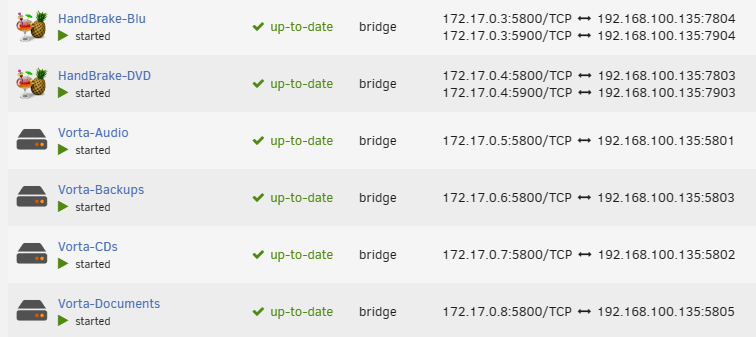
I don't use radarr or sonarr but I use multiple instances of a lot of apps. If you know you plan to use multiple then change the name of the app when you install it and as Squid mentions, change the port. What you change the port to is up to you but I just increment the number that the container starts with. Some apps require some other tweaking but you'll figure it out as you go. Just play around a bit. Here's a screenshot of my backup server. I have two Handbrakes so that my Blu-Ray discs use a different compression than the DVDs and I have multiple Vortas because Vorta only supports one archive (although Borg supports multiple). In the end it's easier just to create multiple instances and configure them slightly different and turn them off or on as needed.
-
I only use my cache drives for apps. I use 500GB cache (NVMe) on all my servers except for the older unRAID05 machine which is using 120GB (SATA M2). I find that playing music or movies or updating docs or organizing pics are all fast with regular hard drives. I've never quite seen the appeal of SSD other than for a quick boot-up. In the end, I use the cache for the apps (and you don't need much for that). I originally tried TrueNAS and I loved the configurability but it's very low-level and I'm a Windows guy so it took a lot of work and trial and error to get things working. In the end I felt it was too much of a hassle. You had to be a really knowledgeable Linux person to use it properly. I thought that zfs was really slick but that's tricky to set up properly. After all, if the block size is small then it uses a lot of memory but if the block size is too large then you lose the real benefit of deduplication. My Linux friend suggested that I look at unRAID and I fell in love with it. Finally, someone who took a Linux OS and made it look good with great features. Add in the community plugins and docker apps and you've got a match made in heaven. Word of caution to Limetech. Make sure that you support the community because it's a symbiotic relationship. If the users and community don't feel that they are getting the support they need then they will jump ship to the next great thing. So far so good!
-
Hi, I'm Tim and I also have OSD. I managed to convince some family members to host a couple of my servers. The unRAID01 and unRAID02 are off-site. The 01, 02, and 03 servers all synchronize between each other so each are duplicates (triplicates) of one another. Everything works pretty good but I constantly have to tweak things and I can't leave things alone.
-
I think your plan is a good one. Wait and see and save some money. At some point you'll get annoyed with something. Maybe the CPU is overloaded all the time. Maybe transfer speeds are slow. Maybe you're running out of space. Whatever is bothering you is what should drive your choices.
-
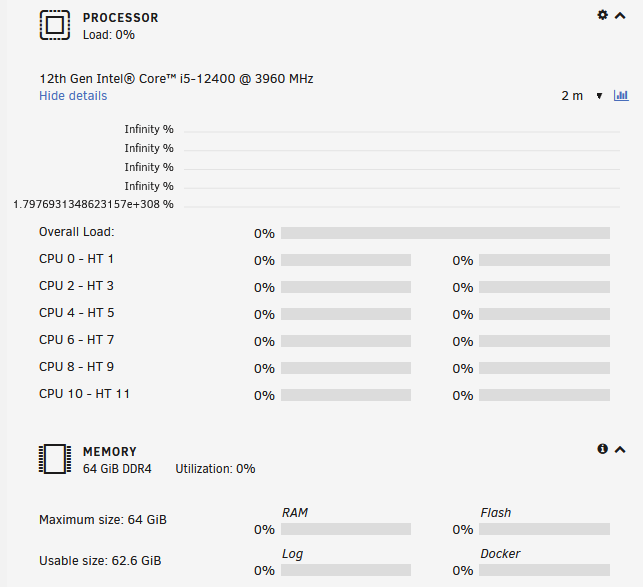
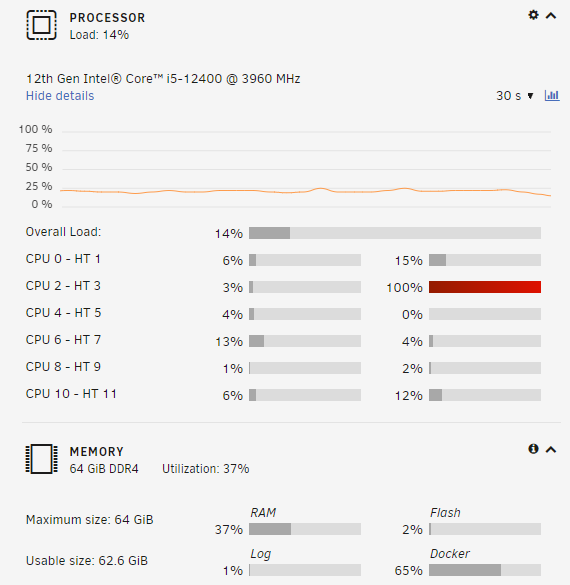
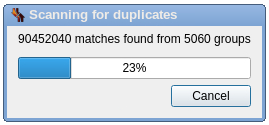
I also have the same problem. It just happened. I've been using Firefox with this server for a few months and everything's been ok until now. The following screenshots show the same server dashboard but with different browsers. The top is Firefox and the bottom is Edge. Both connections are https. The only thing that is different this time is that I'm running a comparison with dupeGuru which seems to be very intensive (and now seems to be frozen). Currently running unRAID 6.10.3. Plan is to upgrade to the latest this weekend. I guess we'll see what happens over the next few days.
-
I had the same question. I tried to repurpose an old machine running Win7. I installed the Unraid OS and gave it a go but it was so old (Core2 Duo with 4GB RAM) that 50% of the CPU and half the memory was in use all the time, even when idle. The first thing to understand is that you don't really "install" the Unraid OS since it sits on its own USB stick. At first I thought this was weird but then I realized that it works nicely because it doesn't really matter what's in the box. My point here is that you should download the Unraid OS and try using your existing hardware. If it works then great but if you find it slow then upgrade the mobo, CPU, and memory. The Unraid OS will use the new hardware. Mobo is around $100, memory is about $150, and CPU is about $150.




