





daemian
Members
-
Joined
-
Last visited
Everything posted by daemian
-
Hey All, I tried doing some searching and was finding posts with similar behaviors, but none of the proposed solutions I found have worked. We had a power outage recently and it resulted in an unclean shutdown (either my UPS is not lasting long enough for the shutdown to complete or the automatic shutdown isnt working properly - i have to check on that after I get things back in working order). When i started the array back up it reported an unclean shutdown was detected (as epected). I started the array, and the parity check started. It was then that i noticed that only 1 of my user shares was listed on the shares page, and my Docker service would not start (presumably because of the shares issue as Settings > Docker is indicating that my vDisk location does not exist. Its on a cache-only share, which is missing). I let the parity check finish, and am now trying to stop the array (seems like a reboot was a common solution i found). But its getting stuck on "Retry unmounting user share(s). Log is spamming this over and over: Jul 15 08:18:17 ur01 emhttpd: shcmd (521060): rm -f /boot/config/plugins/dynamix/mover.cron Jul 15 08:18:17 ur01 emhttpd: shcmd (521061): /usr/local/sbin/update_cron Jul 15 08:18:17 ur01 emhttpd: Retry unmounting user share(s)... Jul 15 08:18:22 ur01 emhttpd: shcmd (521062): /usr/sbin/zfs unmount -a Jul 15 08:18:22 ur01 emhttpd: shcmd (521063): umount /mnt/user Jul 15 08:18:22 ur01 root: umount: /mnt/user: not mounted. Jul 15 08:18:22 ur01 emhttpd: shcmd (521063): exit status: 32 Jul 15 08:18:22 ur01 emhttpd: shcmd (521064): rmdir /mnt/user Jul 15 08:18:22 ur01 root: rmdir: failed to remove '/mnt/user': Directory not empty Jul 15 08:18:22 ur01 emhttpd: shcmd (521064): exit status: 1 lsof | grep /mnt/user comes back blank (nothing) ls /mnt/user shows a folder for the one share that was showing up ("icons") mount | grep /mnt/user also comes back blank I tried to collect a diagnostics, but the page did not finish loading. I found the folder it had created in the root folder, so i zipped it up and scp'ed it off (attached). How should i proceed? Thanks! ur01.marx.local-diagnostics-20240715-0838.zip
-
thanks as always JorgeB, I ran it w/ -L and here was the output Phase 1 - find and verify superblock... Phase 2 - using internal log - zero log... ALERT: The filesystem has valuable metadata changes in a log which is being destroyed because the -L option was used. - scan filesystem freespace and inode maps... clearing needsrepair flag and regenerating metadata sb_fdblocks 458152498, counted 459133020 - found root inode chunk Phase 3 - for each AG... - scan and clear agi unlinked lists... - process known inodes and perform inode discovery... - agno = 0 - agno = 1 inode 2584779900 - bad extent starting block number 4503567558284715, offset 0 correcting nextents for inode 2584779900 bad data fork in inode 2584779900 cleared inode 2584779900 - agno = 2 - agno = 3 - process newly discovered inodes... Phase 4 - check for duplicate blocks... - setting up duplicate extent list... - check for inodes claiming duplicate blocks... - agno = 1 - agno = 0 - agno = 3 - agno = 2 entry "4096-4096-max.png" in shortform directory 2584779899 references free inode 2584779900 junking entry "4096-4096-max.png" in directory inode 2584779899 Phase 5 - rebuild AG headers and trees... - reset superblock... Phase 6 - check inode connectivity... - resetting contents of realtime bitmap and summary inodes - traversing filesystem ... - traversal finished ... - moving disconnected inodes to lost+found ... Phase 7 - verify and correct link counts... Maximum metadata LSN (15:874858) is ahead of log (1:2). Format log to cycle 18. done Out of curiosity i ran it again now w/ -n Phase 1 - find and verify superblock... Phase 2 - using internal log - zero log... - scan filesystem freespace and inode maps... - found root inode chunk Phase 3 - for each AG... - scan (but don't clear) agi unlinked lists... - process known inodes and perform inode discovery... - agno = 0 - agno = 1 - agno = 2 - agno = 3 - process newly discovered inodes... Phase 4 - check for duplicate blocks... - setting up duplicate extent list... - check for inodes claiming duplicate blocks... - agno = 0 - agno = 1 - agno = 2 - agno = 3 No modify flag set, skipping phase 5 Phase 6 - check inode connectivity... - traversing filesystem ... - traversal finished ... - moving disconnected inodes to lost+found ... Phase 7 - verify link counts... No modify flag set, skipping filesystem flush and exiting. Looks good to my eye. Started the array successfully now and things seem to be working 🤞 Appreciate the help as always, I will report back if i have more trouble.
-
So i have been having some issues w/ my unraid recently (crashing, likely becasue of macvlan). I *think* we may have gotten to the bottom of that. I started a new thread as I dont think this issue is related to that (though i could be wrong). I started my array yesterday, it was running through the parity check and all seemed to be well. Fast forward to this morning and suddenly in the main page I see: Unmountable disk present: Disk 2 • HGST_HDN726040ALE614_N8H1H2EZ (sde) This disk is not disabled (no red icon). I am doing my best to follow these instructions in the docs. I tried to stop the array, and it got stuck on syncing filesystem. Tried several things, eventually had to hard power it down. Brought it back up and started it in maintenance mode and ran xfs_repair on disk 2 with the -n flag and got: Phase 1 - find and verify superblock... Phase 2 - using internal log - zero log... ALERT: The filesystem has valuable metadata changes in a log which is being ignored because the -n option was used. Expect spurious inconsistencies which may be resolved by first mounting the filesystem to replay the log. - scan filesystem freespace and inode maps... sb_fdblocks 458152498, counted 459133020 - found root inode chunk Phase 3 - for each AG... - scan (but don't clear) agi unlinked lists... - process known inodes and perform inode discovery... - agno = 0 - agno = 1 inode 2584779900 - bad extent starting block number 4503567558284715, offset 0 correcting nextents for inode 2584779900 bad data fork in inode 2584779900 would have cleared inode 2584779900 - agno = 2 - agno = 3 - process newly discovered inodes... Phase 4 - check for duplicate blocks... - setting up duplicate extent list... - check for inodes claiming duplicate blocks... - agno = 0 - agno = 1 - agno = 2 - agno = 3 entry "4096-4096-max.png" in shortform directory 2584779899 references free inode 2584779900 would have junked entry "4096-4096-max.png" in directory inode 2584779899 inode 2584779900 - bad extent starting block number 4503567558284715, offset 0 correcting nextents for inode 2584779900 bad data fork in inode 2584779900 would have cleared inode 2584779900 No modify flag set, skipping phase 5 Phase 6 - check inode connectivity... - traversing filesystem ... entry "4096-4096-max.png" in shortform directory inode 2584779899 points to free inode 2584779900 would junk entry - traversal finished ... - moving disconnected inodes to lost+found ... Phase 7 - verify link counts... No modify flag set, skipping filesystem flush and exiting. Then tried running it again without -n and got: Phase 1 - find and verify superblock... Phase 2 - using internal log - zero log... ERROR: The filesystem has valuable metadata changes in a log which needs to be replayed. Mount the filesystem to replay the log, and unmount it before re-running xfs_repair. If you are unable to mount the filesystem, then use the -L option to destroy the log and attempt a repair. Note that destroying the log may cause corruption -- please attempt a mount of the filesystem before doing this. Not sure if i should try the -L option. I googled and saw another post that asked about the smart report for the drive as it may be failing, so I am attaching that here as well. Looking for any advice on how to proceed. I don't know if this is related to the recent crashed, or purely coincidental. Perhaps one of the hard crashed caused the issue and it a took a bit to manifest - I don't know. Thank you for your help. Great appreciated! HGST_HDN726040ALE614_N8H1H2EZ-20240521-1119.txt
-
Thanks JorgeB, I followed the process to delete the docker image and recreate it, i am now seeing ipvlan in the output. This are now running again, ill report back as time goes by and we see if its stable or the problem persists. root@ur01:~# docker network ls NETWORK ID NAME DRIVER SCOPE ac212ad490b6 br0 ipvlan local 86ec9a039786 bridge bridge local db1ff75c54d7 host host local fbfefb6d9d64 none null local Thanks!
-
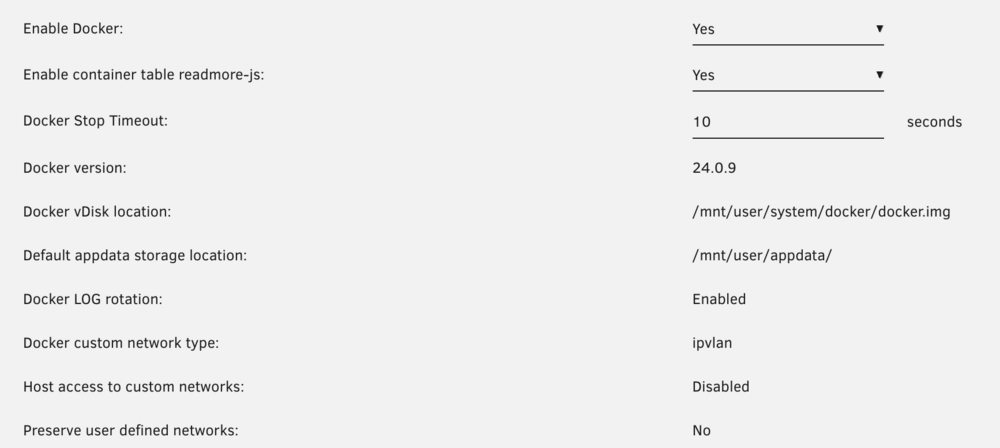
root@ur01:~# docker network ls NETWORK ID NAME DRIVER SCOPE 26b57be4530c br0 macvlan local 202e09e3a3ce bridge bridge local a30031a6206f host host local 91776a234133 none null local It does seems to still be using macvlan for br0. For reference, here is my settings page:
-
Thanks JorgeB, I made the chagne to ipvlan, saved, rebooted and started the array. A few hours it crashed again the same as before. I verified it its still set to ipvlan after bringing it back up. another syslog and diagnostics is attached. Thank you for your help! ur01.marx.local-diagnostics-20240518-2259.zip syslog
-
Good Afternoon, Have an Unraid install that has been going strong for many many years. Have run into issues a few times here and there, but typically its been related to a specific docker (most recently it was Frigate). It has been solid for 9 months or so, until this past Sunday night when it crashed without warning. I brought it back up, and its been crashing ever since. I had to re-add all of my dockers (the page ended up empty), which i never completely finished as its continued to have issues. I tried not running Frigate as that was the culprit in the past, but its still crashing. I also tried safemode, and it also crashed. I ram a memory test, and it passed. I was on 6.12.6 and at one point in this process decided to upgrade to 6.12.10.s Same issue with both Here is the diagnostics and last 2 syslog files (both from crashes). Any ideas what might be going on? Thanks in Advanced! syslog syslog-previous ur01.marx.local-diagnostics-20240517-1543.zip
-
Thanks for the assistance. I ran unraid in safe mode for several days without issues, so i rebooted into "regular" mode and on a hunch started everything but my Frigate docker. Low and behold it ran for a week without issue. Yesterday i started Frigate back up and it crashed in a few hours. So clearly its that docker causing the issue and I can try to get assistance with that specific application for root cause. Thinking about it though and I have a followup questions - is there anything i can do to prevent that docker from crashing the entire system? For instance, can I throttle its access to resources so it cannot choke everything out (at least thats what I assume is happening)? Or are there are prevention/protection measures i can put in place?
-
i did also switch from macvlan to ipvlan a while back (last time i had stability issues) and found it made a massive difference. I did double check that i am still set to ipvlan. Syslog is attached from the latest crash. Thanks, syslog
-
Hello, I have been running unraid for many years. I have had issues at times, but for the last 1-2 years its been extremely stable. Then, seemingly out of nowhere, I stated having stability issues. I cannot think of any notable changes. The server will run fine for a few hours, but then the dockers crash and the GUI goes unreachable. I am not able to connect via SSH either. If i hit the local console it responds initially, and I am able to enter a username, but then i never get to enter the password (it times out after 60 sec and goes back to the username prompt. After it started happening, I did try upgrading to 6.12.3, but that did not help, so i went back down to 16.12.1 Attached is a diagnostics taken after the most recent crash. Hoping someone can take a look and help me figure out what is causing this. Its driving me crazy! TIA! ur01.marx.local-diagnostics-20230812-2205.zip
-
Just wanted to chime in to say I am running into the same issue w/ my Raven scanner and unraid (which had been working for quite some time). Hoping you get a resolution from their support - let us know!
-
just to provide an update. I made the suggested change and so far its been almost 7 days without issue. I will post back if it occurs again - otherwise future readers can assume that did it. Thanks for your help Jorge!
-
ok so the server has crashed a few times since the last post. I did try downgrading back to 6.9.2 - but the problem persisted. Attached is the syslog file from the latest crash time frame (Aug 2 around 11:30am). TIA! syslog-192.168.166.2 (2).log
-
ok I have enabled the syslog server. Thanks for coaching me along here. I will report back when i have data after a crash.
-
Hi all, Hoping someone smarter than I can help me figure out whats going on. I have been running unraid for many years. I have been on the current hardware for over a year and its been very stable. Recently, I began experiencing crashes pretty regularly (uptime always less than 24 hours). This started after 2 changes: 1. I began to really use Frigate (docker). I had run a test setup w/o a TPU for a few weeks with just one camera for a few weeks without issue. However, once my Coral arrived I passed it through to my docker and added my 2 other cameras. 2. I did also upgrade to 6.10.3 at that same time. Now I am experiencing the crashes. It's almost certain the Frigate setup or update is to blame as that is what changed when I started having issues. Hoping someone can look at the diagnostics and help me figure out what the specific issue is. Thanks you in advanced ur01-diagnostics-20220722-1359.zip
-
I am not 100% sure about this since I don't really use it, and have only been using paperless-ng for a few days now, but the original version of paperless had a defined format for interpreting date, correspondent, title, tags, etc. from the filename. My guess is that paperless-ng uses this same logic. See here: https://paperless.readthedocs.io/en/latest/guesswork.html If you get your tags and corespondent text matching setup well you should not have to bother. It will find the info in the OCR text from the coument and set those fields along with the data automatically for you. Of course that doesn't always work - but its pretty good most of the time.
-
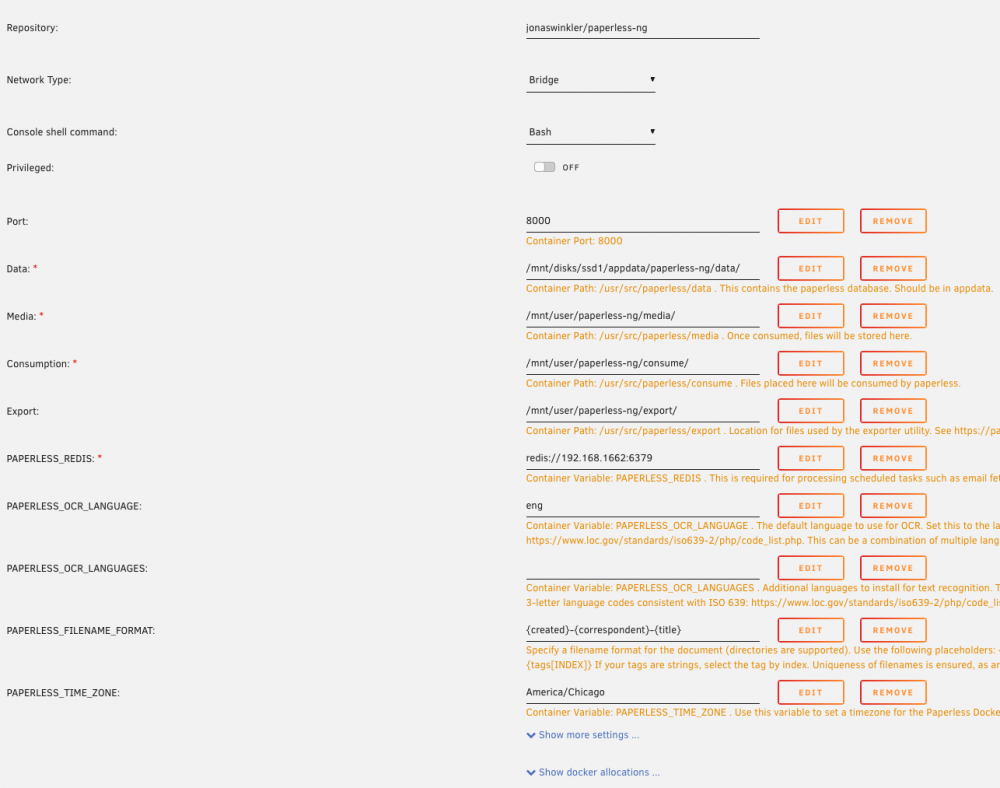
EDIT: I figured it out. It was exactly what it sounded like in the error... the file (.pdf) was missing. What I forgot is that some time ago I had an issue with a drive, and I messed up the replacement process. I ended up losing a number of files, including some from the paperless media directory. I assume the migration was failing because the file was referenced in the paperless DB but not there in the folder. I just put a "fummy" pdf in the folder with the appropriate name and started it again. It would then identify a different missing file. I repeated that process until I got all of the missing files replaced, and then the migration ran successfully! Thanks again for you work on this Docker. ---Leaving this for posterity, though I doubt anyone else will run into what I did--- Thanks for all of your hard work on this docker T0a. I am trying to migrated from an unraid based paperless container I have had for years (thepaperlessproject/paperless) and running into an issue. I may just be doing it entirely wrong.... I installed theredis container and then I made copies of my original papaerless appdata and user shares (with media, consume, & export dirs). When deploying the paperless-ng docker I pointed the appdata, consume, export, and media directories to those copies I made. When I start the docker I get this, and then the container stops: Paperless-ng docker container starting... Mapping UID and GID for paperless:paperless to 99:100 creating directory /tmp/paperless Apply database migrations... Operations to perform: Apply all migrations: admin, auth, authtoken, contenttypes, django_q, documents, paperless_mail, sessions Running migrations: Traceback (most recent call last): File "manage.py", line 11, in <module> execute_from_command_line(sys.argv) File "/usr/local/lib/python3.7/site-packages/django/core/management/__init__.py", line 401, in execute_from_command_line utility.execute() File "/usr/local/lib/python3.7/site-packages/django/core/management/__init__.py", line 395, in execute self.fetch_command(subcommand).run_from_argv(self.argv) File "/usr/local/lib/python3.7/site-packages/django/core/management/base.py", line 330, in run_from_argv self.execute(*args, **cmd_options) File "/usr/local/lib/python3.7/site-packages/django/core/management/base.py", line 371, in execute output = self.handle(*args, **options) File "/usr/local/lib/python3.7/site-packages/django/core/management/base.py", line 85, in wrapped res = handle_func(*args, **kwargs) File "/usr/local/lib/python3.7/site-packages/django/core/management/commands/migrate.py", line 245, in handle fake_initial=fake_initial, File "/usr/local/lib/python3.7/site-packages/django/db/migrations/executor.py", line 117, in migrate state = self._migrate_all_forwards(state, plan, full_plan, fake=fake, fake_initial=fake_initial) File "/usr/local/lib/python3.7/site-packages/django/db/migrations/executor.py", line 147, in _migrate_all_forwards state = self.apply_migration(state, migration, fake=fake, fake_initial=fake_initial) File "/usr/local/lib/python3.7/site-packages/django/db/migrations/executor.py", line 227, in apply_migration state = migration.apply(state, schema_editor) File "/usr/local/lib/python3.7/site-packages/django/db/migrations/migration.py", line 124, in apply operation.database_forwards(self.app_label, schema_editor, old_state, project_state) File "/usr/local/lib/python3.7/site-packages/django/db/migrations/operations/special.py", line 190, in database_forwards self.code(from_state.apps, schema_editor) File "/usr/src/paperless/src/documents/migrations/1003_mime_types.py", line 34, in add_mime_types f = open(source_path(d), "rb") FileNotFoundError: [Errno 2] No such file or directory: '/usr/src/paperless/src/../media/documents/originals/0001216.pdf' Applying documents.1003_mime_types... A snapshot of my docker settings is attached, and here are the directories: root@ur01:~# tree -d /mnt/user/paperless-ng/ /mnt/user/paperless-ng/ ├── consume ├── export ├── media │ └── documents │ ├── originals │ └── thumbnails └── temp 7 directories root@ur01:~# tree -d /mnt/disks/ssd1/appdata/paperless-ng/ /mnt/disks/ssd1/appdata/paperless-ng/ └── data └── index 2 directories root@ur01:~# Any idea what I am doing wrong? Thanks in advanced!
-
Found a solution to my issue. In case anyone happes to encounter the same issue in the future: Turns out LinuxServers has a dockerr for the sqlitebrowser I installed that and mounted up my paperless appdata share, opened up the database and found the offending date in thee documents table(the year was 0020 instead of 2020). I changed the value, applies, and wrote the change. tada! all better.
-
thanks for this docker, i had previously used one from Git hub, and migrated to yours some time ago. its been working awesome. But... I have now run into a problem, with papereless, not your docker. It appears to be a know issue where a bad year value causes the web interface to fail to load when you click on Documents. See Here: https://github.com/the-paperless-project/paperless/issues/414 So I need to get into the sqlite db and find the bad value to clear it out. However, I cannot figure out how to accomplish this inside the docker. If i drop into my docker (docker exec -it paperless /bin/bash) and try to run "./manage.py dbshell" it failed because sqlite3 is not installed: bash-5.0# ./manage.py dbshell CommandError: You appear not to have the 'sqlite3' program installed or on your path. bash-5.0# which sqlite3 bash-5.0# Any ideas on how i can most easily get in there? PS. I know this thread is fairly old, but there were a few request for scanner recommendations. Anyone looking for a scanner recommendation - Iook into Raven. I had a neatdesk scanner for many many years, but they quite supporting the hardware and as a result I could no longer get it to work with modern operating systems. And it was really only designed to work with their software so you had to export to a pdf to get it into paperless. The time had come to replace it and I found out about the Raven and it seemed perfect. I just purchased a raven scanner (the original not the pro) and i am extremely happy with it. It does not require an computer (has a built in android tablet), does OCR automatically, and supports directly scanning to SMB shares. So i have it configured to drop them right in my /consume directory from the unraid share - its great! Read the reviews - their customer service is top notch and they continue to improve the product. When I was looking at the scanner I did a live chat on their website and was immediately connected to someone who was able to very quickly and accurately answer my very specific questions. There was a coupon when I first looked, but I decided to pull the trigger and buy the next day and the coupon was gone. I went to their website and chatted with them and then enable a new coupon right then! Then Raven reached out and asked to setup a time to talk to me after my purchase to get my feedback and answer any questions I might have. Keep in mind, I'm just a regular guy - not given a promo or anything like that. They opened a feature request based on one of my suggestions and were going to look into a small bug/issues. I was given nothing for this recommendations - I am just really thrilled to see a geat product with excellent customer support and I want them to succeed! I am a very happy customer!
-
You were exactly right. Started looking into some other issues I had and there was something wrong with the new disk I inserted. Not sure if my failed disk wrote to corrupted data to parity or what exactly happened but at the end of the day I had to re-format my new disk. Some data was certainly lost - but I will see if I can get anything off the old disk or restore from backups. The good news is my stuff is working again. Thanks anyhow!
-
Hi - hoping I can get some help. I have been happily running this container for a few years - its awesome. Unfortunately, I recently had some issues with a disk that was failing (it has been replaced and parity rebuilt). During this time I also had to hard down the unraid server once. I ran the parity check after before proceeding with the disk replacement. Now - my nextcloud docker will start, but my clients do not connect (red icon) and when I try to browse to the webpage I get Internal Server Error The server encountered an internal error and was unable to complete your request. Please contact the server administrator if this error reappears multiple times, please include the technical details below in your report. More details can be found in the server log. If i look at the docker log I see: ------------------------------------- _ () | | ___ _ __ | | / __| | | / \ | | \__ \ | | | () | |_| |___/ |_| \__/ Brought to you by linuxserver.io We gratefully accept donations at: https://www.linuxserver.io/donate/ ------------------------------------- GID/UID ------------------------------------- User uid: 99 User gid: 100 ------------------------------------- [cont-init.d] 10-adduser: exited 0. [cont-init.d] 20-config: executing... [cont-init.d] 20-config: exited 0. [cont-init.d] 30-keygen: executing... using keys found in /config/keys [cont-init.d] 30-keygen: exited 0. [cont-init.d] 40-config: executing... chown: changing ownership of '/data': I/O error [cont-init.d] 40-config: exited 0. [cont-init.d] 50-install: executing... [cont-init.d] 50-install: exited 0. [cont-init.d] 60-memcache: executing... [cont-init.d] 60-memcache: exited 0. [cont-init.d] 99-custom-files: executing... [custom-init] no custom files found exiting... [cont-init.d] 99-custom-files: exited 0. [cont-init.d] done. [services.d] starting services [services.d] done. I tried running the Docker Safe New Permissions. I am not sure if it actually ever finished (the page errored out after like 12 hours) - but it did not help. My nextcloud share (mapped to /data in the docker) has the following permissions on the share folder, and the folder below (I obfuscated the user folder names): root@ur01:/mnt/user# ls -al | grep nextCloud drwxrwx--- 1 nobody users 252 Jan 7 2018 nextCloud/ root@ur01:/mnt/user# ls -al nextCloud/ total 112856 drwxrwx--- 1 nobody users 252 Jan 7 2018 ./ drwxrwxrwx 1 nobody users 48 Nov 4 11:57 ../ -rw-rw-rw- 1 nobody users 4096 Jan 26 2017 ._.DS_Store -rw-rw-rw- 1 nobody users 324 Oct 8 10:40 .htaccess -rw-rw-rw- 1 nobody users 0 Jan 26 2017 .ocdata drwxrwxrwx 1 nobody users 44 Jan 31 2017 admin/ drwxrwxrwx 1 nobody users 115 Aug 21 2018 appdata_ocnuvolb7k5t/ drwxrwxrwx 1 nobody users 96 Apr 5 2018 user1/ drwxrwxrwx 1 nobody users 6 Oct 8 10:40 files_external/ -rw-rw-rw- 1 nobody users 0 Jan 26 2017 index.html drwxrwxrwx 1 nobody users 96 Jan 7 2018 user2/ -rw-r----- 1 nobody users 110798670 Nov 8 10:00 nextcloud.log -rw-rw-rw- 1 nobody users 581632 Jan 26 2017 owncloud.db I have also deleted the docker.img file (because of issues on a different docker) and the problem persists. Any idea what i can look at to fix this? Thank you!
-
I Love unraid and it just keeps getting better with every release. Happy Birthday!
-
1.4TB
-
Is anyone having trouble with the size of their cache folder inside of appdata? .../appdata/CrashPlanPRO/cache/ grew to over 30 Gb and I had to empty it to get my dockers to start again because it filled the unassigned drive i was running them on. Now its been running for a week or so and the cache folder is up to 33G again, and my drive is almost out of space. root@ur01:/mnt/disks/ssd1/appdata/CrashPlanPRO/cache# du -h 322M ./42/cpbf0000000000000000000 33G ./42 33G Is there anything I can do?
-
I have been working on setting up various components of this for some time now, now I am suddenly running into this issue where the docker runs for a while, and then I go to use soemthing I have setup in there and it doesnt work. I go into unraid and it turns out the docker is stopped. I don't know why or what happened. I think it must be the app crashing, but perhaps its an unraid thing? I have numerous other dockers running without issues. here is the log from the Docker: [32m2018-04-09 17:25:43 INFO (MainThread) [homeassistant.components.http.view] Serving /api/camera_proxy/camera.living_room to 172.17.0.4 (auth: False)[0m [31m2018-04-09 17:25:44 ERROR (MainThread) [homeassistant.core] Timer got out of sync. Resetting[0m [32m2018-04-09 17:25:44 INFO (MainThread) [homeassistant.core] Bus:Handling <Event system_log_event[L]: timestamp=1523312744.138154, level=ERROR, message=Timer got out of sync. Resetting, exception=, source=core.py>[0m [32m2018-04-09 17:25:46 INFO (MainThread) [homeassistant.components.http.view] Serving /api/camera_proxy/camera.living_room to 172.17.0.4 (auth: False)[0m [32m2018-04-09 17:25:46 INFO (MainThread) [homeassistant.components.http.view] Serving /api/camera_proxy/camera.living_room_2 to 172.17.0.4 (auth: False)[0m [33m2018-04-09 17:25:56 WARNING (SyncWorker_24) [homeassistant.components.switch.tplink] Could not read state for TP-Link Switch: Communication error[0m [32m2018-04-09 17:25:56 INFO (MainThread) [homeassistant.core] Bus:Handling <Event system_log_event[L]: timestamp=1523312756.2240956, level=WARNING, message=Could not read state for TP-Link Switch: Communication error, exception=, source=components/switch/tplink.py>[0m [32m2018-04-09 17:26:01 INFO (MainThread) [homeassistant.components.http.view] Serving /api/camera_proxy/camera.living_room_2 to 172.17.0.4 (auth: False)[0m [32m2018-04-09 17:26:01 INFO (MainThread) [homeassistant.components.http.view] Serving /api/camera_proxy/camera.living_room to 172.17.0.4 (auth: False)[0m [32m2018-04-09 17:26:20 INFO (MainThread) [homeassistant.components.http.view] Serving /api/camera_proxy/camera.living_room to 172.17.0.4 (auth: False)[0m [32m2018-04-09 17:26:21 INFO (MainThread) [homeassistant.components.http.view] Serving /api/camera_proxy/camera.living_room_2 to 172.17.0.4 (auth: False)[0m [32m2018-04-09 17:26:21 INFO (MainThread) [homeassistant.components.http.view] Serving /api/camera_proxy/camera.living_room_2 to 172.17.0.4 (auth: False)[0m [32m2018-04-09 17:26:22 INFO (MainThread) [homeassistant.components.http.view] Serving /api/camera_proxy/camera.living_room to 172.17.0.4 (auth: False)[0m [33m2018-04-09 17:26:27 WARNING (SyncWorker_37) [homeassistant.components.switch.tplink] Could not read state for TP-Link Switch: Communication error[0m [32m2018-04-09 17:26:27 INFO (MainThread) [homeassistant.core] Bus:Handling <Event system_log_event[L]: timestamp=1523312787.199906, level=WARNING, message=Could not read state for TP-Link Switch: Communication error, exception=, source=components/switch/tplink.py>[0m [32m2018-04-09 17:26:41 INFO (MainThread) [homeassistant.components.http.view] Serving /api/camera_proxy/camera.living_room to 172.17.0.4 (auth: False)[0m [32m2018-04-09 17:26:41 INFO (MainThread) [homeassistant.components.http.view] Serving /api/camera_proxy/camera.living_room_2 to 172.17.0.4 (auth: False)[0m [32m2018-04-09 17:26:41 INFO (MainThread) [homeassistant.components.http.view] Serving /api/camera_proxy/camera.living_room_2 to 172.17.0.4 (auth: False)[0m [32m2018-04-09 17:26:42 INFO (MainThread) [homeassistant.components.http.view] Serving /api/camera_proxy/camera.living_room to 172.17.0.4 (auth: False)[0m [33m2018-04-09 17:26:58 WARNING (SyncWorker_33) [homeassistant.components.switch.tplink] Could not read state for TP-Link Switch: Communication error[0m [32m2018-04-09 17:26:58 INFO (MainThread) [homeassistant.core] Bus:Handling <Event system_log_event[L]: timestamp=1523312818.239955, level=WARNING, message=Could not read state for TP-Link Switch: Communication error, exception=, source=components/switch/tplink.py>[0m [32m2018-04-09 17:26:58 INFO (MainThread) [homeassistant.components.http.view] Serving /api/camera_proxy/camera.living_room to 172.17.0.4 (auth: False)[0m [32m2018-04-09 17:26:59 INFO (MainThread) [homeassistant.components.http.view] Serving /api/camera_proxy/camera.living_room_2 to 172.17.0.4 (auth: False)[0m [32m2018-04-09 17:27:04 INFO (MainThread) [homeassistant.components.http.view] Serving /api/camera_proxy/camera.living_room_2 to 172.17.0.4 (auth: False)[0m [32m2018-04-09 17:27:05 INFO (MainThread) [homeassistant.components.http.view] Serving /api/camera_proxy/camera.living_room to 172.17.0.4 (auth: False)[0m [31m2018-04-09 17:27:05 ERROR (MainThread) [homeassistant.core] Timer got out of sync. Resetting[0m [32m2018-04-09 17:27:05 INFO (MainThread) [homeassistant.core] Bus:Handling <Event system_log_event[L]: timestamp=1523312825.4261618, level=ERROR, message=Timer got out of sync. Resetting, exception=, source=core.py>[0m [32m2018-04-09 17:27:15 INFO (MainThread) [homeassistant.components.http.view] Serving /api/camera_proxy/camera.living_room to 172.17.0.4 (auth: False)[0m [32m2018-04-09 17:27:15 INFO (MainThread) [homeassistant.components.http.view] Serving /api/camera_proxy/camera.living_room_2 to 172.17.0.4 (auth: False)[0m [32m2018-04-09 17:27:16 INFO (MainThread) [homeassistant.components.http.view] Serving /api/camera_proxy/camera.living_room_2 to 172.17.0.4 (auth: False)[0m [32m2018-04-09 17:27:16 INFO (MainThread) [homeassistant.components.http.view] Serving /api/camera_proxy/camera.living_room to 172.17.0.4 (auth: False)[0m [33m2018-04-09 17:27:28 WARNING (SyncWorker_30) [homeassistant.components.switch.tplink] Could not read state for TP-Link Switch: Communication error[0m [32m2018-04-09 17:27:28 INFO (MainThread) [homeassistant.core] Bus:Handling <Event system_log_event[L]: timestamp=1523312848.5120802, level=WARNING, message=Could not read state for TP-Link Switch: Communication error, exception=, source=components/switch/tplink.py>[0m [32m2018-04-09 17:27:33 INFO (MainThread) [homeassistant.components.http.view] Serving /api/camera_proxy/camera.living_room_2 to 172.17.0.4 (auth: False)[0m [32m2018-04-09 17:27:34 INFO (MainThread) [homeassistant.components.http.view] Serving /api/camera_proxy/camera.living_room to 172.17.0.4 (auth: False)[0m [32m2018-04-09 17:27:34 INFO (MainThread) [homeassistant.components.http.view] Serving /api/camera_proxy/camera.living_room_2 to 172.17.0.4 (auth: False)[0m [32m2018-04-09 17:27:35 INFO (MainThread) [homeassistant.components.http.view] Serving /api/camera_proxy/camera.living_room to 172.17.0.4 (auth: False)[0m [31m2018-04-09 17:27:35 ERROR (SyncWorker_29) [miio.device] failed to send msg: [Errno 9] Bad file descriptor[0m [33m2018-04-09 17:27:35 WARNING (SyncWorker_29) [homeassistant.components.vacuum.xiaomi_miio] Got exception while fetching the state: [0m [32m2018-04-09 17:27:35 INFO (MainThread) [homeassistant.core] Bus:Handling <Event system_log_event[L]: timestamp=1523312855.6656325, level=ERROR, message=failed to send msg: [Errno 9] Bad file descriptor, exception=, source=components/vacuum/xiaomi_miio.py>[0m Any ideas what might be happening? Thanks!


