





Nodiaque
Members
-
Joined
-
Last visited
Everything posted by Nodiaque
-
ok, I think something happened to the template, let me check
-
Ah it's seems the update I did didn't go through to put it back to bridge. I'll check later, maybe I made a mistake
-
Yeah I think they fixed the network part. There was a lot of people in different threads saying they had connectivity troubles even on Windows.
-
I've push a new tag and updated the template. There is now a new repo nodiaque/steamcmd:windrose-xvfb for those that would like to try with xvfb to see if there's a change in performance. It might also work as bridge network. I tried today to run the non xvfb in bridge and I don't see the error we had yesterday. Wondering if the dev fixed something
-
I saw many other docker using xvfb, I think I'll make another version with it. The question is does it make a difference for the performance. Or does it remove the need for bridge network
-
I'll update the template and doc to reflect that
-
That would be because of the upnp I think. With host, it use directly the nic of the host which give it full access.
-
Yeah we all do things differently. The UberDude one use xvbf to create a fake screen, but since Pieper has it working, I think it's something else. Maybe connection block to the relay server? Are you able to run one on windows without any problem?
-
Ah, I really can't say, I'm just running the server XD. I don't even own the game. Maybe you could check in the dev forum for the game (I think they are mostly active on steam). Did you manage to have a working game? Some other user here are reporting crash problem after the tutorial.
-
windrose is a highly early access game. The Requirement for the game are quite high even for just 2 player. It's also running on Windows Emulation (Wine) which add a layer
-
I'm going to try something, it will take some time. I saw in the thread that the game doesn't work properly if there's no screen. Some use xvfb to remove that problem. I'll create a new baseimage with wine and xvfb to test. I never did that so we'll see how it goes
-
Hello, what docker are we talking about? This thread contain 3 different docker. I guess it's probably Enshrouded, which is kowned to have serious performance problem. You could try to use the proton or the non-proton version to see if it work better.
-
That's what someone in the thread said.
-
Oh you could simply go the docker compose way by hand and start the docker. Just like you did the docker pull. He did document everything on its Github. I do see in the steam page other user reporting samething. I also saw so. Where (cant find the page anymore on my cellphone) that if it can't reach the relay server, it will close or do something like it after a timeout. Information isn't that big for the dedicated server right now. And the fact it's upnp to a relay server in Russia with no direct connection, really weird.
-
I did see in the steam page that there was problem right now. Something to try is this docker from someone in the thread and see if the samething happen. I basically did the exact samething but who knows. It's not the same base docker image. GitHubGitHub - UberDudePL/windrose-dedicated-server-docker: Doc...Dockerized Windrose Dedicated Server (SteamCMD + Wine) with persistent saves and 24/7 hosting setup. - UberDudePL/windrose-dedicated-server-docker Maybe just to see if it's related or not.
-
it just appeared. Docker hub should show it since it's where it's from. You must check in the tag nodiaque/steamcmd:windrose But I see it in CA now Beware of the info. This game is weird. No Port forwarding and configuration is to be done in .cfg file that are created after the whole game is launched. Which mean let it init, and then shutdown, edit, and play
-
it should be I think in the hour? It's a process that does it automatically. As for the game, I just started yesterday Soulmask so Windrose will have to wait XD
-
Ok, so I created a windrose app. I see the server start but I cannot say if it's working or not since I don't have the game. According to the documentation and the docker I saw about this game, there's no port forward required. The game use invitation code. You must let the game fully start before closing and editing both files
-
I think you are talking about ich777 which is in another thread. My work do come from him though. I just have a very busy schedule and doing server for games I don't own isn't easy since I can't test. I'll see what I can do but can't really provide a time-lapse for now
-
I'm unsure if people here use booklore, but you should uninstall it.
-
Technically in unraid, all your docker should run off the same user which would remove that problem. From what I read, the problem is not shelf ark but booklore that set the file as 600. That's what i was saying. Using booklore api, it's booklore that's creating the file.
-
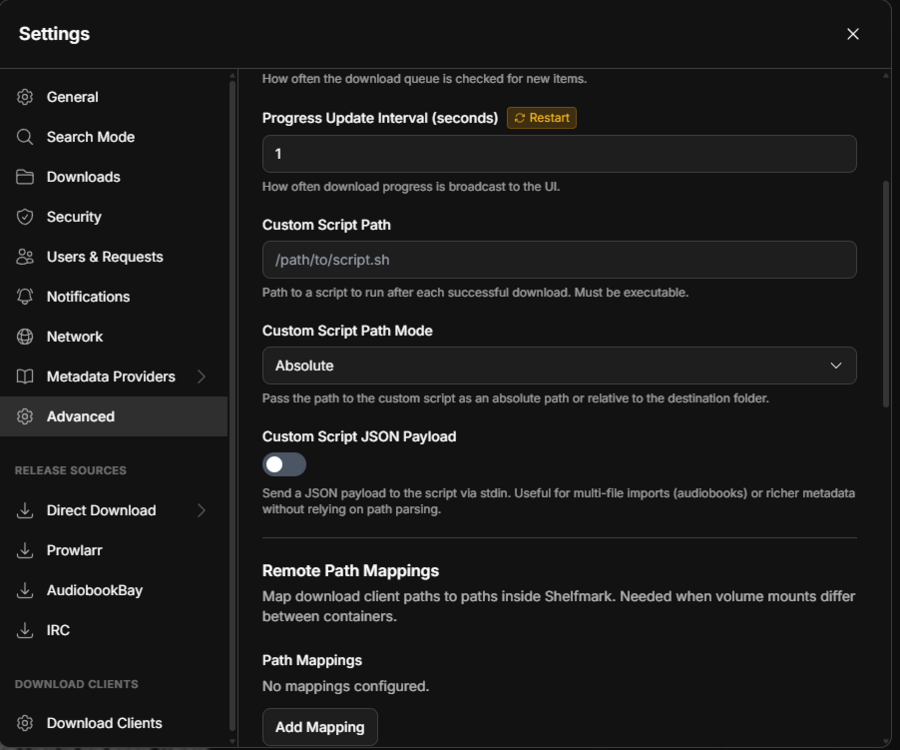
I haven't tried the booklore integration yet. I did setup booklore not long ago but it's using a different library since it wasn't properly integrated yet. The problem is booklore not running as intended unraid puid and guid of 99:100. Using CWA work properly and the file get moved no problem. What you could do is simply create a custom script in shelfmark that change the mod after the download. You have that option under advanced But there's something bugging me. How do you integrate with booklore? By my understanding, you just set a path to download the files and then whatever library tools you use, you set that folder as import folder. Using either CWA or Booklore shouldn't change the file mod when it get downloaded. If you are talking the file after it got ingested by Booklore, then you need to look at booklore. You might also want to look at the folder where you set the download for booklore, if the parent has 600 file permission, maybe that's why you get 600 file permission on booklore. Is your booklore trying to access from smb? Cause SMB isn't supported by booklore BookLore's file operations (metadata writing, file renaming, file organization) are built for local file systems only. Network-attached storage (NAS, NFS, SMB/CIFS mounts, cloud-backed FUSE, etc.) is unsupported and untested. edit: I see in download mode, there's Booklore API now. Mine is set to Folder since I use CWA. I honestly don't know how it work with the API but I guess when using the API, it's Booklore that create the file. So I'm not sure who is creating that file with 600 permission. You might want to head to both project github and ask question
-
Did you move the file while the server was running? If so, that's the problem. The docker lost the mapping to the files and you can't do much about it. Restarting the server should restart the mapping. But I don't get why mover would have move those file. Files in appdata should be on ssd cache drive and never moved. You can use unraid file explorer to see if the file exist where the mapping point to
-
The file is created by the game if it doesn't detect any file. You said you restarted. Did you change the file while the docker was running? If yes, that's the problem, never edit the config file while it's running. As for the default config file or exemple, you can find them on enshrouded website.
-
The format for password isn't that. It changed in a version that I can't remember. Refer to the game documentation for how to setup the password properly. It's now using role base password. Edit:my bad, I didn't see the json file on my phone and though you just put a password: somewhere in the file. I see now it seems to have roles. I honestly don't own the game so I'm not very sure how to setup the game itself. Maybe start with the demo file on the enshrouded website and go from there? Also don't forget to edit the file while the docker is stopped.



