





aglyons
Members
-
Joined
-
Last visited
Everything posted by aglyons
-
I'm just getting my ducks in a row on a plan. If I convert each disk in the array to ZFS, then I should be able to use those commands to move datasets from the assigned cache pool back to the array. Does this function in any way f'up the FUSE system and corrupt the parity? Do the parity drive(s) need to be in ZFS as well? Currently, the parity drives show no FS at all. My ultimate goal is to reduce the time it takes to move data around in the event of maintenance. I went through this recently, and our entire media system and all my home lab services were down for about 36 hours, just waiting for files to be moved. I'm not really looking for 100% redundancy, but I think that downtime could be cut by 75% just by moving data as block storage rather than at a file level. Hopefully, ZFS can be used in this situation.
-
Question/Scenario.... If we have app data on a ZFS pool as a dataset, with the inner folders also as individual datasets, if we need to move the files from the pool to the array to do some drive maintenance or relocate things, does the plugin provide the capability to move the datasets as blocks rather than individual files? Would the array drives also need to be formatted as ZFS for that to work? I just went through shifting stuff around and moving 5,000,000 smallish files ended up taking ages. Moving as a block would speed this up massively.
-
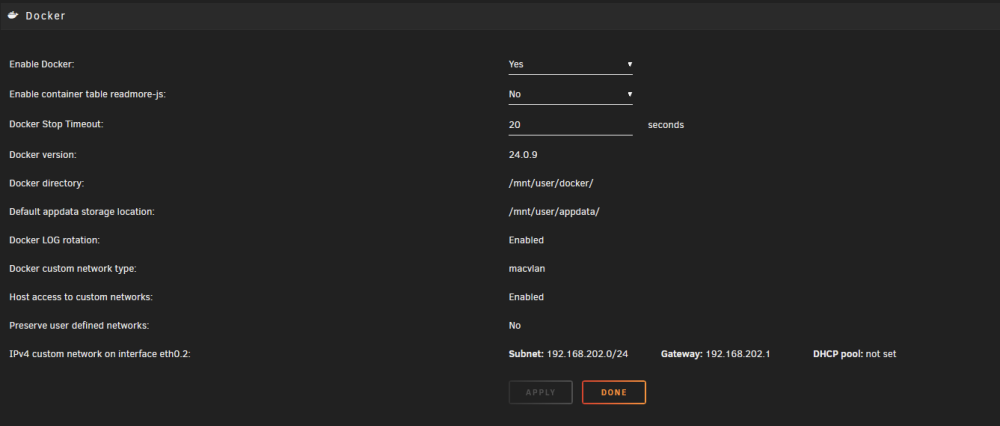
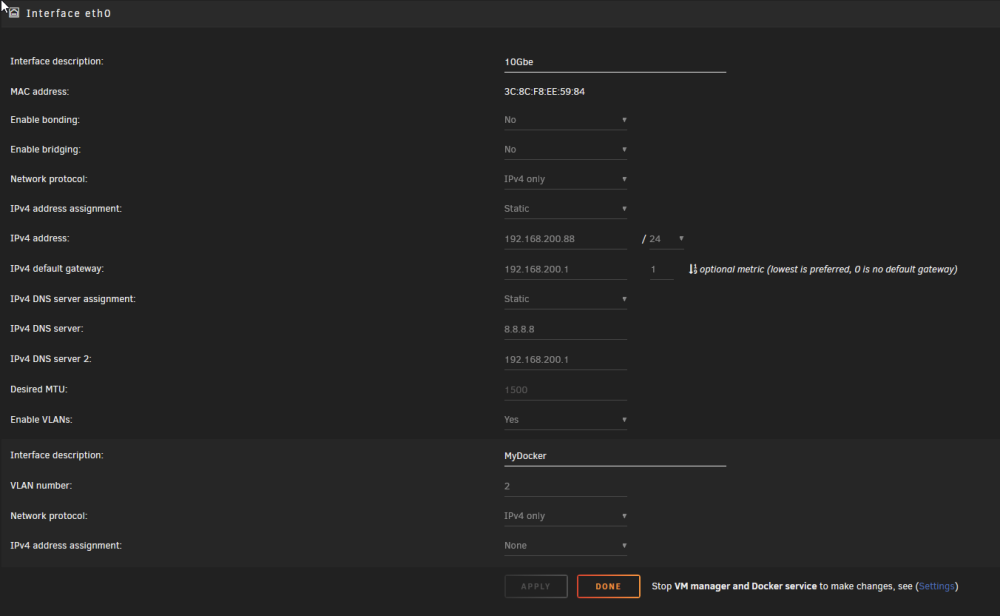
I gave up running VM's on UR and moved my HAOS onto bare metal -a small NUC. I'm still running MACVLAN and I don't have duplicated IP's in Unifi anymore. Network settings have a VLAN created with no IP assigned on the primary NIC. Docker settings are as follows Docker custom network type: macvlan Host access to custom networks: Disabled Preserve user defined networks: No IPv4 custom network on interface eth0: Subnet: 192.168.1.0/24 Gateway: 192.168.200.1 DHCP pool: not set IPv4 custom network on interface eth0.2: Subnet: 192.168.2.0/24 Gateway: 192.168.202.1 DHCP pool: not set Hope this helps sort you out. A.
-
I honestly don't know what the problem is, specifically with Unraid. I've run VM's on VMware with no issues at all. I dumped VMWare when I set up the Unraid server. When they came out with the "fix" for call trace crashes, they went and did some funky workaround which seems overly complicated and possibly introduces new issues, like this. I'm not sure why UR has such issues with Docker containers using the bridge network. I have another server running Ubuntu with Docker with all containers using the bridge driver and have never had a call trace lockup ever. It got to the point for me that I gave up on VMs in UR and restored the HAOS config onto a small NUC dedicated to HAOS. I'm sorry that I can't give you a solution other than to suggest giving up on UR VMs and possibly considering moving Docker containers to another system running just Docker. One thing that really drives me nuts with UR is HOW docker containers are managed. If no template is created in the apps, it isn't easy to translate a container's requirements into a UR template. I've learned that docker-compose Yaml's are the better way to go, as when you start a container with docker run, when you remove the container, your run command is gone, so you either have to remember all your volume mappings and ENV vars. Compose files are not deleted when the container is in, so all your settings remain. But Docker-Compose in UR is only supported with a plugin. While it allows you to create the Yaml's, there are quirks. Again, there's something weird with defining the network to use. I have some compose containers in UR, and even though I've tried every network named in Docker, it still creates its own network with a useless 28-character name, which messes up the UI.
-
As I have come to understand, if you are running a container in Unraid that supports GUID/PUID/UMASK, setting them to 99:100, the UMASK should actually be 000. By default, files created by nobody:users in Unraid are provided 777:666 access. UMASK is used to remove permissions from files. It cannot add any. Putting a UMASK other than 000 on a container running with Unraid PUID:GUID would in effect, reduce access to the files created by the container.
-
-
**Originally posted in MAC/SMB by accident v6.12.13 I have a media share in UR that a remote Ubuntu system, running Tdarr in a container. I have the media drive mapped using an allowed user account in the UR server. Tdarr can access all the files, and it's chugging through everything. But I am seeing that all the files Tdarr pushes over are flagged as created by the user account that was used to mount the share. There's no 'nobody' account in the UR users list. If there's a default password for the nobody account, I am not aware of it. How can I get this remote container to create the files as nobody? Is this even a problem, as I thought it was? Also, I've been wracking my brain trying to find out how to configure the permissions on the Ubuntu server so that it creates files with the correct permissions. By default, the umask on the Ubunutu is 022. I tried setting the Tdarr container to 0000, which wouldn't work as the default in Ubuntu is 0775/0664. I've found several sites that walked through setting the default umask for the system with no success. I've set the Tdarr container to run as 99:100 and tried 0:0, but neither made any difference. All files are created as 0775/0664. While this isn't stopping the files from moving to the UR share, it shows different permissions once moved over.
-
Let me clear up the confusions. First, I have and always have had the system running in MACVLAN mode. The actual problem is the primary NIC VHOST (vhost0) is being assigned the same IP as the primary NIC. The primary NIC and vhost0 each have unique MAC addresses. As such, the network has two systems with different MAC addr using the same IP addr. The cherry in top being both systems are plugged into the same physical network port! This behavior has only cropped up since implementing the workaround to allow MACVLAN without the call-trace lock ups. What's really confusing to me is if you search online for "Linux, MACVLAN, call trace" all that comes up are UnRaid reports. Even the bug report for the Linux kernel was made by limetech. There are no other reports by anyone else about this behavior. So it seems to me that this is an UNRaid specific issue. I have other Linux systems running Docker with MACVLAN networks that have never had a call trace lock up. So why are we seeing this happen on UNRaid systems?
-
I don't mean to be confrontational bmartino1, I appreciate your trying to help. But I'm not sure what the concern is with how the VLANs are set up on the UDM. All the services on that VLAN that are served by Unraid work just fine across the network. All of those containers on that VLAN show up as individual clients in the Unifi Network UI, with unique MAC addresses, just as I wanted them to. Also Spanning Tree is for network loops across switches. It would have no bearing in this situation. The settings on the UDM would have nothing to do with the UNRaid server assigning the primary NICs IP to the vhost0 interface. That is what is causing the 'duplicate IP/different MAC addr' problem. This is NOT just shown in the Unifi Controller, it is clear in the CLI output on the UNRaid server itself. NetworkChucks video shows the MACVLan network he created does not have an IP assigned to it at all. So why is UR assigning that IP? Perhaps this is a side effect of the workaround for the MACVLan freeze issue in the linux kernel that came out a little while ago. That is when I started seeing this issue pop up. Once I went through the workaround setup, this behavior started.
-
OK, so I am not running the controller in a container or VM, I have a UDMProSE. Hardware. IT (unifi hardware is on its own "default" VLAN) Docker (for docker containers or other external services) Family (for regular client devices) Guest (standard unifi guest network) I've watched NetworkChucks video a while back and just watched it again, just in case something jumped out at me. The odd thing is the networks he was creating don't result in the same behavior that UNRaid does. His MACVLANnetwork setup does not attach the same IP as the host. It doesn't assign an IP at all. Here on UR, it does and that is what is causing the problem IMO. To dissect the three points you mentioned; To see unfi lan network traffic you: 1 must have a unifi/ubnt switch. YUP, all my network equipment is Unifi 2 Macvlan docker network driver must be used... YUP, but that's what UNRaid is supposed to be doing in the background, right? 3 have a Mac address that is different from unraids on the docker. Not totally clear what you mean here but the point of the MACVLAN is so that each container on that network will get it's own MAC. So that would mean yes, Unifi should, and does, see each container as a separate client device and tracks the traffic. That is why I want to use MACVLAN. Using IPVLAN, Unifi doesn't see the client and I can't setup traffic rules against them. Bridge is even worse as it all goes though one IP address and one MAC. That also kills anything possible with PiHole (local DNS, etc). So I'm still at a loss here as the way I see it, which is also how it was shown in NetworkChucks video, the vhost should not be getting the same IP as the parent interface. It shouldn't be getting an IP address at all as far as I can tell.
-
Hmmmmm........Nope. No dice! One thing I will say has changed is it is much more stable in showing up in Unifi now. It used to pop up now and then and then disappear for a bit. Now it's there full time and never goes away. (but would a reboot be needed to clear anything out?) root@KNOXX:~# netstat -i Kernel Interface table Iface MTU RX-OK RX-ERR RX-DRP RX-OVR TX-OK TX-ERR TX-DRP TX-OVR Flg bond0 1500 191492028 0 31613 0 1517176420 0 0 0 BMmRU bond0.2 1500 1672302 0 0 0 1477775 0 0 0 BMRU docker0 1500 0 0 0 0 0 0 0 0 BMU eth0 1500 191492028 0 109419 0 1517176420 0 0 0 BMPsRU lo 65536 3104925 0 0 0 3104925 0 0 0 LRU macvtap0 1500 4186327 0 0 0 6011325 0 0 0 BMRU vhost0 1500 178933022 0 26852 0 67473052 0 0 0 BMRU vhost0.2 1500 16069 0 0 0 6 0 0 0 BMRU virbr0 1500 0 0 0 0 0 0 0 0 BMU All that seems to have happened is two new interfaces were added, bond0 and bond0.2. the vhost0 and vhost0.2 are still there and from what I can see, vhost0@bond0 is coming up with the same IP as eth0. root@KNOXX:~# ip addr 256: docker0: <NO-CARRIER,BROADCAST,MULTICAST,UP> mtu 1500 qdisc noqueue state DOWN group default link/ether 02:42:14:ad:6e:85 brd ff:ff:ff:ff:ff:ff inet 172.17.0.1/16 brd 172.17.255.255 scope global docker0 valid_lft forever preferred_lft forever 1: lo: <LOOPBACK,UP,LOWER_UP> mtu 65536 qdisc noqueue state UNKNOWN group default qlen 1000 link/loopback 00:00:00:00:00:00 brd 00:00:00:00:00:00 inet 127.0.0.1/8 scope host lo valid_lft forever preferred_lft forever inet6 ::1/128 scope host valid_lft forever preferred_lft forever 2: tunl0@NONE: <NOARP> mtu 1480 qdisc noop state DOWN group default qlen 1000 link/ipip 0.0.0.0 brd 0.0.0.0 3: eth0: <BROADCAST,MULTICAST,PROMISC,SLAVE,UP,LOWER_UP> mtu 1500 qdisc mq master bond0 state UP group default qlen 1000 link/ether 3c:8c:f8:ee:59:84 brd ff:ff:ff:ff:ff:ff 278: virbr0: <NO-CARRIER,BROADCAST,MULTICAST,UP> mtu 1500 qdisc noqueue state DOWN group default qlen 1000 link/ether 52:54:00:ca:33:2d brd ff:ff:ff:ff:ff:ff inet 192.168.122.1/24 brd 192.168.122.255 scope global virbr0 valid_lft forever preferred_lft forever 279: macvtap0@bond0: <BROADCAST,MULTICAST,UP,LOWER_UP> mtu 1500 qdisc noqueue state UP group default qlen 500 link/ether 52:54:00:94:77:76 brd ff:ff:ff:ff:ff:ff inet6 fe80::5054:ff:fe94:7776/64 scope link valid_lft forever preferred_lft forever 252: bond0: <BROADCAST,MULTICAST,MASTER,UP,LOWER_UP> mtu 1500 qdisc noqueue state UP group default qlen 1000 link/ether 3c:8c:f8:ee:59:84 brd ff:ff:ff:ff:ff:ff inet 192.168.200.88/24 metric 1 scope global bond0 valid_lft forever preferred_lft forever 253: bond0.2@bond0: <BROADCAST,MULTICAST,UP,LOWER_UP> mtu 1500 qdisc noqueue state UP group default qlen 1000 link/ether 3c:8c:f8:ee:59:84 brd ff:ff:ff:ff:ff:ff 254: vhost0@bond0: <BROADCAST,MULTICAST,UP,LOWER_UP> mtu 1500 qdisc fq state UP group default qlen 500 link/ether 02:65:43:f8:ad:c4 brd ff:ff:ff:ff:ff:ff inet 192.168.200.88/24 scope global vhost0 valid_lft forever preferred_lft forever 255: [email protected]: <BROADCAST,MULTICAST,UP,LOWER_UP> mtu 1500 qdisc fq state UP group default qlen 500 link/ether 02:65:43:f8:ad:c4 brd ff:ff:ff:ff:ff:ff EDIT: Maybe someone can explain the purpose of the vhost interfaces? eth0 is defined and so is the VLAN eth0.2. What is the point or purpose of the vhost additions, one for the physical interface eth0 and one for the VLAN eth0.2? In a stretch I could understand the vhost0.2 as eth0.2 is a virtual NIC in a way. But why would the primary NIC eth0 need a vhost as well in vhost0?

-
I enabled bonding "active-backup (1)". Nestat -i reports the following. root@KNOXX:~# netstat -i Kernel Interface table Iface MTU RX-OK RX-ERR RX-DRP RX-OVR TX-OK TX-ERR TX-DRP TX-OVR Flg bond0 1500 221481 0 63 0 17634 0 0 0 BMmRU bond0.2 1500 30618 0 0 0 9139 0 0 0 BMRU docker0 1500 0 0 0 0 0 0 0 0 BMU eth0 1500 221481 0 109304 0 17634 0 0 0 BMPsRU lo 65536 1039555 0 0 0 1039555 0 0 0 LRU vhost0 1500 5021 0 53 0 674 0 0 0 BMRU vhost0.2 1500 60 0 0 0 6 0 0 0 BMRU root@KNOXX:~# I'll have to wait and see if the duped IP warning pops up again. I'll post back if I see anything. Thx for helping out!!!
-
root@KNOXX:~# netstat -i Kernel Interface table Iface MTU RX-OK RX-ERR RX-DRP RX-OVR TX-OK TX-ERR TX-DRP TX-OVR Flg docker0 1500 0 0 0 0 0 0 0 0 BMU eth0 1500 994505887 0 107185 0 6225434828 0 0 0 BMPRU eth0.2 1500 22788216 0 0 0 10709997 0 0 0 BMRU lo 65536 914688 0 0 0 914688 0 0 0 LRU macvtap0 1500 36174618 129 129 0 41388622 0 0 0 BMRU vhost0 1500 42786669 0 72288 0 62893 0 0 0 BMRU vhost0.2 1500 1481570 0 0 0 3 0 0 0 BMPRU virbr0 1500 0 0 0 0 0 0 0 0 BMU I'm confused as AFAIK, bonding is for combining multiple physical NICs which in this system, there is only one NIC.
-
First off, thanks for those that took some time to reply. I appreciate the help! So instead of "nestat -i" I used "ip -d link" which showed all the links and the promiscuity value. I can't say I would know what is right or wrong here. But, trying to wrap my head around this, to me, I think eth0 should NOT have promiscuous mode turned on and the VLAN eth0.2@eth0 SHOULD have it turned on. It's only eth0.2 that has multiple MAC addresses on it. ETH0 does not. Just to clarify so we are all on the same page, it is 02:65:43:f8:ad:c4 (vhost0@eth0 & [email protected]) that is being reported on Unifi as having the same IP as 3c:8c:f8:ee:59:84 (eth0) A couple of other questions if anyone knows: Why does eth0 have "promiscuity 2" whereas all the others are "promiscuity 1" or "promiscuity 0". Why are maxmtu different across intefaces? It's "65535" on eth0.2, virbr0 and vhost0.2 and "16334" on eth0, vhost0 and macvtap0. root@KNOXX:~# ip -d link 1: lo: <LOOPBACK,UP,LOWER_UP> mtu 65536 qdisc noqueue state UNKNOWN mode DEFAULT group default qlen 1000 link/loopback 00:00:00:00:00:00 brd 00:00:00:00:00:00 promiscuity 0 allmulti 0 minmtu 0 maxmtu 0 addrgenmode eui64 numtxqueues 1 numrxqueues 1 gso_max_size 65536 gso_max_segs 65535 tso_max_size 524280 tso_max_segs 65535 gro_max_size 65536 2: tunl0@NONE: <NOARP> mtu 1480 qdisc noop state DOWN mode DEFAULT group default qlen 1000 link/ipip 0.0.0.0 brd 0.0.0.0 promiscuity 0 allmulti 0 minmtu 0 maxmtu 0 ipip any remote any local any ttl inherit nopmtudisc addrgenmode eui64 numtxqueues 1 numrxqueues 1 gso_max_size 65536 gso_max_segs 65535 tso_max_size 65536 tso_max_segs 65535 gro_max_size 65536 3: eth0: <BROADCAST,MULTICAST,PROMISC,UP,LOWER_UP> mtu 1500 qdisc mq state UP mode DEFAULT group default qlen 1000 link/ether 3c:8c:f8:ee:59:84 brd ff:ff:ff:ff:ff:ff promiscuity 2 allmulti 0 minmtu 68 maxmtu 16334 addrgenmode eui64 numtxqueues 32 numrxqueues 32 gso_max_size 65536 gso_max_segs 65535 tso_max_size 65536 tso_max_segs 65535 gro_max_size 65536 parentbus pci parentdev 0000:03:00.0 4: eth0.2@eth0: <BROADCAST,MULTICAST,UP,LOWER_UP> mtu 1500 qdisc noqueue state UP mode DEFAULT group default qlen 1000 link/ether 3c:8c:f8:ee:59:84 brd ff:ff:ff:ff:ff:ff promiscuity 1 allmulti 0 minmtu 0 maxmtu 65535 vlan protocol 802.1Q id 2 <REORDER_HDR> addrgenmode eui64 numtxqueues 1 numrxqueues 1 gso_max_size 65536 gso_max_segs 65535 tso_max_size 65536 tso_max_segs 65535 gro_max_size 65536 5: vhost0@eth0: <BROADCAST,MULTICAST,UP,LOWER_UP> mtu 1500 qdisc fq state UP mode DEFAULT group default qlen 500 link/ether 02:65:43:f8:ad:c4 brd ff:ff:ff:ff:ff:ff promiscuity 0 allmulti 0 minmtu 68 maxmtu 16334 macvtap mode bridge bcqueuelen 1000 usedbcqueuelen 1000 addrgenmode eui64 numtxqueues 1 numrxqueues 1 gso_max_size 65536 gso_max_segs 65535 tso_max_size 65536 tso_max_segs 65535 gro_max_size 65536 6: [email protected]: <BROADCAST,MULTICAST,PROMISC,UP,LOWER_UP> mtu 1500 qdisc fq state UP mode DEFAULT group default qlen 500 link/ether 02:65:43:f8:ad:c4 brd ff:ff:ff:ff:ff:ff promiscuity 1 allmulti 0 minmtu 68 maxmtu 65535 macvtap mode bridge bcqueuelen 1000 usedbcqueuelen 1000 addrgenmode eui64 numtxqueues 1 numrxqueues 1 gso_max_size 65536 gso_max_segs 65535 tso_max_size 65536 tso_max_segs 65535 gro_max_size 65536 7: docker0: <NO-CARRIER,BROADCAST,MULTICAST,UP> mtu 1500 qdisc noqueue state DOWN mode DEFAULT group default link/ether 02:42:d6:d7:15:3b brd ff:ff:ff:ff:ff:ff promiscuity 0 allmulti 0 minmtu 68 maxmtu 65535 bridge forward_delay 1500 hello_time 200 max_age 2000 ageing_time 30000 stp_state 0 priority 32768 vlan_filtering 0 vlan_protocol 802.1Q bridge_id 8000.2:42:d6:d7:15:3b designated_root 8000.2:42:d6:d7:15:3b root_port 0 root_path_cost 0 topology_change 0 topology_change_detected 0 hello_timer 0.00 tcn_timer 0.00 topology_change_timer 0.00 gc_timer 47.60 vlan_default_pvid 1 vlan_stats_enabled 0 vlan_stats_per_port 0 group_fwd_mask 0 group_address 01:80:c2:00:00:00 mcast_snooping 1 no_linklocal_learn 0 mcast_vlan_snooping 0 mcast_router 1 mcast_query_use_ifaddr 0 mcast_querier 0 mcast_hash_elasticity 16 mcast_hash_max 4096 mcast_last_member_count 2 mcast_startup_query_count 2 mcast_last_member_interval 100 mcast_membership_interval 26000 mcast_querier_interval 25500 mcast_query_interval 12500 mcast_query_response_interval 1000 mcast_startup_query_interval 3125 mcast_stats_enabled 0 mcast_igmp_version 2 mcast_mld_version 1 nf_call_iptables 0 nf_call_ip6tables 0 nf_call_arptables 0 addrgenmode eui64 numtxqueues 1 numrxqueues 1 gso_max_size 65536 gso_max_segs 65535 tso_max_size 65536 tso_max_segs 65535 gro_max_size 65536 10: virbr0: <NO-CARRIER,BROADCAST,MULTICAST,UP> mtu 1500 qdisc noqueue state DOWN mode DEFAULT group default qlen 1000 link/ether 52:54:00:ca:33:2d brd ff:ff:ff:ff:ff:ff promiscuity 0 allmulti 0 minmtu 68 maxmtu 65535 bridge forward_delay 200 hello_time 200 max_age 2000 ageing_time 30000 stp_state 1 priority 32768 vlan_filtering 0 vlan_protocol 802.1Q bridge_id 8000.52:54:0:ca:33:2d designated_root 8000.52:54:0:ca:33:2d root_port 0 root_path_cost 0 topology_change 0 topology_change_detected 0 hello_timer 1.28 tcn_timer 0.00 topology_change_timer 0.00 gc_timer 80.37 vlan_default_pvid 1 vlan_stats_enabled 0 vlan_stats_per_port 0 group_fwd_mask 0 group_address 01:80:c2:00:00:00 mcast_snooping 1 no_linklocal_learn 0 mcast_vlan_snooping 0 mcast_router 1 mcast_query_use_ifaddr 0 mcast_querier 0 mcast_hash_elasticity 16 mcast_hash_max 4096 mcast_last_member_count 2 mcast_startup_query_count 2 mcast_last_member_interval 100 mcast_membership_interval 26000 mcast_querier_interval 25500 mcast_query_interval 12500 mcast_query_response_interval 1000 mcast_startup_query_interval 3125 mcast_stats_enabled 0 mcast_igmp_version 2 mcast_mld_version 1 nf_call_iptables 0 nf_call_ip6tables 0 nf_call_arptables 0 addrgenmode eui64 numtxqueues 1 numrxqueues 1 gso_max_size 65536 gso_max_segs 65535 tso_max_size 65536 tso_max_segs 65535 gro_max_size 65536 30: macvtap0@eth0: <BROADCAST,MULTICAST,UP,LOWER_UP> mtu 1500 qdisc noqueue state UP mode DEFAULT group default qlen 500 link/ether 52:54:00:94:77:76 brd ff:ff:ff:ff:ff:ff promiscuity 0 allmulti 0 minmtu 68 maxmtu 16334 macvtap mode bridge bcqueuelen 1000 usedbcqueuelen 1000 addrgenmode eui64 numtxqueues 1 numrxqueues 1 gso_max_size 65536 gso_max_segs 65535 tso_max_size 65536 tso_max_segs 65535 gro_max_size 65536
-
Thinking about this some more, I'm wondering why I have 2 vhost adapters listed in the UR CLI. If bridging is disabled on the primary NIC and MACVTAP is taking care of the Docker and VM's getting out. Why are there VHOSTs being created for the primary LAN (vhost0@eth0) and the added VLAN ([email protected]), which is also on the primary NIC? Why would the VLAN (eth0.2) need a vhost created for it at all? It's these VHOST NICs (both have the same MAC addr) that are showing up in the Unifi logs as sharing the same IP as the UN primary NIC. root@KNOXX:~# ip addr 1: lo: <LOOPBACK,UP,LOWER_UP> mtu 65536 qdisc noqueue state UNKNOWN group default qlen 1000 link/loopback 00:00:00:00:00:00 brd 00:00:00:00:00:00 inet 127.0.0.1/8 scope host lo valid_lft forever preferred_lft forever inet6 ::1/128 scope host valid_lft forever preferred_lft forever 2: tunl0@NONE: <NOARP> mtu 1480 qdisc noop state DOWN group default qlen 1000 link/ipip 0.0.0.0 brd 0.0.0.0 3: eth0: <BROADCAST,MULTICAST,UP,LOWER_UP> mtu 1500 qdisc mq state UP group default qlen 1000 link/ether 3c:8c:f8:ee:59:84 brd ff:ff:ff:ff:ff:ff inet 192.168.200.88/24 metric 1 scope global eth0 valid_lft forever preferred_lft forever 4: eth0.2@eth0: <BROADCAST,MULTICAST,UP,LOWER_UP> mtu 1500 qdisc noqueue state UP group default qlen 1000 link/ether 3c:8c:f8:ee:59:84 brd ff:ff:ff:ff:ff:ff 5: vhost0@eth0: <BROADCAST,MULTICAST,UP,LOWER_UP> mtu 1500 qdisc fq state UP group default qlen 500 link/ether 02:65:43:f8:ad:c4 brd ff:ff:ff:ff:ff:ff 6: [email protected]: <BROADCAST,MULTICAST,UP,LOWER_UP> mtu 1500 qdisc fq state UP group default qlen 500 link/ether 02:65:43:f8:ad:c4 brd ff:ff:ff:ff:ff:ff 7: docker0: <NO-CARRIER,BROADCAST,MULTICAST,UP> mtu 1500 qdisc noqueue state DOWN group default link/ether 02:42:d6:d7:15:3b brd ff:ff:ff:ff:ff:ff inet 172.17.0.1/16 brd 172.17.255.255 scope global docker0 valid_lft forever preferred_lft forever 10: virbr0: <NO-CARRIER,BROADCAST,MULTICAST,UP> mtu 1500 qdisc noqueue state DOWN group default qlen 1000 link/ether 52:54:00:ca:33:2d brd ff:ff:ff:ff:ff:ff inet 192.168.122.1/24 brd 192.168.122.255 scope global virbr0 valid_lft forever preferred_lft forever 30: macvtap0@eth0: <BROADCAST,MULTICAST,UP,LOWER_UP> mtu 1500 qdisc noqueue state UP group default qlen 500 link/ether 52:54:00:94:77:76 brd ff:ff:ff:ff:ff:ff inet6 fe80::5054:ff:fe94:7776/64 scope link valid_lft forever preferred_lft forever
-
I just happened to open the UR log window today, no particular reason just taking a peek. And noticed that etho and macvtap0 were trading promiscuous mode back and forth. This, seemingly goes on all the time, forever. Apr 10 10:40:05 KNOXX kernel: device eth0 entered promiscuous mode Apr 10 10:40:06 KNOXX kernel: device macvtap0 left promiscuous mode Apr 10 10:40:06 KNOXX kernel: device eth0 left promiscuous mode Apr 10 10:40:20 KNOXX kernel: device macvtap0 entered promiscuous mode Apr 10 10:40:20 KNOXX kernel: device eth0 entered promiscuous mode Apr 10 10:40:21 KNOXX kernel: device macvtap0 left promiscuous mode Apr 10 10:40:21 KNOXX kernel: device eth0 left promiscuous mode Apr 10 10:40:35 KNOXX kernel: device macvtap0 entered promiscuous mode Apr 10 10:40:35 KNOXX kernel: device eth0 entered promiscuous mode Apr 10 10:40:36 KNOXX kernel: device macvtap0 left promiscuous mode Apr 10 10:40:36 KNOXX kernel: device eth0 left promiscuous mode Apr 10 10:40:50 KNOXX kernel: device macvtap0 entered promiscuous mode Apr 10 10:40:50 KNOXX kernel: device eth0 entered promiscuous mode Apr 10 10:40:51 KNOXX kernel: device macvtap0 left promiscuous mode Apr 10 10:40:51 KNOXX kernel: device eth0 left promiscuous mode Apr 10 10:41:05 KNOXX kernel: device macvtap0 entered promiscuous mode Apr 10 10:41:05 KNOXX kernel: device eth0 entered promiscuous mode Apr 10 10:41:06 KNOXX kernel: device macvtap0 left promiscuous mode Apr 10 10:41:06 KNOXX kernel: device eth0 left promiscuous mode Apr 10 10:41:20 KNOXX kernel: device macvtap0 entered promiscuous mode Apr 10 10:41:20 KNOXX kernel: device eth0 entered promiscuous mode Apr 10 10:41:21 KNOXX kernel: device macvtap0 left promiscuous mode Apr 10 10:41:21 KNOXX kernel: device eth0 left promiscuous mode Apr 10 10:41:35 KNOXX kernel: device macvtap0 entered promiscuous mode Apr 10 10:41:35 KNOXX kernel: device eth0 entered promiscuous mode Apr 10 10:41:36 KNOXX kernel: device macvtap0 left promiscuous mode Apr 10 10:41:36 KNOXX kernel: device eth0 left promiscuous mode Apr 10 10:41:50 KNOXX kernel: device macvtap0 entered promiscuous mode Apr 10 10:41:50 KNOXX kernel: device eth0 entered promiscuous mode Apr 10 10:41:51 KNOXX kernel: device macvtap0 left promiscuous mode Apr 10 10:41:51 KNOXX kernel: device eth0 left promiscuous mode I also still have the duplicated IP warnings in my Unifi. I have gone through every post outlining fixing the MACVLAN networking issues that all claim to solve both the freezes and the duplicate IP warnings, but to no avail. I should add that after following the post below, I am unable to contact the host system from my Homeassistant VM. I can't ping it or map network drives to any content on the host system from within the VM. I'm happy to provide screenshots of network and docker configs and any log files that might help diagnose this once and for all. Any thoughts here? knoxx-diagnostics-20240410-1051.zip
-
I think this may be causing problems when it comes to VM's going through the MACVTAP. I posted a new thread as it's similar but not the same. What do you think @JorgeB ?
-
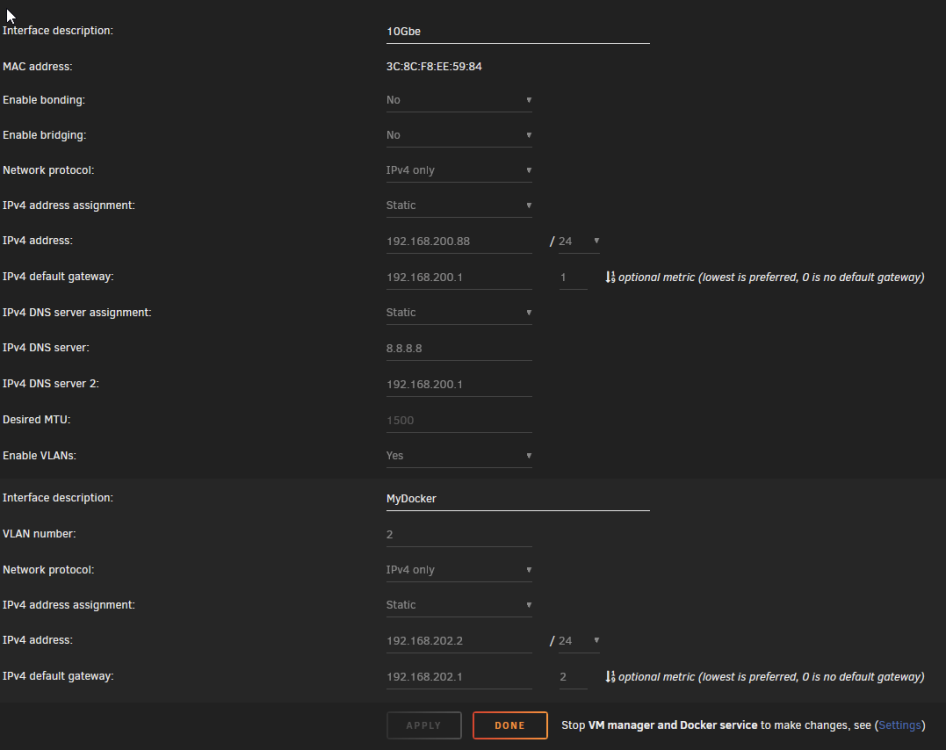
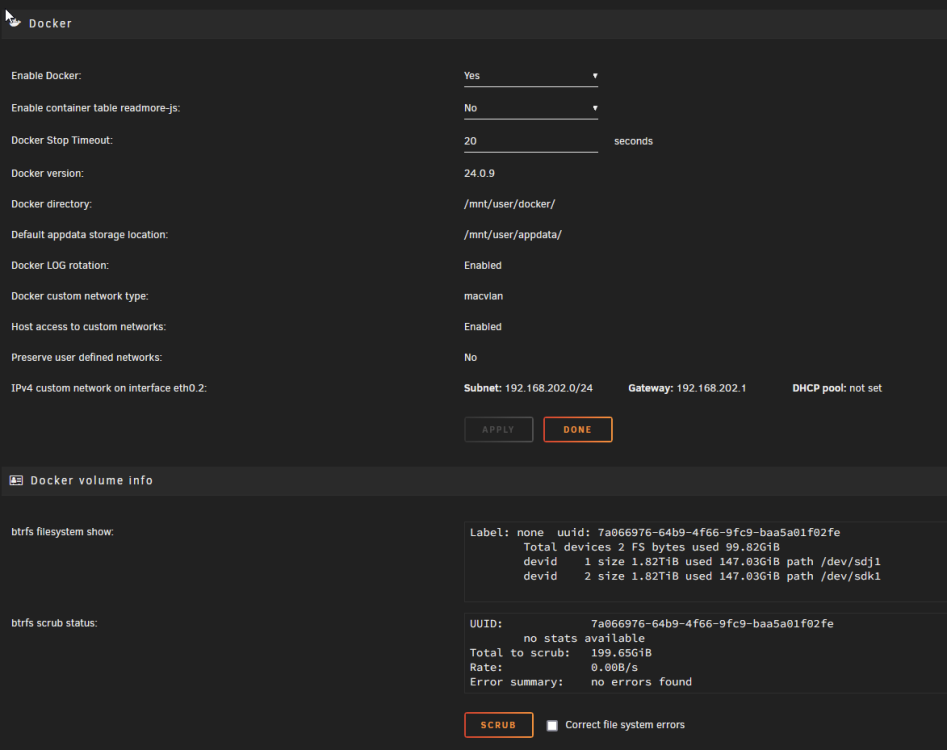
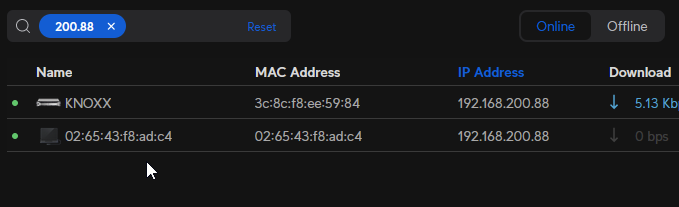
BUMP This has to be an issue with UR as I can map SMB drives in HAOS on other systems on the network. It's just connecting to the host IP address or hostname that does not work. Also, the duplicate HOST IP is on the network again with a different MAC. I suspect that this is the main culprit. I believe the HAOS VM, because it goes through the MACVTAP, it believes that eth0.2 'IS' the system I am trying to connect to. Since there are no shares there (it's a bridge after all) it fails. I've cleaned up a bunch of things that were not being used, mainly extra NICs that were in the system that I chose not to use. There is only one physical NIC in the system now and it has no bridging or bonding set. I do have a VLAN configured on it and that is being used for most of my Docker containers. Docker config Now from what I gather, because I have a VLAN set, the system is creating a VHOST for it, eth0.2 as well as etho. It is the MAC for eth0.2 that is causing the duplicated HOST IP on the network root@KNOXX:~# ip addr 1: lo: <LOOPBACK,UP,LOWER_UP> mtu 65536 qdisc noqueue state UNKNOWN group default qlen 1000 link/loopback 00:00:00:00:00:00 brd 00:00:00:00:00:00 inet 127.0.0.1/8 scope host lo valid_lft forever preferred_lft forever inet6 ::1/128 scope host valid_lft forever preferred_lft forever 2: tunl0@NONE: <NOARP> mtu 1480 qdisc noop state DOWN group default qlen 1000 link/ipip 0.0.0.0 brd 0.0.0.0 4: eth0: <BROADCAST,MULTICAST,UP,LOWER_UP> mtu 1500 qdisc mq state UP group default qlen 1000 link/ether 3c:8c:f8:ee:59:84 brd ff:ff:ff:ff:ff:ff inet 192.168.200.88/24 metric 1 scope global eth0 valid_lft forever preferred_lft forever 5: eth0.2@eth0: <BROADCAST,MULTICAST,UP,LOWER_UP> mtu 1500 qdisc noqueue state UP group default qlen 1000 link/ether 3c:8c:f8:ee:59:84 brd ff:ff:ff:ff:ff:ff inet 192.168.202.2/24 metric 1 scope global eth0.2 valid_lft forever preferred_lft forever 6: vhost0@eth0: <BROADCAST,MULTICAST,UP,LOWER_UP> mtu 1500 qdisc fq state UP group default qlen 500 link/ether 02:65:43:f8:ad:c4 brd ff:ff:ff:ff:ff:ff 7: [email protected]: <BROADCAST,MULTICAST,UP,LOWER_UP> mtu 1500 qdisc fq state UP group default qlen 500 link/ether 02:65:43:f8:ad:c4 brd ff:ff:ff:ff:ff:ff inet 192.168.202.2/24 scope global vhost0.2 valid_lft forever preferred_lft forever 8: docker0: <NO-CARRIER,BROADCAST,MULTICAST,UP> mtu 1500 qdisc noqueue state DOWN group default link/ether 02:42:b4:d2:d6:aa brd ff:ff:ff:ff:ff:ff inet 172.17.0.1/16 brd 172.17.255.255 scope global docker0 valid_lft forever preferred_lft forever 10: virbr0: <NO-CARRIER,BROADCAST,MULTICAST,UP> mtu 1500 qdisc noqueue state DOWN group default qlen 1000 link/ether 52:54:00:ca:33:2d brd ff:ff:ff:ff:ff:ff inet 192.168.122.1/24 brd 192.168.122.255 scope global virbr0 valid_lft forever preferred_lft forever 11: macvtap0@eth0: <BROADCAST,MULTICAST,UP,LOWER_UP> mtu 1500 qdisc noqueue state UP group default qlen 500 link/ether 52:54:00:94:77:76 brd ff:ff:ff:ff:ff:ff inet6 fe80::5054:ff:fe94:7776/64 scope link valid_lft forever preferred_lft forever root@KNOXX:~# But I am lost as to why the MAC address for both eth0.2@eth0 and [email protected], which is reported in UR as having the IP 192.168.202.2, shows up on the network as having the IP 192.168.200.88 ?!?!? Also, I am curious as to why the MACVTAP is IPV6 only? I have IPV6 disabled in UR and across my network. It's also disabled in HAOS. Does this matter in this instance or is that strictly for internal purposes and one of the reasons the MACVTAP approach works as it does?
-
AH HA! Was that mentioned somewhere that I totally missed? While I managed to get those scripts run using PHPMyAdmin eventually, I initially tried running them in DBeaver Desktop v24.0.0.202403091004. DBeaver always failed with an SQL syntax error for some reason. Thanks!
-
Hey all! Brand new install of this (latest-nomariadb). Upon startup I get an error; "An error has occurred and this action cannot be completed. If the problem persists, please notify your system administrator or check your system logs." I've looked at the Guacamole log and there was nothing. But looking at the other logs (catalina.out and MariaDB error logs) I see that while Guacamole (192.168.202.253) is configured to use the UNAME and PWD in the configuration file, it doesn't use that to try an connect to the DB server (192.168.200.88.) config ### http://guacamole.apache.org/doc/gug/jdbc-auth.html#jdbc-auth-mysql ### MySQL properties mysql-hostname: 192.168.200.88 mysql-port: 3306 mysql-database: guacamole mysql-username: guacamole mysql-password: ********************************* mysql-server-timezone: America/New_York catalina.out 14:28:54.765 [http-nio-8080-exec-7] WARN o.a.g.e.AuthenticationProviderFacade - The "mysql" authentication provider has encountered an internal error which will halt the authentication process. MariaDB error log 2024-03-13 14:28:32 5 [Warning] Aborted connection 5 to db: 'unconnected' user: 'unauthenticated' host: 'localhost' (This connection closed normally without authentication) 2024-03-13 14:28:32 6 [Warning] Access denied for user 'root'@'localhost' (using password: YES) 2024-03-13 14:28:54 7 [Warning] IP address '192.168.202.253' could not be resolved: Name does not resolve It is trying to connect to the server as root@localhost This is the initial startup so there are no tables even created yet on the DBServer. UPDATE* The MariaDB error log just updated with a new line 2024-03-13 14:38:54 7 [Warning] Aborted connection 7 to db: 'guacamole' user: 'guacamole' host: '192.168.202.253' (Got timeout reading communication packets) So user 'guacamole' did connect but the connection timed out for some reason?!
-
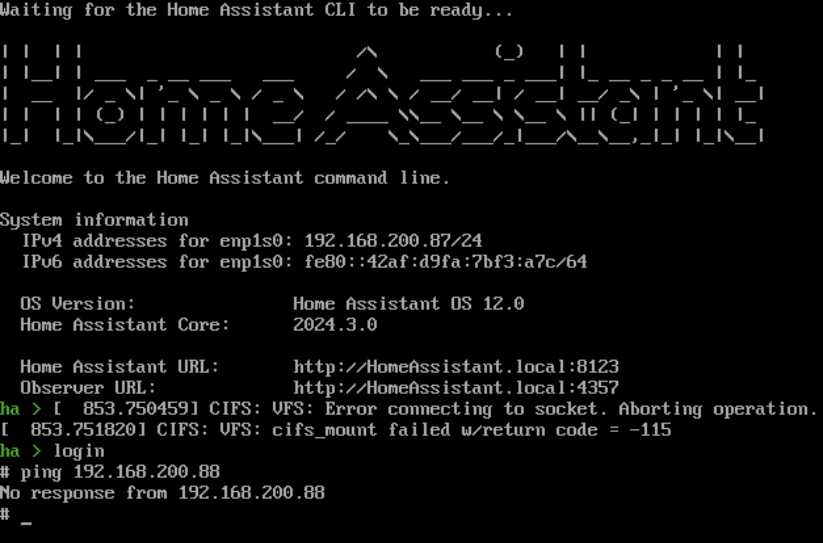
I had the issue of duplicate IP's on my network and happened across another post that seemed to sort things out. But it introduced a new issue that I haven't been able to figure out. I figured out my error after re-reading the post @murkus wrote. I had the custom network for the eth0 still enabled in the docker config. That solved the duplicate IP, different MAC issue! BUT! I seem to have now run into another problem. HAOS VM is using the vhost0 network and it is accessible on the network. But there was an error in HAOS about a failed mounted network storage volume that is located on the host system. [853.7504591] CIFS: VFS: Error connecting to socket. Aborting operation. [853.7518201] CIFS: VFS: cifs mount failed w/return code = -115 After pulling my hair out I determined that while everyone on the network can access the HAOS website, and HAOS can ping and mount shares on other systems, HAOS can't ping or mount anything on the host system and the host system can't ping the VM. HOST (UnRaid): 192.168.200.88 HAOS VM: 192.168.200.87 Can't ping VM from HOST root@KNOXX:~# ping 192.168.200.87 PING 192.168.200.87 (192.168.200.87) 56(84) bytes of data. From 192.168.200.88 icmp_seq=1 Destination Host Unreachable From 192.168.200.88 icmp_seq=2 Destination Host Unreachable From 192.168.200.88 icmp_seq=3 Destination Host Unreachable From 192.168.200.88 icmp_seq=4 Destination Host Unreachable From 192.168.200.88 icmp_seq=5 Destination Host Unreachable From 192.168.200.88 icmp_seq=6 Destination Host Unreachable From 192.168.200.88 icmp_seq=7 Destination Host Unreachable ^C --- 192.168.200.87 ping statistics --- 8 packets transmitted, 0 received, +7 errors, 100% packet loss, time 7195ms pipe 4 root@KNOXX:~# Can't ping HOST from VM Host UnRaid routing table root@KNOXX:~# ip route default via 192.168.200.1 dev eth0 metric 1 default via 192.168.202.1 dev eth0.2 metric 2 172.17.0.0/16 dev docker0 proto kernel scope link src 172.17.0.1 linkdown 192.168.122.0/24 dev virbr0 proto kernel scope link src 192.168.122.1 linkdown 192.168.200.0/24 dev eth0 proto kernel scope link src 192.168.200.88 metric 1 192.168.200.0/24 dev br1 proto kernel scope link src 192.168.200.253 metric 1 linkdown 192.168.202.0/24 dev vhost0.2 proto kernel scope link src 192.168.202.2 192.168.202.0/24 dev eth0.2 proto kernel scope link src 192.168.202.2 metric 1 root@KNOXX:~# HAOS VM routing table # ip route default via 192.168.200.1 dev enp1s0 proto static metric 100 172.30.32.O/23 dev hassio proto kernel scope link src 172.30.32.1 172.30.232.0/23 dev docker0 proto kernel scope link src 172.30.232.1 192.168.2OO.0/24 dev enp1s0 proto kernel scope link src 192.168.2OO.87 metric 100 Any thoughts??
-
Does this step not interfere with the new workaround to solve the MACVLAN call trace issues? In the config docs it states "Settings > Docker > Host access to custom networks = Enabled". If I recall correctly, this was required to allow the workaround to function properly as a custom network is created when docker is started.
-
I just happened across this the other day. I haven't spun one up as yet but it looks interesting. One interesting tool is is ability to convert a run command to a compose YAML. https://github.com/louislam/dockge
-
I haven't run into any issues myself. I'm not a scripter really. This was built with the help of ChatGPT and just kept adding revisions until it did everything I was looking for. I've run into some docker containers that don't provide UUID/GUID features so it's impossible to set those. That's why I created it. It has saved me headaches of not being able to access files created by those apps across the LAN/SMB.
-
Not everyone, including me is super comfortable with the CLI or writing scripts. And for all the things Synology does wrong, one thing they did right IMO is the UI for the hyperbackup. It's so easy to pick and choose a bunch of folders across the NAS and schedule a backup. I used to use Hyperbackup and point it to a QNAP NAS that had an rsync server running. Took all of 2 minutes to get set up. But UR can't be used as a target rsync server, or at least I nor anyone else has figured out how. So all the backups across the network need to be done from within the UR cli, mapping each remote folder one by one. AFAIK there also isn't any built in failure notifications with that, so that would mean scripting out error detection and notification functions, etc. I think you can see where this is going. It would be so much simpler if there was either a built in rsync server that could handle network wide backups as a target or an addon/userscript/docker template that would offer these functions. Alas, I've never been able to find one. I've resorted to getting another Synology and backing them up to each other.




