Jaybau
Members
-
Joined
-
Last visited
Everything posted by Jaybau
-
Just to be clear we are talking about Unraid pools, not filesystem btrfs/ZFS pools. I thought there was a way to have JBOD in a pool from any filesystem format.
-
How do I add these drives to an existing pool without "Unmountable: Unsupported or no file system" problem? Existing Pool "Torrents": Devices/Drives (sdk, sdb, sda): I tried adding only the xfs drives together, but ran into the problem of losing my partitions when I start the array.


-
When creating a Pool, can you use/mix different filesystems wiithout problems? Or do all the drives/partitions in a pool need to be the same filesystem?
-
Thanks everyone. Spaceinvader has a great and simple walktrhough video. The key part for me is the "Mover Action". You have to specify the action "Cache -> Array", then run the Mover. This will then move files off the Cache. But here are some notes... Notes: 1) Moving files off the Cache can take a long time. For me, this took about a day to move everything off the Cache. 2) Moving files back off the array onto the cache takes a long time too. 3) I should have kept track of which shares were configured for Cache, Array, and Mover direction. I have a bunch of shares on the Cache drive, and I couldn't remember what I originally setup. I probably have the info in a previous Diagnostics file somewhere, but now is also a good time to rethink my strategy anyways. 4) Replacing the existing Cache drive caused the existing drive to be located in the Unassigned Devices (okay), but needs to be formatted? This doesn't make sense to me. I exepected the drive to be Unassigned and mountable, with the filesystem/partition info untouched. There's something unexpected that happens when drives are added/removed from a pool that affects the filesytem metadata.

-
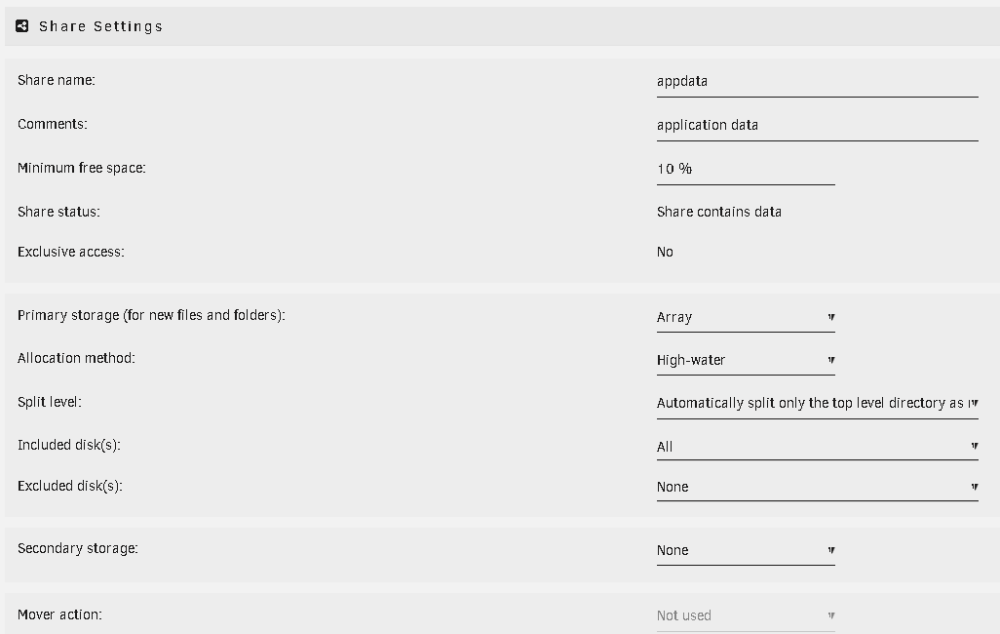
I was following these instructions: https://forums.unraid.net/topic/46802-faq-for-unraid-v6/#comment-511923 Are the instructions different for v6.12.3? I think what might have happened is that when I followed the v6.2 steps it disabled the moving function, therefore the files won't be moved in the other step. I don't know how to proceed without risk. I manually ran the Mover. I set the primary storage to "Array". I set the secondary storage to "None". 4. I clicked the Move button to manually initiate the Mover. 5. When the mover finished, I checked for any empty cache. However, I'm still seeing the appdata folder (and other folders/files) on the cache drive using the location=cache, not the array. What step(s) did I miss? tower-diagnostics-20230715-1035.zip

-
torprivoxy: Where do I edit the torrc configuration?
-
Might anyone else be having this problem with the docker? "Crash when opening a file" https://github.com/jlesage/docker-handbrake/issues/254 The potential work around mentions changing the docker/container's host processors type. Where would I make this change? What would I change it to ("host"?) ? Thank you.
-
When assigning a different disk to the same pool without re-setting the pool, Unraid will automatically wipe the assigned disk without warning and confirmation. This leads to an unintentional wiped partition, data loss, and advanced partition recovery if lucky. This problem is too easy to do, and too disastrous. It either shouldn't be this easy to do, or ideally impossible without explicit user consent to destroy data. Context: Lost drive after creating pool (v6.12) Version 6.12.1 2023-06-20 Thank you. tower-diagnostics-20230624-0856.zip
-
# xfs_repair /dev/sda1 Phase 1 - find and verify superblock... Phase 2 - using internal log - zero log... - scan filesystem freespace and inode maps... - found root inode chunk Phase 3 - for each AG... - scan and clear agi unlinked lists... - process known inodes and perform inode discovery... - agno = 0 - agno = 1 - agno = 2 - agno = 3 - process newly discovered inodes... Phase 4 - check for duplicate blocks... - setting up duplicate extent list... - check for inodes claiming duplicate blocks... - agno = 0 - agno = 1 - agno = 2 - agno = 3 Phase 5 - rebuild AG headers and trees... - reset superblock... Phase 6 - check inode connectivity... - resetting contents of realtime bitmap and summary inodes - traversing filesystem ... - traversal finished ... - moving disconnected inodes to lost+found ... Phase 7 - verify and correct link counts... done Drive also mounted, no issues. Thank you.
-
This worked! Thank you! Output: >>> 64 Created a new DOS disklabel with disk identifier 0x81bec7f8. Created a new partition 1 of type 'Linux' and of size 149.1 GiB. Partition #1 contains a xfs signature. Do you want to remove the signature? [Y]es/[N]o: N /dev/sda1 : 64 312581807 (149.1G) Linux /dev/sda2: write New situation: Disklabel type: dos Disk identifier: 0x81bec7f8 Device Boot Start End Sectors Size Id Type /dev/sda1 64 312581807 312581744 149.1G 83 Linux The partition table has been altered. Calling ioctl() to re-read partition table. Syncing disks. Thanks again.
-
Ouch. That was too easy to do, and without warning or user confirmation. I'll need to figure out how to add/remove drives to a pool without wiping the existing data.
-
# btrfs-select-super -s 1 /dev/sda1 ERROR: mount check: cannot open /dev/sda1: No such file or directory ERROR: cannot check mount status: No such file or directory # btrfs-select-super -s 1 /dev/sda No valid Btrfs found on /dev/sda ERROR: open ctree failed I wonder how that happened. I don't believe I explicitly did anything to wipe the drive. I created a pool. I tried adding the drive to the pool. Started the array. Array wouldn't start because of the drive (I didn't investigate why). I stopped the array. I took the drive out of the pool. I also rebooted somewhere in those steps.
-
I lost a drive after: Upgraded from 6.11.5 to 6.12.1. Removed drive from the 6.11.5 pool (I can't remember if it was called pool or cache in the previous version), named "backup". This was my drive for temporary backups that I didn't want on the parity array or my SSD cache. Created a new 6.12.1 "Pool". Added two slots and two drives to the pool (6.12.1 pool name = "temp" and it automatically created another called "temp 2"). Started the array. Had problems with the new pool, and wouldn't start. Shutdown array. (would be nice if the array was separate from pools) Removed the new pool, and put the separate drives into their original pool names (which would be a new pool). The pool with the problem drive does not start. It is now an "Unassigned Device", no partition information, and Unraid is asking me to format the drive. During the process I did not see an option to touch the drive to format/partition or do anything destructive. I believe the data is still there. Drive: WDC_WD1600AAJS-08WAA0_WD-WCAS28920125 I cannot remember which filesystem is used. Log: Jun 23 16:27:25 Tower kernel: sd 1:0:0:0: [sda] 312581808 512-byte logical blocks: (160 GB/149 GiB) Jun 23 16:27:25 Tower kernel: sd 1:0:0:0: [sda] Write Protect is off Jun 23 16:27:25 Tower kernel: sd 1:0:0:0: [sda] Mode Sense: 00 00 00 00 Jun 23 16:27:25 Tower kernel: sd 1:0:0:0: [sda] Asking for cache data failed Jun 23 16:27:25 Tower kernel: sd 1:0:0:0: [sda] Assuming drive cache: write through Jun 23 16:27:25 Tower kernel: sda: sda1 Jun 23 16:27:25 Tower kernel: sd 1:0:0:0: [sda] Attached SCSI disk Jun 23 16:28:15 Tower emhttpd: WDC_WD1600AAJS-08WAA0_WD-WCAS28920125 (sda) 512 312581808 Jun 23 16:28:15 Tower emhttpd: import 30 cache device: (sda) WDC_WD1600AAJS-08WAA0_WD-WCAS28920125 Jun 23 16:28:15 Tower emhttpd: read SMART /dev/sda Jun 23 16:32:26 Tower emhttpd: WDC_WD1600AAJS-08WAA0_WD-WCAS28920125 (sda) 512 312581808 Jun 23 16:32:26 Tower emhttpd: import 30 cache device: (sda) WDC_WD1600AAJS-08WAA0_WD-WCAS28920125 Jun 23 16:32:26 Tower emhttpd: read SMART /dev/sda Jun 23 16:32:34 Tower emhttpd: WDC_WD1600AAJS-08WAA0_WD-WCAS28920125 (sda) 512 312581808 Jun 23 16:32:34 Tower emhttpd: import 30 cache device: (sda) WDC_WD1600AAJS-08WAA0_WD-WCAS28920125 Jun 23 16:32:34 Tower emhttpd: read SMART /dev/sda Jun 23 16:35:08 Tower emhttpd: WDC_WD1600AAJS-08WAA0_WD-WCAS28920125 (sda) 512 312581808 Jun 23 16:35:08 Tower emhttpd: import 30 cache device: (sda) WDC_WD1600AAJS-08WAA0_WD-WCAS28920125 Jun 23 16:35:08 Tower emhttpd: read SMART /dev/sda Jun 23 16:35:40 Tower emhttpd: WDC_WD1600AAJS-08WAA0_WD-WCAS28920125 (sda) 512 312581808 Jun 23 16:35:40 Tower emhttpd: import 30 cache device: (sda) WDC_WD1600AAJS-08WAA0_WD-WCAS28920125 Jun 23 16:35:40 Tower emhttpd: read SMART /dev/sda Jun 23 16:35:52 Tower emhttpd: WDC_WD1600AAJS-08WAA0_WD-WCAS28920125 (sda) 512 312581808 Jun 23 16:35:52 Tower emhttpd: import 30 cache device: (sda) WDC_WD1600AAJS-08WAA0_WD-WCAS28920125 Jun 23 16:35:52 Tower emhttpd: read SMART /dev/sda Jun 23 16:36:00 Tower emhttpd: WDC_WD1600AAJS-08WAA0_WD-WCAS28920125 (sda) 512 312581808 Jun 23 16:36:00 Tower emhttpd: import 30 cache device: (sda) WDC_WD1600AAJS-08WAA0_WD-WCAS28920125 Jun 23 16:36:00 Tower emhttpd: read SMART /dev/sda Jun 23 16:36:34 Tower emhttpd: WDC_WD1600AAJS-08WAA0_WD-WCAS28920125 (sda) 512 312581808 Jun 23 16:36:34 Tower emhttpd: import 30 cache device: (sda) WDC_WD1600AAJS-08WAA0_WD-WCAS28920125 Jun 23 16:36:34 Tower emhttpd: read SMART /dev/sda Jun 23 16:36:40 Tower emhttpd: WDC_WD1600AAJS-08WAA0_WD-WCAS28920125 (sda) 512 312581808 Jun 23 16:36:40 Tower emhttpd: import 30 cache device: (sda) WDC_WD1600AAJS-08WAA0_WD-WCAS28920125 Jun 23 16:36:40 Tower emhttpd: read SMART /dev/sda Jun 23 16:36:49 Tower emhttpd: WDC_WD1600AAJS-08WAA0_WD-WCAS28920125 (sda) 512 312581808 Jun 23 16:36:50 Tower emhttpd: read SMART /dev/sda Jun 23 16:36:57 Tower emhttpd: WDC_WD1600AAJS-08WAA0_WD-WCAS28920125 (sda) 512 312581808 Jun 23 16:36:57 Tower emhttpd: import 32 cache device: (sda) WDC_WD1600AAJS-08WAA0_WD-WCAS28920125 Jun 23 16:36:57 Tower emhttpd: read SMART /dev/sda Jun 23 16:37:14 Tower emhttpd: WDC_WD1600AAJS-08WAA0_WD-WCAS28920125 (sda) 512 312581808 Jun 23 16:37:14 Tower emhttpd: import 32 cache device: (sda) WDC_WD1600AAJS-08WAA0_WD-WCAS28920125 Jun 23 16:37:14 Tower emhttpd: read SMART /dev/sda Jun 23 16:37:25 Tower emhttpd: WDC_WD1600AAJS-08WAA0_WD-WCAS28920125 (sda) 512 312581808 Jun 23 16:37:25 Tower emhttpd: import 31 cache device: (sda) WDC_WD1600AAJS-08WAA0_WD-WCAS28920125 Jun 23 16:37:25 Tower emhttpd: read SMART /dev/sda Jun 23 16:38:22 Tower emhttpd: /sbin/btrfs filesystem show /dev/sda1 2>&1 Jun 23 16:38:22 Tower emhttpd: ERROR: no btrfs on /dev/sda1 Jun 23 16:38:22 Tower emhttpd: /usr/sbin/zpool import -d /dev/sda1 2>&1 Jun 23 16:42:56 Tower emhttpd: read SMART /dev/sda Jun 23 16:45:06 Tower emhttpd: read SMART /dev/sda Jun 23 16:45:12 Tower emhttpd: WDC_WD1600AAJS-08WAA0_WD-WCAS28920125 (sda) 512 312581808 Jun 23 16:45:12 Tower emhttpd: import 31 cache device: (sda) WDC_WD1600AAJS-08WAA0_WD-WCAS28920125 Jun 23 16:45:13 Tower emhttpd: read SMART /dev/sda Jun 23 16:45:55 Tower emhttpd: WDC_WD1600AAJS-08WAA0_WD-WCAS28920125 (sda) 512 312581808 Jun 23 16:45:55 Tower emhttpd: read SMART /dev/sda Jun 23 16:46:02 Tower emhttpd: WDC_WD1600AAJS-08WAA0_WD-WCAS28920125 (sda) 512 312581808 Jun 23 16:46:02 Tower emhttpd: read SMART /dev/sda Jun 23 16:46:22 Tower emhttpd: WDC_WD1600AAJS-08WAA0_WD-WCAS28920125 (sda) 512 312581808 Jun 23 16:46:23 Tower emhttpd: read SMART /dev/sda Jun 23 16:46:29 Tower emhttpd: WDC_WD1600AAJS-08WAA0_WD-WCAS28920125 (sda) 512 312581808 Jun 23 16:46:29 Tower emhttpd: read SMART /dev/sda Jun 23 16:46:34 Tower emhttpd: WDC_WD1600AAJS-08WAA0_WD-WCAS28920125 (sda) 512 312581808 Jun 23 16:46:34 Tower emhttpd: read SMART /dev/sda Jun 23 16:46:41 Tower emhttpd: WDC_WD1600AAJS-08WAA0_WD-WCAS28920125 (sda) 512 312581808 Jun 23 16:46:41 Tower emhttpd: read SMART /dev/sda Jun 23 16:46:57 Tower emhttpd: WDC_WD1600AAJS-08WAA0_WD-WCAS28920125 (sda) 512 312581808 Jun 23 16:46:57 Tower emhttpd: read SMART /dev/sda Jun 23 16:47:04 Tower emhttpd: WDC_WD1600AAJS-08WAA0_WD-WCAS28920125 (sda) 512 312581808 Jun 23 16:47:04 Tower emhttpd: import 30 cache device: (sda) WDC_WD1600AAJS-08WAA0_WD-WCAS28920125 Jun 23 16:47:04 Tower emhttpd: read SMART /dev/sda Jun 23 16:47:25 Tower emhttpd: shcmd (970): /sbin/wipefs -a /dev/sda Jun 23 16:47:25 Tower root: /dev/sda: 2 bytes were erased at offset 0x000001fe (dos): 55 aa Jun 23 16:47:25 Tower root: /dev/sda: calling ioctl to re-read partition table: Success Jun 23 16:47:32 Tower emhttpd: shcmd (981): mount -t xfs -o noatime,nouuid /dev/sda1 /mnt/backup Jun 23 16:47:33 Tower root: mount: /mnt/backup: special device /dev/sda1 does not exist. Jun 23 16:47:33 Tower kernel: /dev/sda1: Can't open blockdev Jun 23 16:47:34 Tower emhttpd: /mnt/backup: no btrfs or device /dev/sda1 is not single Jun 23 16:47:34 Tower emhttpd: /usr/sbin/zpool import -d /dev/sda1 2>&1 Jun 23 16:47:34 Tower emhttpd: shcmd (982): mount -t reiserfs -o noatime,user_xattr,acl /dev/sda1 /mnt/backup Jun 23 16:47:34 Tower root: mount: /mnt/backup: special device /dev/sda1 does not exist. Jun 23 16:49:03 Tower emhttpd: read SMART /dev/sda Jun 23 16:49:10 Tower emhttpd: WDC_WD1600AAJS-08WAA0_WD-WCAS28920125 (sda) 512 312581808 Jun 23 16:49:10 Tower emhttpd: import 30 cache device: (sda) WDC_WD1600AAJS-08WAA0_WD-WCAS28920125 Jun 23 16:49:11 Tower emhttpd: read SMART /dev/sda Jun 23 16:49:21 Tower emhttpd: WDC_WD1600AAJS-08WAA0_WD-WCAS28920125 (sda) 512 312581808 Jun 23 16:49:21 Tower emhttpd: read SMART /dev/sda Jun 23 16:49:27 Tower emhttpd: WDC_WD1600AAJS-08WAA0_WD-WCAS28920125 (sda) 512 312581808 Jun 23 16:49:27 Tower emhttpd: read SMART /dev/sda Jun 24 08:42:47 Tower kernel: sd 1:0:0:0: [sda] 312581808 512-byte logical blocks: (160 GB/149 GiB) Jun 24 08:42:47 Tower kernel: sd 1:0:0:0: [sda] Write Protect is off Jun 24 08:42:47 Tower kernel: sd 1:0:0:0: [sda] Mode Sense: 00 00 00 00 Jun 24 08:42:47 Tower kernel: sd 1:0:0:0: [sda] Asking for cache data failed Jun 24 08:42:47 Tower kernel: sd 1:0:0:0: [sda] Assuming drive cache: write through Jun 24 08:42:47 Tower kernel: sd 1:0:0:0: [sda] Attached SCSI disk Jun 24 08:42:52 Tower emhttpd: WDC_WD1600AAJS-08WAA0_WD-WCAS28920125 (sda) 512 312581808 Jun 24 08:42:52 Tower emhttpd: read SMART /dev/sda Diagnostics attached. Thank you. tower-diagnostics-20230624-0856.zip
-
I want to search my array, pool devices, and unassigned devices for a file. What the best/simplest way to do this? Does Unraid have a search/find/locate tool? Would also be nice if there was an Unraid tool that indexed the files for something quick.
-
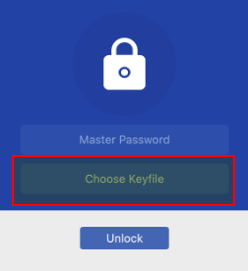
I don‘t understand, what do you mean exactly with that? The Docker's vault login screen doesn't have the option to "Choose Keyfile": I have an existing vault located in the docker at: /enpass/Documents/Enpass/Vaults/primary/vault.enpassdb I assume Enpass is loading this vault based on files: QtProject.conf: lastVisited=file:///enpass/Documents/Enpass/Vaults/primary Enpass.conf: DIALOG_LAST_OPEN_LOCATION=/enpass/Documents/Enpass/Vaults/primary I'm not sure if the docker is using this vault, something else, or how to change it.
-
Does the Enpass docker support keyfile?
-
I wonder if any of this can be related to another potential problem I am having with the docker image? https://forums.unraid.net/topic/137109-troubleshooting-docker-image-file-is-getting-full/
-
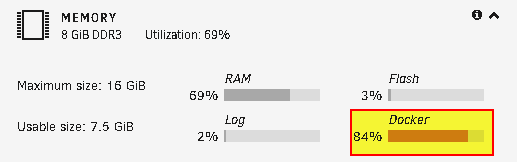
I ran the "Fix Common Problems" plugin and receive the message "Docker image file is getting full". How do I troubleshoot? Is there a script/tool that can help me identify which docker or image? It's also confusing to know how much storage space the docker image file is actually consuming, as the info is different in different reports. Label: none uuid: 4978b6f9-7639-4a2f-9f94-40584c81e9c2 Total devices 1 FS bytes used 31.73GiB devid 1 size 40.00GiB used 36.00GiB path /dev/loop2 UUID: 4978b6f9-7639-4a2f-9f94-40584c81e9c2 Scrub started: Wed Mar 29 12:07:03 2023 Status: finished Duration: 0:03:43 Total to scrub: 32.87GiB

-
I performed a BTRFS scrub on my docker volume: Label: none uuid: 4978b6f9-7639-4a2f-9f94-40584c81e9c2 Total devices 1 FS bytes used 31.73GiB devid 1 size 40.00GiB used 36.00GiB path /dev/loop2 UUID: 4978b6f9-7639-4a2f-9f94-40584c81e9c2 Scrub started: Wed Mar 29 12:07:03 2023 Status: finished Duration: 0:03:43 Total to scrub: 32.87GiB Rate: 150.92MiB/s Error summary: read=4 Corrected: 0 Uncorrectable: 0 Unverified: 0
-
Found some more information within the Disk Log: Mar 29 11:24:53 Tower kernel: ata1.00: exception Emask 0x0 SAct 0x1ffc0 SErr 0x0 action 0x0 Mar 29 11:24:53 Tower kernel: ata1.00: irq_stat 0x40000008 Mar 29 11:24:53 Tower kernel: ata1.00: failed command: READ FPDMA QUEUED Mar 29 11:24:53 Tower kernel: ata1.00: cmd 60/00:30:50:36:24/05:00:01:00:00/40 tag 6 ncq dma 655360 in Mar 29 11:24:53 Tower kernel: ata1.00: status: { DRDY ERR } Mar 29 11:24:53 Tower kernel: ata1.00: error: { UNC } Mar 29 11:24:53 Tower kernel: ata1.00: configured for UDMA/100 Mar 29 11:24:53 Tower kernel: sd 2:0:0:0: [sdh] tag#6 UNKNOWN(0x2003) Result: hostbyte=0x00 driverbyte=DRIVER_OK cmd_age=0s Mar 29 11:24:53 Tower kernel: sd 2:0:0:0: [sdh] tag#6 Sense Key : 0x3 [current] Mar 29 11:24:53 Tower kernel: sd 2:0:0:0: [sdh] tag#6 ASC=0x11 ASCQ=0x4 Mar 29 11:24:53 Tower kernel: sd 2:0:0:0: [sdh] tag#6 CDB: opcode=0x28 28 00 01 24 36 50 00 05 00 00 Mar 29 11:24:53 Tower kernel: I/O error, dev sdh, sector 19150984 op 0x0:(READ) flags 0x4000 phys_seg 89 prio class 0 Mar 29 11:24:53 Tower kernel: ata1: EH complete Mar 29 11:24:53 Tower kernel: ata1.00: exception Emask 0x0 SAct 0x7f8007c0 SErr 0x0 action 0x0 Mar 29 11:24:53 Tower kernel: ata1.00: irq_stat 0x40000008 Mar 29 11:24:53 Tower kernel: ata1.00: failed command: READ FPDMA QUEUED Mar 29 11:24:53 Tower kernel: ata1.00: cmd 60/08:b8:88:38:24/00:00:01:00:00/40 tag 23 ncq dma 4096 in Mar 29 11:24:53 Tower kernel: ata1.00: status: { DRDY ERR } Mar 29 11:24:53 Tower kernel: ata1.00: error: { UNC } Mar 29 11:24:53 Tower kernel: ata1.00: configured for UDMA/100 Mar 29 11:24:53 Tower kernel: sd 2:0:0:0: [sdh] tag#23 UNKNOWN(0x2003) Result: hostbyte=0x00 driverbyte=DRIVER_OK cmd_age=0s Mar 29 11:24:53 Tower kernel: sd 2:0:0:0: [sdh] tag#23 Sense Key : 0x3 [current] Mar 29 11:24:53 Tower kernel: sd 2:0:0:0: [sdh] tag#23 ASC=0x11 ASCQ=0x4 Mar 29 11:24:53 Tower kernel: sd 2:0:0:0: [sdh] tag#23 CDB: opcode=0x28 28 00 01 24 38 88 00 00 08 00 Mar 29 11:24:53 Tower kernel: I/O error, dev sdh, sector 19150984 op 0x0:(READ) flags 0x800 phys_seg 1 prio class 0 Mar 29 11:24:53 Tower kernel: ata1: EH complete Mar 29 11:24:53 Tower kernel: BTRFS warning (device sdh1): i/o error at logical 165618454528 on dev /dev/sdh1, physical 9804255232, root 5, inode 260, offset 3305271296, length 4096, links 1 (path: system/docker/docker.img) Mar 29 11:24:53 Tower kernel: BTRFS error (device sdh1): bdev /dev/sdh1 errs: wr 0, rd 36, flush 0, corrupt 0, gen 0 Mar 29 11:24:53 Tower kernel: ata1.00: exception Emask 0x0 SAct 0x87ff0147 SErr 0x0 action 0x0 Mar 29 11:24:53 Tower kernel: ata1.00: irq_stat 0x40000008 Mar 29 11:24:53 Tower kernel: ata1.00: failed command: READ FPDMA QUEUED Mar 29 11:24:53 Tower kernel: ata1.00: cmd 60/08:40:90:38:24/00:00:01:00:00/40 tag 8 ncq dma 4096 in Mar 29 11:24:53 Tower kernel: ata1.00: status: { DRDY ERR } Mar 29 11:24:53 Tower kernel: ata1.00: error: { UNC } Mar 29 11:24:53 Tower kernel: ata1.00: configured for UDMA/100 Mar 29 11:24:53 Tower kernel: sd 2:0:0:0: [sdh] tag#8 UNKNOWN(0x2003) Result: hostbyte=0x00 driverbyte=DRIVER_OK cmd_age=0s Mar 29 11:24:53 Tower kernel: sd 2:0:0:0: [sdh] tag#8 Sense Key : 0x3 [current] Mar 29 11:24:53 Tower kernel: sd 2:0:0:0: [sdh] tag#8 ASC=0x11 ASCQ=0x4 Mar 29 11:24:53 Tower kernel: sd 2:0:0:0: [sdh] tag#8 CDB: opcode=0x28 28 00 01 24 38 90 00 00 08 00 Mar 29 11:24:53 Tower kernel: I/O error, dev sdh, sector 19150992 op 0x0:(READ) flags 0x800 phys_seg 1 prio class 0 Mar 29 11:24:53 Tower kernel: ata1: EH complete Mar 29 11:24:53 Tower kernel: BTRFS warning (device sdh1): i/o error at logical 165618458624 on dev /dev/sdh1, physical 9804259328, root 5, inode 260, offset 3305275392, length 4096, links 1 (path: system/docker/docker.img) Mar 29 11:24:53 Tower kernel: BTRFS error (device sdh1): bdev /dev/sdh1 errs: wr 0, rd 37, flush 0, corrupt 0, gen 0 Mar 29 11:29:33 Tower kernel: BTRFS info (device sdh1): scrub: finished on devid 2 with status: 0 All the error logs involve "path: system/docker/docker.img".
-
UUID: af9fa197-4f10-4658-b89b-002599ca51e2 Scrub started: Wed Mar 29 11:24:22 2023 Status: finished Duration: 0:05:11 Total to scrub: 78.46GiB Rate: 258.37MiB/s Error summary: read=4 Corrected: 0 Uncorrectable: 0 Unverified: 0
-
I'm receiving the error: Unraid Cache disk SMART health [187]: 28-03-2023 17:12 Warning [TOWER] - reported uncorrect is 14 M4-CT256M4SSD2_00000000130309265B2B (sdh) BTRFS Scrub: UUID: af9fa197-4f10-4658-b89b-002599ca51e2 Scrub started: Tue Mar 28 17:16:28 2023 Status: finished Duration: 0:05:27 Total to scrub: 78.45GiB Rate: 245.67MiB/s Error summary: read=4 Corrected: 0 Uncorrectable: 0 Unverified: 0 Should I assume my cache drive has bad data (I don't know what BTRFS is actually telling me)? Should I assume my cache drive is going bad, and needs to be replaced? Thank you. tower-diagnostics-20230329-0025.zip
-
Is there an option to connect to the container through a non-web VNC? I'm trying to connect to Firefox container through Remmina using port from "noVNC WebGUI".
-
Traceback (most recent call last): File "app/main.py", line 85, in <module> dqueue = DownloadQueue(config, Notifier()) File "/app/app/ytdl.py", line 195, in __init__ self.queue = PersistentQueue(self.config.STATE_DIR + '/queue') File "/app/app/ytdl.py", line 150, in __init__ with shelve.open(path, 'c'): File "/usr/local/lib/python3.8/shelve.py", line 243, in open return DbfilenameShelf(filename, flag, protocol, writeback) File "/usr/local/lib/python3.8/shelve.py", line 227, in __init__ Shelf.__init__(self, dbm.open(filename, flag), protocol, writeback) File "/usr/local/lib/python3.8/dbm/__init__.py", line 95, in open return mod.open(file, flag, mode) _gdbm.error: [Errno 13] Permission denied: '/downloads/.metube/queue' Setting umask to 022 Creating download directory /downloads and state directory /downloads/.metube User set by docker; running MeTube as 99:100 Changing the "Extra Parameters" from "--user 99:100" to "--user 1000:1000" seems to work. Not sure 1000:1000 is the correct solution.
-
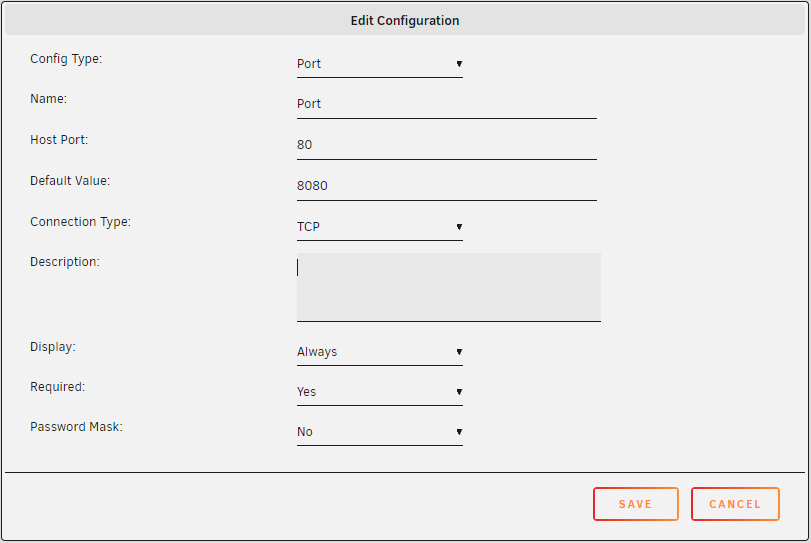
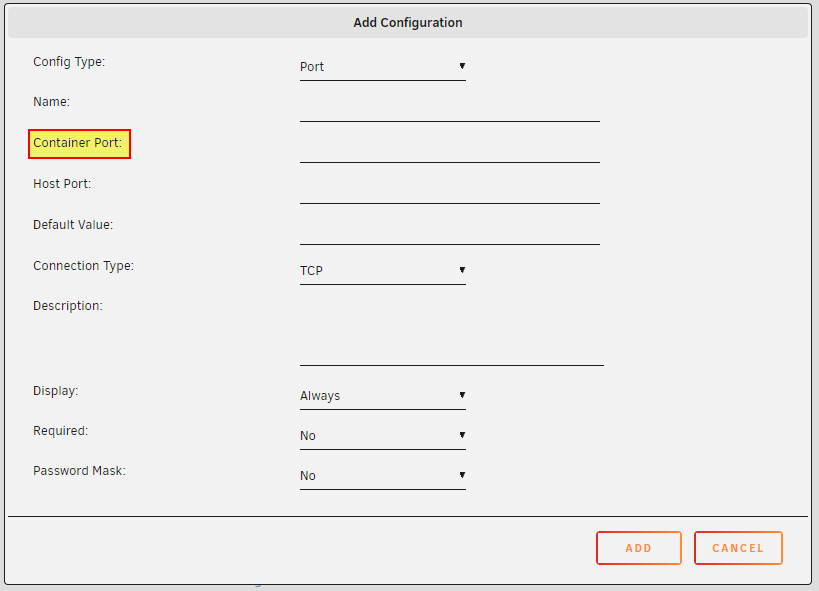
My configuration for this Docker (SearXNG) seems to be missing the "Container Port" that I see in other containers. Another Docker has these options: