Duckers
Members
-
Joined
-
Last visited
Everything posted by Duckers
-
Why is dupeguru using 7.8GB ram? It started out at around 2GB, but only 20% in it has already eated itself to a 4th of my server's ram.
-
Latest Qdirstat docker is showing the wrong folder content while scanning. I click on data, but it shows "documents" for example.
-
It won't start. mkdir: cannot create directory '/home/headless/.vnc': Permission denied /dockerstartup/vnc_startup.rc: line 57: /home/headless/.vnc/passwd: No such file or directory chmod: cannot access '/home/headless/.vnc/passwd': No such file or directory /dockerstartup/vnc_startup.rc: line 65: /home/headless/.vnc/config: No such file or directory /dockerstartup/vnc_startup.rc: line 99: /dockerstartup/vnc.log: Permission denied /dockerstartup/vnc_startup.rc: line 127: /dockerstartup/novnc.log: Permission denied /dockerstartup/startup.sh: line 25: kill: (19) - No such process And does it support intel? Added dev/dri, but can't start it because it lacks permissions. Also set it to privileged, and added path for configs to be in, but no permissions.
-
A function to remove array drives without risking data loss, yet retain a parity under the whole removal process. As currently you'd be needing to rebuild array to "properly" remove a drive fast and effective. But instead, this feature could create a new parity based off the drive config you want in the new config by excluding drives of removal, parity will be kept and used from the old config while new one builds. Once it has been built on the new parity, it'll do a parity check to verify, Once confirmed healthy, the old will proceed to rebuild itself by mirroring the new one, once done, and second parity check has confirmed new config is 100% fine, stop array and safely remove the old drive.
-
Oh, might be because I clicked multiquote :s Sorry about that. Still not familiar with this forum 😛 And gotcha for the server related. Do you have a page with templates on how one can set up a game server for ourselves? Or would it be somewhat similar to other game templates? As I'm willing to dig into how I setup one myself for personal use to not have others risk getting into trouble.
-
Did you ever get it to work? As i'm struggling to get mine running through compose lol.
-
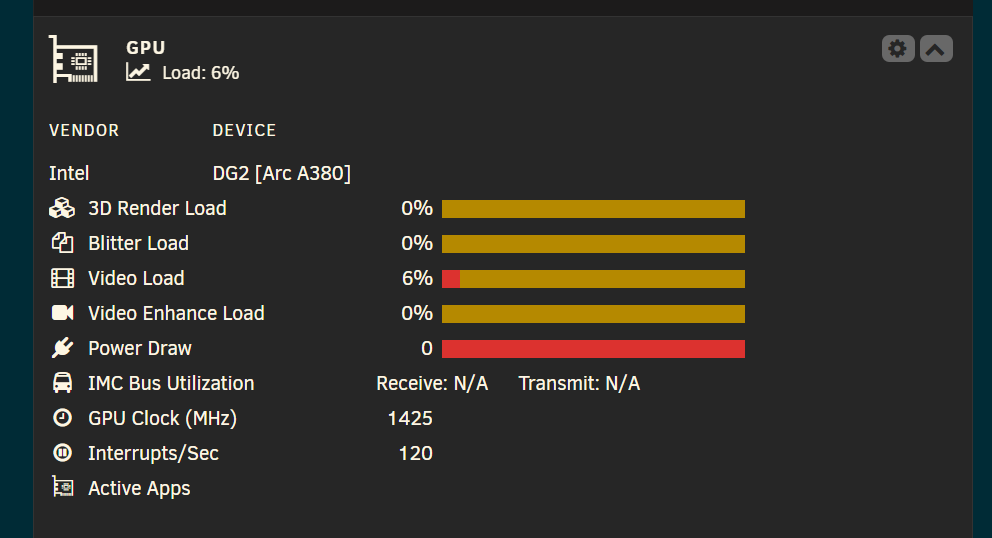
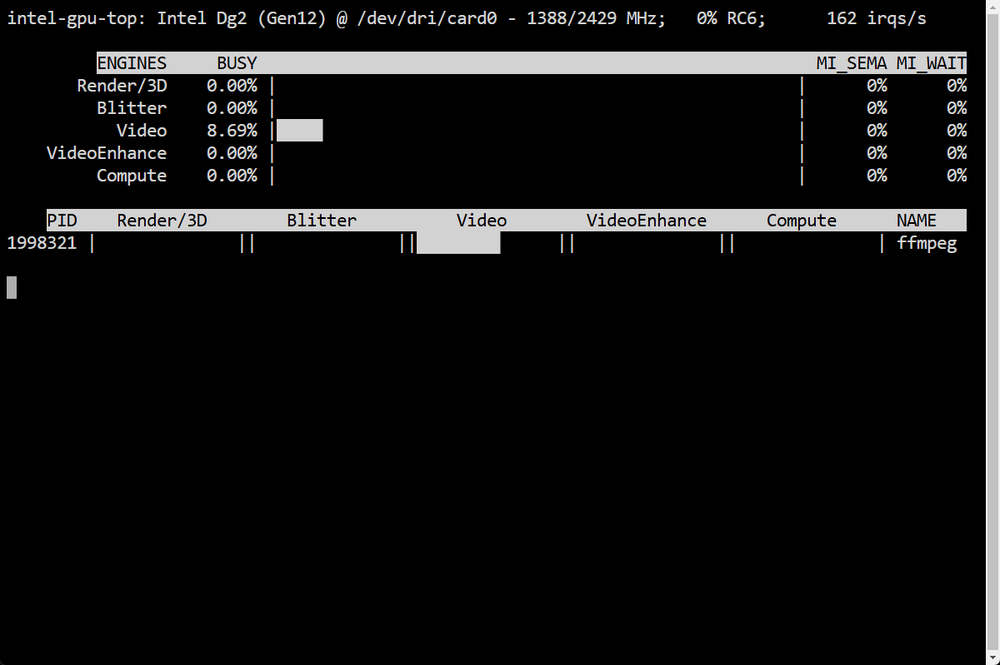
Unraid 7.0.0 erors with gpu-statistics. using arc A380 on AM4 with 5900x Stats showing little to no video load, while intel_gpu_top shows 50% load on video. As well as unable to read power draw, IMC bus receive and transmit. Other stats also inaccurate as i'm transcoding videos to av1 via a docker a friend is working on to automate transcoding of all media to av1.
-
Bit too complicated for me lol. I just need it to run in multi instance, and only list infected files. Directory i set in the docker config if i want to scan certain folders
-
So i added --i to it like the other one to view what it found, What's the parameters to do what the other did, which was only list what it detects, but not spam every file it has scanned? As i want it to only list potentially bad files, but not remove them. As a lot of the hits are false positives. And is there a script to note for instance if it's done with a share? As that way i can tell how far along it is.
-
Found it, i just typed it wrong Ran it as a fun test, and it definitely brought the poor 7400 to it's knees, but it should now be 2-5x faster. Is it normal for it to have dockerd process still do 100% after it's shut down?
-
Didn't find it in apps section. As i don't know how to install dockers via docker image.
-
Gotcha! Will run verbose next time! Also, how can i make it use more cpu performance? As it appears to only use 1 core, or less? Or does it have a argument to do multiple disks at once to multithread up the scan that way if the little cpu it uses is due to spinning rust's mechanical limitation? Cause it's been over 4 or 5 days scanning now, and it has by the looks of it, barely started lol. And oddly my last post only had 1 error even if i pasted a bunch Here's the other errors i need explained as well. LibClamAV Warning: file_bytes is not valid unicode: invalid utf-8 sequence of 1 bytes from index 112 LibClamAV Warning: Bytecode run timed out in interpreter after 662625000 opcodes LibClamAV Warning: Bytecode 'BC.Legacy.Exploit.Andr-2.{Extra_Field,Master_Key}' (id: 35) failed to run: Exceeded time limit Gonna assume the 2 below was due to too big file? And what's the command to increase the size? LibClamAV info: scancws: Error decompressing SWF file. Scanning what was decompressed. LibClamAV Warning: SWF: declared output length != inflated stream size, 14879 != 4916
-
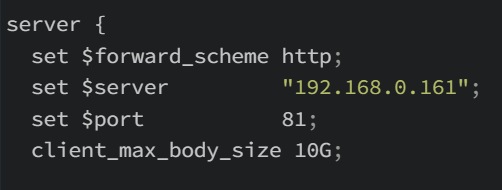
Where do i go, and what file do i edit to increase it's allowed filesize to come through to my server? As i set xbackbone to allow 25GB, but still, i get errors when i try to upload a 2GB file. Read that i'd need to set the amount in nginx as well, but can't figure out where to do that. I added it like this in an attempt, for the xbackbone config within nginx's appdata folder, but didn't help, and still denied me to upload it.
-
Hoi, why do i get these? `LibClamAV Warning: PNG: Unexpected early end-of-file.`
-
I want to request 2 features for it, as i for one keep it open at all times to not have to rescan all the data every time it restarts from either server restart, or other task requiring array to be stopped. 1: A session save/restore function, where it will write all the files it has found per sector to a text file on the ram, And whenever it's getting the shutdown command if we restart server/stop docker, first command it will self issue to itself, is write that "text file" from ram onto a text file in it's appdata folder, so it can load it up again and resume from where it was last time. And as it knows where the existing files were prior to restart/docker shutdown, it will scan any other sector that contains files it hasn't logged yet. That way we can save half a day++ on every rescan. 1: Auto scan and add new files/autodetect if a file has been deleted to the list whenever it detects such activity.
-
What's the proper steps to add a docker properly to a subdomain? I've tried to add even hastebin the same way inn npm as i did my image host, but it keeps redirecting to my xbackbone image subdomain.
-
Hoi, how do i setup unraid as the exit node? Cause it's option is greyed out, and can't seem to edit anything in it. The container is apparently now only for specialist use now, but it somehow worked, and got to use it as a exit node, and vpn my phone to my home server for blocking ads, but got no local address access of tailscale IP, nor my local home ip when on 5g. So i want to find out how to properly take control of the plugin.
-
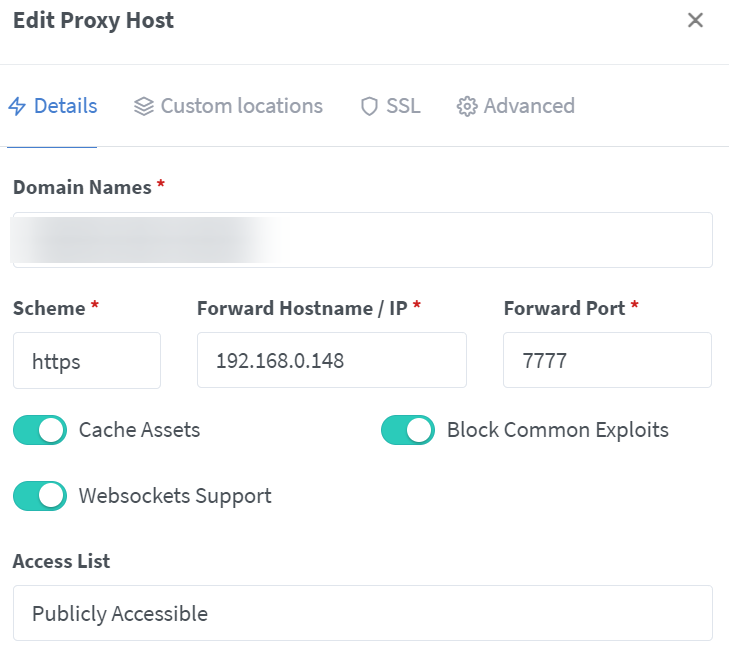
Hoi, what am i missing? My image host works just fine, and when i launch webui from docker list in unraid, it opens as expected in the subdomain it's assigned. But for hastebin for instance, opening it's webui is still local IP, and when i click on it's hastebin link in NPM, it redirects immediately to my image host. I setup the cloudflare CNAME the exact same way as with the image host, ssl is set up as well. Other containers won't work either.
-
Hoi, tailscale is now all set up on my end, unraid as exit node, i can browse the web and everything. But i can't seem to access unraid's webui or anything. Nor browse the shares over SMB with x-plore. docker logs shows it's accepting, but still can't access anything of the server.
-
Not sure if it's the right post to ask, but i'll try: What's the command to pass a docker with it's own IP and port through the tailscale docker to have it get it's own IP for a game server? Palworld specifically.
-
Hoi, i installed the new fancy plugin, but got 1 issue, 1 question: 1: Can't set my server as a exit node when added through the plugin 2: How can i setup a "subnet mask" for the tailscale IP to redirect my game server on unraid to use tailscale? As my ISP blocks all "fun", i can't host game servers as is. And when i tried to enter my server with game's port at the end of tailscale IP, it didn't work.
-
For palworld, is there a way to fish out the invite code from cli or something? That way i don't have to throw my IP out everywhere
-
Thanks! So, i'm going to remove the game parameters in the docker, that makes it not show up in the list, but people can instantly connect using for instance my subdomain? As i plan to pass through my local ip and port through cloudflare to let buddy's connect. And what should i set "public ip" to? just local IP, then pass that through cloudflare?
-
Hoi, wanted to test palworld game host, but got this error: ---Ensuring UID: 99 matches user--- ---Ensuring GID: 100 matches user--- ---Setting umask to 000--- ---Checking for optional scripts--- ---No optional script found, continuing--- ---Taking ownership of data...--- ---Starting...--- ---Update SteamCMD--- tid(33) burning pthread_key_t == 0 so we never use it Redirecting stderr to '/serverdata/Steam/logs/stderr.txt' Logging directory: '/serverdata/Steam/logs' [ 0%] Checking for available updates... [----] Verifying installation... Steam Console Client (c) Valve Corporation - version 1705108307 -- type 'quit' to exit -- Loading Steam API...dlmopen steamservice.so failed: steamservice.so: cannot open shared object file: No such file or directory OK Connecting anonymously to Steam Public...OK Waiting for client config...OK Waiting for user info...OK CWorkThreadPool::~CWorkThreadPool: work processing queue not empty: 1 items discarded. ---Update Server--- tid(57) burning pthread_key_t == 0 so we never use it Redirecting stderr to '/serverdata/Steam/logs/stderr.txt' Logging directory: '/serverdata/Steam/logs' [ 0%] Checking for available updates... [----] Verifying installation... Steam Console Client (c) Valve Corporation - version 1705108307 -- type 'quit' to exit -- Loading Steam API...dlmopen steamservice.so failed: steamservice.so: cannot open shared object file: No such file or directory OK Connecting anonymously to Steam Public...OK Waiting for client config...OK Waiting for user info...OK Success! App '2394010' already up to date. ---Checking if configuration is in place--- ---Configuration found, continuing...--- ---Checking if PublicIP is in place--- ---Nothing to do, PublicIP: *ip* still up-to-date!--- ---Prepare Server--- ---Server ready--- ---Start Server--- setrlimit() failed with error 22 (Invalid argument) - Max per-process value allowed is 0 (we wanted infinity). sh: 1: xdg-user-dir: not found dlopen failed trying to load: steamclient.so with error: steamclient.so: cannot open shared object file: No such file or directory [S_API] SteamAPI_Init(): Loaded '/serverdata/.steam/sdk64/steamclient.so' OK. (First tried local 'steamclient.so') CAppInfoCacheReadFromDiskThread took 4 milliseconds to initialize Setting breakpad minidump AppID = 2394010 [S_API FAIL] Tried to access Steam interface SteamUser021 before SteamAPI_Init succeeded. [S_API FAIL] Tried to access Steam interface SteamFriends017 before SteamAPI_Init succeeded. [S_API FAIL] Tried to access Steam interface STEAMAPPS_INTERFACE_VERSION008 before SteamAPI_Init succeeded. [S_API FAIL] Tried to access Steam interface SteamNetworkingUtils004 before SteamAPI_Init succeeded.
-
Server downloaded a non existing game version? How do i set it to think it's the version it actually is? the server thinks it's version 1.0.217, while the client is the latest 0.12.17