





Bfox135
Members
-
Joined
-
Last visited
Everything posted by Bfox135
-
I have been using the Cache-Mover plugin and honestly its a nightmare and I don't think its actually moving anything back. Gonna test this out and see if it works better. Thank you 👍
-
Anyone else having issues where when the plugin looks at drive or CPU temps it drops everything to 0 and stops working?
-
I'm Having a Problem that ever since 7.2.6 if any hard drives assigned to the fans causes the fan drop to 0% even i Idle speed is set. I know the Original Dev hasn't posted in a while but just bringing it up.
-
Still a random issue is 7.2 ....fun
-
When setting remote access to Always with Static or UPNP, Remote connection fails because the NginX Daemon does not start. a New Config File is generated with faulty configs. nginx config Test # nginx -t nginx: [emerg] a duplicate default server for 192.168.1.55:443 in /etc/nginx/conf.d/servers.conf:73 nginx: configuration file /etc/nginx/nginx.conf test failed Output when applying settings Aug 23 18:00:59 FoxServer rc.nginx: Reloading Nginx server daemon... Aug 23 18:00:59 FoxServer rc.nginx: Reloading Nginx server daemon... Aug 23 18:00:59 FoxServer rc.nginx: Reloading Nginx server daemon... Aug 23 18:01:00 FoxServer rc.nginx: Checking configuration for correct syntax and then trying to open files referenced in configuration... Aug 23 18:01:00 FoxServer rc.nginx: /usr/sbin/nginx -t -c /etc/nginx/nginx.conf Aug 23 18:01:00 FoxServer rc.nginx: Checking configuration for correct syntax and then trying to open files referenced in configuration... Aug 23 18:01:00 FoxServer rc.nginx: Invalid configuration, Nginx server daemon not reloaded Aug 23 18:01:00 FoxServer rc.nginx: /usr/sbin/nginx -t -c /etc/nginx/nginx.conf Aug 23 18:01:00 FoxServer rc.nginx: Invalid configuration, Nginx server daemon not reloaded Aug 23 18:01:00 FoxServer rc.nginx: Checking configuration for correct syntax and then trying to open files referenced in configuration... Aug 23 18:01:00 FoxServer rc.nginx: /usr/sbin/nginx -t -c /etc/nginx/nginx.conf Aug 23 18:01:00 FoxServer rc.nginx: Invalid configuration, Nginx server daemon not reloaded Servers.config sample # Listen on local socket for nchan publishers # server { listen unix:/var/run/nginx.socket default_server; location ~ /pub/(.*)$ { nchan_publisher; nchan_channel_id "$1"; nchan_message_buffer_length $arg_buffer_length; nchan_message_timeout 0; } location ~ /nchan_stub_status$ { nchan_stub_status; } } # # Always accept http requests from localhost # ex: http://localhost # ex: http://127.0.0.1 # ex: http://[::1] # server { listen 127.0.0.1:80; # lo listen 127.0.0.1:443; # lo listen [::1]:80; # lo listen [::1]:443; # lo # add_header Content-Security-Policy "frame-ancestors 'self' "; include /etc/nginx/conf.d/locations.conf; } # # Port settings for https protocol (self-signed cert) # ex: https://tower.local # server { listen 192.168.1.55:443 ssl default_server; # br0 listen 192.168.5.1:443 ssl default_server; # br2 listen 192.168.255.2:443 ssl default_server; # eth3 listen 100.125.166.23:443 ssl default_server; # tailscale1 listen [fd7a:115c:a1e0::e101:a617]:443 ssl default_server; # tailscale1 http2 on; add_header Content-Security-Policy "frame-ancestors 'self' "; # Ok to use concatenated pem files; nginx will do the right thing. ssl_certificate /boot/config/ssl/certs/FoxServer_unraid_bundle.pem; ssl_certificate_key /boot/config/ssl/certs/FoxServer_unraid_bundle.pem; ssl_trusted_certificate /boot/config/ssl/certs/FoxServer_unraid_bundle.pem; # # OCSP stapling ssl_stapling off; ssl_stapling_verify off; # location ~ /wsproxy/443/ { return 403; } include /etc/nginx/conf.d/locations.conf; } # # Redirect http requests to https # ex: http://tower.local -> https://tower.local # server { listen 192.168.1.55:80 default_server; # br0 listen 192.168.5.1:80 default_server; # br2 listen 192.168.255.2:80 default_server; # eth3 listen 100.125.166.23:80 default_server; # tailscale1 listen [fd7a:115c:a1e0::e101:a617]:80 default_server; # tailscale1 add_header Content-Security-Policy "frame-ancestors 'self' "; return 302 https://$host:443$request_uri; } # # Port settings for https protocol (self-signed cert) # ex: https://tower.local # server { listen 192.168.1.55:443 ssl default_server; # br0 listen 192.168.5.1:443 ssl default_server; # br2 listen 192.168.255.2:443 ssl default_server; # eth3 listen 100.125.166.23:443 ssl default_server; # tailscale1 listen [fd7a:115c:a1e0::e101:a617]:443 ssl default_server; # tailscale1 http2 on; add_header Content-Security-Policy "frame-ancestors 'self' "; # Ok to use concatenated pem files; nginx will do the right thing. ssl_certificate /boot/config/ssl/certs/FoxServer_unraid_bundle.pem; ssl_certificate_key /boot/config/ssl/certs/FoxServer_unraid_bundle.pem; ssl_trusted_certificate /boot/config/ssl/certs/FoxServer_unraid_bundle.pem; # # OCSP stapling ssl_stapling off; ssl_stapling_verify off; # location ~ /wsproxy/443/ { return 403; } include /etc/nginx/conf.d/locations.conf;
-
well it very much is cause I ran the mover on 7.0.1 and now I have about 4tb of shows missing from the drive it was moving the shows too.... every episode expect for the one's it moved.
-
I know this issue was Patched but does anyone know what versions of unraid were effected by this bug? Reason I am asking is because I am on version 7.0.1 and Thought I was save and used the Mover to empty a drive and I'm very sure it deleted a whole hardrive worth of data. Luckily it was just TV shows.
-
sorry for the delay but you have to add a new volume path. this is what I did to fix it.

-
Hey, I noticed it was mention in a older post but wanna bring up again. Traccar is missing Volume path. This needs to be added or else Traccar deletes the database when it updates. I had it happen twice now thinking it was a fluke but the docker container was missing this path. --volume /opt/traccar/data:/opt/traccar/data:rw \
-
For everyone having issues with Folder view on 7.0.X Having Issues TLDR: Remove and Reinstall Folder View.
-
I am using a Branched off version of your container that supports UDP port Forwarding. BUT I will give credit where credit it due! I was pulling my hair out trying to get Glutun to work so this was a night and day difference in ease of use.
-
Commenting to Bring this Suggestion up again. I also got EMC Array That I cant use both controllers on.
-
No issues, just wanna say good shit. I have tried a bunch of other VPN docker containers but yours just WORKS for port forwarding.
-
Did some testing and found that "Remote server 'NFS' port 2049 is not open" now the question is how do I enable that port on that specific ethernet port?
-
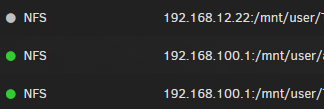
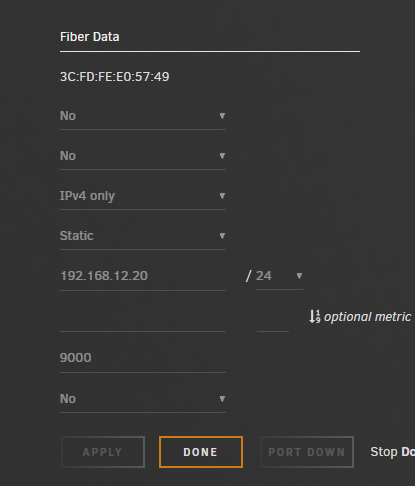
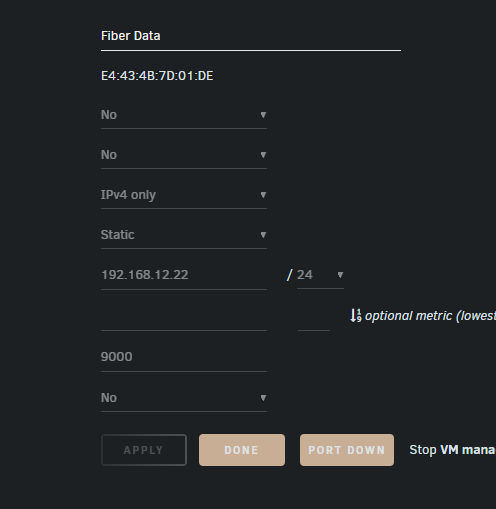
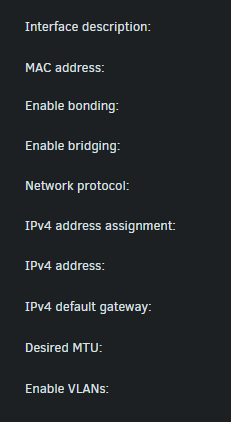
Have 2 unraid servers I am trying to interconnect and share storage. I have them bother directly connected and manual IP assigned. They are able to ping and see each other 192.168.12.22 <---> 192.168.12.20 but for some reason when I create a NFS connection it shows as offline EVEN THO it is able to see the shares and connection when createing the NFS? anyone have IP 192.168.100.1 is the normal connection out.
-
You are AMAZING!! Thank you!!
-
SO, I really like how PWM Fan works but I have one issue that can't make me switch from Dynamix auto fan controller. There is only 2 active control settings. is there any possibility to add more fan settings to control more fan separately from each other? So all of the fans don't have to speed up based on one Hard drive Temp? example: CPU - Fan 1 HDD 1 2 3 - Fan 2 HDD 4 5 6 - Fan 3 HDD 7 8 9 - Fan 4
-
I would also like the ability to have multiple arrays. mainly for data backup and archiving on the same system. Array 1: 12 - 3tb HDD 2 Parity Array 2: 3 - 12tb HDD 1 Parity
-
This is a Weird question and I just in a predicament until a new drive arrives. But is there a way to remove/ Zero out a drive so that the parity ignores it and supplies redundancy for the other drives? For Clarification, I had 2 drives Die in a single day and both Parity Drives are being used to emulate them. 1 Drive is empty and not being used currently, and the other was half full. I have moved all of my files off of the half full emulated drive that is being run off of parity using Unbalanced. The Half full Emulated drive is now completely empty. is there any way for the parity to ignore the drive/ see it as all 0 so incase another drive dies I have a parity ready for it? My expectations are low but I am just wondering if it is possible?
-
Did you ever get around to trying this method with LSI 9750? I know this post is from years ago but I'm just now in the thick of it.
-
That's correct, The cache is separate from the array. You assign the cache to the Shares instead of the the Array Itself. Data is only moved onto the array if. 1. The Share is set to be on the array. 2. The Cache is set to dump data onto the array. (Primary Storage "cache" => Secondary Storage "Array") You can also set the share to skip the Cache all together (Primary Storage "Array")
-
Shot in the dark. are you using macvlan or ipvlan in your docker?
-
macvlan is a menace.
-
Depends. If all the data is on the cache drives and nothing is on the xfs array then go for it cause as far as you are concerned nothing is on those drives. You would just have to recreate the xfs. if xfs is set for Raid 1. then you can just replace one drive at a time and let them rebuild. If the xfs is raid 0 then you would need to set up a parity drive to hold a copy of the data while you swap each drive one at a time. any internal unraid settings\configurations are stored on the USB.
-
Well I have taken the "If it ain't broke" approach and put the old config back and I'm leavening it on. It's just a real problem because I cannot bring down my array.



