





Wadzwigidy
Members
-
Joined
-
Last visited
Everything posted by Wadzwigidy
-
Update to this, I reset my settings in OperaGX and now the search function works in it as well.
-
I am such a knuckle head. I figured out the issue and can't believe it's taking me this long to figure out but it's my browser. I use OperaGX and the search function doesn't work in that browser but it does in chrome and edge, just fine. Sorry if I wasted anyone's time with my stupidity lol.
-
Version 2025.01.28 for me. Just updated OS to 7.1 today and the search function still isn't working. I'm not real sure what else to do at this point. CA-Logging-20250508-0355.zip
-
Ever since upgrading to 7.0.1 the search function in the community applications does nothing. You can type in the search box but nothing happens when you commit the search. wadzserver-diagnostics-20250424_0604.zip Edit: I actually tried downgrading to 7.0.0 and the search function still does not work.
-
Ever since upgrading to 7.0.1 the search function in the community applications does nothing. You can type in the search box but nothing happens when you commit the search. wadzserver-diagnostics-20250424_0604.zip
-
AWESOME!! Thank you!! Please, Have a cup of coffee on me good sir!
-
When do you think you'll get around to updating it to remove that from the container. Obviously no rush I was just wondering
-
copy that, probably the easiest route honestly. Don't get me wrong it's a nice idea to be able to set a value to true and it download the necessary files and boom. But with this game it just isn't that easy anymore, plus they keep updating it so much it's just easier to make it just the game server files and people can add bepinex to the container if they want, when there is a more stable release. with that said I do appreciate all you do. Thank you
-
https://github.com/TrueOsiris/docker-vrising/issues/45 seems it's still in the work any how
-
I mean it was a straight brand new container, I backed up my save files and deleted everything and started over fresh, so if anything is wrong with the container then it's whoever setup the default configuration. I'm literally only trying to figure out why the server don't run with BepInEx installed. Currently it's it default state, if you enter 'true' for the ENABLE BEPINEX parameter, the server will just loop, never actually starting.
-
from what I have looked up it's a preloader. but it's irrelevant now because I removed it to see if it would still start up and it did. But I'm not sure if the mods are being recognized and executed so I only have one part of this fixed so far, starting up with bepinex enabled. I'll keep digging
-
So I was able to resolve the issue. I went to the BepInEx git hub and downloaded the latest winx64 version (https://github.com/BepInEx/BepInEx/releases/tag/v5.4.23.1) and I also download the patcher. I copied all the files from the zip (BepInEx_win_x64_5.4.23.1.zip) and pasted them in the vrising folder, replacing anything it asked to replace. Then I copied the patcher from the zip (BepInEx_Patcher_5.4.23.1.zip) and pasted it into the vrising\bepinex/patchers folder. Started the docker and it started with no issues. So far........
-
I'll keep digging at this and If I figure out a solution I will let you know
-
I did try that and same issue
-
Do you know how to fix this. I have the same issue as well. It's seems it's only with the docker. If I install the server from steam and follow the BepInEx install instructions the server starts with no issues. Any thoughts on what the issue might be?
-
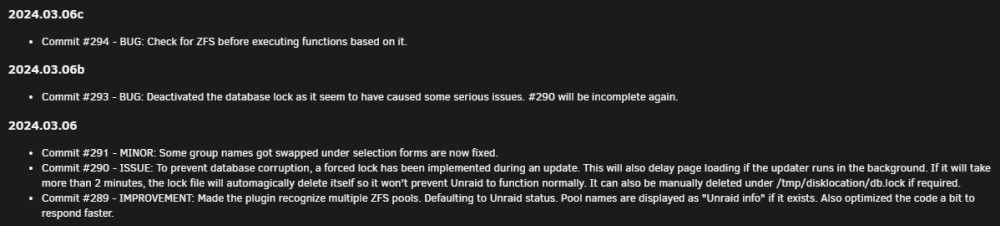
I updated disk location plugin today as well and it resolved this issue.
-
Cool beans man. That's kind of why I said that I didn't know if it would work for everyone. I personally haven't used windows 10 in a while I've been on windows 11 since it released. But I recently started having issues connecting to my share much like what others mentioned here in previous post so that's why I figured I would provide my solution. I'm glad you will be good to go soon as well. good luck.
-
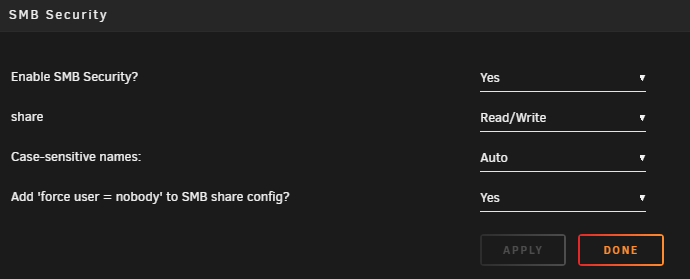
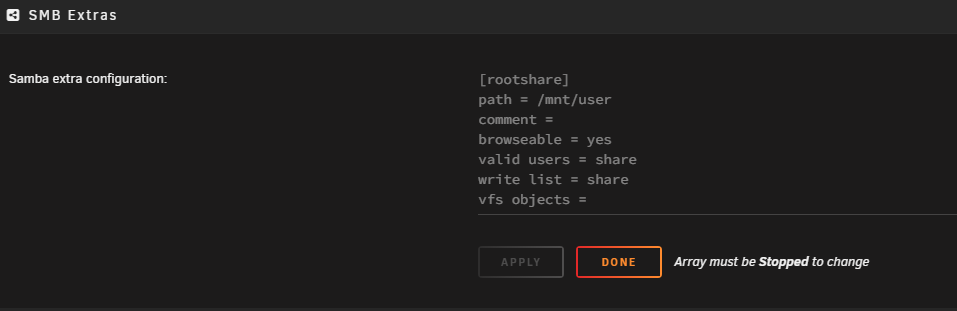
I think it was an update to Unassigned Devices plugin. (I could be wrong) I don't remember seeing the options below but I set them and mine work now. Enable SMB Security was set to No before. Also I cleared out my SMB config, started my array back up and stopped again and put this in my SMB config. I don't know if these will work for everyone but they worked for me. I hope this helps. Good Luck.
-
That worked!! Thank you!
-
I can't seem to get this Docker working. I know I have to be doing something wrong but I have reinstalled a few times and switched the printer usb port a few times as well but the docker keeps failing. Any ideas what I'm doing wrong. docker: Error response from daemon: error gathering device information while adding custom device "/dev/serial/by-id": not a device node.
-
That did the trick. I added a usb 3 slot adapter and connected the 4 baby into it and the speeds are 20MB/s avg. I realized I have some SATAII drives in my array as well. Replacing those with SATAIII drives will increase speed as well. Thank you for your help @Vr2Io
-
Well I'll be, if I would have just done some simple math lol. Thank you for you help. Once I get this slot adapter things should be much better.
-
Ok so that JMicron must be my 4 Bay. I did have to plug it into one of the USB2.0 ports due to USB3.0 port availability. I have a slot adapter on the way to utilize the 3.0 header on my board, that should help. I'll update post with results of that. You think that is the only thing. I mean 8MB/s seems extremely slow. My parity check is 5% in and were looking at 2 days before it's finished.
-
Is something wrong with my setup. I mean I know it's a Frankenstein and I know parity checks are slow but I think 8mb per sec means something is either setup wrong or not optimized very well. Would any be able to shine some light on why it's so slow and how to speed it up. Thanks in advance. wadzserver-diagnostics-20220708-2357.zip



