





Shu
Members
-
Joined
-
Last visited
Everything posted by Shu
-
-
That is correct Host: localhost Port: 8080 no other settings changed (other than remove when done downloading) I tried restoring a backup from June 19 (when I am pretty sure it was working). Confirmed the backup & restore did take effect but it did not fix the issue. On binhex-Prowlarr's side, when I try to test the Sonarr app, it fails for connection refusal. 2023-06-28 15:02:48,584 DEBG 'start-script' stdout output: [Warn] ProwlarrErrorPipeline: FluentValidation.ValidationException: Validation failed: -- BaseUrl: Unable to complete application test, cannot connect to Sonarr. Connection refused (localhost:8989) [v1.5.2.3484] FluentValidation.ValidationException: Validation failed: -- BaseUrl: Unable to complete application test, cannot connect to Sonarr. Connection refused (localhost:8989) at Prowlarr.Api.V1.ProviderControllerBase`3.VerifyValidationResult(ValidationResult validationResult, Boolean includeWarnings) in ./Prowlarr.Api.V1/ProviderControllerBase.cs:line 202 at Prowlarr.Api.V1.ProviderControllerBase`3.Test(TProviderDefinition definition, Boolean includeWarnings) in ./Prowlarr.Api.V1/ProviderControllerBase.cs:line 193 at Prowlarr.Api.V1.ProviderControllerBase`3.Test(TProviderResource providerResource) in ./Prowlarr.Api.V1/ProviderControllerBase.cs:line 142 at Microsoft.AspNetCore.Mvc.Infrastructure.ActionMethodExecutor.SyncObjectResultExecutor.Execute(IActionResultTypeMapper mapper, ObjectMethodExecutor executor, Object controller, Object[] arguments) 2023-06-28 15:02:48,584 DEBG 'start-script' stdout output: at Microsoft.AspNetCore.Mvc.Infrastructure.ControllerActionInvoker.InvokeActionMethodAsync() at Microsoft.AspNetCore.Mvc.Infrastructure.ControllerActionInvoker.Next(State& next, Scope& scope, Object& state, Boolean& isCompleted) at Microsoft.AspNetCore.Mvc.Infrastructure.ControllerActionInvoker.InvokeNextActionFilterAsync() --- End of stack trace from previous location --- at Microsoft.AspNetCore.Mvc.Infrastructure.ControllerActionInvoker.Rethrow(ActionExecutedContextSealed context) at Microsoft.AspNetCore.Mvc.Infrastructure.ControllerActionInvoker.Next(State& next, Scope& scope, Object& state, Boolean& isCompleted) at Microsoft.AspNetCore.Mvc.Infrastructure.ControllerActionInvoker.InvokeInnerFilterAsync() --- End of stack trace from previous location --- at Microsoft.AspNetCore.Mvc.Infrastructure.ResourceInvoker.<InvokeFilterPipelineAsync>g__Awaited|20_0(ResourceInvoker invoker, Task lastTask, State next, Scope scope, Object state, Boolean isCompleted) at Microsoft.AspNetCore.Mvc.Infrastructure.ResourceInvoker.<InvokeAsync>g__Awaited|17_0(ResourceInvoker invoker, Task task, IDisposable scope) at Microsoft.AspNetCore.Mvc.Infrastructure.ResourceInvoker.<InvokeAsync>g__Awaited|17_0(ResourceInvoker invoker, Task task, IDisposable scope) at Microsoft.AspNetCore.Routing.EndpointMiddleware.<Invoke>g__AwaitRequestTask|6_0(Endpoint endpoint, Task requestTask, ILogger logger) at Prowlarr.Http.Middleware.BufferingMiddleware.InvokeAsync(HttpContext context) in ./Prowlarr.Http/Middleware/BufferingMiddleware.cs:line 28 at Prowlarr.Http.Middleware.IfModifiedMiddleware.InvokeAsync(HttpContext context) in ./Prowlarr.Http/Middleware/IfModifiedMiddleware.cs:line 41 at Prowlarr.Http.Middleware.CacheHeaderMiddleware.InvokeAsync(HttpContext context) in ./Prowlarr.Http/Middleware/CacheHeaderMiddleware.cs:line 33 at Prowlarr.Http.Middleware.StartingUpMiddleware.InvokeAsync(HttpContext context) in ./Prowlarr.Http/Middleware/StartingUpMiddleware.cs:line 38 at Prowlarr.Http.Middleware.UrlBaseMiddleware.InvokeAsync(HttpContext context) in ./Prowlarr.Http/Middleware/UrlBaseMiddleware.cs:line 27 at Prowlarr.Http.Middleware.VersionMiddleware.InvokeAsync(HttpContext context) in ./Prowlarr.Http/Middleware/VersionMiddleware.cs:line 29 at Microsoft.AspNetCore.ResponseCompression.ResponseCompressionMiddleware.InvokeCore(HttpContext context) at Microsoft.AspNetCore.Authorization.Policy.AuthorizationMiddlewareResultHandler.HandleAsync(RequestDelegate next, HttpContext context, AuthorizationPolicy policy, PolicyAuthorizationResult authorizeResult) at Microsoft.AspNetCore.Authorization.AuthorizationMiddleware.Invoke(HttpContext context) at Microsoft.AspNetCore.Authentication.AuthenticationMiddleware.Invoke(HttpContext context) at Microsoft.AspNetCore.Diagnostics.ExceptionHandlerMiddleware.<Invoke>g__Awaited|6_0(ExceptionHandlerMiddleware middleware, HttpContext context, Task task) 2023-06-28 15:02:48,607 DEBG 'start-script' stdout output: [Warn] ProwlarrErrorPipeline: Invalid request Validation failed: -- BaseUrl: Unable to complete application test, cannot connect to Sonarr. Connection refused (localhost:8989)
-
As far as I can tell (and since I originally set this all up last year up until this week), it was al setup correctly - though, I have only used the input ports and no output ports (I can't seem to remember which guide I used to set this up a while ago). I'm going to try setting up Sonarr outside of the VPN and see if that works.
-
I do use binhex-qbittorrentVPN but on bridge mode - using nordvpn. My *arrs are routed through the binhex-qbit container with a custom network (--net=container:binhex-qbittorrentVPN) Didn't have issues prior to the 25th/26th. I even tried previous version of somnar & qbit but to no avail.
-
I also tried with LinuxServer's Sonarr image but faced the exact same issue. Neither qBittorrent nor Prowlar indexers will connect.
-
-Testing Download client connection- From Sonarr's Log: 2023-06-27 11:22:52,684 DEBG 'sonarr' stdout output: [Warn] SonarrErrorPipeline: Invalid request Validation failed: -- Host: Unable to connect to qBittorrent From Sonarr's Events page Message: Unable to test qBittorrent: Failed to connect to qBittorrent, check your settings. Exception: NzbDrone.Core.Download.Clients.DownloadClientException: Failed to connect to qBittorrent, check your settings. ---> System.Net.WebException: The operation has timed out.: 'http://localhost:8080/api/v2/app/webapiVersion' ---> System.Net.WebException: The operation has timed out. at System.Net.HttpWebRequest.RunWithTimeoutWorker[T] (System.Threading.Tasks.Task`1[TResult] workerTask, System.Int32 timeout, System.Action abort, System.Func`1[TResult] aborted, System.Threading.CancellationTokenSource cts) [0x000e8] in /build/mono/src/mono/mcs/class/System/System.Net/HttpWebRequest.cs:956 at System.Net.HttpWebRequest.GetResponse () [0x0000f] in /build/mono/src/mono/mcs/class/System/System.Net/HttpWebRequest.cs:1218 at NzbDrone.Common.Http.Dispatchers.ManagedHttpDispatcher.GetResponse (NzbDrone.Common.Http.HttpRequest request, System.Net.CookieContainer cookies) [0x00123] in C:\BuildAgent\work\63739567f01dbcc2\src\NzbDrone.Common\Http\Dispatchers\ManagedHttpDispatcher.cs:81 --- End of inner exception stack trace --- at NzbDrone.Common.Http.Dispatchers.ManagedHttpDispatcher.GetResponse (NzbDrone.Common.Http.HttpRequest request, System.Net.CookieContainer cookies) [0x001c0] in C:\BuildAgent\work\63739567f01dbcc2\src\NzbDrone.Common\Http\Dispatchers\ManagedHttpDispatcher.cs:107 at NzbDrone.Common.Http.HttpClient.ExecuteRequest (NzbDrone.Common.Http.HttpRequest request, System.Net.CookieContainer cookieContainer) [0x00086] in C:\BuildAgent\work\63739567f01dbcc2\src\NzbDrone.Common\Http\HttpClient.cs:126 at NzbDrone.Common.Http.HttpClient.Execute (NzbDrone.Common.Http.HttpRequest request) [0x00008] in C:\BuildAgent\work\63739567f01dbcc2\src\NzbDrone.Common\Http\HttpClient.cs:59 at NzbDrone.Core.Download.Clients.QBittorrent.QBittorrentProxyV2.IsApiSupported (NzbDrone.Core.Download.Clients.QBittorrent.QBittorrentSettings settings) [0x00019] in C:\BuildAgent\work\63739567f01dbcc2\src\NzbDrone.Core\Download\Clients\QBittorrent\QBittorrentProxyV2.cs:36 --- End of inner exception stack trace --- at NzbDrone.Core.Download.Clients.QBittorrent.QBittorrentProxyV2.IsApiSupported (NzbDrone.Core.Download.Clients.QBittorrent.QBittorrentSettings settings) [0x00081] in C:\BuildAgent\work\63739567f01dbcc2\src\NzbDrone.Core\Download\Clients\QBittorrent\QBittorrentProxyV2.cs:63 at NzbDrone.Core.Download.Clients.QBittorrent.QBittorrentProxySelector.FetchProxy (NzbDrone.Core.Download.Clients.QBittorrent.QBittorrentSettings settings) [0x00000] in C:\BuildAgent\work\63739567f01dbcc2\src\NzbDrone.Core\Download\Clients\QBittorrent\QBittorrentProxySelector.cs:87 at NzbDrone.Core.Download.Clients.QBittorrent.QBittorrentProxySelector+<>c__DisplayClass7_0.<GetProxyCache>b__0 () [0x00000] in C:\BuildAgent\work\63739567f01dbcc2\src\NzbDrone.Core\Download\Clients\QBittorrent\QBittorrentProxySelector.cs:82 at NzbDrone.Common.Cache.Cached`1[T].Get (System.String key, System.Func`1[TResult] function, System.Nullable`1[T] lifeTime) [0x000b1] in C:\BuildAgent\work\63739567f01dbcc2\src\NzbDrone.Common\Cache\Cached.cs:104 at NzbDrone.Core.Download.Clients.QBittorrent.QBittorrentProxySelector.GetProxyCache (NzbDrone.Core.Download.Clients.QBittorrent.QBittorrentSettings settings, System.Boolean force) [0x00049] in C:\BuildAgent\work\63739567f01dbcc2\src\NzbDrone.Core\Download\Clients\QBittorrent\QBittorrentProxySelector.cs:82 at NzbDrone.Core.Download.Clients.QBittorrent.QBittorrentProxySelector.GetProxy (NzbDrone.Core.Download.Clients.QBittorrent.QBittorrentSettings settings, System.Boolean force) [0x00000] in C:\BuildAgent\work\63739567f01dbcc2\src\NzbDrone.Core\Download\Clients\QBittorrent\QBittorrentProxySelector.cs:65 at NzbDrone.Core.Download.Clients.QBittorrent.QBittorrent.TestConnection () [0x00000] in C:\BuildAgent\work\63739567f01dbcc2\src\NzbDrone.Core\Download\Clients\QBittorrent\QBittorrent.cs:387 My Download Client settings are the exact same as Radarr's which has no issues present for either download client or indexers.
-
I'm having a similar issue. I'm not exactly sure when Sonarr stopped being able to connect to my qBit or Prowlarr (any of the indexers). I checked my proxy settings in Sonarr but didn't see any of those settings populated. Still not sure the cause or the fix. Am still on unraid 6.11.5
-
You are correct - my mistake. I mixed up the "standard" tool vs the plugin.
-
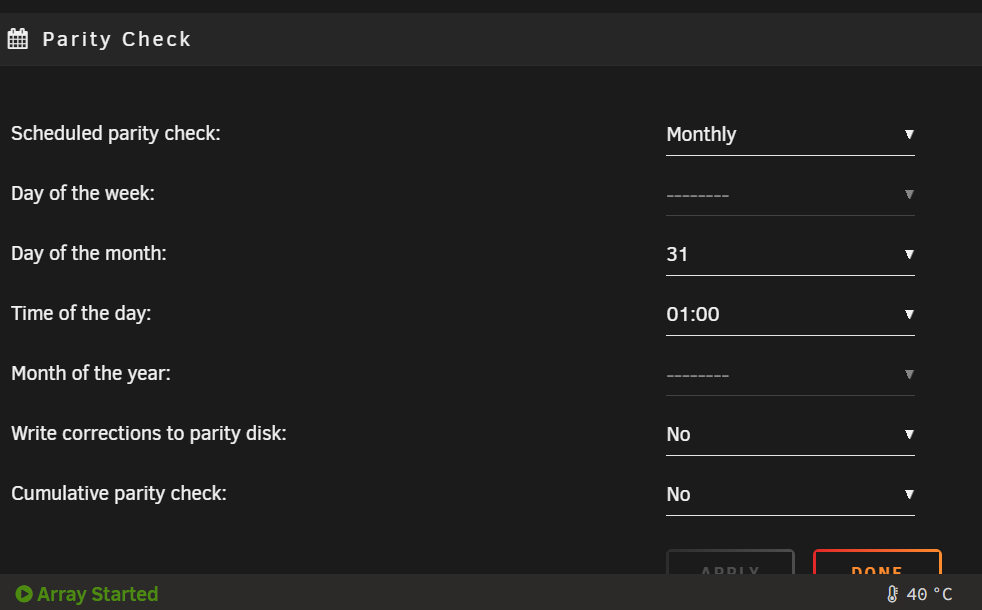
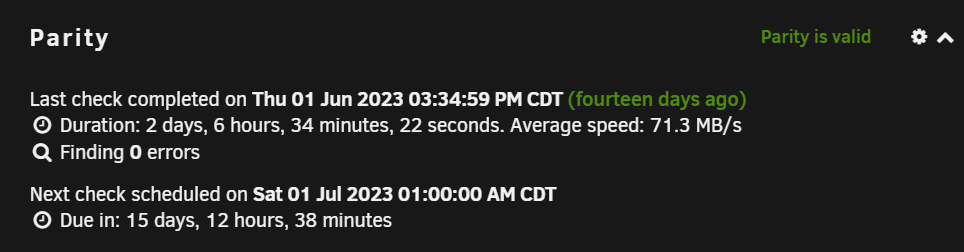
Is this a bug or feature? Gist of my discrete post: I have my Parity Scheduler set to "Monthly" on the "31" at "01:00" am. With these settings, I am expecting a Parity Check to run every other month (months that have a 31st day) at 1am on the 31st. However, on my dashboard in the Parity Check section, it says my next scheduled check is for July 01st at 1am. Thoughts?
-
Can I ask if you have an insight on why a parity check is currently scheduled for July 1st given my current settings? Is that the intended behavior or a bug?
-
That is ideally what I want to happen; but if you look at my first screenshot (from the dashboard), it is scheduled to run on July 1st - despite having the Scheduler set to run only on the 31st. My intended goal is to have a parity check every other month, not monthly.
-
I believe this used to work earlier in the year/late last year but I'm facing an issue now. I want to run the parity check every other month and I configured this by setting the Scheduler to run on the 31st of each month at 1am. However, the dashboard is showing the next parity check for July 1st at 1am. Any ideas?
-
You could try looking into Cloudflare Tunneling. I don't believe that requires any port forwarding. There's a docker container you use to tell cloudflare what your current IP address is.
-
Would this thread help?
-
I don't even remember if I manually set that up. I do use CA Appdata Backup for my containers - suppose I could turn Organizr's backup 'feature' off. I setup Organizr when I first got started with unraid and Appdata backup probably a month later or so (I first learned of unraid in August '22).
-
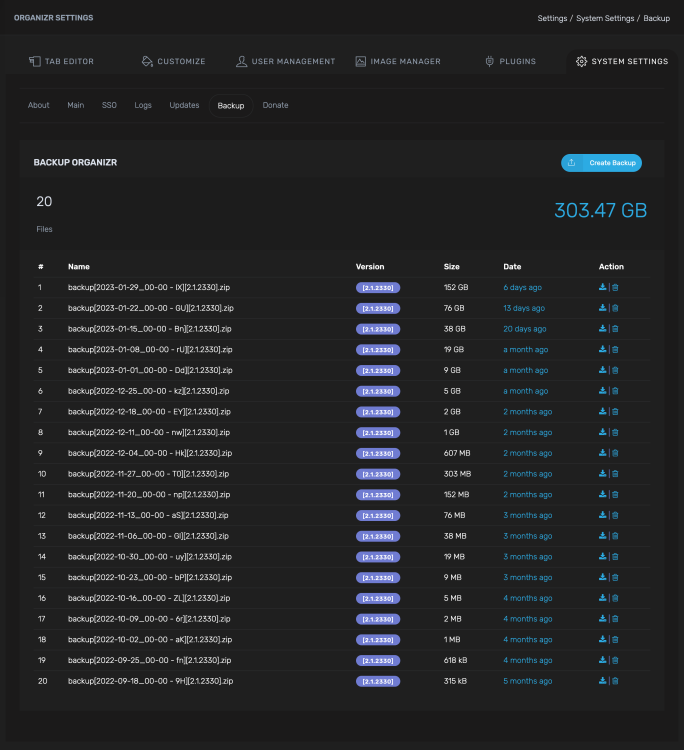
A separate problem here. For some reason, my organizrv2 container is backing up every week and this latest backup is taking up 152gb. Screenshot attached. Not sure why this is... Edit: A few minutes later...I deleted all backups (except my first for...sentimental reasons) and manually created a backup - it was 627 kB. My guess and quick math is that the backups are backing up all previous backups as well. (Add up all those backups and it will roughly equal the size of the latest on, 152gb).
-
Would it make a difference to know that I have another disk of the same male/model/size that I bought at the same time that is connected in the same way? (Hba) which is not experiencing errors Edit 13:15local: I changed the sata data to the mobo port (away from the hba). I also swapped the sata power cable with a different drive (am using 1-2 sata power splitter).
-
Reviving this thread today (Happy New Year!) as my drive again spew out some errors and is now disabled (sector errors?). I had swapped the sata data cable with another drive previously so I think we can rule that. RMA? 520unraid-diagnostics-20230101-0026.zip
-
Full transparency...I started a re-build of that one disk last night after reading other threads..... Followed these steps: https://wiki.unraid.net/Manual/Storage_Management#Rebuilding_a_drive_onto_itself Currently at 49.x% 520unraid-diagnostics-20221219-0841.zip
-
That sounds like best-case scenario, right? I did a system shutdown (plus, unplugged the power) and started it up again but disk still had the red X. I tried "clear stats" but that didn't remove the X. Is re-build the right step?
-
Hello Smart folks, Yesterday, I was transferring a whole bunch of linux iso's from my cache to my arrary when I got notified of disk read errors from my disk 1 (14tb, 9tb used, 4 months old). I stopped the array, ran a short SMART test which came back clean then an extended SMART test which just finished, also clean (almost 20 hours in). Here are my diags and my disk 1 smart report. Is this a replace-drive-kind-of-thing? Or how should I best proceed? Thanks! 520unraid-diagnostics-20221218-1414.zip 520unraid-smart-20221218-1415.zip
-
I'm using this tag: "telegraf:1.20.2-alpine" Here is the post where I was able to fix it:
-
What temp does it overheat at? I was having issues with overheating too and I decided to add these to my rig: NVME Heatsink & 120mm Panteks T30 Fans; since adding them, I rarely get overheating issues (at 41ºC+). As to the mover, it will only transfer at the write speeds of the HDD it's writing to. Read speeds for basically all NVMEs will outperform write speeds for HDD (don't forget your Parity, too, as it will need to write to that drive at the same time). I would say go with what your budget affords. I used to run the 2 500gb 660p's but I found that I would consistently fill up the 500gb forcing a manual mover run so I swapped them with 1tb NVMEs instead.
-
I was having similar issues (random crashes likely from hardware issue) when I got started with Unraid in August (link to post here: I did a memtest on my ram, swapped ram, swapped GPU, added UPS, added SATA Power breakout cables, but nothing fixed it. 10 days uptime is longest I had without a crash. Eventually, I swapped the CPU and Mobo with my main PC and that seemed to fix it! (Old: Ryzen 3600 & MSI X570 | New: Ryzen 5600 & Asus B550-F). My main PC is now running my 'old' cpu and mobo with no issues on windows. I can't say for sure if it was a CPU or Mobo issue as I swapped both at the same time but I can say I haven't had a random crash since. I would recommend testing hardware one at a time. It might take a while but it'll be worth it. I will say, though, that my issues existed since I started with Unraid; your issue seems more spontaneous than mine; not sure.
-
I've been having similar permissions issues but with files in specific folders. Not a real solution to your problem but a temp solution could be to use the "rm" command in the terminal of your server?


