





eschultz
Members
-
Joined
-
Last visited
-
@Tanne I don't see any servers registered under your account. Can you please try signing out and back in again from the avatar in the top right of the Unraid web ui?
-
Expanded disk space so ElasticSearch would stop preventing writes at < 10% free space. Search indexes rebuilt. Tomorrow will be the real test to see if the extra free space fixes it permanently.
-
Hey everyone, this issue with repeated lock outs should now be resolved, you should no longer have to manually delete any cookies.
-
Tapatalk integration should be back online. Please let me know if you still experience issues with tapatalk.
-
Thanks for reporting. Rank icons are now restored. I'll check in to this next, sounds like that theme component reset during the upgrade:
-
On the flash drive, under the 'config' folder you'll need to edit the 'go' file in there.
-
@BasDL Are you still having issues with the webgui connecting to the internet? Which proxy server software are you using?
-
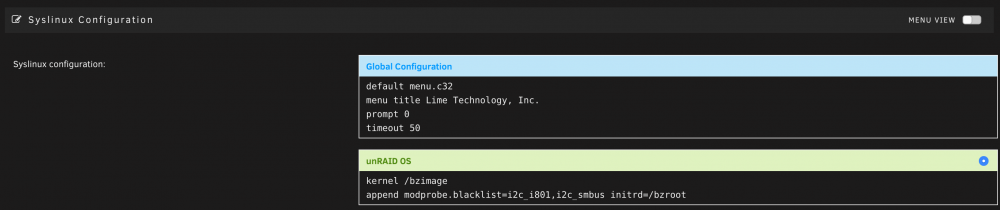
The SMBus most likely is the culprit and has a driver assigned, preventing you from passing through the audio controller (both in the IOMMU group 9). To get around this, you'll need to prevent Unraid from assigning the SMBus driver upon boot by adding "modprobe.blacklist=i2c_i801,i2c_smbus" to your Syslinux configuration append line. Just navigate to this page: https://cronos/Main/Flash?name=flash And modify the green block's append line: Then hit Apply and reboot the Unraid server. Your Windows VM should be able to start after that.
-
Which motherboard or add-on card are you using that has thunderbolt?
-
A new build is ready for internal testing but I haven't upgraded to Catalina yet. Could someone please test it out?: https://s3.amazonaws.com/dnld.lime-technology.com/tools/Unraid.USB.Creator.macOS-1.7.dmg
-
Yeah, get rid of the following from network.cfg: IFNAME[1]="br1" BRNAME[1]="br1" BRNICS[1]="eth1" BRSTP[1]="no" BRFD[1]="0" DESCRIPTION[1]="VMs connections" PROTOCOL[1]="ipv4" USE_DHCP[1]="no" IPADDR[1]="192.168.86.125" NETMASK[1]="255.255.255.0" GATEWAY[1]="192.168.85.1" METRIC[1]="2" Also change SYSNICS="2" to SYSNICS="1" at the end. Then reboot server.
-
Looks like in 6.7 the default route is being set incorrectly to br1 instead of br0. Are you using br1 for anything? It looks like eth1, the link for br1, is disconnected anyways...
-
We actually removed git from 6.7.0 but it'll probably be added in to 6.8
-
Try adding https_proxy in the mix too: http_proxy=http://proxyserver:port https_proxy=http://proxyserver:port /usr/local/sbin/emhttp &
-
This plugin will need to upgrade to using the openvpn-2.4.6-x86_64-2 package since it is compiled to work with the newer versions of openssl. The legacy version of openssl (libcrypto.so) was removed in 6.7.0-rc1.



