





mayberts
Members
-
Joined
-
Last visited
Everything posted by mayberts
-
ah, well that end that project 🤣 time to look for new hardware that can support 12-16 disks Thanks
-
Hello you beautiful people, I'm here to see if any of you have any insight or wisdom that will help me. I have a QNAP ts-1635ax NAS and I would like to install unraid. This unit does not have a HDMI port to I can't connect it to a monitor and get to the BOIS, but according to this I can get to the BIOS using the console interface. I have the console cable connected and I can see the BIOS name and date when it boots up, but I am unable to press ctrl+f1 to change the BIOS as the keyboard isn't active to initial boot. I guess my main questions are Can I get to the BIOS? Can I "activate" the keyboard at boot? Will unraid work on this device? Thanks mayberts
-
So I can benchmark my xfs nvme array now, thank you. I'm currious as to why I can no longer benchmark my btrfs nvme's? I can on diskspeed version :2.9.7
-
I can bench all my drives with version 2.9.7
-
I'm also getting this issue. I recently added 4 500GB nvme drives, with a total of 8 nvme drives. the first four used to bench, now none of them do.
-
Me too, now. Just added a container in unraid.
-
I've not tried, don't have a need for it. I'll be honest, I prefer Librenms and the dashboard is better than Observium.
-
I switched to Observium, easier to setup and no need for a separate sql container
-
@irishjd did you find a solution to this? I am getting the same issue
-
I didn't know that, does it do it a monthly schedule like rollarr? I will have a look at it today
-
looks like the repo is gone. should the docker in the unraid apps still work? it's not working for me, and I am trying to work out if it's a plex issue or Rollarr
-
Hi, I recently installed this plugin and everything was working fine until yesterday. when I go to the IPMI plugin setting I get this error `Fatal error: escapeshellarg(): Input string contains NULL bytes in /usr/local/emhttp/plugins/ipmi/include/ipmi_options.php on line 27` I have rebooted, removed the plugin and reinstalled, nothing seems to work. any ideas on how to fix this? EDIT Fixed. I sshed to the server and edit the ipmi.cfg in /boot/config/plugins/ipmi and removed the username and password fields
-
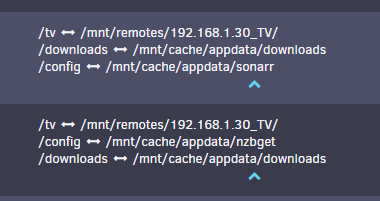
@Squidthank you so much, I had a few things wrong with my mappings. I forgot the specify a download location for NZBGet 🤣 The Docker FAQ was a huge help too. I have attached a screenshot of the new mappings. its working now.
-
Hey, I'm new to Unraid so I will be as detailed as I can. I have recently moved from ESXI and Windows VM's first off I'm not sure if if my issue is with Sonarr or NZBGet, but thought I would start here. I have NZBGet and Sonarr set up and everything is functioning but Sonarr fails on importing the file. I believe this is to do the folder mappings of the containers but unsure on how to troubleshoot and fix. I have looked at several docs and tutorials, but my set up is slightly different to the tutorials. All off my media is on my QNAP NAS and I am using the Unassigned Devices plugin and the media shares are added to Unraid as SMB's for instance my TV shows are \\192.168.1.30\TV I am new to docker and my Windows brain can't work out how to sort the mappings (if that's the issue) Containers: NZBGet /tv - /mnt/remotes/192.168.1.30_TV/ /config - /mnt/user/appdata/nzbget Sonarr /tv - /mnt/remotes/192.168.1.30_TV/ /downloads - /downloads/completed/tv/ /data - /mnt/user/data/ /config - /mnt/user/appdata/sonarr I hope I have explained this enough, if not please let me know. Thanks

