





bombz
Members
-
Joined
-
Last visited
Everything posted by bombz
-
My apologies. That got it, and Mariadb needed one, awesome. Thanks!
-
Gotcha. Not sure where I can select 'check for updates' under the options when you select the icon, it doesn't list that as something to select.
-
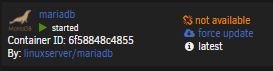
Good day all, I have been using Mariadb for some time and recently I have noticed that on my docker setting page I see the following 'not available' action where it generally says 'up-to-date' <see attached screen> anyone else encounter this concern or know a fix? Thanks
-
Good call here I followed the same instructions 01. crated a new folder appdata/swag 02. copied content from appdata/letsencrypt/ to appdata/swag 03. located swag docker in app store and used the same settings from appdata/letsencrypt/ 04. Applied settings ** note: if you have letsencrypt running and you copy settings the docker will download BUT not start as the same ports for letsencrypt are allocated ** 05. stop letsencrypt docker 06. start swag docker 07. tested container 08. successful
-
You bet! OK, I will plan to work on this update Friday this week and hope everything goes smooth. Thanks for the heads up on Nextcloud, currently I don't have that running, only a few containers at this point. Hope this goes smoothly.
-
Good to know. That was my plan going into it. I was not sure if it would cause other concerns. I suppose I will backup all directories as well as take a copy of my docker.img and move it to a safe place, in case I need to restore back if I run into any concerns.
-
Did you only edit the repository from linuxserver/letsencrypt to linuxserver/swag and start the docker, and everything worked ?
-
Hello, Currently running linuxserver/letsencrypt 'fix common problems' said this is not depreciated and should be updated. I read in the migration notes "As long as you keep the /config folder mapping the same, all your previous config and data will be picked up by the new container" I am going to SSH and backup (copy) /mnt/user/appdata/letsencrypt for safe keeping in case. Before I proceed: 01. what's the best method to backup the dockers in the state their in? < backup the docker.img to another location > that way if it is required to revert and 'start over' the ability to copy and replace is available? 02. can I simply edit the repository from linuxserver/letsencrypt to linuxserver/swag and start the docker and it will push and keep my settings? 03. Am I required to remove letsencrypt docker, then add SWAG, and configure the docker to point at the correct paths, without needing to reconfigure everything? Thanks,
-
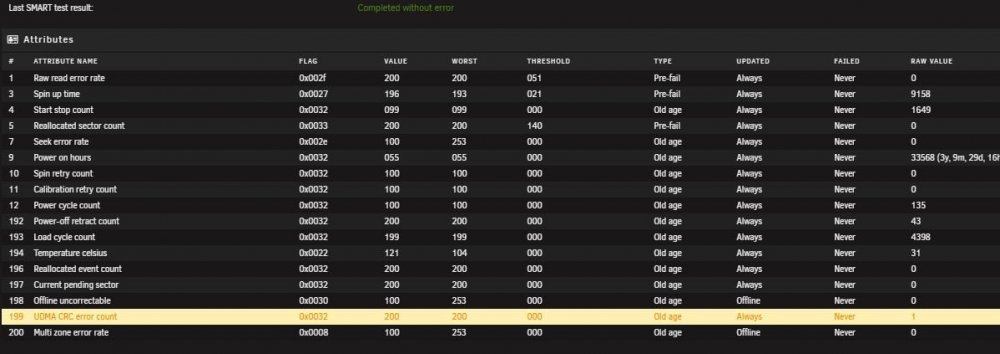
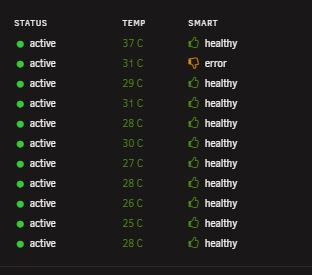
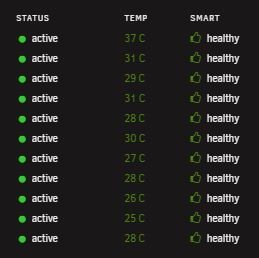
Hello, I have acknowledged the error, which changed from 0 to 1 If the disk trips again that would be concerning to replacing the disk? This disk is on the LSI SAS 9211-8i breakout cable. their not easy cables to swap (I'd have to order new breakout cables). Is it advisable to replace the cable or just the disk (If the errors continue to rise) udma crc error count returned to normal value array health report [PASS]
-
Awesome man! This is great info and good work on your part. I will be attaching another disk soon as I am cleaning up disk currently. I have updated UD as per your recommendation. Appreciate the insight and assistance!
-
I will use SSH to 'umount' for the time being. Seems to work just fine. Weird that I can't via the GUI. Maybe a disk issue, I am puzzled.
-
No problemo. I performed another reboot and attempted to mount and unmount the disk. Unmount is grayed out. I wonder if it is a partition issue with the disk Jun 12 16:57:29 ntfs-3g[8897]: Mounted /dev/sda2 (Read-Write, label "6TBDUMP", NTFS 3.1) Jun 12 16:57:29 ntfs-3g[8897]: Cmdline options: rw,noatime,nodiratime,nodev,nosuid,umask=000 Jun 12 16:57:29 ntfs-3g[8897]: Mount options: rw,nodiratime,nodev,nosuid,allow_other,nonempty,noatime,default_permissions,fsname=/dev/sda2,blkdev,blksize=4096 Jun 12 16:57:29 ntfs-3g[8897]: Global ownership and permissions enforced, configuration type 1 Jun 12 16:57:29 unassigned.devices: Successfully mounted '/dev/sda2' on '/mnt/disks/6TBDUMP'. This disk is a swap disk while i organize data I can always format it when I am done, perhaps that's why it's having a concern.

-
Pass Thru is disabled, never toggled it. Been using UD as I always have. Mount, copy, unmount.

-
I have restarted the server and I can try again later on. Never has been an issue before, started to do it on this disk today however. Mount log: Jun 12 11:57:31 UnRAID unassigned.devices: Successfully mounted '/dev/sdo2' on '/mnt/disks/

-
Hello, I have been using UD often lately as I am cleaning up my disks. Recently I have been able to mount disks, and not unmout them. When they are mounted, the unmount button via the GUI is grayed out and cannot be selected. If i power off the drive, the drive becomes mountable and 'mount' is selectable. However unmount remains grayed out Has anyone ran into this concern before? I cannot pull any logs as the drive is mounted and there is no ability to unmount it, seems strange? Is there a manual method I can use to unmount via SSH?

-
Thank you, and yes, I have had notification setup for years :-)
-
Thanks for your input. I am juggling the thought if I do or don't. Dual parity may be a year out still, to match the 10TB disk. I am often monitoring my server daily if not, weekly, and review SMART, and if there are any error counts within the 'main' tab menu. Generally if I see SMART or errors start to populate (as it has happened in the past) I immediately swap the disk as soon as I can. Trying to think if I burn another 10TB on dual parity setup for the satisfaction and protection. I have some thinking to do on that empty drive bay, as I do have some 4TBs sitting around after this upgrade that are not being used. Never a bad idea to have hot swap available for the current 4s in the array currently. I will think on it. Thanks again!

-
OK. Good to know when running dual parity, both parity disks need to be as large or larger then the largest, so same rules apply. I thought I could get away with a smaller disk as parity2, now thinking about it, that wouldn't make sense. Now the decision time. Do I run single parity, or dual parity, hmm hmm
-
Hello, I have read through some of the posts here and got lost in some of the conversations. Thought to reach out on this topic as I am in the middle of an upgrade. I will try to keep this short and simple Current array size in disk - 11 disk total Current chassis physical drive bays - 12 disk total Parity was upgraded successfully from 6TB to 10TB Disk 3 was upgraded (currently rebuilding) 4TB to 10TB I currently have 1X physical drive bay OPEN for one of the following purposes that I was considering: 01. Dual parity (add another 10TB disk in the future) 02. Data disk (add more storage space) **If i go with option 01, does the second parity disk need to match @ 10TB or can it be 8,6,4,etc?** As there are many experienced users in the community, and what you would recommend? Option 01 or Option 02? Being my array is not large in physical disk (currently 11 disk), would dual party would be worth wild? As disk size in the world today has improved, I am remaining with this chassis at the 12X drive bay limit. Suggestions (if you were me)? Thanks,
-
Thank you for your assistance. I attempted linuxserver version (2015) first and it prompted a server error when I attempted to start it the binhex did not. I can understand the frustration, I knew as soon as I responded the 'smh' was understandable. Copy that on the troubleshooting steps and outlook. Its been a long few days on this. Long story short I made some successful progress tonight, but good things came of it. Continue some more tomorrow.
-
I have setup port forwarding for 80 and 443 -> custom port for letsencrypt letsencrypt is using using a different network 'proxy' Perhaps I am confused and not understanding as I am learning this. Following the video guide nginx was not referenced. reading the troubleshooting guide I was reading about nginx and thought letsencrypt handled what nginx did or does. nginx container needs to run alongside letsencrypt? I will feel terrible if that's the case this is new to me. Also I have been fiddling with letsencrypt restarts too many times that I am now at a standstill as I have received from letencrypt "too many failed authorizations recently" as far as I know I am required to wait up to 1 week before I can try again 😞 binhex nginx is installed 80 > 8080 443 > 8443 Cannot hit nginx from outside the network

-
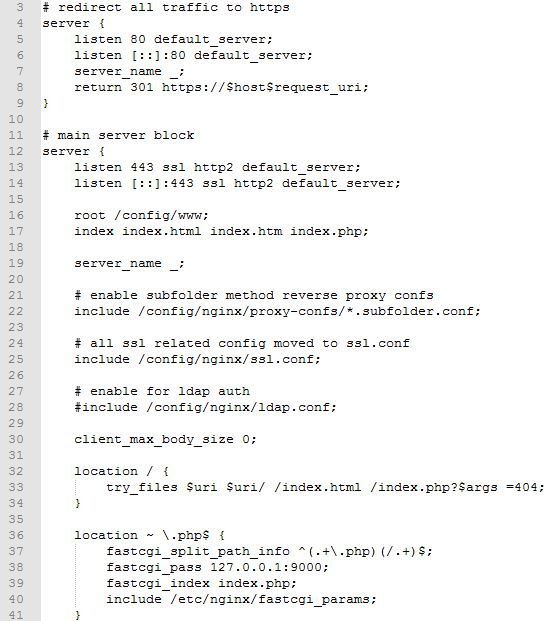
Yes I followed them. I have also completely removed the docker and the files in appdata to start a fresh install. Have the ports and fw rules set, can ping the domain successfully, I can hit the domain service on the direct port with a port forward rule directly to the service. I have rebooted modem and gateway etc. can't seem to get the docker app to talk Still have: http-01 challenge for domainnamehere Cleaning up challenges Some challenges have failed Domain: domiannamehere Type: connection Detail: Fetching http://domainnamehere/.well-known/acme-challenge/long string of data (I do not see this folder anywhere under the letsencrypt folder via SSH) Error getting validation data I have added the default config from letsencrypt/nginx/site-confs/ not sure if this will help there are also no logs being created on /var/logs/letsencrypt - as stated in the error window
-
Thank you, Yes I saw this a few posts back, went over it. Everything seems to be good on that front. I also followed 'Spaceinvader' video tutorial as well
-
I am having the same concern: Error getting validation data I have read a few pages of the thread, and cannot seem to gather why this is happening. Ping urls with no issue port forwarding is enabled. firewall to access ports accordingly. Error Waiting for verification... Challenge failed for domain http-01 challenge for Error getting validation data Has there been any fix to allow this container to work? Would the default config help, I installed this docker fresh, opened my FW wide open to make sure nothing was blocking and not having any success.
-
Thank you for your response. Yes I ended up doing disk level copies. I was looking at this the wrong way, and after moving data where it needed to go, I THEN reorganized my shares. unBALANCED is an AWESOME plugin! Thank you again to this wonderful community. You all kick butt! My gratitude to you all!




