





PhilBarker
Members
-
Joined
-
Last visited
Everything posted by PhilBarker
-
I've just had this exact same issue - I'm going through moving files off of one disk at a time to the rest of the array, then swapping to ZFS The last disk I changed to ZFS, moved all the files off the next disk onto it, when I stopped the array I got the error saying it was the wrong disk. And checking the disk logs the reported size changed after the ZFS format, but the array config obviously didn't update. Not good! Posted a new thread as I'm currently mid-panic and hoping for some help 😱
-
I'm having the exact same issue as here - I've been moving data from my xfs disks around, to clear a disk, swapping to zfs All has been going well - done disk 5, 4 and 3 Just moved everything from disk 2 to disk 3, stopped the array to change disk 2 to ZFS and it's warning me that disk 3 is the wrong disk The logs for disk 3 show that the size has changed Dec 6 17:12:18 Jarvis kernel: ata38: SATA max UDMA/133 abar m2048@0xfbc00000 port 0xfbc00180 irq 70 Dec 6 17:12:18 Jarvis kernel: ata38: SATA link up 6.0 Gbps (SStatus 133 SControl 300) Dec 6 17:12:18 Jarvis kernel: ata38.00: ATA-10: WDC WD60EDAZ-11U78B0, 80.00A80, max UDMA/133 Dec 6 17:12:18 Jarvis kernel: ata38.00: 11721045168 sectors, multi 16: LBA48 NCQ (depth 32), AA Dec 6 17:12:18 Jarvis kernel: ata38.00: Features: NCQ-prio Dec 6 17:12:18 Jarvis kernel: ata38.00: configured for UDMA/133 Dec 6 17:12:18 Jarvis kernel: sd 39:0:0:0: [sdh] 11721045168 512-byte logical blocks: (6.00 TB/5.46 TiB) Dec 6 17:12:18 Jarvis kernel: sd 39:0:0:0: [sdh] 4096-byte physical blocks Dec 6 17:12:18 Jarvis kernel: sd 39:0:0:0: [sdh] Write Protect is off Dec 6 17:12:18 Jarvis kernel: sd 39:0:0:0: [sdh] Mode Sense: 00 3a 00 00 Dec 6 17:12:18 Jarvis kernel: sd 39:0:0:0: [sdh] Write cache: enabled, read cache: enabled, doesn't support DPO or FUA Dec 6 17:12:18 Jarvis kernel: sd 39:0:0:0: [sdh] Preferred minimum I/O size 4096 bytes Dec 6 17:12:18 Jarvis kernel: sdh: sdh1 Dec 6 17:12:18 Jarvis kernel: sd 39:0:0:0: [sdh] Attached SCSI disk Dec 6 17:13:20 Jarvis emhttpd: WDC_WD60EDAZ-11U78B0_WD-WX22D70KRVPJ (sdh) 512 11721045168 Dec 6 17:13:20 Jarvis kernel: mdcmd (4): import 3 sdh 2048 5860521540 0 WDC_WD60EDAZ-11U78B0_WD-WX22D70KRVPJ Dec 6 17:13:20 Jarvis kernel: md: import disk3: (sdh) WDC_WD60EDAZ-11U78B0_WD-WX22D70KRVPJ size: 5860521540 Dec 6 17:13:20 Jarvis emhttpd: read SMART /dev/sdh Dec 8 03:20:42 Jarvis emhttpd: spinning down /dev/sdh Dec 8 04:01:47 Jarvis emhttpd: read SMART /dev/sdh Dec 8 22:59:21 Jarvis emhttpd: read SMART /dev/sdh Dec 8 22:59:42 Jarvis emhttpd: WDC_WD60EDAZ-11U78B0_WD-WX22D70KRVPJ (sdh) 512 11721045168 Dec 8 22:59:42 Jarvis kernel: mdcmd (4): import 3 sdh 2048 5860521540 0 WDC_WD60EDAZ-11U78B0_WD-WX22D70KRVPJ Dec 8 22:59:42 Jarvis kernel: md: import disk3: (sdh) WDC_WD60EDAZ-11U78B0_WD-WX22D70KRVPJ size: 5860521540 Dec 8 22:59:42 Jarvis emhttpd: read SMART /dev/sdh Dec 11 06:44:23 Jarvis emhttpd: spinning down /dev/sdh Dec 11 08:08:45 Jarvis emhttpd: read SMART /dev/sdh Dec 11 11:01:58 Jarvis emhttpd: read SMART /dev/sdh Dec 11 11:02:16 Jarvis emhttpd: WDC_WD60EDAZ-11U78B0_WD-WX22D70KRVPJ (sdh) 512 11721045168 Dec 11 11:02:16 Jarvis kernel: mdcmd (4): import 3 sdh 2048 5860521540 0 WDC_WD60EDAZ-11U78B0_WD-WX22D70KRVPJ Dec 11 11:02:16 Jarvis kernel: md: import disk3: (sdh) WDC_WD60EDAZ-11U78B0_WD-WX22D70KRVPJ size: 5860521540 Dec 11 11:02:17 Jarvis emhttpd: read SMART /dev/sdh Dec 11 11:04:18 Jarvis emhttpd: shcmd (352990): /sbin/wipefs -af /dev/sdh Dec 11 11:04:18 Jarvis root: /dev/sdh: 8 bytes were erased at offset 0x00000200 (gpt): 45 46 49 20 50 41 52 54 Dec 11 11:04:18 Jarvis root: /dev/sdh: 8 bytes were erased at offset 0x57541e95e00 (gpt): 45 46 49 20 50 41 52 54 Dec 11 11:04:18 Jarvis root: /dev/sdh: 2 bytes were erased at offset 0x000001fe (PMBR): 55 aa Dec 11 11:04:18 Jarvis emhttpd: writing GPT on disk (sdh), with partition 1 byte offset 32KiB, erased: 0 Dec 11 11:04:18 Jarvis emhttpd: shcmd (352991): sgdisk -Z /dev/sdh Dec 11 11:04:19 Jarvis emhttpd: shcmd (352992): sgdisk -o -a 8 -n 1:32K:0 /dev/sdh Dec 11 11:04:20 Jarvis kernel: sdh: sdh1 Dec 12 20:51:22 Jarvis emhttpd: read SMART /dev/sdh Dec 12 20:51:41 Jarvis emhttpd: WDC_WD60EDAZ-11U78B0_WD-WX22D70KRVPJ (sdh) 512 11721045168 Dec 12 20:51:41 Jarvis kernel: mdcmd (4): import 3 sdh 64 5860522532 0 WDC_WD60EDAZ-11U78B0_WD-WX22D70KRVPJ Dec 12 20:51:41 Jarvis kernel: md: import disk3: (sdh) WDC_WD60EDAZ-11U78B0_WD-WX22D70KRVPJ size: 5860522532 Dec 12 20:51:42 Jarvis emhttpd: read SMART /dev/sdh Dec 12 20:52:18 Jarvis emhttpd: WDC_WD60EDAZ-11U78B0_WD-WX22D70KRVPJ (sdh) 512 11721045168 Dec 12 20:52:18 Jarvis emhttpd: read SMART /dev/sdh Dec 12 20:52:22 Jarvis emhttpd: WDC_WD60EDAZ-11U78B0_WD-WX22D70KRVPJ (sdh) 512 11721045168 Dec 12 20:52:22 Jarvis kernel: mdcmd (4): import 3 sdh 64 5860522532 0 WDC_WD60EDAZ-11U78B0_WD-WX22D70KRVPJ Dec 12 20:52:22 Jarvis kernel: md: import disk3: (sdh) WDC_WD60EDAZ-11U78B0_WD-WX22D70KRVPJ size: 5860522532 Dec 12 20:52:22 Jarvis emhttpd: read SMART /dev/sdh Dec 12 20:53:03 Jarvis emhttpd: WDC_WD60EDAZ-11U78B0_WD-WX22D70KRVPJ (sdh) 512 11721045168 Dec 12 20:53:03 Jarvis emhttpd: read SMART /dev/sdh Dec 12 20:53:08 Jarvis emhttpd: WDC_WD60EDAZ-11U78B0_WD-WX22D70KRVPJ (sdh) 512 11721045168 Dec 12 20:53:08 Jarvis kernel: mdcmd (4): import 3 sdh 64 5860522532 0 WDC_WD60EDAZ-11U78B0_WD-WX22D70KRVPJ Dec 12 20:53:08 Jarvis kernel: md: import disk3: (sdh) WDC_WD60EDAZ-11U78B0_WD-WX22D70KRVPJ size: 5860522532 Dec 12 20:53:08 Jarvis emhttpd: read SMART /dev/sdh Dec 12 20:55:07 Jarvis emhttpd: WDC_WD60EDAZ-11U78B0_WD-WX22D70KRVPJ (sdh) 512 11721045168 Dec 12 20:55:07 Jarvis emhttpd: read SMART /dev/sdh Dec 12 20:57:54 Jarvis emhttpd: WDC_WD60EDAZ-11U78B0_WD-WX22D70KRVPJ (sdh) 512 11721045168 Dec 12 20:57:54 Jarvis kernel: mdcmd (4): import 3 sdh 64 5860522532 0 WDC_WD60EDAZ-11U78B0_WD-WX22D70KRVPJ Dec 12 20:57:54 Jarvis kernel: md: import disk3: (sdh) WDC_WD60EDAZ-11U78B0_WD-WX22D70KRVPJ size: 5860522532 Dec 12 20:57:54 Jarvis emhttpd: read SMART /dev/sdh Dec 12 20:58:19 Jarvis emhttpd: WDC_WD60EDAZ-11U78B0_WD-WX22D70KRVPJ (sdh) 512 11721045168 Dec 12 20:58:20 Jarvis emhttpd: read SMART /dev/sdh Yesterday it was reporting as 5860521540 and then after the zfs format it's reporting as 5860522532 but the array config is now saying this is the wrong disk! I am extremely nervous now because there's been a lot of files moved around over the last few days during my zfs conversion, and changing of filesystems. The parity should be fine, but I'd really rather not let it rebuild the disk from parity over what's on there in case I lose everything! Is there any way at all that I can just fix the array config, and tell it that it really is the correct disk and then after it's mounted I can do a parity check? Any help very much appreciated at this point jarvis-diagnostics-20231212-2114.zip

-
Overview: Support for Docker image mattwebbio/orbital-sync which can synchronise a master pihole container on Unraid to a single or multiple slave pihole instance (either virtualised or physical on Raspberry PI). Docker Hub: https://hub.docker.com/r/mattwebbio/orbital-sync GitHub: https://github.com/mattwebbio/orbital-sync No credit is taken for this excellent application, I spent days trying to find a nice solution without SSH/Rsync capability in the pihole container, this works perfectly as it connects to the admin interface, creates a backup using the inbuilt "teleporter" then imports the backup into the slaves. You can also setup notifications if you want to be notified on success/failure. Expectations: This container will run when started, perform a synchronisation, then wait for x minutes (as specified by a container variable). It will run every x minutes until stopped. 12/9/2023, 11:12:20 PM: ➡️ Signing in to http://192.168.1.xxx/admin... 12/9/2023, 11:12:20 PM: ✔️ Successfully signed in to http://192.168.1.xxx/admin! 12/9/2023, 11:12:20 PM: ➡️ Downloading backup from http://192.168.1.xxx/admin... 12/9/2023, 11:12:20 PM: ✔️ Backup from http://192.168.1.xxx/admin completed! 12/9/2023, 11:12:20 PM: ➡️ Signing in to http://192.168.1.yyy/admin... 12/9/2023, 11:12:20 PM: ✔️ Successfully signed in to http://192.168.1.yyy/admin! 12/9/2023, 11:12:20 PM: ➡️ Uploading backup to http://192.168.1.yyy/admin... 12/9/2023, 11:12:26 PM: ✔️ Backup uploaded to http://192.168.1.yyy/admin! 12/9/2023, 11:12:26 PM: ➡️ Updating gravity on http://192.168.1.yyy/admin... 12/9/2023, 11:12:28 PM: ✔️ Gravity updated on http://192.168.1.yyy/admin! 12/9/2023, 11:12:28 PM: ✔️ Success: 1/1 hosts synced. 12/9/2023, 11:12:28 PM: Waiting 30 minutes... Logs This container logs to stdout. To see the logs you will have to execute the docker logs command. docker logs OrbitalSync or use the logs link from Unraid gui.
-
Exact same issue here File downloaded - `Samsung_SSD_870_EVO_SVT02B6Q_Win.iso` Followed all 7z commands - cd into ./root/fumagician, chmod +x, run it and get the error that the firmware files aren't in the correct path did anyone manage to fix this?
-
https://forums.unraid.net/topic/129124-run-keeps-filling-up-due-to-log-file/ This ^^
-
Just had this issue this morning Seemed to be the Plex container writing a ton of info logs {"level":"info","msg":"Using low-level runtime /usr/bin/runc","time":"2023-06-10T08:17:17+01:00"} {"level":"info","msg":"Running with config:\n{\n \"AcceptEnvvarUnprivileged\": true,\n \"NVIDIAContainerCLIConfig\": {\n \"Root\": \"\"\n },\n \"NVIDIACTKConfig\": {\n \"Path\": \"nvidia-ctk\"\n },\n \"NVIDIAContainerRuntimeConfig\": {\n \"DebugFilePath\": \"/dev/null\",\n \"LogLevel\": \"info\",\n \"Runtimes\": [\n \"docker-runc\",\n \"runc\"\n ],\n \"Mode\": \"auto\",\n \"Modes\": {\n \"CSV\": {\n \"MountSpecPath\": \"/etc/nvidia-container-runtime/host-files-for-container.d\"\n },\n \"CDI\": {\n \"SpecDirs\": null,\n \"DefaultKind\": \"nvidia.com/gpu\",\n \"AnnotationPrefixes\": [\n \"cdi.k8s.io/\"\n ]\n }\n }\n },\n \"NVIDIAContainerRuntimeHookConfig\": {\n \"SkipModeDetection\": false\n }\n}","time":"2023-06-10T08:17:22+01:00"} it's writing this into log.json over and over until it runs out of space in my case in here /run/docker/containerd/daemon/io.containerd.runtime.v2.task/moby/ee915362cd78cd496a851176c392358304b634dd99e244d1700b5c2b825e06dc/log.json I have deleted the log.json file for now and it's recreated it - buys some time I have to go out but when I get back home I'll see if I can work out what's going on
-
Same issue here - have to restart unraid-api every day
-
There's a big difference between opening up the plex port for sharing your legally purchased media and opening up the main web port so you can access the unraid admin panel remotely. I'd never even consider doing that - as others have said you can use a VPN for that or personally I use tailscale. The tailscale client installs on my phone, laptop etc... and I can access my unraid admin panel from anywhere securely if I need to (not that I ever have had to). These kind of hacks are usually not that smart and are just scanning IP's looking for an unraid server to respond. If you've only got plex ports open you've not got much to worry about.
-
I am so confused. So you're no longer using an ASM1166 card - you're using a SAS card. In that case the firmware is irrelevant and if the SAS card isn't detected you have a different issue.
-
As has been said it's highly unlikely the 8 port card will work as it uses a port multiplier. The very first post in this thread recommends the ASM1166 6 port card. I've linked the one I have and it works fine. Most 6 port ASM1166 cards work fine. And also previously discussed is that the silverrstone firmware applies fine to generic cards, I've upgraded mine, I've even written a blog post about it https://docs.phil-barker.com/posts/upgrading-ASM1166-firmware-for-unraid/ I'm afraid if you ignore all the advice on which card to buy, and buy an 8 port instead of a 6 port, and don't read the previous posts - you're going to continue having bad times
-
Let me try that again Mzhou SATA Card
-
This is the exact one I got. I think I’ve linked it before somewhere but maybe not here. http://MZHOU PCIe SATA Card 6 Ports 1X PCIe SATA Expansion Card - 6 Gbps SATA 3.0 PCI Express Card - SATA Controller Expansion Card with 6 SATA Cables and Low Profile Bracket (Chipset ASM1166) https://amzn.eu/d/epDumJc It’s gone up in price since I got it though 😔
-
That solved the master container. All child containers permanently show as needing update. I’ve set the warning to be ignored for now
-
I'm afraid to say I literally ordered cheap ASM1166 6 port card from amazon. It arrived. I plugged it in - all hard drives detected and worked fine.
-
They're not fakes - they're old 2nd hand units from stripped down servers in China In the case of "unopened new" they are likely spares kept on-site for server support that were never used. Check the other listings - genuine Dell ones, tons to choose from. They don't exactly hold a massive value because they were fitted to so many rack servers that are now decommissioned and stripped for parts. Like buying xeon CPU's for peanuts these days.
-
Also cost shouldn't be too much of an issue - you can get something like this if you have an x8 or x16 pci slot free LSI 9223 9200 9240-8i HBA FW:P20 9211-8i IT Mode ZFS FreeNAS unRAID 2* SFF SATA For £33 which isn't much more than the cheap ASM cards on amazon
-
Yep, stick to 6 port for ASM1166 - I only use it because my only free PCI slot is a 1x slot so I can't really run a proper card. I'm planning in the future to ditch my A320 board for an X570 with 8 SATA ports when I can spare the money. That will mean I can use on-board sata for all my current disks, but expanding in the future I can go LSI instead of relying on the cheap ASM boards.
-
That's so weird I don't have that board I have a Gigabyte A320 But I ordered a card from Amazon and it had the Marvell 88SE9215 chip. It seemed to work but I hadn't read this thread to see the warning. Randomly it just seemed to power down and all disks connected to it vanished. They didn't get corrupted or anything they just disappeared and I had to reboot. I sent it back and got the ASM1166 6 port version (it's an MZHOU card I have) and it has been bulletproof ever since. Only issue I had was enabling power saving features but as said earlier after I upgraded the firmware it's worked perfectly with that too
-
Yes of course
-
Yeah it's easy to do just takes some piecing together of info scattered around I've added a quick guide to my docs site just really for future reference https://docs.phil-barker.com/posts/upgrading-ASM1166-firmware-for-unraid/
-
Cheap copy here, upgraded firmware with the Silverstone firmware, zero issues
-
The firmware is a lottery too I bought a card end of last year. The firmware was 4 years old. ASM1166 Since upgrading the firmware the speed has improved massively and it’s working fine with power management too
-
Just wanted to say a massive thank you for everything you do. I wanted to get sys temps monitored but couldn't because I have a gigabyte board with the IT8686E chip I tried searching everywhere and couldn't find anywhere to make it work with linux. I should learn to look at the plugins first! Works perfectly, thanks for all the great work!
-
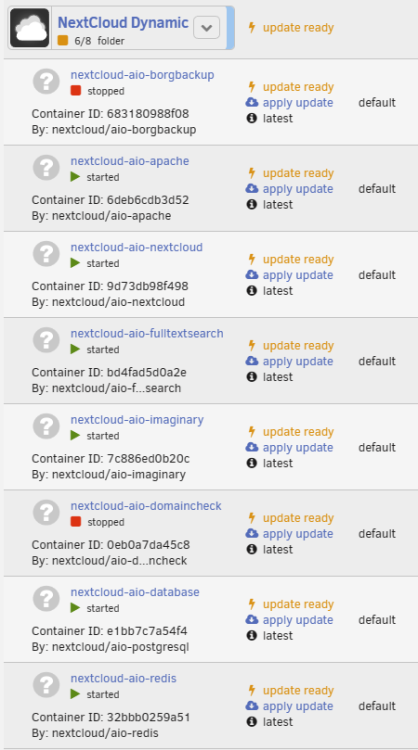
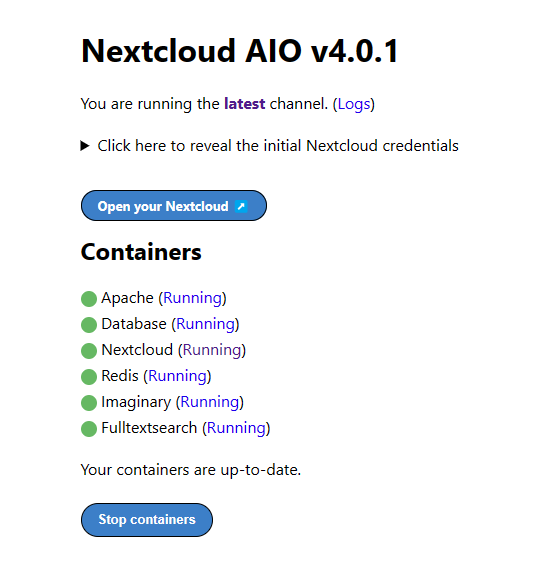
I have nextcloud on my unraid - I use nextcloud AIO as I found it far faster and more stable than a manual install. Nextcloud AIO is a master container that spins up service containers (8 of them), it handles updates of the service containers itself and offers full backup through borgbackup. Unraid keeps showing ALL of the service containers as "update ready" although there isn't and this is managed by the master container anyway. I looked around to see if there's any way to exclude some containers from the update check as the noise from notifications becomes annoying but I couldn't find anything - did I miss an option? Thanks in advance
-
I'll stick ubuntu on a usbstick and try it - though I would expect the SATA controllers to have ASPM enabled, seeing as my PCIe sata expansion card has them enabled and the chipset sata controller has the exact same capabilities




