





SomeoneOnLine
Members
-
Joined
-
Last visited
Everything posted by SomeoneOnLine
-
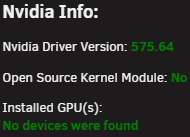
Sorry if this has been asked/discussed already. I have an RTX 4070 Super (ASUS Dual) running on my UnRaid Box and about every 6 or so days the GPU seems to disappear from the "Installed GPU(s)" list when viewing the NVidia-Driver plugin. Rebooting seems to fix it for another 6 or so days then I have to rinse and repeat. This has been an issue for the last few versions of UnRaid going back to I think maybe 7.0 or so. I am not running the OpenSource version (for no particular reason). I can switch if that's the actual fix. What the functional difference between the opensource version and the other one? I only use the GPU in docker containers. No VMs use/need the GPU. Am I the only one seeing this? Any suggestions? Mobo : ASUS Pro-WS-X570-ACE (Workstation Motherboard) GPU : ASUS Dual NVidia RTX 4070 Super (Single GPU) UnRaid : 7.1.4 NVidia Driver : 575.64
-
Thanks. This could come in handy. Ima check it out.
-
HA. Thats good to know. I kinda figured/hoped that by just hitting shutdown it would but never really tested it. but either way its good to know that it will attempt to stop all needed services as cleanly as it can. thanks again for clarification.
-
Thanks. I guess I was thinking there would be more options of sorts to fine tune stopping docker and vms, the array itsself, and shutting down the box. This particular subject (NUT) is kinda sorta new to me so im trying to learn a few things while not frying my rig! My initial thinking/worry is that I could lose power while I'm not home and was hoping that the ups would tell unraid to as gracefully as it can stop everything then power off. My bios has options to have the mobo post after power failure etc.. I just dont know in what order it does what.
-
So i recently purchased a new APC 1500M2 UPS for my unraid server. Hooked it up and have got it to the point of showing the stats and such of the battery etc.. I guess now what I am trying to understand is how I can make sure that if and when the battery gets to a certain % or something it either runs a script of sorts or at least lets met tell it to Stop all Docker Containers, VMs etc.. (as cleanly as you can), then unmount the array, then shutdown/power off. I dont want it to get stuck in some kind of power off/on loop etc.. How can I tell it to stop dockers, vms, unmount array etc, then shutdown? Many Thanks!
-
Thanks! Thats what I was hoping to hear. Just wanted to make sure. Thanks again!
-
So I have noticed that at times when I look at my Parity Drive's they have different Write Values. If Parity writes are getting made to 1 drive shouldn't they be made to the other drive? They never seem to line up unless I reboot, even then they eventually get out of sync. Should I be worried?

-
Thanks for the reply. Im not so much trying to keep my unraid server powered up for extended periods of time when on UPS Power. Im mainly looking to make sure that when and if I lose AC power to my unraid server it does a clean proper shutdown of all services (docker and VMs, Array) and power off my server to avoid hardware issues. Is there a plugin/app or way to have unraid run a script if AC power is lost or UPS/DC power is at x%? Thanks in advance for any guidance! ~SOL
-
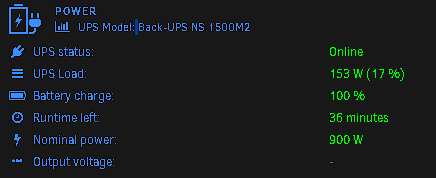
So I finally purchased a brand-new APC/UPS "Back-UPS NS 1500M2" for my unraid server. Its been long overdue. UnRaid seems to see it just fine via the USB cable. I just want to make sure that in the event that the batterie in my UPS get to x% it starts a shutdown of both Docker and my VMs and then Stops the Array and Shutdown cleanly. It seem as though the default values just shutdown the OS and dont cleanly stop Docker,VM,Array before shutting down the OS. Is there a script of sorts that I can have unraid run when the APC/UPS batterie get to a certain %? to properly stop Docker, Then VMs then Unmount the Array then Shutdown the UnRaid OS? The attached Screenshot is my UnRaid Server at idle~ plugged into the APC/UPS.
-
Just came across this thread. Good to know its not just me. My server seems to be locking up or something every few days or so. Then all of a sudden without doing anything its just fine. Rebooting doesnt seem to matter. Also "Fix Common Issues" plugin seems to be broken as well. Haven't even looked into that yet.
-
ok. thanks.
-
So I am somewhat new to Unmatic. Coming from a somewhat new but basic understanding of Tdarr on unraid to convert my movie library to x265. I am evaluating Unmatic and even setup a patreon account to donate a little somethin something for the dev efforts. However I am able to get it to work and its already converting some movies just fine (re-encoded about 30 or so movies already) it looks like when I click on the Datapanel (after I installed the plugin) I get an error popup. Anyone know what this means? Im running on unraid 6.12.4 At the end of the day I am looking to see how much actual space is saved etc.. after conversion of movies etc.. Unmatic Version: 0.2.4~7339f8b from Unraid plugin store

-
So frustrating with this darn error. it seems to be if I leave a browser session open on the main dashboard it causes this error but cant be for sure. I have to reboot like ever few days. super frustrating.
-
Someone on reddit recommended I do a xfs repair on the disk1. I did. and after what looks like fixing trillions of lines/files/etc...and rebooting everything like normal its all back to life. now I just need to spot check it all some more. but on the surface its looking promising.
-
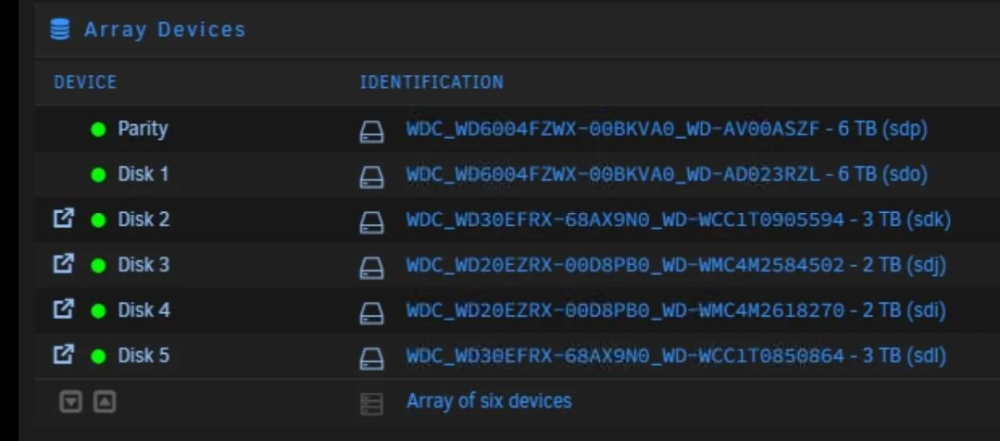
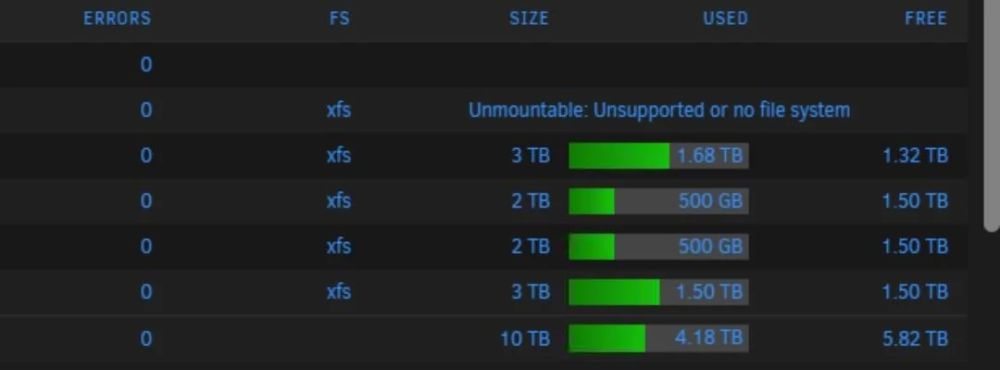
So I had a drive go TU in my array. Lucky I have at least a single parity drive. I did the below which now the drive shows green with no errors it still shows it's unmountable as it not formatted. It looks like it wants me to format it which I have not done yet. Basically I have not replaced the failed drive yet. I plan to just not right now. the below completed without error (rebuilding data) took 15h. Stop the array, unassign the disk, start the array in maintenance mode, stop it again, reassign the drive to the same slot. The idea is to start the array temporarily with the drive “missing” so it changes from “disabled” to “emulated” status, then to stop it and “replace” the drive to get it back to “active” status. I understand that I should replace the drive and I will here soon but..... Basically all the content on drive1 doesn't show in my array ever since it failed. Im not sure what all happened. I never formatted the failed drive once it failed and went into disabled state. I just re-added it to the array and let it do a rebuild. rebuld finshed but looks like it still not mountable as the drive has no fs on it. but the picutres makes it look like its still XFS. Im confused. Is the data lost? The parity drive seems fine. Prior to the drive failure, it was a 15TB array. now it shows as a 10TB array! Is the data from Disk 1 lost?
-
All though I haven't tried this plugin.....yet. I definitely will be once I get back on land in a few days. Thanks for this. Now to see if and when someone can make a headscale plugin to pair up with this plugin. Thanks for this! ~SOL
-
Thank you! That is what I was hoping and thinkg was the case. I was just looking to verify.
-
Can someone point me in the direction and or maybe explain how performing a Parity Check while updating/writing data to the array works? I think I understand that a Parity Check is more or less a "verify process" more than a ""correct or fix process" where you might otherwise write new data to the array. When I'm reminded of Scheduled Parity Checks I tend to get paranoid about new data being randomly written to the array by misc docker containers and or guest vms etc... It seams like "Parity Corrections" are more or less "on the fly as detected" rather than during a Parity Check Process? like, If a manual or scheduled Parity Check starts and somewhere about 35% or so parity check complete, I update and or write new data to the array, is the parity check effected at all? What if it checks a parity bit that I or a docker happen to be updating at the time? How does parity check now its valid or not other than being a 0 or 1 in the checking process? How does Parity checking and or "writing corrections" work when performing a Parity Check? Thanks for any info that can be provided! ~SOL
-
Just checking back in! The VM I rebuilt from scratch has been up without issues (idle most of the time) since friday and all is stable with unraid host and the vm. I have 5 different VirtioFS mounts in Windows 11 Pro 22H2 guest vm. I also have memoryBacking enabled as per requirements to get mounts to work in windows. I didnt tweak anything really at all in guest os. im sure that helps as I can get carried away at times in misc windows tweaks. ~SOL
-
I actually just re/built from scratch about 2 hours ago a new win11 guest vm on my unraid host because my last one was locking up and or seizing up all cpu's attached to the guest. I tweaked the heck out of the guest os, so I wasnt sure if it was my tweaking things too much or one or many of the mounted shares via VirtioFS. il share back in a few days or so if mine locks up or not. But if others are having same behavior then I'm not gonna hold my breath! ~SOL
-
what about if you boot into GUI mode and access via localhost? Maybe an old DNS or cached entry in browser? what unique URL (old format) you referring to?
-
Discovered Something I thought I would share, If you find that some EXEs will not run directly from a mounted share in Windows, in particular, EXEs that require Admin Rights to run. Make sure that the Windows Service "WebClient" is Running. If not set it to Automatic and Start it. This was the case for me on a Windows 11 VM. Milage May Vary! Google-Fu, To The Rescue! Error 0x800704b3 when launching application from HFS+ volume
-
NICE! I just updated one of my win11 vms. gonna see if its more stable then previous releases. now if I could only figure out how to change the drive letter that gets assigned to the mount point!
-
Im a few months into using unraid. I like it. a lot. However I have found that with between me learning unraid and how/where it stores its appdata stuff, I found that my appdata folder(s) are scattered all over the place depending on when I made what change in global settings or each container, let alone whatever location the container auth has predefined. Which brings me to point, I installed this plugin. played with it for a min. I like it. It did backup the folders I expected it to but I had to run the backup 3 times where I manually changed the source path to the various different docker appdata locations. Is there a way to scriptomagically or chronomagically run the backup at the same time to include the various source paths? Im learning that before I startup a docker container for the first time I need to make sure that the container paths are where I want them to be vs their default values!



