





PetabyteLDA
Members
-
Joined
-
Last visited
Everything posted by PetabyteLDA
-
Hi, It's not working yet, but I'm trying to fix it... Check https://forums.unraid.net/topic/196049-support-mrfroggys-repository/ The template for Joomla CMS is already working fine.
-
This is the location for MrFroggy's Repository Support on Github GitHub: https://github.com/JoelFrojmowicz/UnRAID-Templates Any questions regarding installation of configuration for any of the docker containers maintained at this repository must be posted here. Application Name: Joomla! CMS Application Site: https://www.joomla.org/ Docker Hub: https://hub.docker.com/_/joomla Documentation: https://docs.joomla.org/ Other: Docker container for Joomla! CMS. A separate database must be configured before installing. Application Name: Tianji Application Site: https://tianji.dev/ Docker Hub: https://hub.docker.com/r/moonrailgun/tianji Documentation: https://github.com/msgbyte/tianji Other: Docker container for Tianji. A separate database (Postgres) must be configured before installing.
-
After updating everything was working fine with NUT plugin until I noticed this on the footer. Before the upgrade to 7.2.0 the footer was exactly that but the NUT data was on the left, not on the right. Is it possible to put it back where it was before the upgrade? Regards from Portugal!

-
-
Why not running HAOS inside Unraid as a VM? I used to have HAOS in a separate NUC but now I have everything in just one box! I know UnRAID VM engine is not the fastest, but for HAOS is more than enough. Today I have 5 VMs (HAOS, Kali Linux, Debian Linux, SAP 7.52 SP4, Windows 11). And all works just fine. Now with a NUC free for other usage, I converted the NUC to be a console game center for my kids.
-
Well, what can I say... I use It for everything (all of the above and more)! 5 VM's (HASSOS, Kali Linux, Debian Linux, SAP 7.52 SP4, Windows 11) About 50+ docker containers Backup Server for all my devices at home Media Server for all my photos and videos Media Server for all my movies, TV Shows, concerts and music Productivity server for all my personal and work files Personal AI Server VPN Server NUT Server - Power surge (connected to an UPS) - Shutdown other PCs and devices and then shut down itself Well, it's just amazing what UnRAID can do. I just love it!
-
This is way overkill. But it all depends on what are you going to do with the server... In my case, I'm running 50+ containers (including Plex) and about 10 VMs with an Intel I5-14500 and 128GB RAM. Everything runs smoothly. I would throw a 10Gbit NIC into the build instead of Ryzen 9.
-
Try to uninstall and install it again.
-
Welcome!
-
Just check some pages back. I had the same error and help was provided in this forum to fix it. Just uninstall the plugin and install it again. Configuration is not deleted during uninstall.
-
Now it's on the latest version. Configuration was kept intact. Thank you for your support!
-
I've deleted the 2024 folder but the problem with the update persists...
-
I don't know if this helps, but I just noticed, I've 3 directories in /boot/config/plugins related to "Disk Location". Is this normal?

-
Yeah, it says it only occurs when we install the plugin manually. This was not my case. I've installed using CA APPS. The only plugin I've installed manually was the "Folder View" for UnRAID 7. Do I need to do the same procedure? Uninstall and install again? Is there any way to keep the existing configuration?
-
I can't get this version... Is this normal? UnRAID can't check for newer version of this plugin. I'm on version 7.0.1.

-
Now it's working on version 7. Steps on how to install new version: - Make backup of your configurations (Docker and VM); - >>>> Uninstall Folder View <<<<< - Copy the files as described on https://github.com/VladoPortos/folder.view/tree/main - Manually Install as described on the link above.
-
Hi, I would like to make a suggestion for a new feature in the upcomming releases of "Dynamix Auto Fan Control": - Add a new field in the configuration to set a fan name. - Display the fan name in the bottom bar of UnRAID. Instead of the "flag" icon, the fan name could be displayed. Thanks for your amazing work making these amazing plugins available to all of us! Regards,

-
The red light is not flashing and it's not only one led, there are 3 fixed red lights near the power connector of the GPU card. Yes, I was already planning on installing the graphics card in my Windows 11 rig to make sure if the problem is the card. But I think it is... As the card was working for several monhts normally in my UnRAID rig and making no sound at all. And suddenly after upgrading to 7.0.1 this issue started. But as you said before, it's pure coincidence. Thank you very much for your help!
-
Never noticed the "Downgrade" Option!! That was easy. Downgraded and the problem persists... After a while I've noticed a red light just above the power connector of the GPU. That's not a good sign. After researching, I've discovered it's normally caused by a short circuit. The GPU works normally, just the fans are at 100% speed. But I think your suspition is right. It was a coincidence for the problem started just after the upgrade to 7.0.1. I think the topic can be closed as this is not related to UnRAID. Thanks @SShadow for all your support leading to identifying the problem. For now, I've removed the GPU from the rig and started the upgrade procedure again.
-
Hi @SShadow, Already tried to take the GPU out and install again - no effect (all fans still runs at 100%). I saw several cases just like mine reported in the internet (various forums). I don't think this issue is related to UnRAID, but I would like to rollback to 7.0.0 just to make sure. But how do I achive this? By restoring a backup? Or is it possible to downgrade by using UnRAID standard upgrade procedure?
-
Hi @SShadow, Thanks for your tips. Shutting down does not work as I already did it. I even clean all the PC. I'll try to take the GPU out and install it again. And try to downgrade UnRAID to 7.0.0. Maybe, just maybe, one of those options can solve the issue. But I think you are right, maybe it's just bad timming. But for coincidence, this issue started when UnRAID started in the new version (7.0.1). Is there any software I can use to set the fans settings in the GPU firmware? Even using a Windows PC? Regards.
-
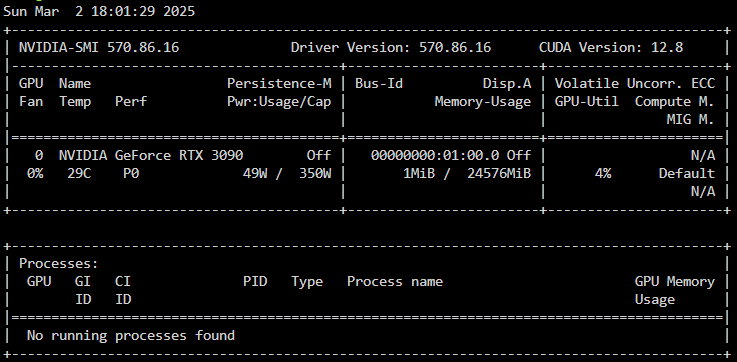
Hi @SShadow, First of all, thank you for trying to solve my problem!! I've just tried your suggestion to downgrade Nvidia drivers down to 570.86.16 but the problem persists. After boot, I ran "nvidia-smi" and like the latest version the fans are reported as 0% but they are at 100%. Tried running the nvidia-setting command to set GPU fan to 30%. The command returned that the fan speed was changed but the fans are still running at 100%. Any other suggestions?

-
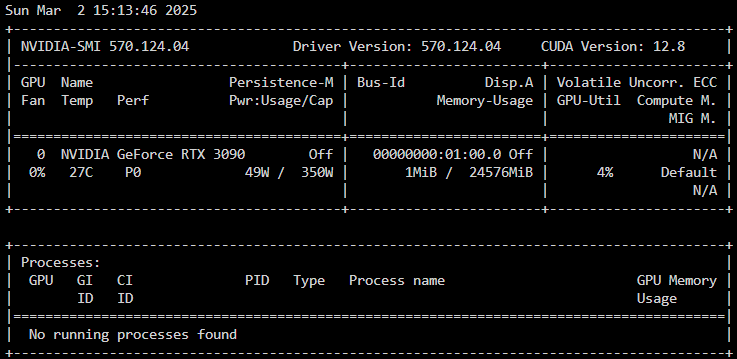
Hi all, After upgrading my UnRAID rig from 7.0.0 to 7.0.1, the upgrade procedure updated the new NVidia drivers and reboot normally. The problem is after the reboot (now with UnRAID 7.0.1 installed), my NVIDIA RTX 3090 fans are at maximum speed even if nothing is using the GPU. This problem only happened after updating to UnRAID 7.0.1. At UnRAID version 7.0.0 the GPU fans were working normally - Silent when GPU not in use. As shown by nvidia-smi, the fan is at 0% but all 3 fans are running at 100% and the GPU is at 0% usage, no processes and the GPU is at 27ºC. I've already tried to run the command: nvidia-settings -c :0 -a "[gpu:0]/GPUFanControlState=1" -a "[fan:0]/GPUTargetFanSpeed=30" But the fans are still on 100% and making a very loud noise. I've even tried to clean the whole PC to check if dust were accumulating and making the fans runs faster, but this diodn't work either (but now my UnRAID rig is shiny clean). Maybe something is wrong with the new driver? Does anyone have the same issue? Please HELP! I'm getting crazy working everyday near a PC with this level of noise. Regards,

-
I had the same issues and others when trying to install W11 in a UnRAID VM. The latest try the installation went well and everything appears to be working, but after aprox 60min without interacting with the VM the CPU boost to 100% and the VM screen went black. First I thought it was the updates but after running 5 days with 100% CPU. I even tried to install W11 VM without a network connectivity. But the problem persists. I just give up on W11 and installed a W10 VM. No problems at all with the W10 VM. Everything works normally.
-
Thanks for your support!






