





PetabyteLDA
Members
-
Joined
-
Last visited
Everything posted by PetabyteLDA
-
The problem was within the NIC's drivers in Windows 11. After playing around with the Windows 11 driver, I could get a better result. Right now I can get 9.30Gbit in one direction and 6.5Gbit on the other, using iPerf3. Is there anything I can change in the configuration of UnRAID or the drivers to achieve > 9Gbit on both directions? Is there any "guide" or "best practice" for configuring 10Gbe networking with UnRAID?
-
Yeah, I know. But you didn't suggested how to identify the problem. Can you suggest any tool or method to identify the problem?
-
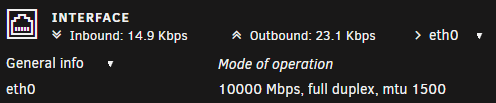
@JorgeB, UnRAID detect the NIC as a 10Gbit Ethernet Card. I've updated the firmware on the UnRAID machine and now the transfer speed are even worst!! Is anything I can do to discover what is causing this issue? Maybe a network setting is not right? What do you suggest?
-
I've already changed the cable and the test is exactly the same. What else can I do to find what causing this issue? Are there any setting I need to change in UnRAID to optimize the transfer?
-
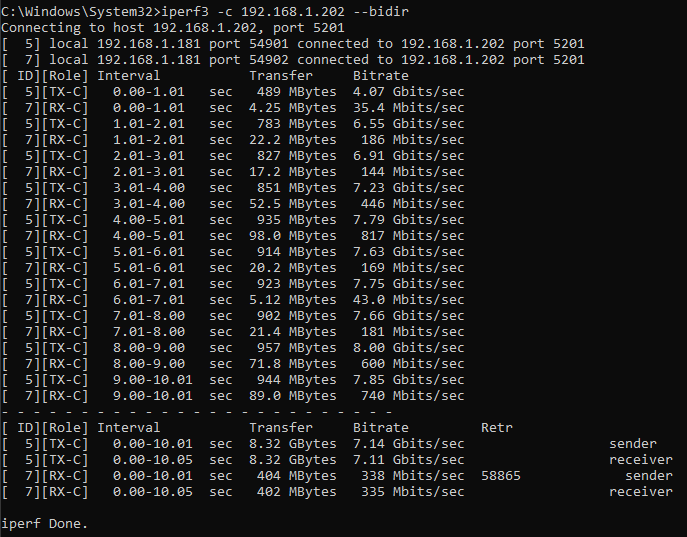
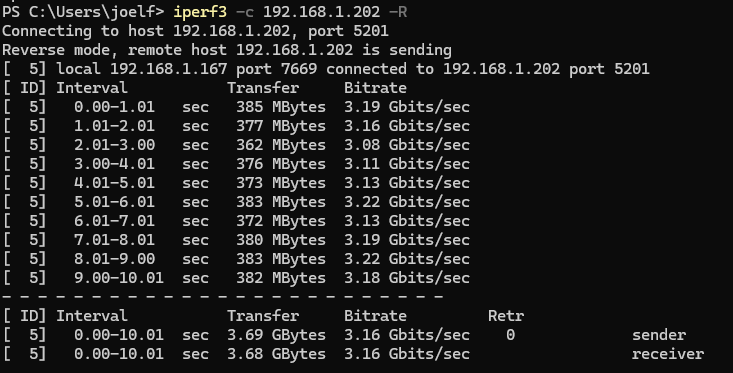
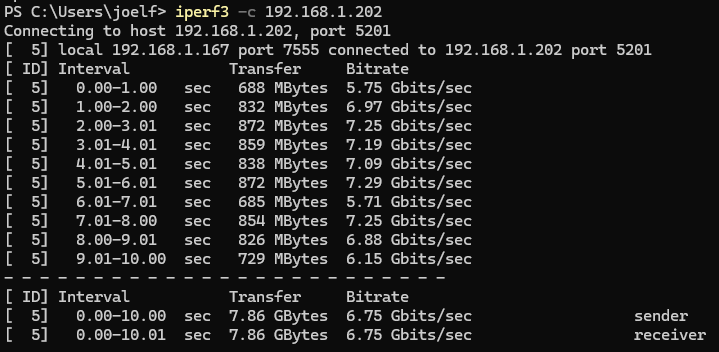
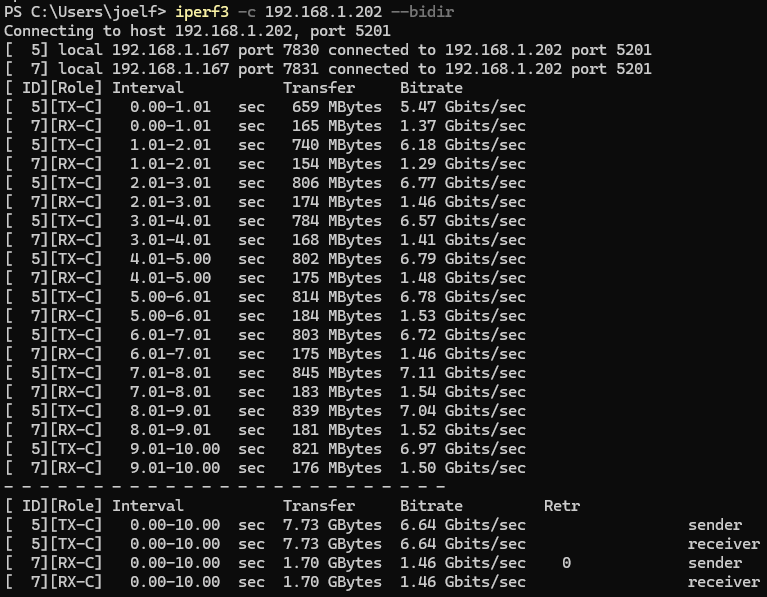
Hi/Olá @JorgeB Now I've upgraded to 10Gbe on both my Desktop and my NAS using the TP-LINK TX401 PCIe Card. I'm using the QNAP Switch QSW-2104-2T (have 2 x 10Gbe Ports and 4 x 2.5Gbe ports). The problem is the transfer speed from and to UnRAID cache. After testing with iperf3, the transfer speed from Desktop to UnRAID is 6.75 Gbits/s: And the transfer speed from UnRAID to Desktop is lower at 3.16 Gbit/s!! And If I test using the "--bidir" parameter the result is even worst. Can you help me solving this transfer speed issue? Thank you in advance! Regards,
-
Where is this option? I don't see it. I'm using 6.12.10.
-
Both are only 5-6 months away. Will be any coupon available anytime soon?
-
Does Lime Technology release coupons in a regular basis? Are any coupon available right now? Where can I get one?
-
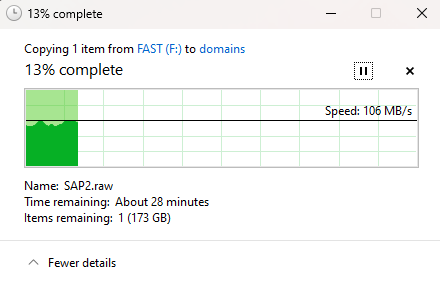
Well, I don't know how you did it, but maybe my UnRAID system got scared from your expertise and started working normally... I did this test with the same file this morning and it was at ~69MB/s, now it's ~106MB/s. Maybe something was running on the NAS at the time I tried to copy the file... SDD Trim maybe? I'll order a new switch with 10Gbe ports and I'll test it again. Sorry to bother you with this, but my trial ends next weekend and I need to decide if I'll buy UnRAID or not. Well, as this problem is solved, my conclusion is yes! It's an amazing Operating System for a Home Lab/NAS. Thank you for your patience and support! It's an amazing community. Regards!
-
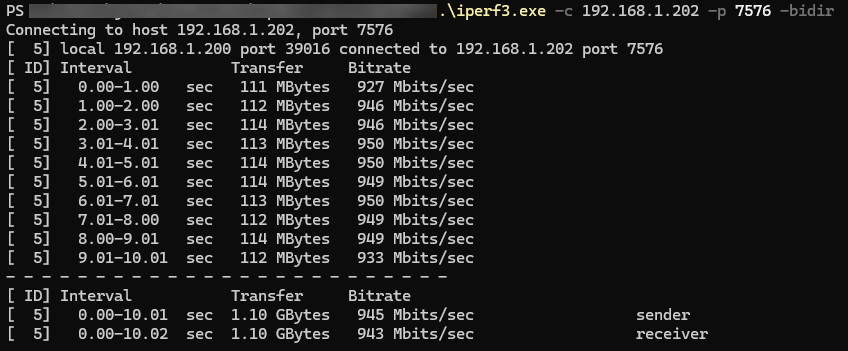
I apologize for my stupidity... Here is the test between my desktop PC and UnRAID using 10Gbe NICs (on both) but with a 1Gbe Switch.
-
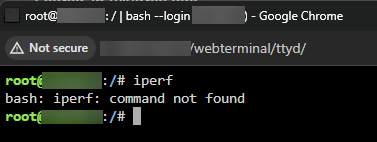
Where?? I'm trying to run it from the terminal inside UnRAID: I'm using UnRAID 6.12.10
-
I'm trying to find it but I can't. The only place I could find this tool was in a docker container. Should I install it or it should be installed within UnRAID O.S. ? How do I install it?
-
I had the same issue. But I've discovered the right procedure: Press "DETECT" and then SAVE. Only then you can choose the Sensors and click APPLY.
-
Hi all UnRAID Experts, Right now I'm evaluating purchasing UnRAID. After doing some tests everything is perfect and works as expected. Everything but one thing that I think it must be a misconfiguration I made. I've tried to transfer a large file (200GB) from my PC to a share that is cache only on my UnRAID system using Samba. The problem is the transfer speeds. I'm getting a constant 69MB/s. I know I'm using right now a 1Gbit NIC on both ends and the swith is also 1Gbit. The cache drive was created by using 2 NVME WD SN770 in RAID 1 using BTRFS. But my point is, when I transfer the same file from the same PC to a QNAP system (using the same NVME drives), I get 118MB/s. I've read about Turbo Write but this is also relevant for the cache drive? Is the problem related to RAID 1 or for using BTRFS ? Is this normal? What am I missing? Sorry for my english, I'm from Portugal! PS: Fix Common Problems is clear. No error reported. Regards
-
Hi, Did you bought the server for UnRAID? I've the same issue with QNAP. I own a TS-673A (6 bay with a 5 x 4TB HDD in RAID 5) and it started to sound the alarm with SMART alerts and orange LED in tray 2. I've tested the drives and they appear to be OK. I made an decision to replace the NAS and last week I've managed to complete the build of my new UnRAID build: Case: Fractal Design Meshify 2 MB: Asrock Z790 Pro RS/D4 (Have 8 SATA ports and 4 PCIE slots and use DDR4) CPU: Intel I5-14500 RAM: Crucial CP2K32G4DFRA32A (128GB - 4 x 32GB) PSU: 850w ETH: TP-Link TX401 (Works well in UnRAID) HDD: 5 x Seagate EXOS X18 18TB (Refurbushed) PS: You don't need ECC RAM if you are not going to use ZFS...
-
Exactly.
-
The video shared before was just an overview regarding several features in the upcoming version 7. Yes I'm sure (At least, based on the podcast below). But as this was published 3 months ago, maybe today, they have changed the strategy...
-
As discussed in the UnRAID PodCast, version 6.13 will not be released. This version will be converted to version 7.00 and will have a bunch of other new features. See all new features here:
-
Regarding Kursader: yes, you're right. My mistake. But I just use it so many times that I think it should be part of UnRaid. Even if it's not a plugin. Or at least something similar attached to the GUI or with a link to open in another browser page. For the rest, I understand and agree with your statements. But some of the plugins I mentioned, are just too important to live with out them. Maybe some of them could be implemented into the core?
-
I think that some particular plugins are just too important for not being part of UnRaid core. Those functionalities should not be part of something outside UnRaid and should be included in the core. (Legend: +++ Must have | ++ Important | + Nice to have) Just to name a few: +++ Fix Common Problems +++ Preclear Disk +++ Unassign Devices Preclear +++ Docker Compose Manager +++ App Data Backup +++ CA Appdata Backup/Restore +++ CA Auto Turbo Write Mode (I think this one is already planned to be included in the core) +++ Tips and Tweaks ++ CA Mover Tuning ++ Disk Location ++ CA User Scripts ++ Unassign Devices Plus ++ Krusader ++ Dynamix S3 Sleep + Libvirt Hotplug USB + CA Appdata Cleanup + CA Auto Update + Dynamix Cache Directories + Dynamix SSD Trim + NerdTools Regards.
-
If you are not using VMs or containers, I don't see any need for an upgrade. What's your CPU/RAM occupation? If you want more expandability, you can always add a PCIe card for more SATA ports... My Plex is in a QNAP NAS wth AMD V1500B with a Passmark of 4500 and I can see with no issues 4K HEVC 10bit. The 4770 have a Passmark score of 7000... But to avoid the issues (Unzipping), just do as I do. Only download/unzip during off peak time. Another way to solve this issue is to store downloaded media into a separeted NVME or SSD and let the UnRaid mover run only at off peak hours.
-
My desires for future developments (in priority sequence): 1 ) Multiple Unraid Arrays (At least 2) 2 ) Fully compatible with Docker / Docker Compose (Network, shares, etc) within GUI 3 ) Performance improvement (Compared to TrueNAS) - Turbo Mode does help! 4 ) Decoupling VM and Containers from Array if they don't use it - Ability to start virtualization services (Docker and KVM) irrespective of array status. 5 ) VM Snapshots 6 ) Native Backup (For Array, cache, VM's and containers data) 7 ) Mover configuration per share 8 ) MFA option for all users 9 ) 3rd parity drive in Arrays (If possible) 10) Incorporation of several plugins into Unraid Core - Some of them are just too important to not having them 11) New UI And thanks for this amazing product!
-
Yes, but when you have two sets of different HDDs, two arrays would benefit the speed of each array. For example: SET 1 - 4 HDDs of old drives @ 150 MB/s - 1 Parity, 3 Data - For Surveilance System (Drives allways spinning 24x7x365) SET 1 - 5 HDDs of Newest drives @ 280 MB/s - 1 Parity, 4 Data - For General Data (Only spins whenever needed) I think in this scenario, two arrays would be a great value.
-


