





DingHo
Members
-
Joined
-
Last visited
Everything posted by DingHo
-
I'm still getting this issue on 7.0.1. I have a successfully running Ubuntu 24.04.02 server with 1 9p manual share running. As soon as I try to add a second 9p share, either manual or unraid share, I can not get an IP address.
-
I recently upgraded to 6.12.6 from 6.9.2. I'm now getting extremely slow write speeds to my encrypted XFS drives, both cache and array are down to ~10MB/s. I can see CPU usage going way up as well. I've attached a diagnostic file. Thank you for any help. scour-diagnostics-20240123-1539.zip
-
Parity finished with zero errors. Thanks.
-
@apandey Thank you. I think you are correct regarding the SATA/Power connections. I swapped another array disk to the problem position and the CRC and read errors began occurring on that drive and not the previous one. I then double checked all connectors on the back of the hot swap drive cage, then tried again and it seems to have fixed it. I'll run a non-correcting parity test now to confirm. Thanks again.
-
My Unraid server has just completed a 5+ month journey across the Pacific ocean on a literal slow boat from China. All disks were removed from the server and packed in pelican cases. I put it all back together and it booted up and the array starts just fine, however I've been getting disk read errors and UDMA CRC errors on Disk4. It's been a long time since the last parity check. I think I should just remove/replace/rebuild Disk4, but just wanted some advice before starting that process. I've attached the diagnostic files. Thank you. scour-diagnostics-20230226-1356.zip
-
I checked, and the files remaining on the cache are not duplicates. The appdata on disk9 is what the mover successfully moved.
-
Hello, I'm trying to clear my single xfs cache drive before encrypting it. I've disabled VMs and docker services. I've set all shares to Yes:Cache. After running the mover a few times, there are still 683MB of files remaining, all from the appdata directory. I've enabled mover logging, and attached the diagnostics. I've noticed in the log repeated issues of: Jul 6 14:06:35 Scour move: move_object: /mnt/cache/appdata/binhex-krusader/home/.icons/BLACK-Ice-Numix-FLAT/96/emotes No such file or directory Thanks for any help. scour-diagnostics-20220706-1408.zip
-
@Shonky Thanks Shonky, best of luck.
-
@Shonky Thanks for the update. I too attempted rebuilding the docker image, with no effect. I think I was able to chase down a cause for my problem, however not sure it applies to anyone but my particular case, and probably not to unRAID in general. When Plex was running its scheduled tasks, it was getting 'stuck' on some music files in one of my libraries. While stuck it would read like crazy on the cache drive, even though the songs are on the array. I could reproduce the issue several times by setting the scheduled task and the watching it get stuck. My temporary solution was to remove that particular music library, I'll have to investigate further to see what file(s) in particular where causing the issue. Just thought I'd update in case this helps anyone else.
-
@JorgeB and @itimpi , Thank you both. I'm currently copying data off the bad drive. Can anyone confirm, I can shuffle around the drive order when I make a new config before rebuilding parity?
-
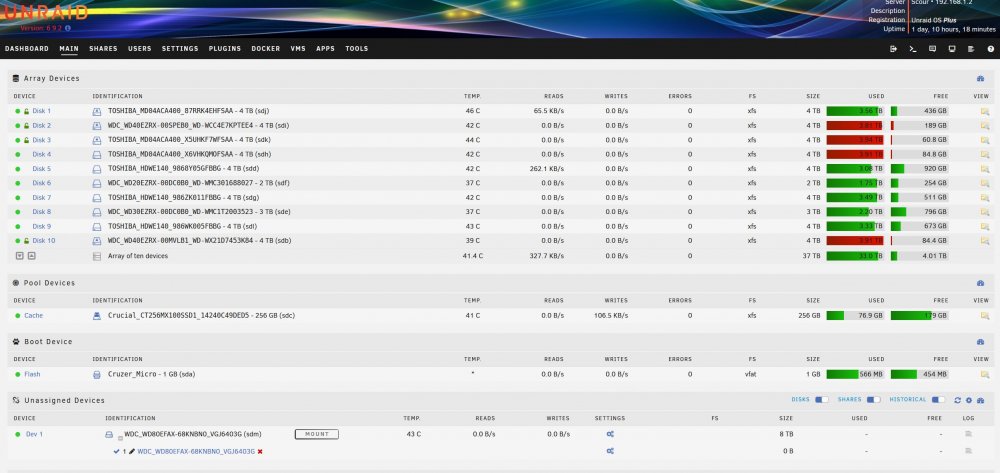
Thanks @JorgeB Here's my plan moving forward, please help me do a sanity check: 1) Stop Array. New Config. Add the Unassigned Device (previous parity drive) as Disk 11 (encrypted). 2) Copy Disk 2 to Disk 11. 3) Stop Array. Tools, New Config. Remove Disk 2. (Can I put the other disks in any order at this point?) 4) Order New Parity Drive 5) Finish encrypting other disks while I wait. 6) Add new drive and parity sync.
-
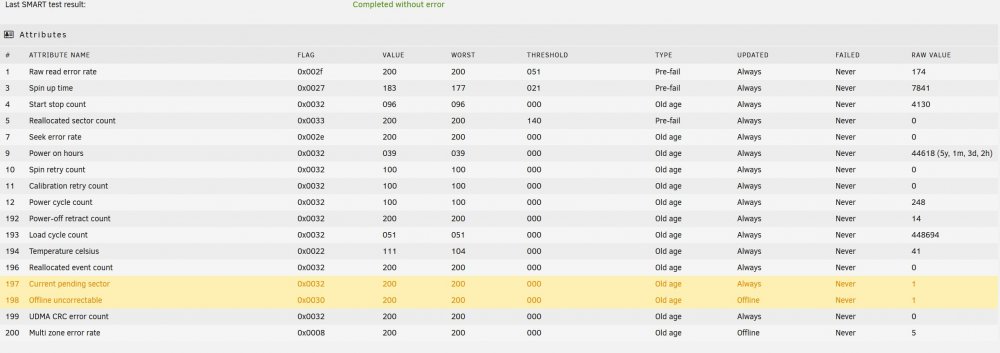
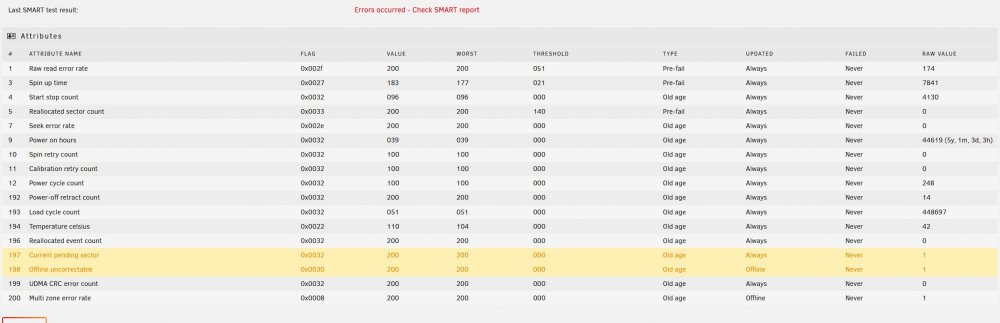
Hello, I'm in the process of encrypting my array, following SpaceInvader One's guide, so I'm currently operating without parity to speed things up. I received the popup notification "Offline uncorrectable is 1" for Disk 2, which I successfully encrypted and copied data to/from without errors yesterday. Today, while copying data with unBALANCE between two other disks I received the above error. SMART shows 1 Current Pending Sector. I then ran an extended SMART test (attached) and nothing appears to have changed. On the Main WebGUI page, Disk 2 still has a green ball and shows no errors. I realize the drive is getting old and I plan to replace it soon, however I just want to get through this encryption process successfully. Should I continue my encryption process of the other disks? If so, is it safe to do a parity sync after completion with this error? Appreciate any guidance from someone more knowledgeable than me. Thank you. scour-smart-20210730-1454.zip
-
You may need to resort to a VM to get that to work. Best of luck.
-
Hi @rcrh, it is in fact only a music server. If you search for 'photos' in community applications you'll find plenty of photo servers. Good luck!
-
Curious if anyone has made any progress on this issue. I'm still encountering it on a fairly regular basis, even after updating to 6.9.2.
-
-
@jonp With your permission, I'll take a crack at generating a transcript with Google Speech-toText. I have an 96kb/s 44.1kHz MP3 of the podcast. If you're interested to provide a FLAC, it would improve the accuracy.
-
Another thing I noticed during my last incident, when I ran 'docker stats', I could see that the netdata container was marked 'unhealthy' I never had netdata running previously when this happened, I just turned it on recently to try and figure this issue out. So I don't think this specific docker is the cause. Also, from the 5 diagnostics top files I have accumulated while this occurs: MiB Mem : 7667.6 total, 117.7 free, 6593.1 used, 956.7 buff/cache MiB Mem : 7667.6 total, 131.4 free, 6260.4 used, 1275.8 buff/cache MiB Mem : 7667.6 total, 121.9 free, 6270.2 used, 1275.5 buff/cache MiB Mem : 7667.6 total, 121.2 free, 6304.1 used, 1242.3 buff/cache MiB Mem : 7667.6 total, 117.0 free, 6156.9 used, 1393.7 buff/cache So similar to @Shonky in terms of RAM related: It doesn't see to point to that. Curious how to figure out what is causing the loop2 read or if there is a workaround to restart a docker if it's marked as unhealthy?

-
I think I'm having the same issue. I posted previously about it (link to thread with multiple diagnostic files below). Here's what I've found... iowait causes all 4 CPUs to peg at 100%, system becomes mostly unresponsive iotop -a shows large amount of accumulating READS from the cache disk (at >300MB/S), specifically, loop2 restarting a docker container via command line will fix the problem (for example, docker restart plex, or docker restart netdata) I can not figure out a pattern to when this happens. Mover or TRIM is not running. No one watching a plex movie. I'm on 6.8.3, all drives formatted to XFS
-
Does that mean the existing container will stay on the final release of forked-daap and cease to be updated or it will just keep the existing name and still get updated from the new project? Thanks, and I appreciate your efforts.
-
Will this project be switching over to the new name/repository? https://github.com/owntone/owntone-server
-
Hello, I'm also having trouble after the update. I've renamed the old /appdata/binhex-rtorrentvpn/rtorrent/config/rtorrent.rc. A new rtorrent.rc was created after updating and restarting, and I've made no modifications to it. All of my torrents are missing. The log gives me this error: [12.02.2021 10:02:04] JS error: [http://admin:[email protected]:9080/js/stable.js : 1783] TypeError: this.dBody is undefined
-
@tmor2 I can confirm HW accel does work when you get the plex pass. I've got your exact setting above, and it works great. However I'm still on on old i5-3570k so I'm really curious about the 4k encoding on the newer processor. Let us know when you can.
-
@tmor2 Did this fix it? I have the same CPU as you, and I'm considering to move it to my unraid tower. Any chance you could confirm if you can get HW x265 4k HDR --> 1080p SDR with tone mapping encoding to work with the iGPU? Very much appreciated.
-
I'm curious on this as well. I'd like to set it up with something like: plex.tower sonarr.tower pihole.tower





