ijuarez
Members
-
Joined
-
Last visited
Everything posted by ijuarez
-
Awesome docker. Making my plug in for airvpn.org Sent from my SM-N960U using Tapatalk
-
I don't think you'll find any provider under that, unless they have a sale and it's only for one year. Sent from my Nokia 7.1 using Tapatalk
-
Yep, Sent from my Nokia 7.1 using Tapatalk
-
You don't have to use the port 80 you do have to use for 443 I don't use port 80 whatsoever and it works fine Sent from my Nokia 7.1 using Tapatalk
-
You only gave your VM one CPU..that might be a problem. Sent from my Nokia 7.1 using Tapatalk
-
Can the VM be updates without any issues, looks like apple has updates for mojave
-
Not sure what brand if router you have but the very first line you have http going from port 80 to 80 then later on you have your let's encrypt forward. I assuming that your router applies forwards from top to bottom that maybe your problem. If not they might blocking port 80. Sent from my BND-L34 using Tapatalk
-
The last update the put a new feature that your can bind Plex to different interfaces. That worked well for regular installs but it wreack havoc on docker installs. Some users had to roll back. Sent from my BND-L34 using Tapatalk
-
Has the problem of listening on multiple interfaces been fixed? Just curious Sent from my BND-L34 using Tapatalk
-
So you made your unraid gui accessible to the internet via the LE container? Sent from my BND-L34 using Tapatalk
-
Haters!! Lol Sent from my BND-L34 using Tapatalk
-
ISP will block port 80 but not 443 as it's https. Sent from my BND-L34 using Tapatalk
-
I like drama! Sent from my BND-L34 using Tapatalk
-
Did you mean to bond them ( nic teaming)? Not and expert at bonding but I do know the the switch has to be able to do link aggrigation other wise it's a wast of time. Sent from my BND-L34 using Tapatalk
-
sorry for the late reply, so you have 2 network cards and have them set to bond?
-
very odd it looks like your containers do not have the host ip 192.168.7.60, also is there a reason why you chose to have most of your containers in host mode instead of bridge mode. Care to share your network settings page.
-
No, that's is just letting you the LE container is working, you need to access your server via it's new port 192.168.7.60: XXX Sent from my BND-L34 using Tapatalk
-
What is the IP of your server? What's your network setup Sent from my BND-L34 using Tapatalk
-
Did you intentionally blur the ips on the containers that are not on the proxy net,? Sent from my BND-L34 using Tapatalk
-
I suggest you head over to youtube and search for spaceinvader one he is member if this forums and has produced some great how to's Sent from my BND-L34 using Tapatalk
-
Your ISP is probably blocking port 80 Sent from my BND-L34 using Tapatalk
-
got an odd ball issue, so i am using the LE container and have the proxy conf correct (because it will resolve from the outside world) i was able to set it up and seem to work fine. Obviously i did not want the word to be able to see it so in tautulli i went ahead and used a http username and http password. To password protect it. The issue is when i try to access from the outside it will take the login but it will not display the info it goes back to the login. If i purposely put the wrong password or username it tells me its wrong. I notice that when it loops it puts this on the address bar https://tautulli.lahoma.org/auth/login?redirect_uri=/ So i tried within my network and i used the same creds and it worked. I cannot access it with firefox or chrome however if i used edge it works internally.....very odd
-
had to the same, i had mini -itx board with on board chip and it worked great, but then i found out that pfsense will require a AES chip eventually so i moved to and i-3 and decided to start from scratch of course pfsense 2.3 has been replaced with a better 2.4 and found nvguru guide same me tons of head aches.
-
that guide is a bit old pfSense fan did a great job but he had dropped for a while. Take a look at his he used the same switches as you i believe. I dont use a SG cisco but a 3750G and his guide worked perfectly pfsense guide
-
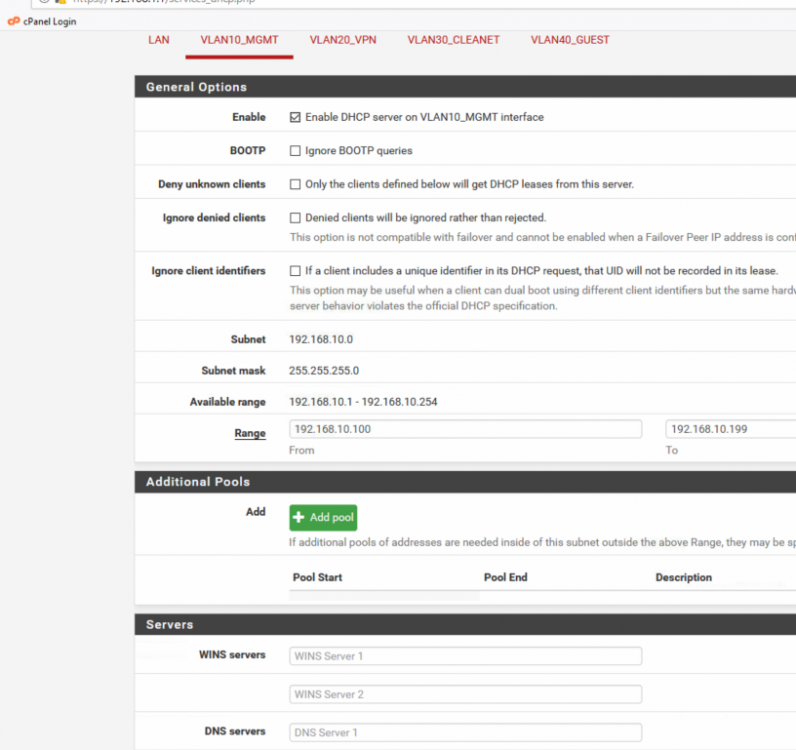
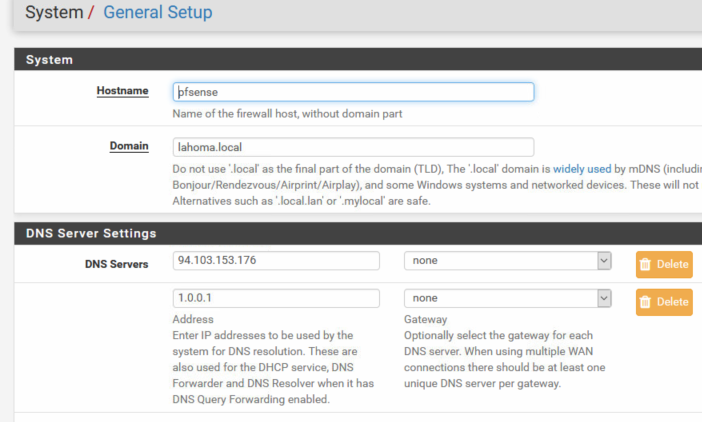
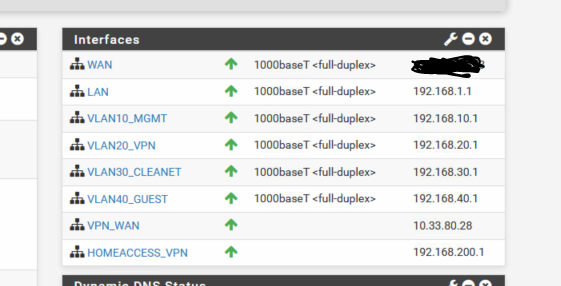
I looked up getflix and their dns servers, one screenshoot you had of the unraid config showed and addy of 55.blah blah for dns that is getflixs' So since you are using DHCP and pfSense is handing out the ip you need to look at Services-DHCP Server- then click on the vlan that is 192.168.10.0. See mine called vlan10 under dns i have no servers, because im letting my gateway address also be my dns server for that vlan. my assumption is that under you setup you have a DNS address of getflix. Next i see you are using air vpn (the best VPN out there. just saying) let me ask you again are you forcing all of your traffic thru the vpn? i ask because in your above screenshot you have one of airvpns dns addresses and unless all of your traffic is going thru the vpn tunnel you it will not know were to go. My general setup also below in the image. my setup only has vlan20 using the vpn everything is using wan. and last i hate to ask but are your cisco switches setup with vlans?