





StylishQuoter
Members
-
Joined
-
Last visited
Everything posted by StylishQuoter
-
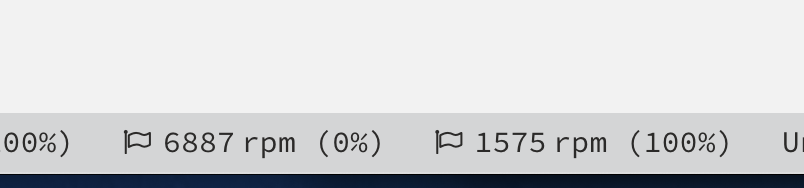
Is this plugin still officially supported or should we consider it use at your own risk? I think it's assigning the wrong PWM percentage to fans. (FAN1 is at 100% but it's assigning 100% to a different FAN) Feels the mapping is detected incorrectly, is there any way I can manually correct this? The fan on the left is at 100%, the fan on the right should be at 0%
-
neleh-diagnostics-20241210-2051.zipneleh-diagnostics-20241210-2032.zip CPU pegged at 100% tried restart php, didn't help tried stopping docker service, didn't help tried restarting via ssh, this helped. What's wrong? Thanks!
-
bumping for question 2 and 3 Thanks!
-
ah got it. Pool's MFS is currently 0 which is problematic. I'll fix that. For the Share's setting. I've always thought that the Share's setting of say 100GB will result in this behavior: When a disk in Cahce pool (or any pool and array disk that this share is allowed to write into) has less than 100GB available on that disk, then write to that disk will be disallowed and the write will automatically fall back to secondary location (if set), which in my case is set to array. Am I interpreting the setting wrong? thanks.
-
This actually reminds me of something.. So the reason Cache pool is filled is due to qbit downloading into a share called "data2" data2 actually has (I think) correct setup with a 97.7GB minimum free space in Share Settings. Qbit is set with "Pre-allocate disk space for all files", and it's downloading various medias so there'll be no single file that will be as close to 90GB. How come in this case qbittorrent can still fill the Cache pool?
-
So this is what happened from my POV, not sure if I'm describing the root cause tho which could be unrelated. 1. I completed filled Cache pool, 0B usable in UI 2. Started mover via UI, mover showing all errors due to fs read only, Docker containers are almost all stopped (presumably crashed due to not able to write into Appdata). 3. stopped array, reboot server, start array 4. Started mover via UI, mover running correctly. 5. Diagonistic generated at this time 6. notices BTRFS error in syslog: https://pastebin.com/DfrCwigv Everything seems to be working fine currently but still have a couple of questions: 1. What caused the original fs read only issue? Cache pool full shouldn't cause fs issue? 2. is my Cache/Array ok now? 3. When I'm trying to generate diagnostic through GUI, I see tons of log prints for individual files I have/had in cache and the GUI crashed. I ended up needing to generate the diag via terminal. Is my server ok? Is there any cleanups I need to do? Thanks! neleh-diagnostics-20241202-1201.zip
-
I recently migrated all my drives to a Supermicro 4U and moves all my SSDs to be connected via the backplane to a LSI. (All SSDs used in a Pool.) And later I become aware that SSDs TRIM sometimes don't work well with certain LSIs on certain softwares, and sometimes it would stop working due to software (Unraid) upgrades. So my question is, if I want to know for sure that TRIM is working correctly for a given drive at any given time, what would be the best way to check it? say the drive is sdi 1. run hdparm -I /dev/sdi on it? (likely no but I don't know for sure) 2. check the GUI somewhere? (probably no as I can't find anything in the drive's info page, but would be great to be able to) 3. run a fstrim -v /mnt/name_of_pool_using_ssd? (probably this but I don't know for sure) Thanks!
-
Got it. Thanks! Currently I'm running a user script to `rc.docker stop` and 7z the whole folder, on a lower frequency. Seems like I can use this plugin to backup all the smaller containers, and then run user script to do the larger ones less frequently. When using the plugin to restore, does it automatically put back the backed-up external volumes (aka appdata folders)? Or is it that user is expected to just copy it back?
-
Hi! Background is that I recently lost my appdata folder, and then realized that I have no back up for it. (did have the templated backed up so that's something... thanks!) I noticed that I can use this plugin to also backup external volumes, which usually are the actual app data folders. Before I turn it on for everything, I want to ask if there's any downside to enabling it for all, except maybe it will drastically increase the backup time and size. Thanks!
-
neleh-diagnostics-20241117-0013.zip So here's the situation. I HAD a share, called "public", that I setup in my server that was set up as: Primary: Cache Secondary: None Then I had a catastrophic data lose on my Cache drives (Raid1). Everything on Cache was totally gone. I have replace the Cache SSDs. And the share named "public" has totally disappeared Shares tab. But now I can't seem to create a new share callled "public" anymore. I click "Add Share", it will just go to the same create share page. Is something still lingering somewhere that I need to cleanup? Thanks!
-
I have 1 folder that I can't get the Order to work inside the folder setting. Tried different browser still no dice. Order works fine for my other folders. The only different I can think of is for the problem folder I'm using Regex, all others are manual selections. Would using Regex disable Order? thanks.
-
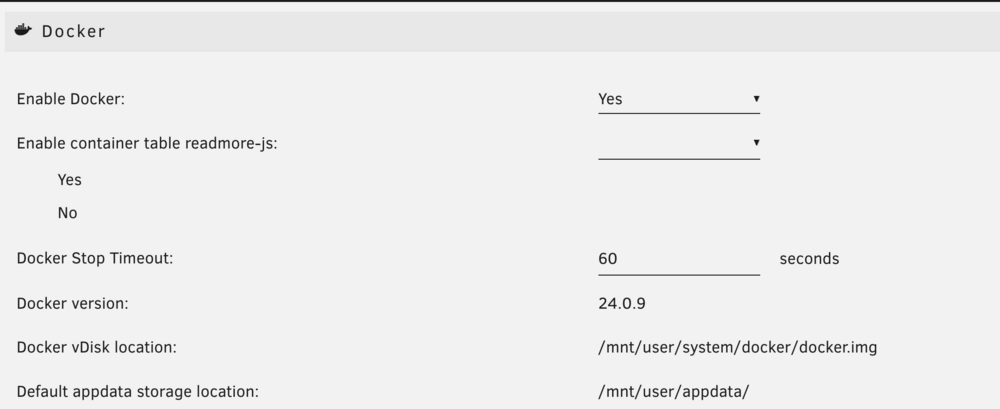
6.12.10
-
Thank you! Found it. Lots of more buttons to click. Hope this part can also me automated
-
Hi I ran a restore for all containers and it was successful. However in Docker there's still 0 containers. debug ID is f37207f7-5f83-4498-a9c8-c33d5117a639 Thanks!
-
Sorry for bumping a old thread but this total convinced me to give up tweaking with split level. But if this is barely a problem nowadays, who haven't this option be removed?
-
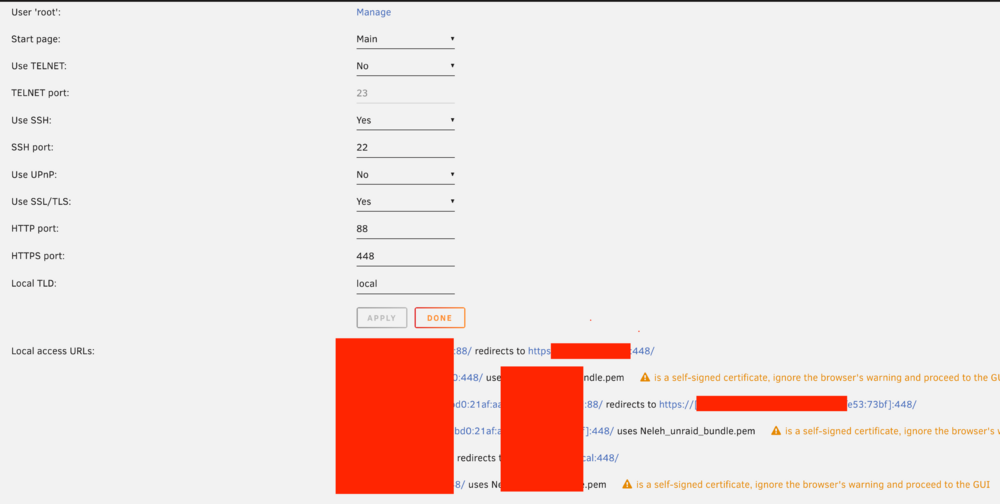
Thanks for helping take a look. This is my management access page. And this is my docker compose: container_name: GUS-unraidapi image: bokker/unraidapi-re:6.12 # Use tag for your version - 6.11 or 6.12 network_mode: bridge hostname: ${HOSTNAME} ports: - ${UNRAID_API_UI_PORT}:80 volumes: - ${APPDATA_PATH}/GUS-UnraidAPI:/app/config environment: MQTTBroker: 192.168.[redacted] MQTTPort: 1883 MQTTBaseTopic: homeassistant KeyStorage: config TZ: ${TIMEZONE} restart: unless-stopped depends_on: - influxdb labels: net.unraid.docker.icon: https://raw.githubusercontent.com/ElectricBrainUK/UnraidAPI/master/static/iconx64.png net.unraid.docker.webui: http://[IP]:[PORT:${UNRAID_API_UI_PORT}]/ I'm using the compose plugin setup for it but I also tried the CA app with same configuration. It is the same that only Docker is available. In the app, server address I used "https://192.168.[redacted]:448" with username password. Is it that it can't work with https with self cert? Thanks!
-
Thanks for building and maintaining this great tool. Does unbalanced handle/maintain hardlink? I have trash folder setup and use *rr for hardlinked file management. Recently did a Scatter job to clear a drive, but afterwards my non-hardlinked file number jumped by a lot. Since I moved many files, it's unclear to me if no hard links are preserved or just partially. Currently using jdupes to fix, but wonder if I did anything wrong, or is it expected that hardlinks will be broken. Thanks!
-
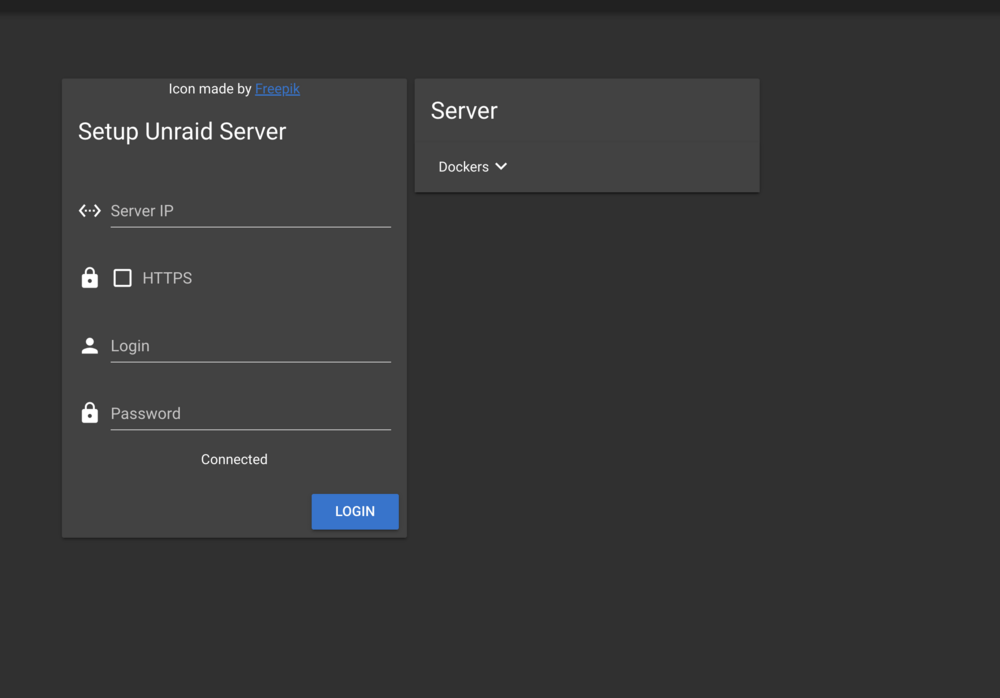
Only docker section is available, is this normal? unraid 6.12.10 Logs: ``` Failed to retrieve config file, creating new. 2024-10-05 00:27:39 [info]: Updating auth cookie for https://192.168.50.50:448 [redacted]=[redacted]; path=/; secure; HttpOnly; SameSite=Lax 2024-10-05 00:27:40 [warn]: Skipping VMs for https://192.168.50.50:448 2024-10-05 00:27:43 [warn]: Skipping VMs for https://192.168.50.50:448 2024-10-05 00:27:46 [error]: request to https://192.168.50.50:448/state/plugins/dynamix.docker.manager/images/Unraid-API-RE-icon.png failed, reason: self signed certificate 2024-10-05 00:27:46 [error]: request to https://192.168.50.50:448/state/plugins/dynamix.docker.manager/images/CloudflaredTunnel-icon.png failed, reason: self signed certificate 2024-10-05 00:27:46 [error]: request to https://192.168.50.50:448/state/plugins/dynamix.docker.manager/images/code-server-icon.png failed, reason: self signed certificate 2024-10-05 00:27:46 [warn]: Skipping VMs for https://192.168.50.50:448 2024-10-05 00:27:46 [error]: request to https://192.168.50.50:448/state/plugins/dynamix.docker.manager/images/backblaze_personal_backup-icon.png failed, reason: self signed certificate 2024-10-05 00:27:46 [error]: request to https://192.168.50.50:448/state/plugins/dynamix.docker.manager/images/binhex-krusader-icon.png failed, reason: self signed certificate 2024-10-05 00:27:46 [error]: request to https://192.168.50.50:448/state/plugins/dynamix.docker.manager/images/SpeedTest-By-OpenSpeedTest-icon.png failed, reason: self signed certificate 2024-10-05 00:27:47 [warn]: Skipping VMs for https://192.168.50.50:448 2024-10-05 00:28:25 [error]: File config/mqttDisabledDevices.json not found! Creating it with empty array [] Error: ENOENT: no such file or directory, open 'config/mqttDisabledDevices.json' at Object.openSync (node:fs:590:3) at Object.readFileSync (node:fs:458:35) at updateMQTT (/app/mqtt/index.ts:389:21) at Timeout._onTimeout (/app/mqtt/index.ts:441:5) at listOnTimeout (node:internal/timers:559:17) at processTimers (node:internal/timers:502:7) { errno: -2, syscall: 'open', code: 'ENOENT', path: 'config/mqttDisabledDevices.json' } 2024-10-05 00:28:26 [warn]: Skipping VMs for https://192.168.50.50:448 2024-10-05 00:29:26 [warn]: Skipping VMs for https://192.168.50.50:448 2024-10-05 00:30:26 [warn]: Skipping VMs for https://192.168.50.50:448 ``` Thanks!
-
Thanks for sharing. Seems the Docker UI isn't running the correct docker run comman: Command execution docker run -d --name='telegraf' --net='host' -e TZ="America/Los_Angeles" -e HOST_OS="Unraid" -e HOST_HOSTNAME="[REDACTED]" -e HOST_CONTAINERNAME="telegraf" -e 'HOST_PROC'='/rootfs/proc' -e 'HOST_SYS'='/rootfs/sys' -e 'HOST_ETC'='/rootfs/etc' -e 'HOST_MOUNT_PREFIX'='/rootfs' -l net.unraid.docker.managed=dockerman -l net.unraid.docker.icon='https://github.com/atribe/unRAID-docker/raw/master/icons/telegraf.png' -v '/var/run/utmp':'/var/run/utmp':'ro' -v '/var/run/docker.sock':'/var/run/docker.sock':'ro' -v '/':'/rootfs':'ro' -v '/sys':'/rootfs/sys':'ro' -v '/etc':'/rootfs/etc':'ro' -v '/proc':'/rootfs/proc':'ro' -v '/mnt/user/appdata/telegraf/telegraf.conf':'/etc/telegraf/telegraf.conf':'rw' -v '/run/udev':'/run/udev':'ro' /bin/bash -c "/entrypoint.sh telegraf" 'golift/telegraf' --user telegraf:$(stat -c '%g' /var/run/docker.sock) docker: invalid reference format. See 'docker run --help'. The command failed.
-
Have 2 question on the order of the scripts displayed in GUI. How can it be linked to the order of folders within a folder since I've always thought such a thing doesn't exist, that there only exist a concept of "Display Order": how a client renders it at the "viewer"'s end (by size, by creation time, etc). And there isn't such a thing as an inherent order of within a folder. 1. How can I change the GUI order currently? (a.k.a how to change the order of `config/plugins/user.scripts/scripts`?) 2. Can we change it so that the order is just by the name of the script? (this will also satisfy this feature request ) Thanks!
-
I may have run into a bug. Running mover 2023.12.19 on unraid 6.12.10 ``` Jun 3 03:00:02 root: mover: started Jun 3 03:00:02 root: /usr/local/emhttp/plugins/ca.mover.tuning/age_mover: line 372: ((: TOTALARRAYSIZE += : syntax error: operand expected (error token is "+= ") Jun 3 03:00:02 root: /usr/local/emhttp/plugins/ca.mover.tuning/age_mover: line 372: ((: TOTALARRAYSIZE += : syntax error: operand expected (error token is "+= ") Jun 3 03:00:02 root: skip: /mnt/disk2/appdata/tautulli/tautulli.db-wal Jun 3 03:00:02 root: skip: /mnt/disk2/appdata/tautulli/tautulli.db-shm Jun 3 03:00:02 root: mover: finished ``` Thanks!
-
You said `If you created the stack using the UI`, are there other ways to create stack? Like e.g. we can direct create it using editors? Just for my own knownledge. Thanks.
-
Thanks all for the help! Yes this worked!
-
Noob here. As I understand from searching some of comments, compose file requiring the `build` command isn't supported well. I'm running into issues where DCM will say it can not resolve the path. `failed to solve: failed to read dockerfile: open /var/lib/docker/tmp/buildkit-mount436360256/Dockerfile: no such file or directory` Basically the compose file provided by the project contains `build: .` I have already put my Stack in a location in pool, say it's `/user/mnt/appdata/path_a` Is there a way I can change the compose file to make it work? or is this fundamentally not supported yet? (The project I'm trying to get working is ViewTube, compose file here https://github.com/ViewTube/viewtube/blob/development/docker-compose.yml ) Thanks!
-
Thanks, you're right. It turns out my Community Apps didn't update, which then caused the Docker page to show everything uptodate when they are not.


