





clowrym
Members
-
Joined
-
Last visited
Everything posted by clowrym
-
Is there a set up possible that allows for "Bridged" Network w/ my VM's running that will also allow me to be able to see the full network when connected to the VPN. Currently if I have Bridge mode turned on I can only see the machine I am connected to..... no access to the rest of my network!
-
I ended up setting up my own Automated docker build of HexParrots dockerfile as he rarely updated his Dockers on Docker-Hub!! I see now he has his own Automated Build!!
-
May be a good idea, I catually thought I was in the Open-vpn forum when i wrote this!!
-
Is it possible to have VM's set up & have the VPN working for Network access as well? Currently if I run my VM's with a network bridge, I get no eccess to the rest of my network, only the unraid box I VPN to?
-
I actually fixed this issue by Giving this Docker it's own IP address, rather than running in Bridge Mode.

-
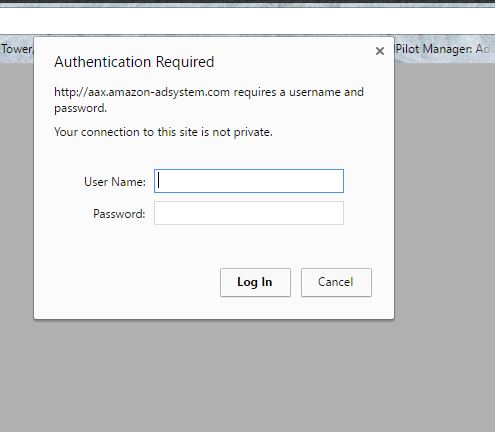
Anyone have any issues with "Authentication Required" on site that have had the add's blocked? I read an earlier response where someone said add these to the blocklist, but they are already listed in my blocklist & were piholed!!
-
+1 for me as well, I use nut with my Dell UPS Rack/Tower 2700W/2300W LV
-
Its actually not overly difficult to add, The only issue is on start-up his java script asks for a language, I had to enter the docker container and manually start the nukkit server, selecting the Language.... Now if I could just figure out how to run Screen inside the docker container!!
-
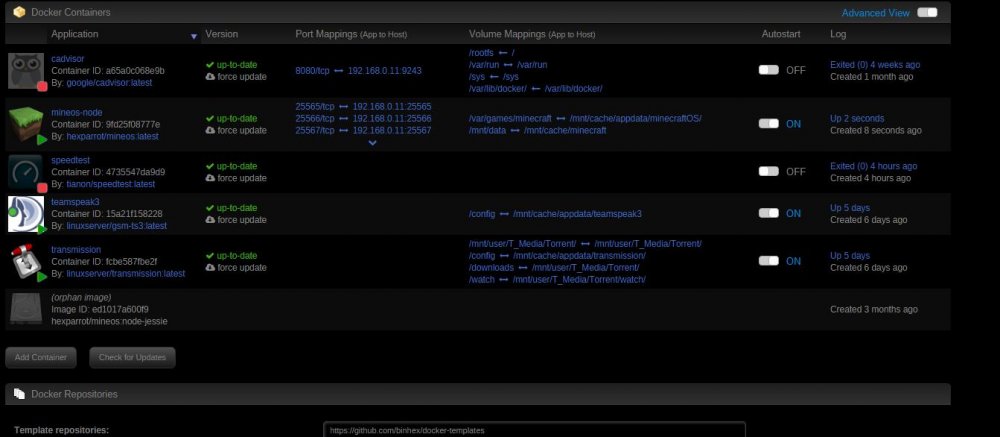
I had looked through the xml as well, but for whatever reason Unraid always apends :latest after "hexparrot/mineos:node-jessie" causing the repository to not be found during an update. Now that he's added the latest tag, no more "update ready"!!
-
Follow-up to the "Update Ready" & my comment regarding the ":Latest" tag, Hexparrot has added a :latest tag for node-jesse on Docker hub, Just change the Repository to just "hexparrot/mineos" everything should work fine!
-
Exactly!! & it errors out as there is not latest tag used in the repo
-
Thats the issue, I don't have :latest......
-
Trouble shooting another issue with one of my servers, I came accross this in the Docker log / diag. report: time="2017-02-17T15:59:57.749546995-07:00" level=error msg="Handler for POST /images/create returned error: Error parsing reference: \"hexparrot/mineos:node-jessie:latest\" is not a valid repository/tag" Checking my main minecraft server, I have this error as well when I try and run the update I had a response from Hexparrot..... looks like the ":latest" could be the issue & I don't see where to make this change, as this is a little beyond what I have delved into with dockers, i could be wasting your time:
-
Trouble shooting another issue with one of my servers, I came accross this in the Docker log / diag. report: time="2017-02-17T15:59:57.749546995-07:00" level=error msg="Handler for POST /images/create returned error: Error parsing reference: \"hexparrot/mineos:node-jessie:latest\" is not a valid repository/tag" Checking my main minecraft server, I have this error as well when I try and run the update
-
I thought maybe initially it was due to me trying to port my old MineOS server files to your MineOS-node Docker, the previous was user:group 1000:1000, so I set up Mineos-node on my second unraid server & had the same issues with files being owned by root & not being able to create servers until i chmod'd the files!
-
I've had to do the same, I have to chmod all my files to user 1000:1000 to make anything work. I tried adding GUID/UUID to the docker template, but it didn't seem to make any difference.
-
Trying top install the latest update, but fails everytime... plugin: updating: speedtest.plg +============================================================================== | Skipping package python-2.7.13-x86_64-1 (already installed) +============================================================================== plugin: skipping: python-2.7.9-x86_64-1.txz - unRAID version too high, requires at most version 6.1.99 +============================================================================== | Skipping package pyOpenSSL-0.15.1-x86_64-1_slack (already installed) +============================================================================== plugin: downloading: https://raw.githubusercontent.com/dmacias72/unRAID-plugins/master/archive/speedtest-2017.02.12a-x86_64-1.md5 ... done Wrong 'plugin' package md5 hash. plugin: run failed: /bin/bash retval: 1
-
This is the repo, I added it using Community apps Auto conversion . I do have it set in Host mode. https://hub.docker.com/r/tianon/speedtest/~/dockerfile/ https://hub.docker.com/r/tianon/speedtest/ you get the results only by looking at the docker logs Basically October 18th was my last Stable upload (Uploads dropped to average of 8~10mbs, uploads stayed Stable @ 150+) w/ the plugin & December 13th was the last Sable expected Download speed w/ the plugin.
-
I've been trying them all to get back to the Stable results I was getting in early October!! Below I tried a number of different versions, as well as selecting a server on a few & a few leaving it up to the script to select. root@Test:/boot/config/plugins/speedtest# speedtest Retrieving speedtest.net configuration... Testing from TELUS (75.158.3.51)... Retrieving speedtest.net server list... Selecting best server based on ping... Hosted by Shaw Communications (Calgary, AB) [18.71 km]: 10.531 ms Testing download speed................................................................................ Download: 40.28 Mbit/s Testing upload speed... Upload: 11.98 Mbit/s root@Test:/boot/config/plugins/speedtest# speedtest --server 4207 Retrieving speedtest.net configuration... Testing from TELUS (75.158.3.51)... Retrieving speedtest.net server list... Selecting best server based on ping... Hosted by Shaw Communications (Calgary, AB) [18.71 km]: 10.33 ms Testing download speed................................................................................ Download: 9.93 Mbit/s Testing upload speed... Upload: 5.42 Mbit/s root@Test:/boot/config/plugins/speedtest# speedtest --server 4207 Retrieving speedtest.net configuration... Testing from TELUS (75.158.3.51)... Retrieving speedtest.net server list... Selecting best server based on ping... Hosted by Shaw Communications (Calgary, AB) [18.71 km]: 6.582 ms Testing download speed................................................................................ Download: 43.11 Mbit/s Testing upload speed... Upload: 7.19 Mbit/s ripts/speedtest-1.0.1.pylugins/speedtest# /usr/local/emhttp/plugins/speedtest/scr Retrieving speedtest.net configuration... Testing from TELUS (75.158.3.51)... Retrieving speedtest.net server list... Selecting best server based on ping... Hosted by Shaw Communications (Calgary, AB) [18.71 km]: 6.503 ms Testing download speed................................................................................ Download: 68.51 Mbit/s Testing upload speed... Upload: 13.66 Mbit/s ripts/speedtest-1.0.1.py --server 4207 Retrieving speedtest.net configuration... Testing from TELUS (75.158.3.51)... Retrieving speedtest.net server list... Selecting best server based on ping... Hosted by Shaw Communications (Calgary, AB) [18.71 km]: 7.611 ms Testing download speed................................................................................ Download: 68.67 Mbit/s Testing upload speed... Upload: 10.25 Mbit/s ripts/speedtest-1.0.0.py --server 4207st# /usr/local/emhttp/plugins/speedtest/scr Retrieving speedtest.net configuration... Testing from TELUS (75.158.3.51)... Retrieving speedtest.net server list... Selecting best server based on ping... Hosted by Shaw Communications (Calgary, AB) [18.71 km]: 10.112 ms Testing download speed... Download: 16.78 Mbit/s Testing upload speed... Upload: 13.62 Mbit/s root@Test:/boot/config/plugins/speedtest# mc /speedtest/scripts/speedtest-0.3.1.py --server 4207ts# /usr/local/emhttp/plugins/ Retrieving speedtest.net configuration... Retrieving speedtest.net server list... Testing from TELUS (75.158.3.51)... Hosted by Shaw Communications (Calgary, AB) [18.71 km]: 840.528 ms Testing download speed.................................................... Download: 45.41 Mbits/s Testing upload speed.................................................. Upload: 23.60 Mbits/s /speedtest/scripts/speedtest-0.3.1.py --server 4207ts# /usr/local/emhttp/plugins/ Retrieving speedtest.net configuration... Retrieving speedtest.net server list... Testing from TELUS (75.158.3.51)... Hosted by Shaw Communications (Calgary, AB) [18.71 km]: 5.228 ms Testing download speed.................................................... Download: 30.73 Mbits/s Testing upload speed.................................................. Upload: 18.20 Mbits/s /speedtest/scripts/speedtest-0.3.4.py --server 4207ts# /usr/local/emhttp/plugins/ Retrieving speedtest.net configuration... Retrieving speedtest.net server list... Testing from TELUS (75.158.3.51)... Hosted by Shaw Communications (Calgary, AB) [18.71 km]: 840.547 ms Testing download speed.................................................... Download: 35.21 Mbit/s Testing upload speed.................................................. Upload: 15.51 Mbit/s /speedtest/scripts/speedtest-0.3.4.py --server 4207ts# /usr/local/emhttp/plugins/ Retrieving speedtest.net configuration... Retrieving speedtest.net server list... Testing from TELUS (75.158.3.51)... Hosted by Shaw Communications (Calgary, AB) [18.71 km]: 839.998 ms Testing download speed.................................................... Download: 161.62 Mbit/s Testing upload speed.................................................. Upload: 31.74 Mbit/s /speedtest/scripts/speedtest-0.3.4.py Retrieving speedtest.net configuration... Retrieving speedtest.net server list... Testing from TELUS (75.158.3.51)... Selecting best server based on latency... Hosted by Shaw Communications (Calgary, AB) [18.71 km]: 6.784 ms Testing download speed.................................................... Download: 53.23 Mbit/s Testing upload speed.................................................. Upload: 17.46 Mbit/s /speedtest/scripts/speedtest-0.3.4.pypeedtest/scripts# /usr/local/emhttp/plugins/ Retrieving speedtest.net configuration... Retrieving speedtest.net server list... Testing from TELUS (75.158.3.51)... Selecting best server based on latency... Hosted by Shaw Communications (Calgary, AB) [18.71 km]: 6.671 ms Testing download speed.................................................... Download: 66.48 Mbit/s Testing upload speed.................................................. Upload: 20.53 Mbit/s
-
Ran a couple different tests from command line: root@Test:~# speedtest-linux github.com/zpeters/speedtest -- unofficial cli for speedtest.net Server: 5627 - Calgary, AB (Datahive Inc.) 2017/02/07 09:39:00 Testing download speed .......... 2017/02/07 09:39:19 Testing upload speed ..... Ping (Lowest): 9.72 ms | Download (Max): 72.98 Mbps | Upload (Max): 67.05 Mbps root@Test:~# speedtest-linux github.com/zpeters/speedtest -- unofficial cli for speedtest.net Server: 5627 - Calgary, AB (Datahive Inc.) 2017/02/07 09:42:56 Testing download speed .......... 2017/02/07 09:43:22 Testing upload speed ..... Ping (Lowest): 10.74 ms | Download (Max): 76.43 Mbps | Upload (Max): 71.46 Mbps root@Test:~# speedtest-xml Internet bandwidth test started Retrieving speedtest.net configuration... Testing from TELUS (75.158.3.51)... Retrieving speedtest.net server list... Selecting best server based on ping... Hosted by Shaw Communications (Calgary, AB) [18.71 km]: 6.87 ms Testing download speed... Download: 5.80 Mbit/s Testing upload speed... Upload: 5.70 Mbit/s Share results: http://www.speedtest.net/result/6033282380.png root@Test:~# speedtest-xml Internet bandwidth test started Retrieving speedtest.net configuration... Testing from TELUS (75.158.3.51)... Retrieving speedtest.net server list... Selecting best server based on ping... Hosted by Shaw Communications (Calgary, AB) [18.71 km]: 6.742 ms Testing download speed... Download: 36.58 Mbit/s Testing upload speed... .Upload: 3.35 Mbit/s Share results: http://www.speedtest.net/result/6033287833.png Still not quite the results i expect!! If I specify a server using speedtest-linux I get the results I expect...ran it twice just to be sure: root@Test:~# speedtest-linux --server 4207 github.com/zpeters/speedtest -- unofficial cli for speedtest.net Server: 4207 - Calgary, AB (Shaw Communications) 2017/02/07 09:49:44 Testing download speed .......... 2017/02/07 09:49:59 Testing upload speed ..... Ping (Lowest): 12.83 ms | Download (Max): 175.60 Mbps | Upload (Max): 101.24 Mbps speedtest-linux --server 4207 github.com/zpeters/speedtest -- unofficial cli for speedtest.net Server: 4207 - Calgary, AB (Shaw Communications) 2017/02/07 09:52:11 Testing download speed .......... 2017/02/07 09:52:21 Testing upload speed ..... Ping (Lowest): 12.48 ms | Download (Max): 177.11 Mbps | Upload (Max): 100.47 Mbps But not with speedtest-xml: root@Test:~# speedtest-xml --server 4207 Internet bandwidth test started Retrieving speedtest.net configuration... Testing from TELUS (75.158.3.51)... Retrieving speedtest.net server list... Selecting best server based on ping... Hosted by TELUS (Calgary, AB) [18.71 km]: 6.728 ms Testing download speed... Download: 93.69 Mbit/s Testing upload speed... Upload: 4.96 Mbit/s Share results: http://www.speedtest.net/result/6033320252.png root@Test:~# speedtest-xml --server 4207 Internet bandwidth test started Retrieving speedtest.net configuration... Testing from TELUS (75.158.3.51)... Retrieving speedtest.net server list... Selecting best server based on ping... Hosted by Shaw Communications (Calgary, AB) [18.71 km]: 10.321 ms Testing download speed... Download: 59.39 Mbit/s Testing upload speed... Upload: 5.79 Mbit/s Share results: http://www.speedtest.net/result/6033322539.png
-
You just start the docker, it runs once and then shuts off...I'll try running yours from command line see if i get different results, I do like the scheduled tests which I cant do with the docker
-
It sucks the 1.0.2c has those upload spikes though. It really skews the graph with a 1500Mbps upload. Looking at your original history graph the Oct drop in data speeds happen right after the release of 6.3 rc2. Do you know if you were on 6.3 then? The only other thing I can think of is the original scripts are reliant on python. So do you have and other plugin that might overwrite the version of python include with this plugin. The 1.0.2c doesn't require python. Just installed the Docker Speedtest (By: tianon/speedtest:latest)and I get the results I would expect based on my 160/160 connection Retrieving speedtest.net configuration... Testing from TELUS (75.158.3.51)... Retrieving speedtest.net server list... Selecting best server based on ping... Hosted by Shaw Communications (Calgary, AB) [18.69 km]: 12.174 ms Testing download speed................................................................................ Download: 172.25 Mbit/s Testing upload speed... Upload: 160.25 Mbit/s Not sure why there is a difference in the Speedtest plugin
-
I use mc on my mac all the time, Works great, Have you pressed the "fn" key before pressing the F-keys?
-
My files are root:root. I get the same error with spigot builds, but I don't know anything about spigot. It all works with standard jars or even forge jars for me. This may be the issue with Building Spigot, I see hexparrot updated 12 days ago SHELL=/bin/bash Otherwise spigot does not build (fails on ApplyPatches.sh) All my current servers are Spigot servers, i'll have to try and figure out the issue!!
-
i did try 1.0.1, but my results are worse!! at least with 1.0.2c when i wasn't getting the spike's I was seeing what i expected 1.0.1 results:


