





Free Man
Members
-
Joined
-
Last visited
Everything posted by Free Man
-
Any thoughts? My unbalanced tab is still sitting & spinning on the same file. This is the 6th day...
-
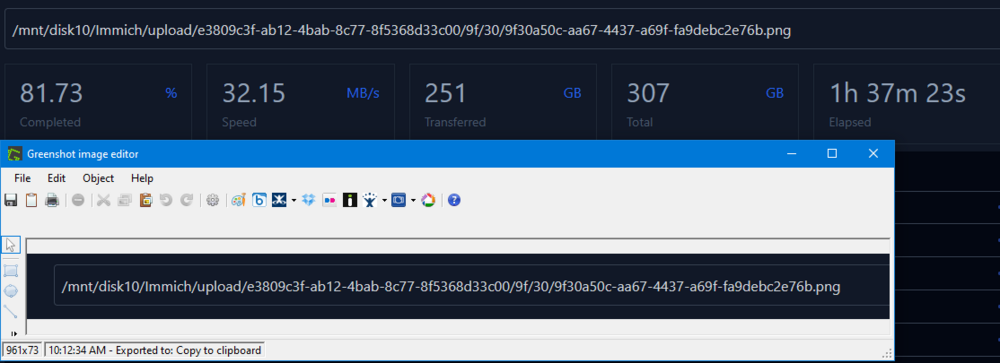
I don't use this often, but when I do, it's a lifesaver! Unusually, though, I've run into a bit of a snag this time around. I'm trying to consolidate data from a share that had been spread all around the array onto one drive. It's been stuck showing this since last night: I grabbed this screen shot of the current file it was working on at about 1000 this morning. It's now 1620, and it's showing it's still on the same file. I tried clicking on the stop button around the time I took this screen shot, figuring that something had hung, yet it's still sitting here. Clicking on the link in the UR dashboard to browse the share indicates that all files for this share are now on my destination drive (or cache), and that nothing is left on disk 10, which unbalanced is trying to copy files from. Suggestions on where to go from here? Do I need to reboot the server to get the plugin to stop? Additionally, though I don't think it's related, I got several of these NaN% indications. It appears as though there may have been one for an empty subdirectory from the main /immich share directory. I didn't get one for every disk, nor for every subdirectory. It seems to have processed past them all just fine, so it looks like maybe it's just a display bug. Not looking for a "solution" to this, just sharing as an observation and something to look at in the future.


-
7.1.2 -> 7.1.4 One minor glitch: When I logged into the server and it showed me the Main page of the GUI, the "UNRAID" logo/text was there twice and the version number overlaid the "Dashboard" link, making it unclickable. I clicked on "Dockers" (after noting some people having issues there), didn't see any issues and noted that the display glitch was gone. I've clicked through several other tabs and the glitch remains gone. I used to have a really nice signature with all my hardware, dockers & plugins, but I lost access to my old forum account in one of the forum updates and haven't bothered to rebuild it, so this'll do: As to the complaints about UNRAID's release cycle, I for one am thrilled that they find & fix critical bugs very quickly. Sure, many don't apply to me, but at least I know that if one ever does, the odds of it getting fixed rapidly are very good indeed. The upgrade process (since v5) couldn't be easier, and I've often wished that whoever does the upgrade process here would go fix the process for Windows. I've dealt with Windows updates that refused to apply themselves after a dozen tries. Also, UNRAID pops up an upgrade notice & gives you the option to ignore this upgrade. Where Windows nags you every few days to update & reboot.
-
I've been using this plugin foreverish (some time in 2016 was the first file date). My /boot drive is now filled to the point where I can't install the unraid 7.1.3 update. Looking at disk space usage on my flash drive, FIP is one of the largest users at > 1GB of storage. Looking back at the last 2 years of comments, there seem to be lots of problems and little support/resolution. I've never had FIP tell me that a file was corrupted, so... It's time for FIP to go.
-
Check this post: https://forums.unraid.net/topic/59647-support-djoss-crashplan-pro-aka-crashplan-for-small-business/page/54/#findComment-1554378 and follow the quotes backwards. It just seems to do that every now and then. Well, it does recently, anyway...
-
Odd that 2 of the same drive would be so different, unless one was in use at the time. Oh well, neither is the fastest thing in the world, so I'm not really too worried about it. I've got monthly tests set up now, so we'll see if that one remains slow, or if it was a one-off. Thanks.
-
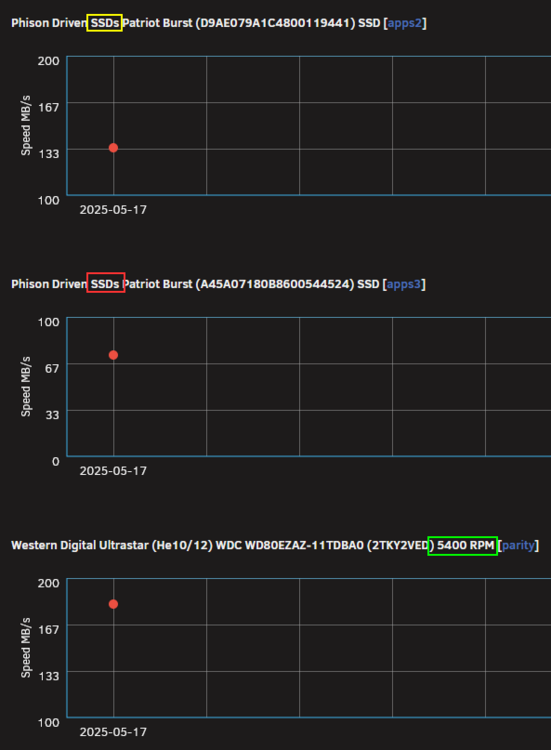
OK, gotta ask... Do these numbers make any sense at all??? How is it that an SSD is reading at ~80MB/s while a 5400RPM drive reads more than 2x that speed?? I understand that these may not be the fastest SSDs ever made, but still... Is this an indication that maybe the drive is dying, or was it probably just in use by something else at the time of the speed test?
-
I'll be honest - I don't use the info that this plugin holds all that often, but when I do, it's VERY helpful! That said, I just now realized that I was stuck on the 2025.02.08 version. I'm very thankful that you posted & pinned this comment explaining what to do. I uninstalled and reinstalled and now, all seems good. Thanks for continuing to maintain & evolve this plugin!!
-
Eagerly, yet patiently waiting... and... I see that was a rather old comment. I've gotten myself caught up and am still patiently waiting.
-
Hallelujah!!! Came here about to ask the same question and saw your post. Suppose I could have read the pinned posts myself, but who does that?
-
Things seem to be back up and running, but this is how far behind it got... And no, I don't seem to get that smoking hot upload speed someone else posted.

-
I've been getting this the last several days as well. I actually went 3 days without a successful backup. Now I'm getting multiple hours since last backup - used to be 15 minutes.
-
Thanks for picking up the torch, @VladoPortos!! Finally upgraded to v7.x. Unfortunately, I forgot to grab all my old folderview config data first. I've gotten things organized close to the way they were - close enough. No real issues so far, just wanted to say thanks.
-
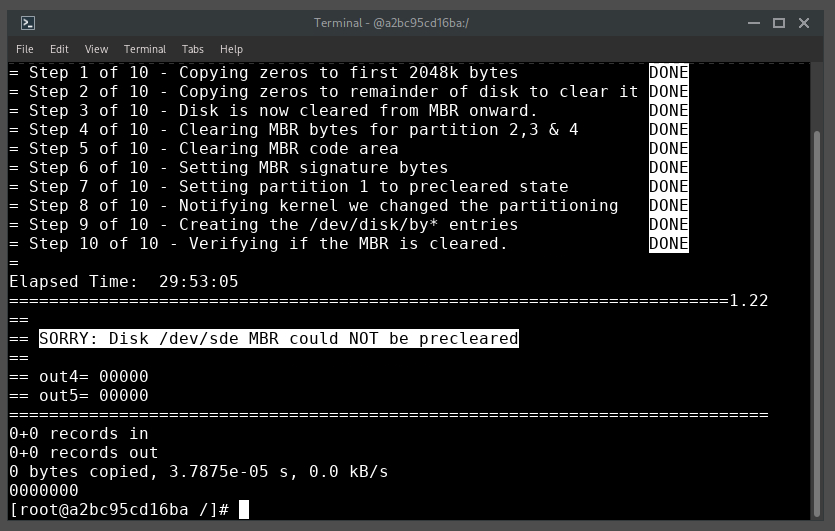
After many years of running preclear - both from the plugin and now the docker, I don't think I've ever seen this one: That's: ================================================================== 1.22 = unRAID server Pre-Clear disk /dev/sde = cycle 1 of 1, partition start on sector 64 = Disk Pre-Clear-Read completed DONE = Step 1 of 10 - Copying zeros to first 2048k bytes DONE = Step 2 of 10 - Copying zeros to remainder of disk to clear it DONE = Step 3 of 10 - Disk is now cleared from MBR onward. DONE = Step 4 of 10 - Clearing MBR bytes for partition 2,3 & 4 DONE = Step 5 of 10 - Clearing MBR code area DONE = Step 6 of 10 - Setting MBR signature bytes DONE = Step 7 of 10 - Setting partition 1 to precleared state DONE = Step 8 of 10 - Notifying kernel we changed the partitioning DONE = Step 9 of 10 - Creating the /dev/disk/by* entries DONE = Step 10 of 10 - Verifying if the MBR is cleared. DONE = Elapsed Time: 29:53:05 ========================================================================1.22 == == SORRY: Disk /dev/sde MBR could NOT be precleared == == out4= 00000 == out5= 00000 ============================================================================ 0+0 records in 0+0 records out 0 bytes copied, 3.7875e-05 s, 0.0 kB/s 0000000 [root@a2bc95cd16ba /]# Don't know that I've ever had an MBR related error before. Additionally, it was throwing a ton of errors while clearing (as viewed from UD): and now that I've got the preclear error, I'm seeing this on the disk details in UD: Plus, I've got a nasty squeaking sound coming from the server that's never been there before. This drive had right at zero power on hours when I installed it and first checked the attributes (forgot to do that immediately, but the POH was roughly equal to the run time of the preclear at that time, so it was pretty close to zero). Is this likely: A) bad SATA cabling/poor seating in the hot-swap bay? B) DOA hard drive? Is there any chance that popping it out of the hot-swap bay and plugging it back in might help? I'd provide the full log file(s), but the most recent logs in ...\appdata\binhex-preclear\preclear_reports are from 2022 - nothing from this drive's run. If they're held temporarily elsewhere, point me at 'em and I'll upload here.




-
It might be good to mention the need to manually uninstall the old ControlR and install ControlRd back in your original post on from last Thursday. I've been waiting to see an update come through from CA AutoUpdate, and, obviously, haven't. I'm installing the new version now, I presume that it will continue to work with the older version of the Android app until such time as the new app is released and my phone upgrades? I've installed the new version of controlrd on the server, uninstalled the old version, added the server back in via QR code and all is good, including UPS stats! Thanks again for your long term effort to support and improve this!
-
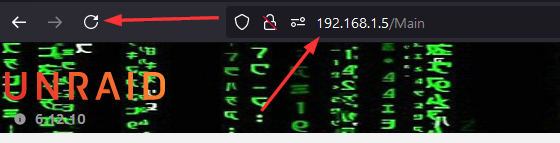
I do, primarily, use the IP address and occasionally the name. Are you saying that the server was up & running just fine, but that the browser simply couldn't find it by name? This is what the tab looks like in my Firefox browser (yes, this is after a server and PC restart, but this tab is pinned in Firefox, so it's what it always is) but clicking the "refresh" button and hitting F5 had zero effect on this tab. Even shutting down the browser and restarting it (and trying to load the dashboard in a totally different browser) got no response. I'm not sure where another dns service would be running on my PC/network, but I'll look into that.
-
The syslog would have been posted within roughly 10 minutes or so of having restarted the server (power button down until it shut down). Was having issues for at least 2 hours prior to that, that I'm aware of.
-
Weirdly, this was the version I had. I don't know how many releases there have been between that one and the 2024.05.11 version, but CA didn't find them despite auto updates being turned on (and getting regular updates of dockers, though, TBH, nothing about plugins). I uninstalled/reinstalled and all is good. Thanks for continuing to develop & support this, jb!
-
Ah! I did have syslog server running! Here's the log: syslog-192.168.1.5.log
-
Thanks, I'll do that. In the meantime, any suggestions on a smooth shutdown, or should I just "pull the plug"? Also, it's not actually crashing. The server is up. I can access shares and some dockers. I just can't access the GUI and other, random dockers.
-
Extended SMART test can take many hours to run. Be patient...
-
After upgrading from 6.12.9 to 6.12.10, I had some issues. Now, after sitting while I was at work, I get no response from the WebGUI: * Hit (ctrl) F5 and the browser page gives no indication of reloading * Login to the server from a totally different browser - it presents the login page, I can log in, but nas.local/Main gives an HTTP ERROR 500 Some of my dockers are responsive and I can access them, some are totally unresponsive - I click on links within their management pages and get zero response. Ctrl-F5 doesn't even seem to attempt to refresh the page. SSH has been disabled, and since I can't get access to the WebGUI, I can't run diagnostics or start a web terminal session to reboot the server from the command line. Any suggestions.
-
Much as I hated doing it, after 2 hours without the server, no dockers running, and no access to data, I powered off (5 second press of the power button), gave it a few moments, then turned the power back on. The server came back up, all dockers started, no indications of error, and it did not report an unclean shutdown and start a parity check (which, frankly, surprises me). I may initiate a parity check later, just to be on the safe side. Not sure it'll help, but here are diagnostics after it booted. nas-diagnostics-20240610-2029.zip This might help with a post-mortum - the syslog date stamped yesterday. Last entry is 9 June 2024 @ 13:42, but maybe there's a clue? syslog-20240609-134232.txt syslog-20240609-134232.txt
-
OK... something funky is going on. I just got an array health report from the server via Pushover, so the server's obviously functioning. However the GUI is still not responding and PuTTY connections are refused (haven't logged in via PuTTY in a while - been using the browser based terminal, so I don't remember if I disabled SSH or not). Any suggestions?
-
For some reason, I didn't get a notification from my server until a couple of days ago that the 6.12.10 update was available. I kicked it off this afternoon, and, after receiving a "plugin updated" and "ok to restart" notification via pushover, I restarted the server. Now I get no GUI access and no SSH access. I've tried connecting via Firefox (my normal), Brave and Chrome. I cleared all browser history in Chrome and still no dice. This is the first upgrade issue I've had since 4.x -> 5.0, so I'm shocked and at a loss for what to do. It's been a good 20 minutes or so and there's just no response. I don't have KVM plugged into the server, so I can't see what errors it might be giving me. The simple, though not recommended solution, would be a hard power-down and reboot to see if it'll start or, power-down and pull the USB to see if there's anything in the syslog. What other options do I have?






