Free Man
Members
-
Joined
-
Last visited
Everything posted by Free Man
-
Today is the 2nd time in the last week or so that I've gotten this warning message on my dashboard: I do the Force SMART+DB as recommended and everything comes back, but I'm 99.999% sure I've never had this happen before. Any thoughts or suggestions on fixing this so it stops happening? Unraid v7.2.4 Disk-location v2026.02.19

-
Is this broken? Should I cancel the running preclear and switch then? Container preclear aborted. Process restarted via UD preclear plugin.
-
I was about to launch a preclear on my new 14TB drive when I noticed this: Device Start End Sectors Size Type /dev/sdq1 2048 27344762879 27344760832 12.7T Microsoft basic data ######################################################################## invoked as /usr/local/bin/preclear_binhex.sh -f /dev/sdq ######################################################################## (partition starting on sector 63) (it will not be 4k-aligned) Are you absolutely sure you want to clear this drive? (Answer Yes to continue. Capital 'Y', lower case 'es'): Yes^C The (it will not be 4k-aligned) caught my attention. According to the FAQ: if preclear -a or -A not defined then 63 or 64 will be chosen based on Unraid config, UNLESS the drive is > 2.2TB, in which case it will always be 64. I cancelled the run and kicked it off with -a, but this seems like an error in the script. I don't ever recall having run into something like this, but this is also the largest drive I've ever precleared.
-
From the Deluge docs: How can I reset forgotten password? Stop the Web UI before modifying the web.conf file. Edit web.conf in config and delete the entire pwd_sha1 line or use quick method via command-line e.g.: sed -i.bak "/pwd_sha1/d" ~/.config/deluge/web.conf Start the Web UI and the password will have been reset to default password deluge.However, even after deleting the pwd_sha1 line and restarting the container, it's still telling me the password is invalid! I've typed the default password in plain text in notepad++ (to be sure I have it correct) and copy/pasted into the password prompt and it's not working. Anyone have any suggestions?
-
Awesome! Thanks for the response. Took a couple of shots at it, but I got all the changes made and I've got it up and running on WireGuard now! Now... How do I delete the password? I went to look at it so I could plug the pwd into one of my arrs to use it as a download client. Of course, the pwd isn't displayed there, but I did look in the browser pwd manager, used that, and now I can't log in to either the Web GUI of the Deluge client or get a connection from the arr... 😢
-
Funny, with this change that I'm being forced to make, I won't need to, but I appreciate it!
-
I've been running this for years and it's worked very well. I recently received notification from ProtonVPN that I'm using a deprecated OpenVPN connection, so I'll need to reconfigure. They recommend going to WireGuard, but can support an OVPN config if needed. I created a WireGuard config file at my account page from them and downloaded it, but it's downloaded as a .conf file, not a .wg0. Also, there was no /config/wireguard directory for me to put it in, so I created it and dropped the .conf file there. I renamed the /config/openvpn directory to /config/openvpn-OLD so it wouldn't get used. When I tried to restart the container, it complained that 2026-02-21 15:52:31.671515 [warn] VPN_CLIENT not defined (via -e VPN_CLIENT), defaulting to 'openvpn' 2026-02-21 15:52:31.681854 [info] VPN_PROV defined as 'custom' 2026-02-21 15:52:31.744715 [crit] No OpenVPN config file located in /config/openvpn/ (ovpn extension), please download from your VPN provider and then restart this container.It also created a new ./openvpn directory. I tried dropping the .conf file in the ./openvpn directory, but it wasn't particularly fond of that and still wouldn't start. What is the proper string to put in the VPN_CLIENT variable to tell it to use wireguard? Also, can I use my .conf file as is, do I need to modify it in some way, or simply change it to be a .wg0 file and all is good? This is what the .conf file contains (sanitized for security): [Interface] # Key for UrDeluge # Bouncing = 2 # NetShield = 0 # Moderate NAT = on # NAT-PMP (Port Forwarding) = on # VPN Accelerator = on PrivateKey = <snip> Address = 10.2.0.2/32 DNS = 10.2.0.1 [Peer] # US-GA#321 PublicKey = <snip> AllowedIPs = 0.0.0.0/0, ::/0 Endpoint = x.x.x.x:port PersistentKeepalive = 25
-
I have finally gotten to the point where I've got my server back up & running on new hardware. The MoBo has a Realtek 8126 5Gbps NIC, so I'm currently running on a USB NIC to get access, and am trying to install the 8126 version of this plugin, but it's just sitting at the "Install Plugin - In Progress" screen and nothing's happened for a good 10 minutes. I have full access to the server from my desktop machine. I have full internet access (been chatting on Discord, posting this, wife's surfing...), but nothing is happening here. I hit the "Close" button and went to look at the installed plugins to see what was up. Turns out it did install, it just didn't report anything. Additionally, I've got the RTL8168(B)/RTL8111(B) PCI Drivers installed because that's what my old hardware needed. It might be worthwhile during the install to check for other non-built in drivers and remind the user that (s)he may want to uninstall those, as I'm doing next. Now, as I uninstall, I get the same blank "uninstall" screen for a couple of minutes now with nothing happening. I close the dialog, scroll through my plugins and the 8168/8111 driver is gone. I really appreciate you putting these together. It might be nice if there was some sort of output to let us know that it actually (un)installed.
-
It's good to see that this plugin is still alive, functioning and supported! I've just picked up a new MoBo with a Realtec 8126 5G on board, and it looks like I'll want to install this plugin after getting the new hardware installed. I might not get a full 5GB/s out of it yet, but, well, I don't have any other devices on the network with > 1GB NICs, so it won't matter much for now, and there's plenty of time for the driver to mature before I'll really need it.
-
Well, it's been 48 hours without issue, so I'm very happy about this. I'd really like to know what's going on, though. I've had random long-term CPU spikes like this before and I've never been able to track them down.
-
CPU is back at 100%, but the server is, for now, still responsive, and RAM usage is climbing again. Fresh diagnostics: nas-diagnostics-20260201-1802.zip I'm going to start shutting down containers to see if I can identify one that causes a significant drop in CPU. Beyond that, I'm really lost.
-
Thanks. I'll look into getting this set. I also got a notification that it considered it an unclean shutdown, so it probably would have started over anyway. Any thoughts on what's actually causing these issues in the first place? Did you see anything in the diagnostics indicating what's going wrong?
-
Good news: Server's rebooted. Containers are all back up and running. Bad news: parity check started from zero (why wouldn't it have picked up where it left off?) and CPU utilization is still sky high Post-reboot diagnostics attached to see if there are any notable differences. nas-diagnostics-20260201-1415.zip
-
Good news! It managed to reboot in under 10 minutes. Containers are slowly starting up.
-
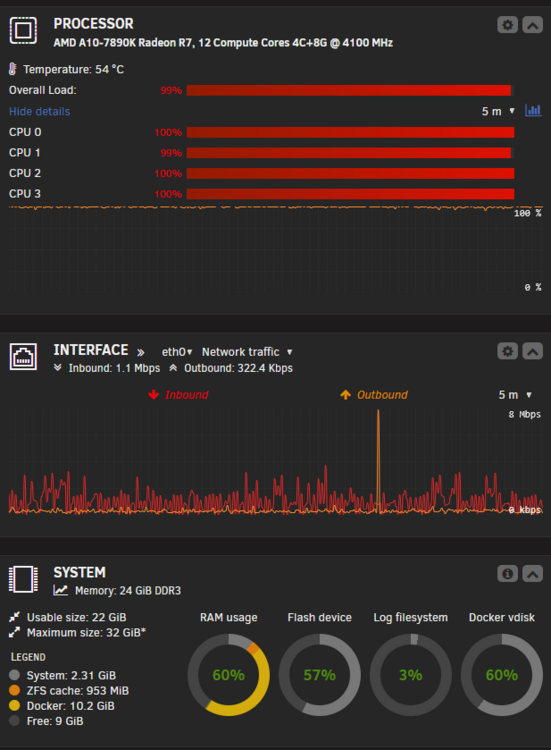
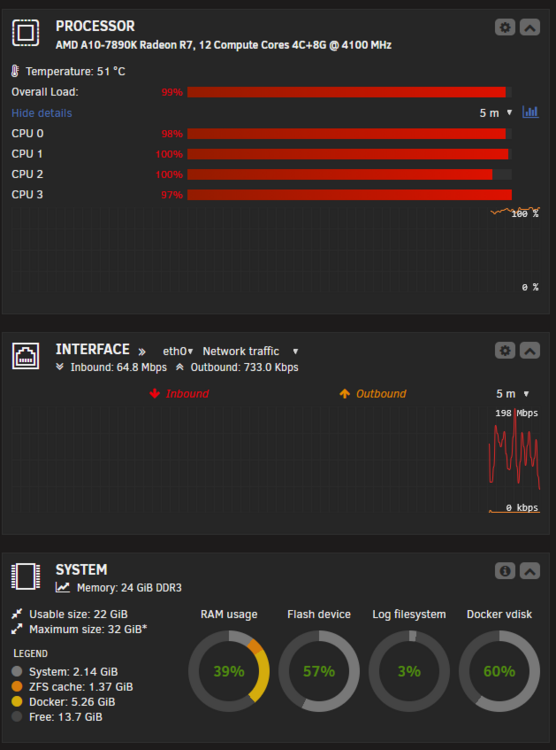
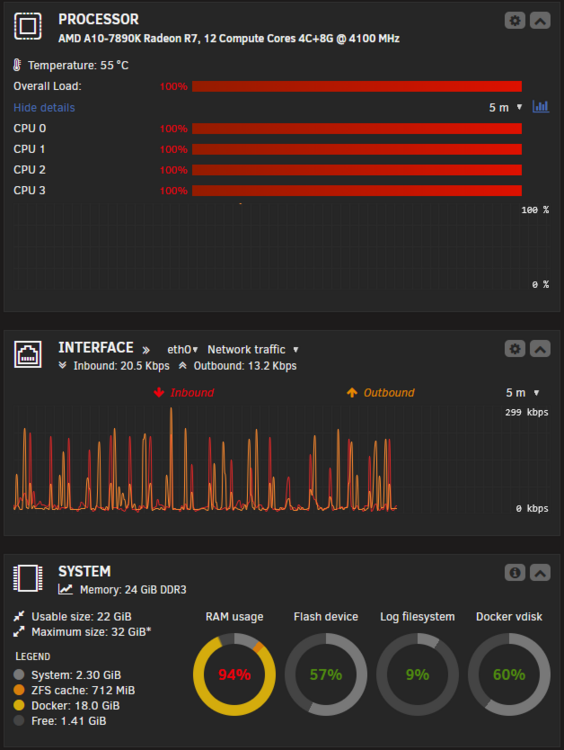
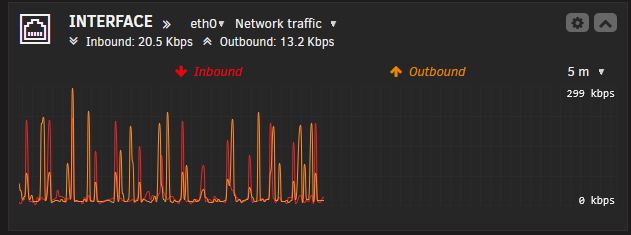
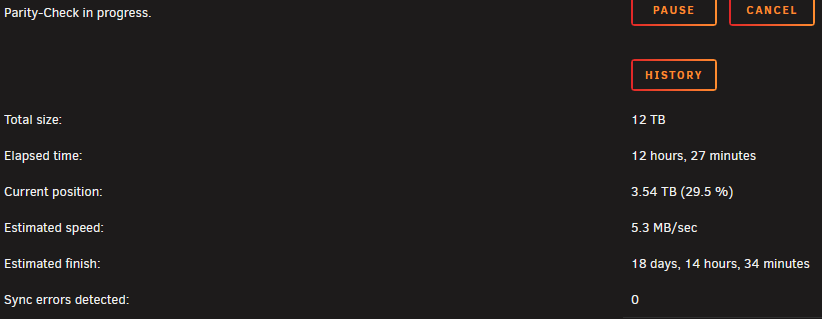
This is the second time I've realized that things aren't working correctly around the house, sat down at the computer, and discovered that the CPU is flat pinned at 100% and RAM is nearly maxed out (94% used last time, only 91% used this time). Yesterday afternoon, I came in from shoveling snow to find it was all locked up. I was able to get all my docker containers to shut down - it only took about 15 minutes for the server to respond and get them all shut down. I then restarted everything 1 by 1 and it was running fine. I came home from church today to find the same thing has happened Today, my first step was to download diagnostics - that too about 10 minutes, and I've attached. I'm also attaching 2 screen shots I took yesterday, and one today. On the 2 from yesterday, you can see the network graph is scrolling based on the browser updating the graph, but it's not getting any new data. On the one from today, I've added a couple of arrows pointing at tiny little spots of CPU graph where it might, possibly, have dipped below 100% utilization. I know it's running a parity check today, but nothing has changed drive-wise in months, so that shouldn't be the cause of the issue, and it didn't start until ~1am this morning, so it couldn't have caused yesterday's lockup. I'm going to try to reboot the server (and sit on my hands to force my patience), but I'd really like to see if someone can give me a clue what's going on. I've had the server sit at 100% CPU for moments in the past, and even be sluggish for a minute or so, but nothing like this in a long time. nas-diagnostics-20260201-1329.zip Additional update: Here's the current status of the parity check. I don't have 18 days to wait for it to finish at its current rate...
-
I need to know my public facing IP address for a tracker I'm getting connected to. Since I feed a specific VPN endpoint into this container, that endpoint won't change. I open a container console and do curl https://whatismyip.com and get back: sh-5.3# curl https://whatismyip.com curl: (6) Could not resolve host: whatismyip.com I had the network set to a custom network (with all my other containers) and got no response from curl, then I changed to Bridge, and got the response above. What am I doing wrong? Interestingly, curl ipinfo.io works just fine... However, I'm getting an IP address returned that doesn't appear to be specified in my `openvpn.ovpn` file. :(
-
To answer my own question, no, there isn't a problem with this. This has repaired all my containers (that I've checked so far), other than HomeAssistant, and that's something that seems to be much deeper than what can be fixed by a simple restore. Working with the HA folks on this. Thanks @JorgeB !
-
Is there any reason that I couldn't use MidnightCommander to manually move the /mnt/disk3/appdata/.. files to /mnt/apps/appdata/.. ? I understand the difference between moving files between user shares and disk shares and the grave danger of attempting to mix the streams.
-
Yes. Yes it does. Once I get these moved over to the pool, everything should be restored to the way it was?
-
My goal was to migrate my "AppData" share off of my "Apps" pool to the array, upgrade the drives in the pool, then migrate back. I stopped all my containers, turned off the Docker service and got the data from the pool to the array using Mover. Then, not thinking clearly (or, clearly not thinking), I started up the Docker service so that "everything would be running for the evening" (though slowly since the containers were living on the array, not fast SSDs), with the plan to pick up the next day with the physical drive replacements. This didn't go well. When I started the Docker service, it created all the container directories on my Apps pool and when I went into my container's web UIs, nothing was configured - everything was in a default state. I immediately shut down all the containers and the Docker service. I then reconfigured the AppData share to live on the Apps pool and ran the mover again to move everything back to the way it was to begin with. Unfortunately, when I started up the service & containers again, everything was still in a default, unconfigured state. Is there any way for me to get back to where I was without having to manually reconfigure everything? nas-diagnostics-20251121-1325.zip
-
Looks like lots of UI improvements are being worked on - very excited and appreciative of your work! Are basic things (like clicking the globe icon and launching a new tab for the container's interface) being worked on? The command prompt & logs icons work, but the globe doesn't Also, I just updated to 7.2 prod and initially, this didn't load for me at all - I got all my containers in an old style, single list. A couple of reloads didn't help. I went to look again this morning to grab a screen shot for a bug post, but... benign neglect has once again come to the rescue and it's grouping everything into folders again just fine!
-
Also, is there a direct to LT support thread now, or do we just post a new question in the general support forum? Maybe you should get this thread locked so goobers like me don't keep asking questions... In my defense, the link from the plugins page does still link to this thread.
-
I've used gfjardim's preclear many times. I think this is my first time using UD preclear. I did find the Tools | Disk Utilities | Preclear page to monitor progress, but I'm not seeing anywhere that shows progress on the Unassigned Devices page and I don't see a preclear icon in the Unraid footer. Have these been removed since this was released back in Feb 2022? Are they no longer available in Unraid 7.x? Am I just missing something? I know preclear is no longer necessary, but I'm old school (UR 4.x days, even), and I like to run it. I've had one drive die during the preclear, so I find it useful. This plugin is appreciated!


-
Just got a forum email and was going to come in to post about the fix, but I see that many beat me to it... Thanks for that! Just did that and worked perfectly here. As a note, I also removed the 11.3.1 build that I'd pulled by adding the tag. Figure there's no reason to have that sitting around for the next decade...
-
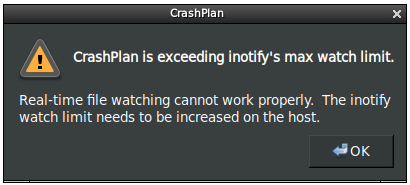
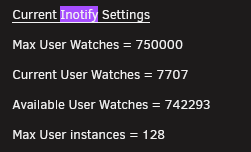
I'm getting an "exceeding inotify's max watch limit" error from crashplan, yet I have the max watches set at 750,000, and only 7707 currently in use. Any other suggestions?