





Joloxx9
Members
-
Joined
-
Last visited
Everything posted by Joloxx9
-
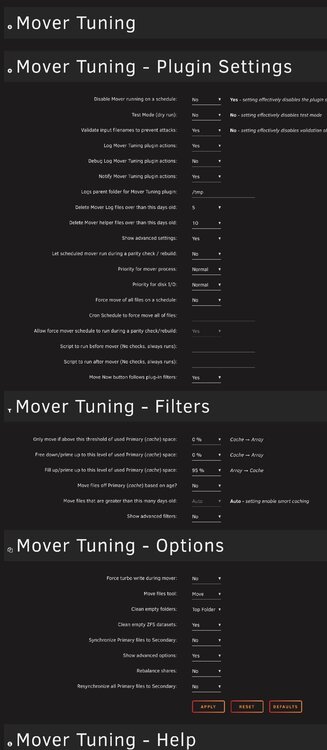
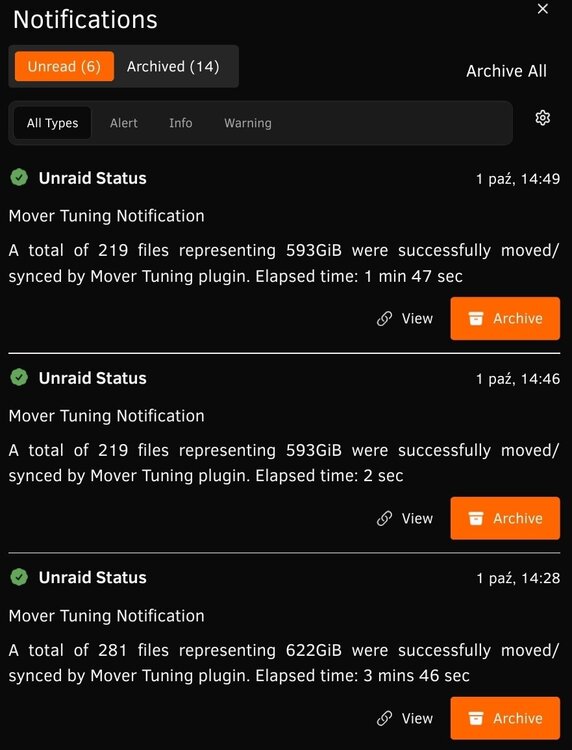
Need some help, always had mover set to move everything, but recently started seeding more etc and keep much more data on cache, hence I was going to upgrade my cache. To do it I have to move all files, so I changed settings to what I think should enforce movement but it mover moved only 5Gb etc despite saying in notification that it moved 600Gb in 3min(got fast HDD😅) can someone tell me which setting is messing with move?
-
Correct, that fixed the system.
-
I do not know what is happening, restarted the server and it didn't come back to life, pelase advise what is going on. Can access only through ssh. tower-diagnostics-20250925-1703.zip
-
Ok thanks, this might be extremely hard to track, but I think I might get an offender, nextclud borg backup.
-
I guess that is the case, but is there a way to find out somehow?
-
Just to show you proper timeline, for months all was good, recently (last week) appdata_kopia share was wiped, I mean all files but one were gone. At the same time appdata_kopia share owner changed from nobody to root, I changed it back to nobody. Since that time, for 3-4 days it was running okay until this night, when basically whole share with data vanished.
-
No, that's the thing. Share was gone, files were gone.
-
Done the test in maintenance mode, no issues found.
-
OK running xfs_repair -n on them and see
-
I know, I have set mover to remove empty folders, but... Mover is scheduled to run at 4AM, and I didn't trigger it in the evening.
-
Hi — I have a strange problem with the share appdata_kopia. This is the share where I keep backups of appdata and Nextcloud. The share settings are “primary cache, secondary array”, with “fill-up” enabled and it’s set to reside only on disk2. A few days ago the problems started: overnight all folders on that share disappeared — only one remained — and the share owner changed from nobody to root. I fixed it: I restored the backup and removed the container I thought was causing it (an Unraid config backup container — I don’t remember the exact name). Everything was fine for the next 2–3 days. This morning I started up and the share is completely gone. Strangely, yesterday at about 21:00 I manually ran a Duplicati backup from that very share. Can someone please check the logs and tell me what’s going on? It worked fine for months. Alternatively, what can I check myself? Apart from Duplicati and an rsync job that runs in the morning, nothing has access or reason to touch that share — and deleting an entire share is a pretty major action. The only thing I found in the logs is this fragment: Sep 9 22:04:23 Arrakis shfs: /usr/sbin/zfs unmount 'cache/appdata_kopia' 2>&1 Sep 9 22:04:23 Arrakis shfs: /usr/sbin/zfs destroy 'cache/appdata_kopia' 2>&1 For some reason something removed that share — but only from the cache, which is quite odd. arrakis-diagnostics-20250910-0537.zip
-
I fixed mine using below method, just privileged mode was not necessary
-
Fixed after messing with shares(changing configs) and restart.
-
Not my build but friends, fresh 7.1.4, he had to create a new config yesterday as there was an issue with one of the drives(something wrong with file system, couldn't create shares). So the file does not exist, what is the easiest approach? He created few shares and nothing, he is waiting for parity to finish syncing before he restarts the system, but I have checked the file on mine system and it just contains some settings from few places, can he just copy it from me in worst case scenario? I really do not want him to re-do the stick etc
-
I am in the same boat as everybody above, guys from team should have a look and at least communicate with users to NOT USE Samsung usb sticks. I have Samsung Bar 64GB bought directly from samsung store, no chance for counterfeit etc. And I am seeing exactly same behaviour as above, same errors after restarts, sometimes I am able to restart unraid server 2-3 times without any issues, but then good luck, and the only way to fix it is to move it from port to port, shame that have my usb slot inside the case... Which cause a lot of headache. Anyway today is the last day on the stick as I am moving into card reader and proper card. Motherboard is Z790 Tomahawk with latest bios but, maybe previous users can share their setup so we can see if there is really problem with the stick or rather stick + mobo combination?
-
I am surprised that there is no F2A.
-
What version of unraid are you running?
-
I would rather move them to the disk, just to avoid things like that, in the future mover might remove empty folders and users might go crazy with that. Especially that immich is growing. Hopefully they will change it at some point and these dummy folders wont be needed anymore.
-
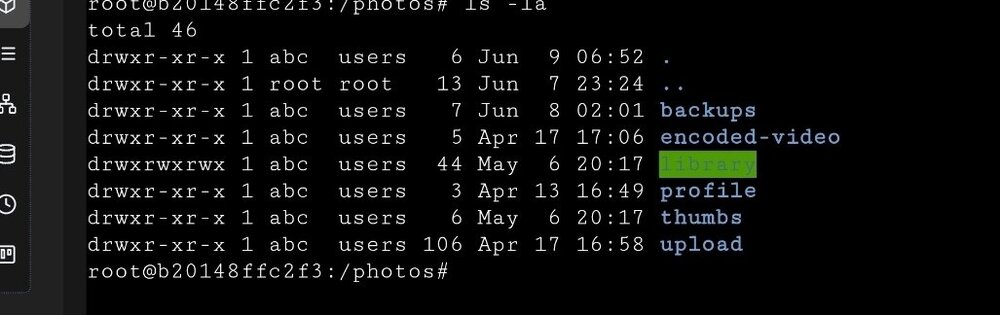
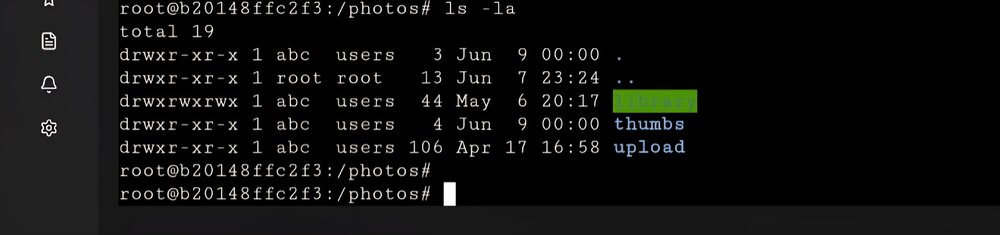
Tested, folders moved to disk1, mover doesn't remove them anymore, link bewteen host and docker is no longer broken. Hopefully this might help someone in the future. Keep in mind, do not keep dummy/empty folders created by immich on cache drive.
-
Thank you for your answer. Few people answered in quite similar way, on unraid discord, immich discord and docker forums, all of you are pointing on the same thing, folder(s) should be moving and that could break mount. HOWEVER I can already answer this is not the case. My appdata share was set in following way main storage - cache, secondary storage array, mover: cache<-array. So technically my files should not move from cache, especially when I have 2TB on the cache and it is never over 50% of utilisation. However anything was possible, hence why gents on discord advised to disable secondary storage, enable exclusive shares etc. And guess what, unfortunately same thing. The 3 folders were gone this morning and immich spammed me with issues. My cache is using zfs mirror, hence why I said I might use /mnt/cache/appdata/etc... because that is the right direct path to the file, however what I have done this morning, I removed the affected 3 binds(left thumbs as there are no issues with it, and this one MUST be on nvme). Immich without these mounts automatically use default folder locations, hence why I moved all stuff to these folders and I am testing it. If it is ok for 24 hours, I will move them to another location, as I have a pool of 3 older sata ssd drives in runnign raidz1 so can try if that mount will work. If that is ok I might leave them there or try to use /mnt/cache mount as a test. However if this will keep failing I might have to run diagnostic. What is quite interesting, once I set it up with exclusive shares yesterday, it was good untill midnight, what was scheduled at midnight? External library scan in immich. What is even more interesting, day before had same issues at the same time. Please see attached log. I have changed cron this morning and run that hour ago, no issues when folders are in their default location. log short.txt
-
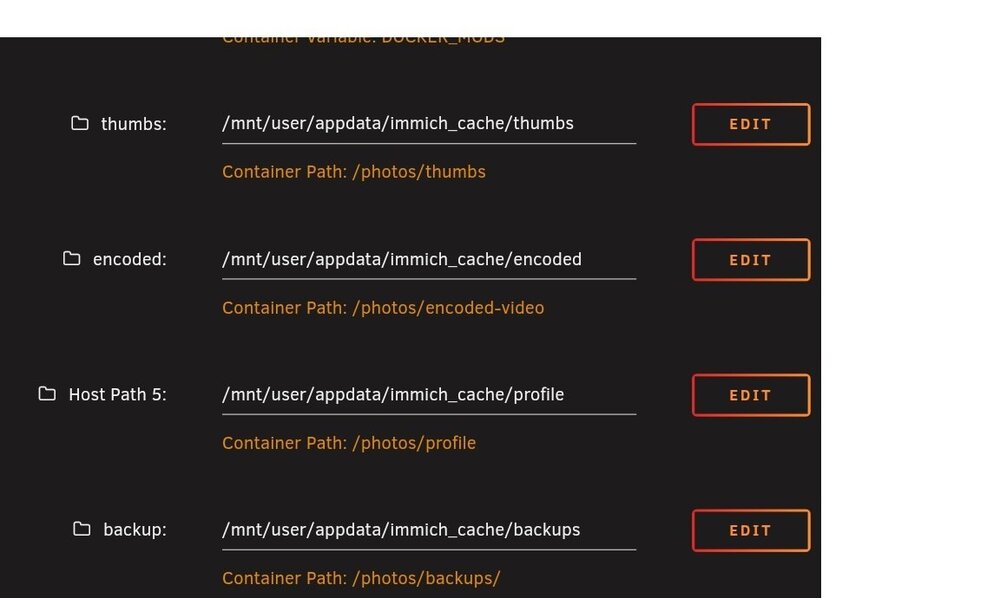
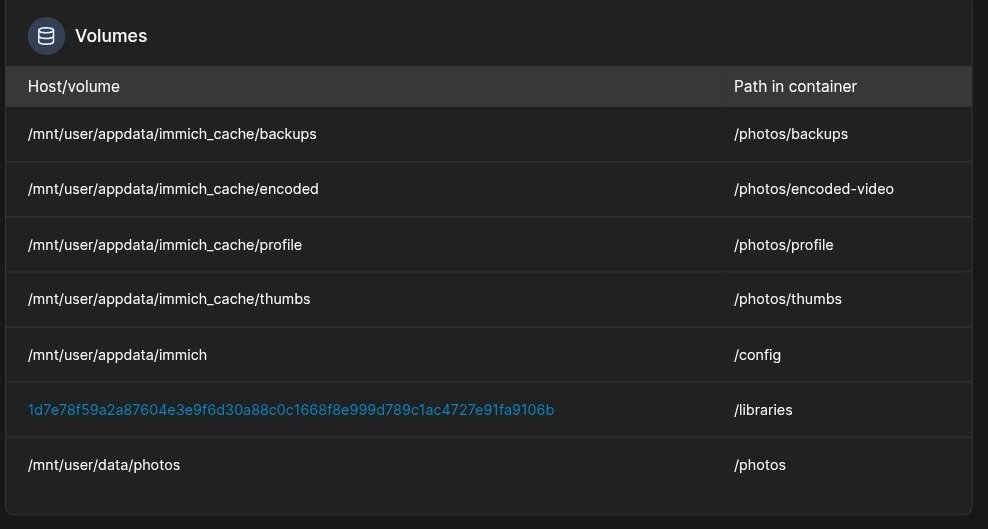
My Immich container is loosing mount points, I feel like an idiot and not sure what might be wrong: This are my mount points: They can be confirmed in the portainer(ignore extra ones): And normally when I inspect the folder I should see something like below: However, every single day I have immich issue in the log etc. saying that it cannot find "encoded-video" folder, then when I check what is in the folder: Simple container restart fixes the issue, but why, and how is it possible that it loses the access? I have 72 containers running, there are no issues with anything else, only with Immich. My appdata is on zfs and files are not moved to the array, there is nothing else using these files, immich is running under 99 user and all files have proper rights. What is happening with this thing? Please advise. What I have done now as test I changed mount points to /mnt/cache instead of /mnt/user
-
I guess in my case as I have reconstruct on it is always on, but if I set it off and then enable turbo mode in plugin it will work only when mover is working I guess?
-
I have Turbo disabled, but reconstruct is on in disk settings, in this case what mode will be used? After I turned on reconstruct speed bumped from 50-60MB to 140-160MB.
-
Backup - stuff from phone to the nextcloud Photos - immich Appdata backup plugin vaultwarden - passwords Duplicati to copy appdata,nextloud and immich to the separate drive (wd mybook) Going to use hetzer cloud for backup, might use Duplicati as well to set it up or I might movie to Kopia as it is faster. Also my unraid got 2 parity drives and cache nvme is running in mirror mode, but I would not call them as typical backup.
-
Thanks for answering, I will try the new mover then, also I think I need to change some settings to not run mover every night maybe :)






