





SliMat
Members
-
Joined
-
Last visited
Everything posted by SliMat
-
Update - I forced an update just after posting this, so they all said "up-to-date", then today when I checked again, they all say "not available" again 😞
-
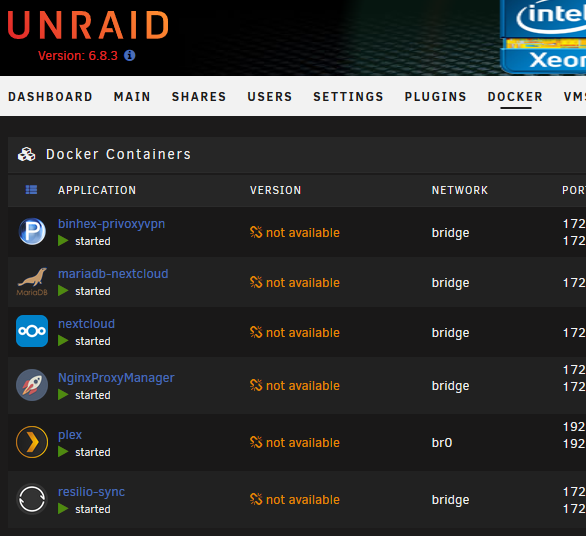
Hi When I go into my DOCKER tab all my dockers are listed as VERSION "not available"; Does anyone else have this, or know how to fix it? The only work around I have found is to switch to advanced view and run "force update"... this then shows that the latest version is installed. But soon after, if I go back into DOCKERs it shows "not available" again. I have two HP servers and this persistent annoyance only happens on one! Any pointers? Thanks
-
Thanks also @Jorgen
-
Many thanks Binhex - that makes a lot more sense... previously I was using DelugeVPN and within that docker's console curl https://ipconfig.co did show the VPN endpoint IP - now I am using Privoxyvpn on my local UnRaid machine as I have rTorrent on a seedbox... so thats why DelugeVPN showed the VPN endpoint... becuase the VPN docker was integrated. Thanks 🙂
-
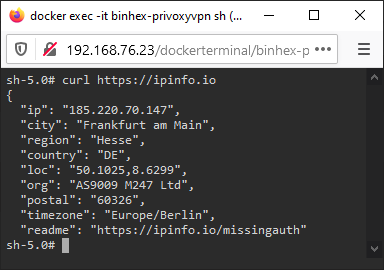
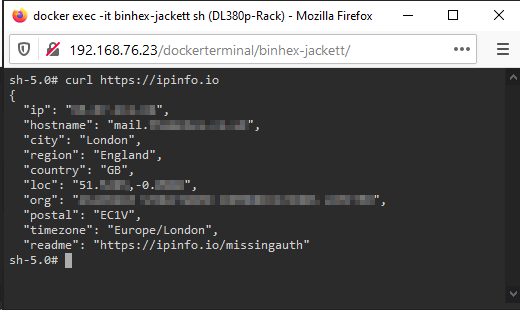
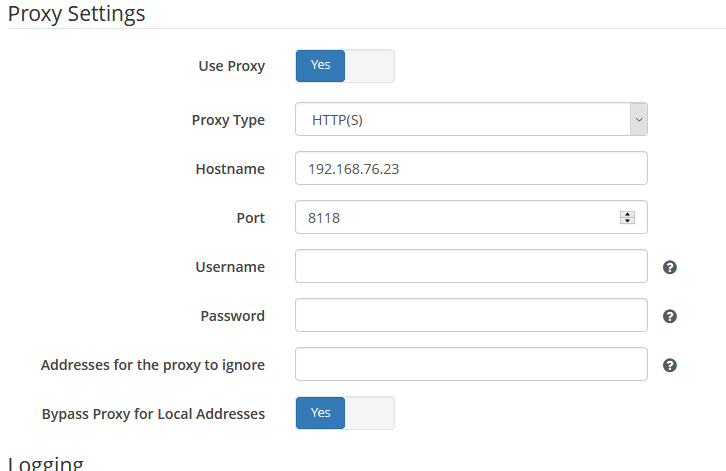
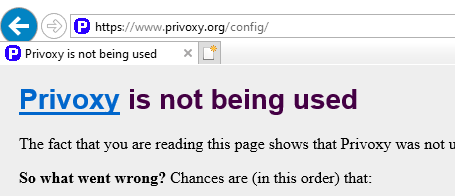
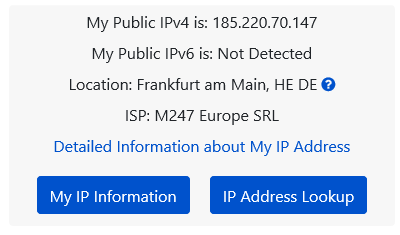
Can anyone help with why my Sonarr, Jackett and Radarr dockers don't seem to be passing traffic through PrivoxyVPN? I have binhex-privoxyvpn configured to use PIA (Frankfurt) and it seems to be configured OK as when I use 'curl https://ipinfo.io' in its console it tells me that the IP is in Germany, which is what I expected... My dockers are set to proxy via the local server IP and port 8118 (and they have been restarted since configuring)... But when I try the same check from the Sonarr/Radarr/Jackett consoles it gives me my genuine static IP address... However, when I proxy one of my Windows 10 VMs, to use privoxyvpn, it correctly identifies, in a web browser, that the endpoint is Germany, i.e. routing through PIA... But when I visit https://www.privoxy.org/config/ it says that Privoxy is NOT being used (I have cleared cache)... Am I missing something, there seems to be lots of conflicting information... are the dockers correctly routing through pivoxyvpn and mis-reporting their endpoints? If so, is there another way to prove all is working well? Thanks in advance
-
Many thanks @jonathanm - once I saw this it made sense and although when I first made the changes it still didn't work, I tried again when I got home from work and it all fell into place "Not to self - hunt out the FAQ when it doesnt work first time"
-
Perfect - thanks 👍
-
Sorry - not worded very well... I have UnRaid at home and a separate UnRaid server in the DC... I was meaning that I don't have any specific ports open as I obviously have 25, 21, 80, 443, etc open on the router in the DC... but nothing specific open on my home router (apart from 80/443 for NginixProxyManager)
-
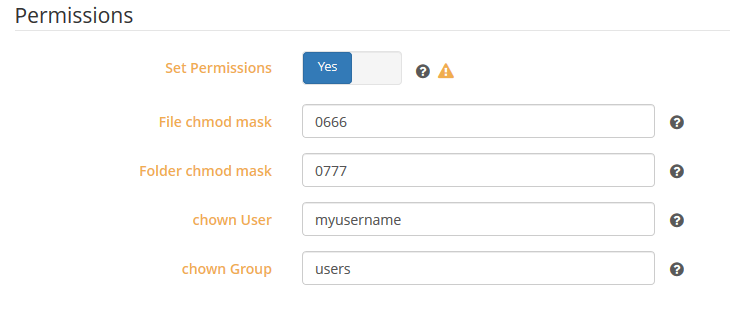
Hi all, I am new to Sonarr / Deluge, etc and have managed to get it kind of set up - but I am struggling to have media automatically moved and renamed once its downloaded. I know its a user/setup issue - but was wondering whether anyone can give me some pointers... So, I am using Sonnar, DelugeVPN (Binhex) and Jackett (LinuxServer). I have a public share mnt/user/Downloads which is set to use the cache drive for new files/directories and mover is set to run at 2am every day. Within this share I have 3 folders complete, incomplete and unzipped_torrents. I have another public share /mnt/user/PLEX which has numerous folders including /TV Shows... kind of obvious what this one is for 🙂 I have DelugeVPN working through a custom VPN (all working correctly) and I have Privoxy enabled (working correctly). DelugeVPN is configured so that the /data path is /mnt/user/Downloads/ Jackett is configured so /downloads path is /mnt/user/Downloads/ and also set to proxy using Privoxy (working AFAIK). Sonnar is configured so the /tv path is /mnt/user/PLEX/TV Shows and /downloads is set to /mnt/user/Downloads/ The issue I seem to have is that when I download any media, it starts in /mnt/user/Downloads/incomplete, which is correct. When its finished downloading it moves, correctly, to /mnt/user/Downloads/complete... but, this is where it stays. Sonnar sometimes shows the media as downloaded and sometimes shows it as "downloading". Also if the download is a single episode rather than a whole series in one I end up with lots of episodes in separate folders (e.g. /mnt/user/Downlaods/complete/myseries.s01e02.720p.seedername/series.s01e02.720p.mkv, /mnt/user/Downlaods/complete/myseries.s01e03.720p.seedername/series.s01e03.720p.mkv, etc) also in these folders there are often txt files and other unwanted files. Sonarr doesnt seem to try to move the files to the /tv (mnt/user/PLEX/TVSeries) folder - however, if I manually create a MySeries folder and then subfolders, Season 1, Season2, etc and manually copy the MKV files into their respective destination folder and use the "preview rename for all episodes" option within the series information section it correctly previews the renaming and when I use the "update series and scan disk" option, from within the series information, it does rename the individual files in the folders I manually created to "My Series - S01E01 - Episode1 Title.mkv", "My Series - S01E02 - Episode2 Title.mkv" and so on. The fact that the rename does work from the Sonarr console seems to rule out and permissions issues, although having tried to research this I have enabled permissions under Settings/Media Management with these settings; So... can someone tell me what I have missed? I know its down to my own lack of knowledge in this area - but I would like to get it working properly. Thanks in advance.
-
A great docker, so far, but one other observation @binhex I have noticed that in the preferences section, when you enable plugins (namely lables & blocklists), after the docker is restarted these revert to the default setting of off... so you have to re-enable them as soon as the docker restarts - I havent searched for a cure to this yet, but is it a known issue?
-
Not that I am aware of, I havent chnaged any port settings in the last couple of days. I tend to keep most ports closed as I run Exchange etc from a VM on an UnRaid server in a datacentre... can you elaborate on what you are thinking? The only thing I have changed since yesterday is that I am using a friends OpenVPN server in a datacentre and have set DelugeVPN to custom settings with a .opvn file provided by him using TCP rather than UDP on PIA and all of a sudden I am getting a download speed of about 150Mbps 😄
-
Many thanks for your help - I cant understand why I had the problems described yesterday, but have left it running again last night and all seems good when I go to https://iknowwhatyoudownload.com. Also have setup proxy for Jackett, etc. Only issue now is getting Sonarr to move and rename as this isnt working without some manual intervention - but thats a Sonarr question
-
Thanks - I have set up privoxy on Sonarr & Jackett 🙂 Also I have downloaded a couple of test files in delugeVPN. One with VPN turned on and one with VPN turned off... so far neither show in https://iknowwhatyoudownload.com - not sure how long it takes to appear, so will check again tomorrow and let you know what the outcome is... hopefully one will be visible and one not 🤞
-
Will do - many thanks again
-
You are right - not knowing a lot about sonarr / jackett / deluge I have been following SpaceInvader One's tut's so will try to find out how to secure jackett too - a friend has offered me a login to his OpenVPN server, so I may end up routing all the traffic from my UnRAID server through a VPN tunnel from my router, which means everything will be protected... but I need to try to sort out the port forwarding issue to get as good a speed as I can. In the meantime I will recreate delugeVPN from scratch and run some tests and come back with the results... it will be a day or two before I know whether the downloads have been recorded. Many thanks and I'll let you know what happens.
-
Apologies... you did say plugin, but either way its not installed for sure; I was definitely using delugeVPN as the other docker was the first one I created with the plan of routing it to PIA via my router (Draytek 2860N), but I had problems with port forwarding and had zero traffic doing it this way, then I found yours with the VPN element integrated already. If you think all looks good I can delete the docker, and the folder from appdata - re-install it from scratch using de.privateinternetaccess.com endpoint from the start so I can use the pia profile... then try downloading some legal Linux ISOs to see if they appear at https://iknowwhatyoudownload.com
-
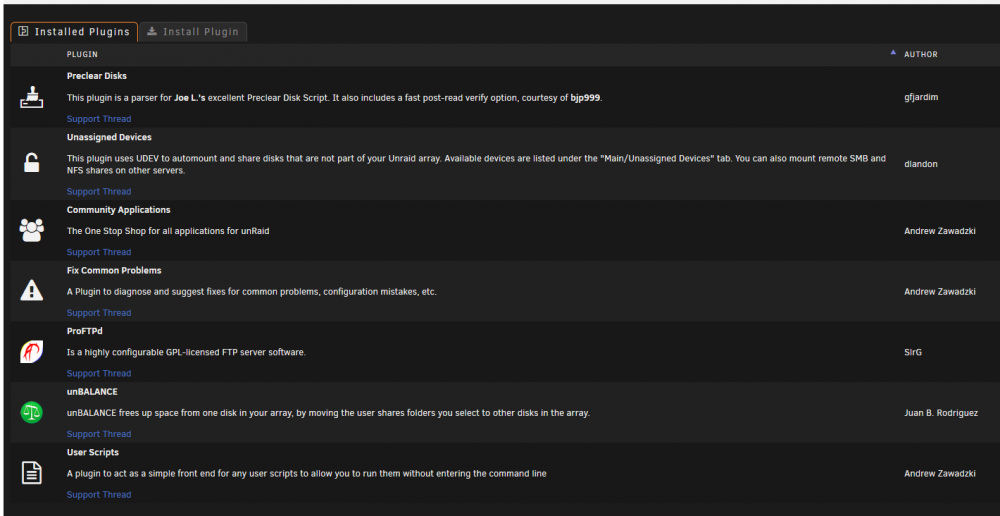
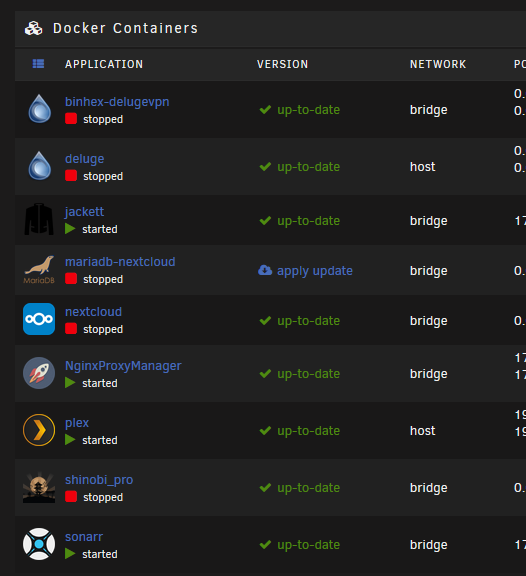
No, the only other dockers I am running that are active are jackett, NginxProxyManager, plex and sonarr. I did originally set-up using nl.privateinternetaccess.com, but quicly realised that it doesn't support port forwarding now so changed to frankfurt-de.privateinternetaccess.com - I must admit that I thought I'd re-created the docker using this one... but maybe I haven't - so what you're saying about the endpoint not supporting port-forwarding may be right. Here is a screen shot of my dockers... all the stopped ones are actually not used now and are just there in case I decide to re-instate them; Let me know what else you would like me to check...
-
Many thanks - log file attached supervisord.log
-
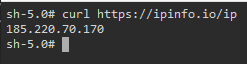
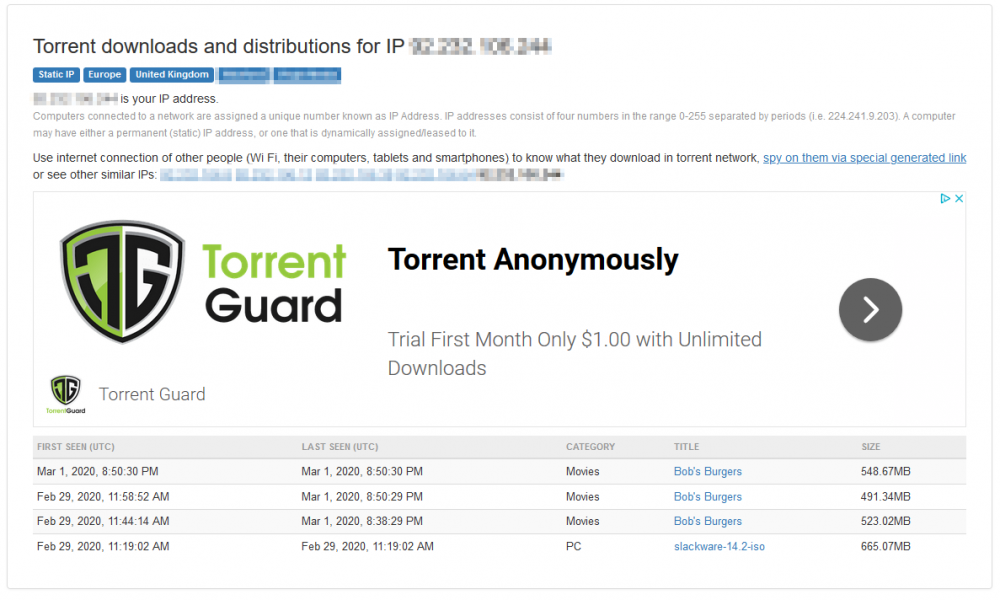
Hi... I have looked through this support thread, but cant see anything which answers this... but apologies if this has been asked and I have missed it! I am new to using torrent downloaders and decided to use delugevpn because of the integration with PIA... so, I followed SpaceInvaderOne's tutorial and every time it installed when I go to the WebUI I get a page cannot be found error. But, I found that if I changed the VPN provider option from PIA to custom, it loaded the WebUI and seems to work. Apart from this, there were no problems setting it up (Thanks*). So, to begin with I wanted to check it was using the VPN before I downloaded anything, so I went into the docker and used the curl https://ipinfo.io/ip command and it shows an IP address which is not mine... so I assumed all was working OK. I set it downloading some cartoons for my kids and left it overnight. This morning I decided to take a look at https://iknowwhatyoudownload.com and was shocked to see that all my downloads from last night are visible against my IP... so, I have immediately stopped the docker till I can get to the bottom of this... Can anyone advise what is going on and why it seems to not tunneling through the VPN?
-
Just had it confirmed by another user that doing this enabled him to clear the fault and reboot his Microserver into UnRAID successfully 😄
-
Another update... In case anyone gets to this point because they have an HP server with this critical error showing in BIOS and no keyboard/mouse/USB port - I have just tested this on my ML30 G9 and if you reboot the server and before it boots into UnRAID do an ILO reset, it clears the critical error from the ILO console
-
Link to bug report....
-
OK, quite a lengthy summary here, which has been going on for over a year and today I am confident that I have got to the bottom of it. I have previously posted several threads which provide a lot of details for each occasion; But in summary... I have had some serious issues with all versions of UnRAID after 6.5.0 with reliability... The servers concerned are 2 x HP MicroServer G8's, 2 x HP DL380p G8's and today 1 x ML30 G9. Yes... I have replaced two servers thinking it was a hardware issue 😞 The machines are configured to boot in legacy mode and the USB key with UnRAID is installed on the internal USB port. However when the machine boots it sometimes shows a critical BIOS error in the HP ILO and once this error shows, you have no keyboard/mouse control in the ILO remote console screen - so all you can do is to force the machine to reboot by using the hold power option in the ILO. Then in most cases after the machine boots, it fails to recognise the USB key in the internal USB port and the only way I'd found to reboot the machine into UnRAID was to remove the USB key to an external port and reboot. As I had never managed to sort this out, I bought a new ML30 G9 over Christmas and just built it with a trial key using v6.8.1 today. As soon as it booted I selected UnRAID with GUI option and it booted into UnRAID. Immediately the server showed a critical PCI-Express error and from the ILO remote console the keybpard/mouse wouldnt work... So I logged into UnRAID from the LAN GUI (which worked OK) and shut down the machine. It wouldnt shut down, so I had to foce it with a 'hold-power button' from ILO. When the machine was powered down it still showed the Critical BIOS PCI-Express error, so I removed the power cord and pressed the power button to discharge everything and when I reconnected power and got on the ILO, the error had cleared. I then rebooted the machine and forgot to change into 'UnRAID with GUI' boot option, which I always have as default so I can get into UnRAID from ILO. I noticed the error didn't apear, so I rebooted and chose 'UnRAID with GUI' option and immediately the critical error flashed up! I have a friend who runs UnRAID 6.8.0 on another Microserver G8 which is completely remote from me. He switched his to 'UnRAID with GUI' mode and also found he has lost ILO keyboard/mouse - so he rebooted and its now stuck in a 'boot device not found' error as it would seem it cant recognise the internal USB port at the moment. When he gets home he will cold boot it and I know it will be fine again! I have attached two diagnistic.zip files from my ML30 G9 today - one was generated when the machine DIDN'T have the critical BIOS error and one when it was in Critical condition - in case they are different! The one generated at 11:46 is in normal condition and the 11:55 one is in critical condition. So far I have replaced my Microserver with another Microserver and then bought this ML30 G9 as I thought it was a compatibility issue with the Microserver and I replaced my DL380 G8 in the datacentre as I thought there was a problem with the original machine... so all in all its been quite costly for me to get to this point, so it would be nice to know that this IS the cause and whether it can be fixed. I have the virgin ML30 G9 with a trial key and no data or config - so if you want anything done on this to try and find the cause please let me know. Hope to hear back soon! hector2-diagnostics-20200117-1146.zip hector2-diagnostics-20200117-1155.zip
-
Do let me know what happens as I can confirm this is an issue with DL380p G8's, Microserver G8's and now ML30 G9's!. I'd be interested to know that I have actually been able to help with something constructive rather than just take-take-take from the forum 😄
-
Hi @1812 - I linked you in this post as I thought you would be interested... I am confident that this is a confirmed bug now (even though I have bought 3 different servers to prove!) as I asked a friend who is miles away to boot his Microserver into GUI mode to prove the fault and he has lost keyboard/mouse and his machine is stuck in a "no boot device found" loop until he gets home. I am just posting the bug now and will link the post URL here shortly in case anyone in future has this problem and can use this information. I found the 'cure' by chance and am so pleased as this has caused me real conserns for sometime! Thanks




