





SliMat
Members
-
Joined
-
Last visited
Everything posted by SliMat
-
Will do as I am confident that this is the issue as I have bought 2 Microservers, 2 DL380s and an ML30 in the last year trying to sort this out LOL - thanks
-
Another BIG update... Having worked out it may be a GUI issue, I asked a friend who has a Microserver G8 to try booting his into GUI mode and guess what... he has also lost keyboard/mouse control in ILO Remote Console too AND he's lost the internal USB port so his machine is now looping saying there is no bootable device!!! So this would definitely appear to be a problem with HP Servers when you boot UnRAID into GUI mode!!! Back to you guys for help 🙂
-
************ I think I may have found the issue... but wouldnt know where to start fixing it...************ I just noticed this... I inadvertently let UnRAID boot into its default non-GUI mode when I downloaded the diagnostic ZIP and after this the ML30 G9 didn't show a critical error and when I shut it down from the GUI on my LAN it shut down within a few seconds. So I rebooted it into GUI mode and immediately I have no keyboard/mouse in the remote console and the server is showing a critical error again... so I have attached another log to this message while the server is in critical condition... hope this helps someone work this out. I can confirm all my servers (apart from this one) default to booting into GUI mode by default... so I am about to change that and see if my Microserver boots OK hector2-diagnostics-20200117-1155.zip
-
Diagnostic Zip attached here hector2-diagnostics-20200117-1146.zip
-
Thanks @testdasi - will reboot into UnRAID and do that right now
-
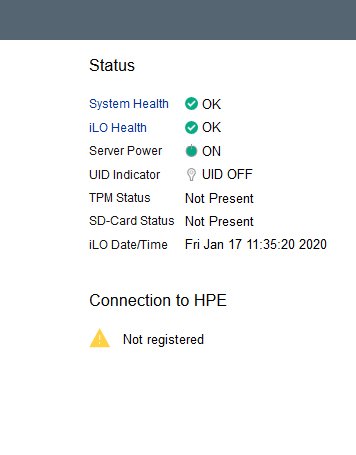
Addendum 2: I just forced the machine to power off and the 'critical error' remains as showing in the ILO (seen this before), so I removed the power and pressed the power button to clear all residual voltage in the system, then reconnected the power and all is back to normal on the ML30 G9 (at least until I try booting UnRAID again);
-
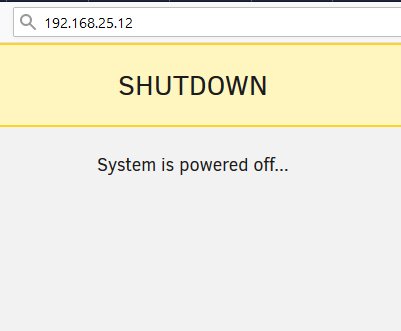
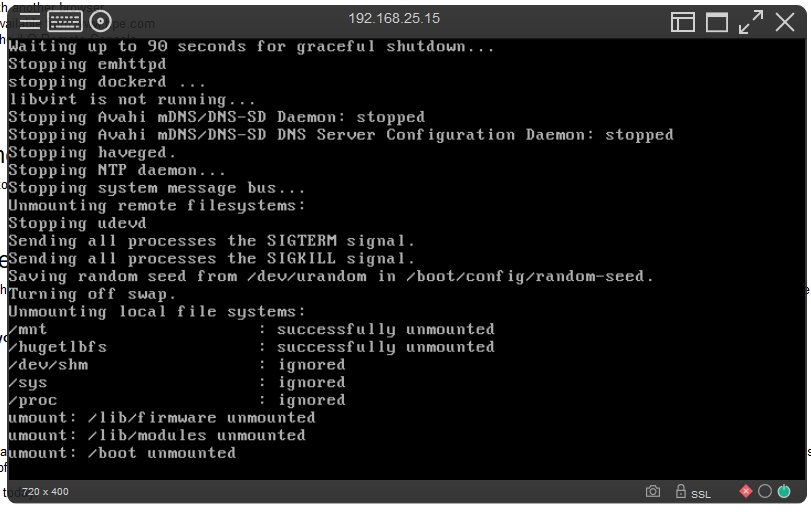
OK, a quick addendum... I tried to shut the stock ML30 G9 down from the UnRAID console and it counted up and then told me the machine was powered off... But the machine is still powered on and the screen shows this... But it has failed to shut down! So, I will have to force it down 😞
-
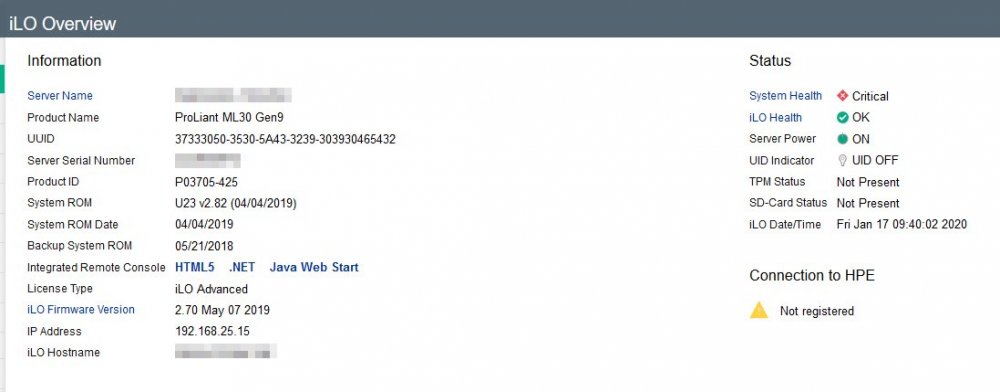
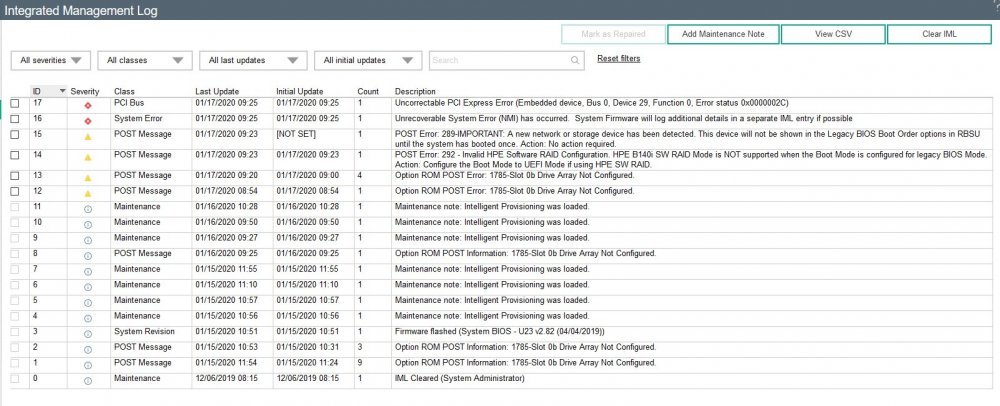
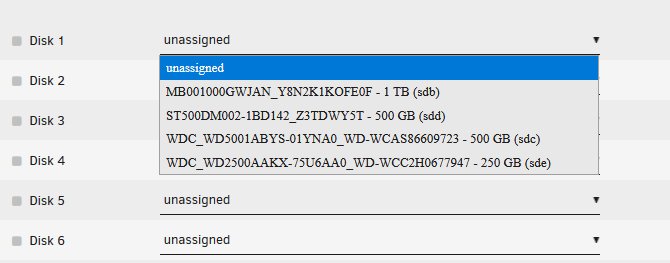
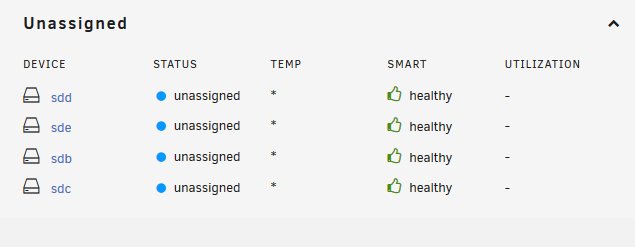
Hi all This is a theme which I have tried to sort out before with no success (with great help from @1812). But there has been a [bad] development today - because I was convinced there might be a hardware issue with my HP Microserver G8, over Christmas I bough a new ML30, with the intention of replacing the Microserver... but this issue appeared on the new machine instantly. Here is an overview and I really hope somoene can help... I am even happy to let someone log in remotely to the server and play as its a virgin machine! So, I have several HP servers running UnRAID (various versions) and they ALL have the same problem... so I am really hoping someone can help me get to the bottom of this. The underlying problem seems to be that UnRAID causes a PCI Bus Error - reports as: "Uncorrectable PCI Express Error" in the Integrated Management Log. I have had this issue with my DL380 (G8) in a datacenter - which is currently running 6.5.0 because this the last version I have successfully installed and not had this errror... obviously being in a DC I cant pop-in whenever I lose control of it! I also have an HP Microserver (G8) at home which has the same issue and today I have installed a clean trial version of UnRAID v6.8.1 which has failed on the first boot! This is what is happening on the brand new ML30 (G9), which is essentially the same on all three HP variations... the symptoms I get are that when the server boots, if I am logged into the Remote Console remotely from ILO, I have no keyboard/mouse... so I cannot get past the login screen. On the front of the server I get a red LED flashing, which indicates an issue with the machine. When I log in to the ILO console I see a System Health - Critical warning; When you interrogate the management log, it tells you that there is an Uncorrectable PCI Express Error; I have plugged a keyboard and mouse into the USB port on the ML30 and do get keyboard/mouse control in the UnRAID environment... but as this is a brand new installation with NO data or config done yet, this has to be a problem with the UnRAID system. Just for completeness, the trial USB key was created using the UnRAID key creator and as the server wouldn't boot into UnRAID in its default UEFI mode, I have switched it to Legacy boot. The onboard B140i controller is not configured and there are 4 x SATA hard disks installed. These are all recognised within UnRAID; As mentioned I have reported this several times with no cure, yet. Here is one of the earlier posts... As mentioned the ML30 G9 which I have just set up is an absolutely stock install with no config yet - so I am happy for any advice, regardless of possible dataloss as there is no data on this machine! Hopefully someone will have some thoughts as I can't believe I am the only one suffering with these problems as they have been going on for over a year now and it is forcing me to consider dropping UnRAID as I cant get it working reliably! @1812 has written lots of very useful posts around HP servers - but I cant find anything which fits this problem! Thanks in advance
-
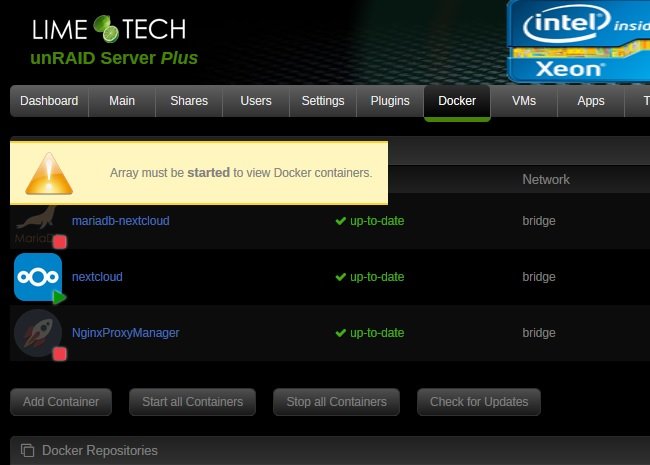
Hi all... My Nextcloud docker keeps freezing and is completely unresponsive. When I try to access the WebGUI it is not accessible at all and when I try to shut it down it never stops. I tried "docker kill nextcloud" which didn't help. So far the only way I have managed to shut it down is to close all my VMs and other dockers... then stop the array (which even when stopped still shows Nextcloud as running)... then to power off the server - which always fails, possibly because the unresponsive Nextcloud docker is hanging it... so I have to force a shut down which means a parity check is invoked every time I reboot. I am running UnRAID 6.5.0 as whenever I have upgraded past here I lose remote control of the machine and as its in a datacenter its 120 mile round trip to pop in and fix it! Any thoughts on where to start looking would be appreciated before I build a Linux VM to host it Thanks
-
Hi @j0nnymoe Just some more feedback - after upgrading my Microserver to 6.7.2 yesterday, it looks like my concerns are well founded... I have just gone to reboot and now it won't see the UnRAID USB key, so the machine wont boot without me physically downgrading to an earlier version 😞 In case your interested this was the thread I posted about the last issue, which has now reappeared after upgrading to 6.7.x again... Glad I haven't risked upgrading the machine in the datacenter as it would cost me a 240 mile journey to fix it
-
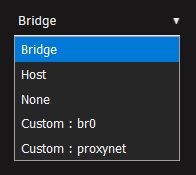
Yep 🙄 OK, I consider this solved now... not ideal, but in case anyone else finds this thread @j0nnymoe seems to be correct. I also had an HP Microserver running 6.5.0 at home, because it had the same issues with the new version as the machine in the DC... so, as it's here and I can easily access it, I just upgraded from 6.5.0 to 6.7.2 and now I do see the custom network in the settings for LetsEncrypt - so this certainly does look like a bug with 6.5.0. I will monitor this machine and see if it behaves with 6.7.2! So, it looks like I'll have to schedule a visit to the DC and then try the upgrade on the DC machine the night before - that way if I lose connection I will be able to pop in the next day to fix it, rather than having it offline while I wait for a slot to get in 😑 Thanks for the advice @j0nnymoe
-
Thanks - but I am reluctant to upgrade as the server is an HP DL380p G8 in a remote datacenter and when I upgraded to the latest version I had massive problems (no mouse or keyboard control in ILO) ending up with the machine falling over and I had to drive to the DC, remove it, roll back to 6.5.0 to get it working then drive it back to the DC. Apart from changing the onboard P420i RAID controller to work in HBA mode rather than RAID I have done nothing to comfort me that I won't get the same problem again if I upgrade. All I have on the machine, which I am using, is a number of VMs (Ubuntu Webservers / Exchange Server), then 2 dockers MariaDB and NextCloud. But am keen to get reverse proxy working. Thanks - any other pointers would be well appreciated.
-
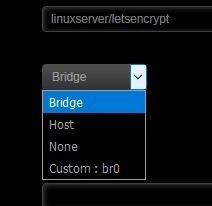
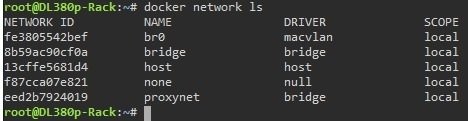
Hi - I hope someone can help... I have been trying to setup a reverse proxy (following SpaceInvader Ones excellent video)... but when I create a docker network called "ProxyNet" - it doesn't appear in the config page for setting up LetsEncrypt. Its definitely there as I can view it from terminal, but it just isnt listed in the drop down box. I am using UnRAID 6.5.0. Attached are a couple of pictures, one showing the options I have in the LetsEncrypt setup page and one showing "ProxyNet" exists when I list the docker networks in terminal. Any thoughts? Thanks
-
UnRAID 6.5.0 - Nextcloud 'backup' plan... Hi - hoping that this is the right place to ask for advice I have been playing with backup solutions for a few weeks (Duplicati / Cloudberry / etc) and have yet to find something I am happy with. I have two UnRAID servers - one at home and one in a datacenter... at home I have several large shares with personal documents, files, media, etc - and the machine in the DC has Nextcloud installed (in a Docker - 16.04) and I have two users in Nextcloud - one user is a copy of my work files from my machine in the office and the other user is my brother who is using it as an offsite copy of his business data... all good there. There is a site-to-site VPN between home and the DC, so I can access the remote server on a local IP. So the obvious backup solution for the data on my home UnRAID server involves replicating files on both servers... but I have yet to work out how to do this. I did think I could install the client on my home PC which has the shares mapped as SMB shares and then use it to synchronise changes, but this machine is not always on and people edit files from a variety of different machines. so my concern is if I add to, or amend, files on one of the SMB shares at home from a machine which doesnt have the Nextcloud client installed (e.g. my Macbook or someone else's PC), will the PC with the Nextcloud client installed spot the change/s, when its switched on, and update the server - or will it realise that the changes weren't made on the local machine, or on the Nextcloud server, and ask which version to keep? Or worse still, update the local copy with the one stored on the server? Or... do I need to install the client on every PC / Mac which accesses the local shares? I cant imagine the latter would be correct as it would be a nightmare managing 8 or 10 installations of Nextcloud client. The ideal solution, IMO, would be to have Nextcloud installed on both UnRAID servers and link them togather so if something changes on one, it updates the other! I did look at Federation, but it reads as though this is only to access files on a number of servers simultaneously rather than backing servers up? Does anyone have any thoughts as I am sure there must be a robust solution out there which I can set up? Thanks in advance SliMat
-
Hi Nuhll As my later post said... no, it didnt work, even when I ran PLAN again. The issue seems to be that the 'Docker Safe New Permissions' command, ignores the /appdata share (for obvious reasons) and its in here that I have a load of folders and files which are not nobody:users... they are root:root - which is why UnBALANCE cant move them. So as I no longer use 'My Media For Alexa', I have manually deleted this directory and now all is working OK. Thanks for the help though.
-
Thanks Nuhll - as per my original post... I did do this
-
OK... another update - I Planned each share separately and found that the errors were coming from the /appdata share - I used to have an app called 'My Media For Alexa', which I dont use, or have installed now, so I will just delete this directory and that should fix this issue. Sorry to clog up the forum, but thought I'd post my findings in case anyone else ends up here with a similar issue. Thanks
-
A quick update, I SSH'd to my UnRAID box and looked at the folder (share) permissions in /mnt/user/ and they are all showing nobody : users - all the folders show rwxrwxrwx (0777) and the files show rw-rw-rw (0666). So as far as I can see, this should all be OK?!?!?! I double checked this in WinSCP too and had a quick browse, but cant see any obvious problems. Thanks
-
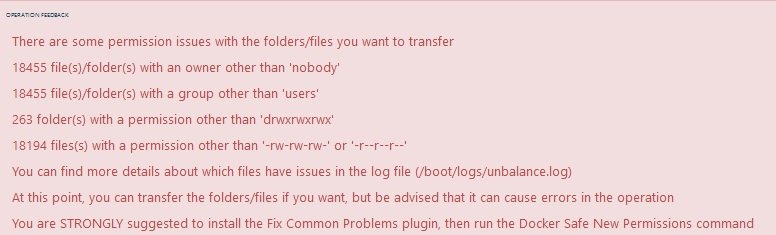
Hi - I'm hoping someone can put my mind at rest, or advise. I have only just installed unBALANCE and used it for the first time to try and move data about so I could free up disks to upgrade the file system from ReiserFS to XFS. So, first I added a pre-cleared disk to the array, copied all the data from one of the full (ish) disks to the new one - which left me an empty ReiserFS disk. When I did this it warned that there were 8 files/folders with an owner other than 'nobody' and STRONGLY suggested to run the Docker Safe New Permissions command - which I duly did. I re-planned the move and I was away from my machine, so didn't see any warning message (as this only seems to be shown for a few seconds then disappears!). So, I did the move and all looks OK... the ReiserFS disk only had a handful of empty folders left showing on it... so I formatted this into XFS and all looked good. I then set up unBALANCE to move the data from then next disk to the newly formatted, empty, XFS disk and hit PLAN. This time it came up with a whole list of 'errors' and recommended running the Docker Safe New Permissions command - which I duly did again. After this was complete I re-planned the move and still have the same list of 'errors'. I have attached a screen shot of the warning message. So, I am holding back on moving anything else in case I am doing something wrong - so some advice would be welcomed. Or the other option is to ignore this warning and move it anyway? Thanks
-
104Gb ECC DDR3 HP Smart Memory in DL380p G8 - 16Gb assigned to my SBS Server VM
-
And my other server is called Hector...

-
I thought I'd share my attempt - as my new DL380p is being installed in the data centre this weekend I thought it deserved its own banner... so thanks to @perhansen for this banner background and @Joseph for removing the original Intel Logo... my server is called "Patroclus" in case you cant guess...

-
You werent wrong - re-installed everything and pointed at the data folder... my remote machines all synced and everything is back where it should be Many thanks
-
Many thanks @CHBMB - I will give this a go tomorrow... I hoped it would be as simple as that but didn't want to proceed and delete the existing folders by mistake.
-
Hi All Apologies if this isn't the right place to ask for help on this, but here goes anyway... OK, I had a bit of a dilema when I upgraded my UnRAID box to the latest version where it ended up unable to start. So I ended up doing a fresh install and thankfully all my VMs re-appeared and worked perfectly. However my NextCloud docker has vanished. I have still got all the data files which I had set up to store in /mnt/user/nextcloud/data. As far as I can remember the docker was installed in /mnt/user/appdata/nextcloud as there is a folder here containing four other folders... log, www, nginx and keys. Is there an easy way to get this back before I start following tutorials on how to re-install NextCloud? I have looked about but cant seem to find anything which explains this, so any idiot guides would be really appreciated... or pointers to where I can find out how to get this back up and running. Thanks




