





SliMat
Members
-
Joined
-
Last visited
Everything posted by SliMat
-
Thanks @binhex - I wasnt sure where the log file was, so found it and had a quick look - found the problem straight away; 2022-07-08 09:44:03.667236 [crit] No OpenVPN config file located in /config/openvpn/ (ovpn extension), please download from your VPN provider and then restart this container. Didnt realise that the ovpn file had been deleted! Thanks
-
Thanks @BVD I really appreciate the time - the connectivity information wont be that sensitive as this server is only my Plex & Nextcloud machine sitting in a DC... but if you are happy to switch to DMs I am happy to send any logs to you for assistance.... I will have a look for the logs and DM you now... many thanks
-
Thanks @BVD I have downloaded the trashbin files from my server (at a datacentre) to my home PC - so have them safe here. I changed the extension on a couple of files back to .PDF and they open fine and are as expected. So, I am using Linuxserver mariadb - if you can tell me where to view the logs and what I'm looking for... or what to post here and I'll get on to it ASAP. Thanks
-
Thanks @BVD Naively I dont have another backup as I was relying on NextCloud as a form of backup as well as having the ability to access work files when out and about. I have copied these to another share on the server and they are all renamed with .dxxxxxxxxxx at the end. Obviously the files in the trashbin are not in folders... so the destination folder where I have copied these to now has 14000ish files all in one folder - if the fix doesnt work and I need to use these, I dont know if there is a way to regroup them in their original folders? I have tested a couple by opening them in Acrobat and they look OK. Anyway, .../files_trashbin has been copied off the server. Also, in answer to one of your comments I am not using any external storage so have not, knowingly, installed any external storage addon. Thanks
-
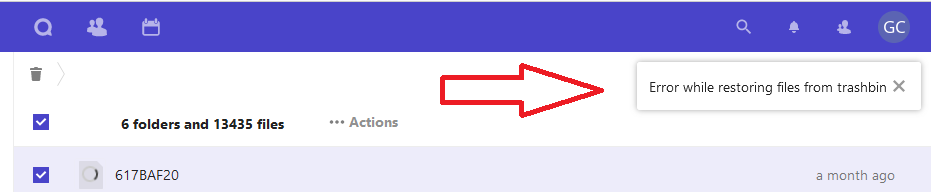
Hi all, I am experienceing a massive problem with Nextcloud, which means I have currently lost about 10 years worth of work... so really need some help restoring it. Recently I have had several instances where all the data on my work PC which syncs with Nextcloud vanishes. When I login to Nextclouds GUI and go to deleted files ALL my files are there, saying they were deleted a few hours ago. The last two times I have checked the box for all files and restored them and they came back. This time it shows 6 deleted folders and over 14000 deleted files. I check the box to select all files and when I start the restore after a few seconds it shows an error - "Error while restoring from trashbin" and restores a handful of files but as there are tens of thousands it will take forever to recover these. Obviously I would like to know why Nextcloud keeps deleting my data, but more urgently is how to get my data back as I have been struggling for a week now and really need this back ASAP. Thanks and hopefully someone can help.
-
Hi all, I have been using Binhex-PrivoxyVPN for a number of years using privateinternetaccess... with no issues However a few weeks ago I noticed some dockers were failing (Sonarr/Radarr, etc). When I looked into it, Binhex-PrivoxyVPN was showing as stopped... so I tried restarting and it starts then immediately stops again. I have checked my PIA credentials and they all seem correct (working in built in Windows VPN client), but I just cant get the docker to start. I have even deleted the whole docker + image and done a fresh install... the only way I can get the docker to start is by setting VPN_ENABLED to "no". I could have sworn there was a SpaceInvaderOne tut on setting this up - but for the life of me cant find it Can anyone help, or point me in the direction of an idiots guide? Thanks in advance
-
Thanks @itimpi & @trurl I edited the resilio-sync docker so it cleared the log file... now I know where the issue is, I will post in the relevant support forum to try and find out why this docker is filling up docker.img with log files. The conainter is now back to 5Mb, until Resilio Sync fills it up again 🙂 At least I have some time to sort it out now 👍 EDIT - I logged into the Resilio-Sync GUI and found "debug logging" is enabled by default... so have unchecked this and hopefully thats an end to this issue 🙂
-
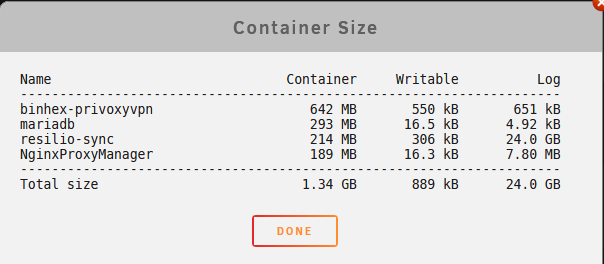
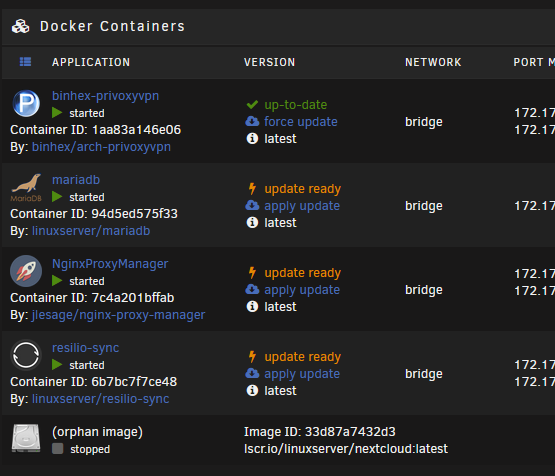
Thanks @itimpi This has been an ongoing issue for a while now, so would be nice to find out why this keeps happening. I only normally have 5 dockers - binhex-privoxyvpn, mariadb, NginxProxyManager, resilio-sync & Nextcloud. I did take a quick look in docker->container size and suspect resilio-sync may be the issue; But not sure what needs to be changed. Where should the docker.img file be located, so I can delete it? Also if I delete the docker.img is it possible to allocate more space to the new one? Also when I switch to advanced view in dockers, I see an 'orphaned image' which says it was created a month ago - I suspect that this is from when the same thing happened with Nextcloud a few weeks ago - do I need to do anything with this, or will UnRAID sort it out when I reinstall NextCloud? Many thanks.
-
Hi Guys I logged in to my server today and got some critical docker utilization errors. I was investigating a NextCloud issue, so decided to apply an update and during the update it failed saying there isnt enough space. The location of my appdata folder is /mnt/users/appdata and as its in the array it shows 5Tb+ of space... so I am not sure why this keeps failing. I have added a 512Gb SSD to the server ready to use as a cache disk - so was wondering whether I should re-locate all my dockers and VMs to this disk as well, or instead of using as a cache disk? Can anyone help as NextCloud is now offline entirely - I did look for a tut on moving dockers/VMs to an SSD but couldnt see any obvious idiots guides. Attached is my diagnostics. Thanks in advance. dl380p-rack-diagnostics-20220630-1154.zip
-
-
No worries - just DM'd it to you.
-
Yes, it still shows as not connected... here is the output; <-----UNRAID-API-REPORT-----> SERVER_NAME: DL380p-Rack ENVIRONMENT: production UNRAID_VERSION: 6.9.2 UNRAID_API_VERSION: 2.46.3 (running) NODE_VERSION: v14.15.3 API_KEY: valid MY_SERVERS: authenticated MY_SERVERS_USERNAME: SliMat RELAY: connected MOTHERSHIP: ok ONLINE_SERVERS: OFFLINE_SERVERS: DL380p-Rack HAS_CRASH_LOGS: no </----UNRAID-API-REPORT----->
-
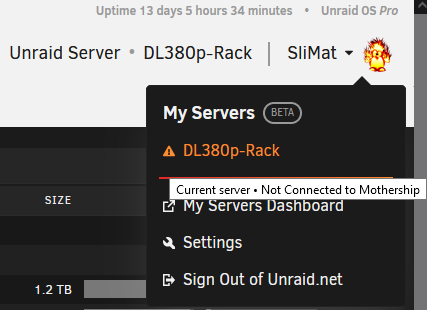
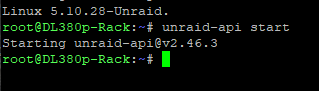
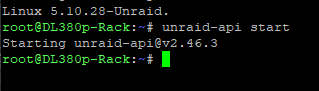
Hi @ljm42 OK, at the moment there is no JSON error showing - but I do have this; So, I ran the command from an SSH terminal; But still have the "not connected" error ? Everything seems to work fine - just annoying seeing this error showing.
-
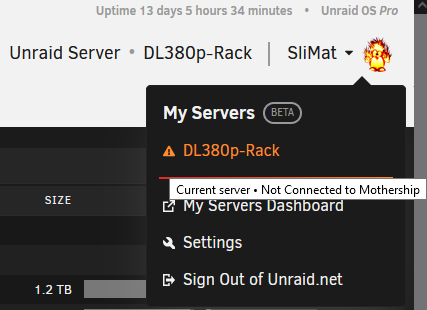
UnRAID = 6.9.2 I didnt see that there was a newer plugin version (when I originally raised issed I was using the latest version), so have upgraded MyServers to version 2022.05.10.1726 tonight and checked to see if there is JSON error still showing... there isnt - But it now says "Current Server Not Connected to Mothership" !! Any ideas as it certainly looks connected as I can access it alright.
-
Not had any help yet... was begining to think I was the only person with this problem.
-
Yes, they're all re-installed and running now. I didnt know there was a "previously installed" option from apps and this made the whole process so much easier than when I had to do a similar thing many years ago
-
Thanks @Squid that seems to have worked for the moment Thanks @trurl the docker service is up and running now and attached are new diags - if you can spot anything awry I'd be grateful. dl380p-rack-diagnostics-20220504-2348.zip
-
Thanks @JorgeB Docker service has now started with no installed dockers... what is the easiest way to reinstall my dockers without losing their settings... rename the appropriate /mnt/user/appdata folder to something else, let the docker create a new appdata folder and then overwrite with the backup?
-
OK, just rebooted... same error message 😞 I have attached new diags. dl380p-rack-diagnostics-20220504-1211.zip
-
Those diags were this morning after rebooting at 5.30pm last night... I'll try another reboot at lunchtime and upload fresh diags - thanks
-
Hi Guys OK, I had an issue yesterday where my remote clients wouldnt connect to my nextcloud docker. I spotted there was an upgrade available, so I thought I'd upgrade it and try again... so I used the "Update" option from the docker screen and it ran really quickly and my nextcloud docker vanished completely from the list of dockers. So, I thought first of all I would reboot the server and see if that resolved anything - but after a reboot it just says "Docker Service Failed to Start". I took a snapshot of /mnt/user/system/docker/docker.img at this point - but not sure if this is too late? I was thinking of deleting /mnt/user/system/docker/docker.img - restarting the docker service to see if it would start and create a new docker.img and then overwrite this new docker.img with the one I took a backup of?!?! Before I make things worse I thought I'd ask if anyone can help? Diagnostics attached. dl380p-rack-diagnostics-20220504-0907.zip
-
Very welcome - glad to help if I can - Have sent a PM
-
Hi @doron OK, the server is built and running... I have put 3 x 1Tb SAS disks, 2 x 2Tb SAS disks and a 146Gb SAS disk in (all Seagate) for you to take a look at. PM me when you are ready and I'll send you login details.
-
Hi @doron OK, the server is nearly ready and I also bought a couple of 2Tb Seagate SAS disks to inclued in the setup for you to test. Do you need the server set to HBA mode, or RAID mode? I usually set HP servers to HBA mode so the disks are visible directly from the O/S, in RAID mode you need each disk mounted individually as RAID 0 in order for UnRAID to see them. Let me know and I should get this online for you in the next 24 hours - if you PM me when you want to connect I can set an open port to ILO for you and I will NAT the remote access ports so you can get to the UnRAID interface too
-
@doron I have had a look at the disks I have locally to put in this server and I have HP/Seagate SAS disks in 1Tb, 500Gb and 146Gb flavours. So I will build a test rig with an assortment of disks and hopefully these will exibit the same problems. I will PM you with login details once I have it arranged


