SliMat
Members
-
Joined
-
Last visited
Everything posted by SliMat
-
Thanks @ljm42 I have upgraded to 6.11.5 and provisioned an SSL cert, so all is back up and running for now
-
Perfect - that got me logged in - thanks Now I'll have a look at how to fix 6.9
-
Thanks @ljm42 I connected to the server (6.9.2) via SSH and tried to run 'use_ssl no'... but the response was; -bash: use_ssl: command not found However I tried https://local-ip and did manage to get to the UI with the expected warnings. I then followed the next instruction to navigate to Settings → Management Access and switched 'Use SSL/TLS' to no. However I now get to the login page but it will not accept my username / password - however when I SSH into the server I can login to terminal using my username and password - so I know it is still correct. I have rebooted the server and get the same problem! Any ideas where to go from here? Thanks
-
Hi All I am trying to connect to my server - it is in a datacenter, connected via a VPN... I have the MyServers plugin installed, but today when I enter the local IP to connect - it resolves to an Unraid.net:14444 address (as usual) but says that the page cannot be found. However on my profile page it shows that the server is online - but again, when I click the "remote access" link from the UnRAID website it just goes to page not found. The VPN is up as I can connect to the servers iLO UI and to VMs which are running, so UnRAID is definitely online - but just cant get onto the UnRAID UI??? Is there an issue - is anyone else having this issue too? Any ideas how to connect to it? Thanks
-
Hi all OK, power costs have finally crippled my production UnRAID server - unfortunately its an HP DL380 G8 with 20+ 2.5" SAS disks... which as we know dont spin down properly without falling off the array... so, I am replacing this with a DL380 G8 with 12 x 3.5" slots, so I can use 3.5" SATA disks, which will spin down when not being used. I have bought 6 x 6Tb disks to start with, replacing a variety of 2.5" disks ranging from 500Gb up to 2Tb. So, my question... what is the best way to migrate? My plan, as I have very few dockers / VMs, was to get a trial UnRAID key to get the new LFF server array built, create identical shares on the new machine, then copy the data over the LAN from each share from one machine to the same share on the other. But I am having a block on what to do when I transfer the licenced UnRAID USB from the old to the new server. Should I remove all the HDD settings from the old server, remove the key, insert in the new machine and then add the disks which will already have the data copied onto them? Any thouhgts on how to make this as seamless as possible would be gratefully received as I think I am over-thinking the process. Thanks
-
Thanks - will try it today 🤞
-
I'm just removing the cache disk for now as I never set it up intentionally, it was a really old SATA Apple disk which was only supposed to store CCTV video - so I wasnt worried that it was a very old dubious disk and have no idea when/how it became included in the system at all Or, do you mean I need to add a new cache disk, set cache=prefer, run mover, then remove the cache disk? In the long run I plan to add a SSD as a cache disk to host VMs on and then I'll take advice on what other data is worth having on there (dokers, etc?) and how to set it up properly - including a backup
-
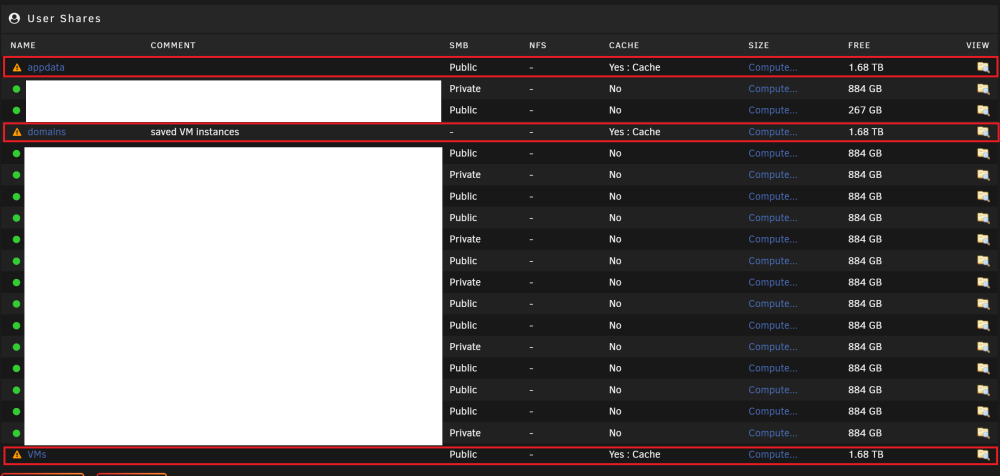
Ah, I thought I saw a folder /mnt/user/appdata/system - but you're right its not there So, to clear this fault it looks like my appdata, domains and VMs shares have lost data; So would the best way forward be to remove the cache drive and then delete these folders, create an empty /mnt/user/appdata folder and recreate my dockers? Obviously when I remove the cache drive the system will (probably) show these 3 shares as all OK because there will no data on a cache disk as this will no longer be there.
-
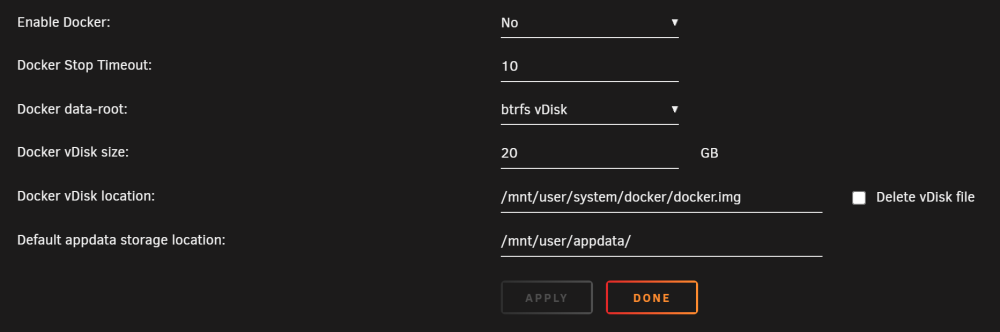
Mine is set to /mnt/user/appdata (also set to this on my production machine too);
-
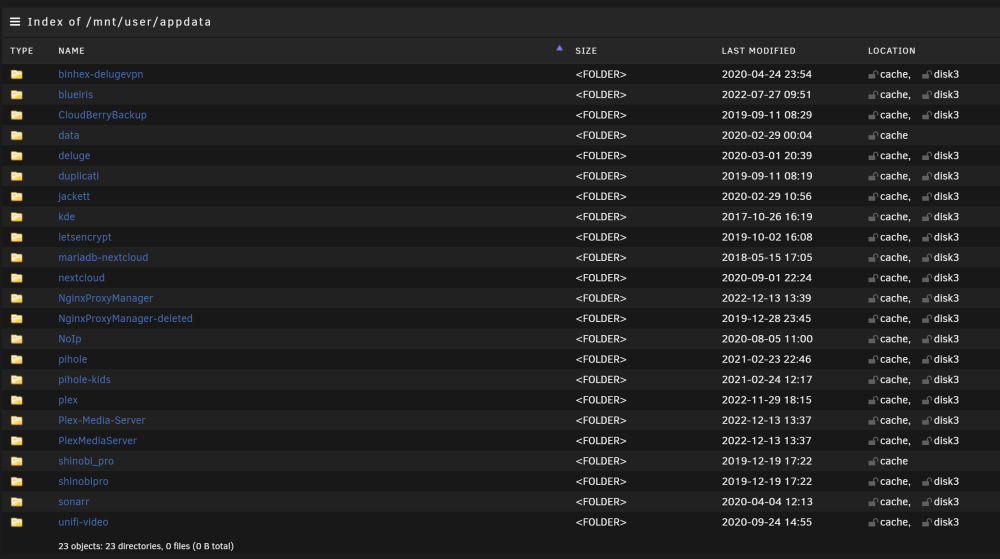
Thanks @JorgeB The data exposed to the cache disk seems to be dockers appdata and some VM's so looks like I will have to delete all these in order to be able to remove the cache disk and then start again. I may see what docker appdata & VMs can be moved onto the array and then just delete everything and start again I guess that the /mnt/user/appdata/system folder is not related to dockers and is needed for the array??
-
New diags attached @JorgeB There are a number of VM images and backups which I can delete as they are no longer needed - but at the moment some of them show as on cache+diskX - so I wasnt sure whether to delete these to create more space, or if as they are partially moved it would create an issue? Thanks unraid-diagnostics-20221214-1608.zip
-
Thanks - I saw that too and wondered whether it was reporting that this failing disk is now read only? I will do this now and post new diags in a bit. Thanks
-
@JorgeB Attached is the diags after invoking mover again... unraid-diagnostics-20221213-2042.zip
-
OK, it ran again but still not everything has cleared, so am running again with logging enabled.
-
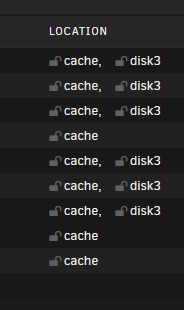
Thanks @JorgeB I have done this and only after re-running it a few times some shares are now showing as just on protected drives and so I have set cache on them to No. But some shares still show data on the cache drive - after it finishes, I invoke mover again, it says its running but nothing seems to change... e.g.; If I keep re-running it will it eventually get everything off the cache disk?
-
Thanks - will do it now and report back
-
Hi all, I have been having issues with Plex on my local UnRAID box on my LAN. I started looking into it today and deleted and recreated the Plex docker and it all worked for 10 mins then said Live TV could not be played. I drilled into the logs and get an error message repeatedly showing; PMS: failure detected. Read/write access is required for path: /config/Library/Application Support/Plex Media Server So I looked at the array and worryingling several shares are showing as Cache = Prefer: Cache or Yes: Cache. I say worryingly because the 'cache' drive is a very old 1Tb Apple disk which I was only using to store CCTV video on from one of my VMs and never intended to be used as a cache disk in the truest sense and this morning I got a cache disk warning saying it was "read only" - this didnt worry me as it was supposed to only be CCTV footage! But now I can see several shares (appdata / domains / system / isos / downloads / VMs) showing Prefer:Cache or Yes:Cache I have never really used cache disks, so read on the forum that in order to move share data from the cache drive to change Cache setting to "Yes: Cache", invoke mover (to move back on to the protected array disks?) and once moved to set cache to No. So, I tested this on a not so important share (VMs - dont ask ) - once I set cache to yes and invoked mover I can look at the share and where it originally showed all data on "cache" it now shows some on cache and some on disk 3; Whenever I go back to mover it shows MOVE NOW - Click to invoke mover... and if I click MOVE NOW it says its moving, but as soon as the page is refreshed it shows the MOVE NOW button again. Am I being too impatient - or am I dowing something wrong? Any help to get my data back into a protected environment before the "cache" disk fails would be very welcome. Thanks
-
Thanks @JonathanM @kizer @jmztaylor Strangely, as far as I understand, I have added the new docker and pointed it to the same set of folders on my media store. So temporarily I have both servers live. Unexpectedly last night I went to watch a series using the new server and it seems to have adopted the series viewing history from the old server - I dont know whether this is expected, but certainly I wasnt expecting this. I havent deleted the old Plex VM (yet), so dont know whether this history is now attached to the new server and will disappear when the old server is deleted - but it does look promising as on the new server we watched an episode of a series and on the new server it shows as played, but on the old server it shows as unwatched... so it looks as though both servers have their own viewing history - but somehow the new server adopted the history from the old server! So, for me (hopefully) this problem is solved - even though I am not sure why/how. However if this works for me then it may help someone in future trying to create a new server Thanks all.
-
-
Hi Guys Apologies for posting this here, but I have just installed the official Plex Inc Plex docker and the support page for the app is 404 Anyway... I have created a new Plex docker in favour of my old Plex VM (Ubuntu) as advised by @JonathanM & @kizer So, its all working at them moment, but as I have multiple users, is there a way of migrating their watch history, so they will be able to know what films and series episodes they have watched? Also, something I just realised as I am writing this, some of the directory mappings have changed names - e.g. Films (/mnt/movies) is now Movies (/data/Movies) on the new server... so, would I need to notify the system of this somehow? Any help would be appreciated. Thanks
-
Thanks @JonathanM & @kizer I always did run it in a docker and cant remember the reason why I changed it to a VM as it was so long ago... I think it might have been because Plex always showed an update was needed and the docker update was really flakey - but not 100% sure now This machine is in a datacentre in London - so will remotely create a new Plex docker and see how it goes. Its a shame as its been running really well for ages. It may take a few days, but I'll try to get it done this week.
-
Well, just tried to play a film and it appears that this didnt fix the problem as I just tried to play a film and it is saying the same error again Any ideas?
-
OK - an update... I tried to update Plex using; sudo apt-get update && sudo apt-get upgrade When I tried before increasing the size of the partition I got a "not enough space" error - so, after I increased the disk size to 50Gb and expanded using Gparted, I ran the update again and it worked. After it completed I tried playing the films which failed before and now they play - so am hoping this cures the problem
-
Hi Guys I have an issue with Plex installed in a VM on UnRAID and was wondering if anyone can advise... I had a 40Gb Ubuntu VM with Plex installed and then shares on my main array for movies, music etc. Usually everything is fine, but today I tried to play a movie and get an error... Playback Terminated - Not enough disc space to convert this item. My array has 1.4Tb of free space, confirmed using sudo df -h in an SSH terminal. The main ubuntu disk showed as 40Gb in size with 19Gb of free space... but I assumed I was reading this wrong, so enlarged the disk to 50Gb in UnRAID and then expanded it in gParted to go from 40Gb to 50Gb. However when I restarted Plex I expected it to be able to play the movie, but still shows the same error! I tried playing the same movie from my laptop using Plex app and it plays fine The device which is coming up with this error is a ROKU stick - I have tried restarting this too!! Can anyone offer any ideas how to fix this, or where to start? Many thanks
-
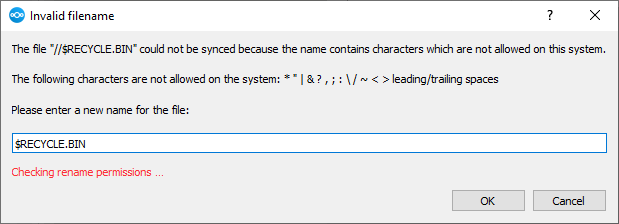
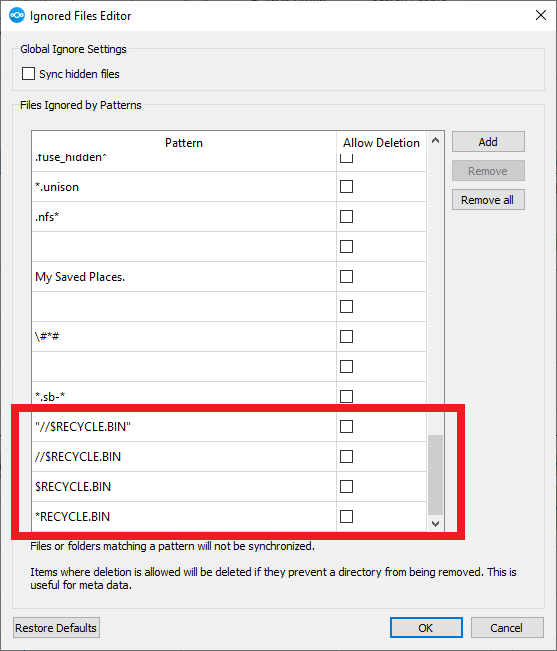
Hi Guys I have finally got round to setting up a fresh NextCloud server after my last instance failed catastrophically. Anyway, I am syncing a data drive on my work PC and all seems to be working except I am getting one annoying warning message which I don't seem to be able to fix. I have searched on numerous NextCloud forums and can see others have the same issue, but as yet no way of fixing it - so I am hoping someone here can help. On the Windows desktop client (3.6.1) I get an error stating "Some files could not be synced!"... Obviously I dont want the RECYCLE.BIN from my PC to be synced... so I tried adding "//$RECYCLE.BIN", plus every variant which I thought may work, to the global ignore list; But it still keeps showing this error - has anyone else seen this, or have any ideas how to fix it? Many thanks