SliMat
Members
-
Joined
-
Last visited
Everything posted by SliMat
-
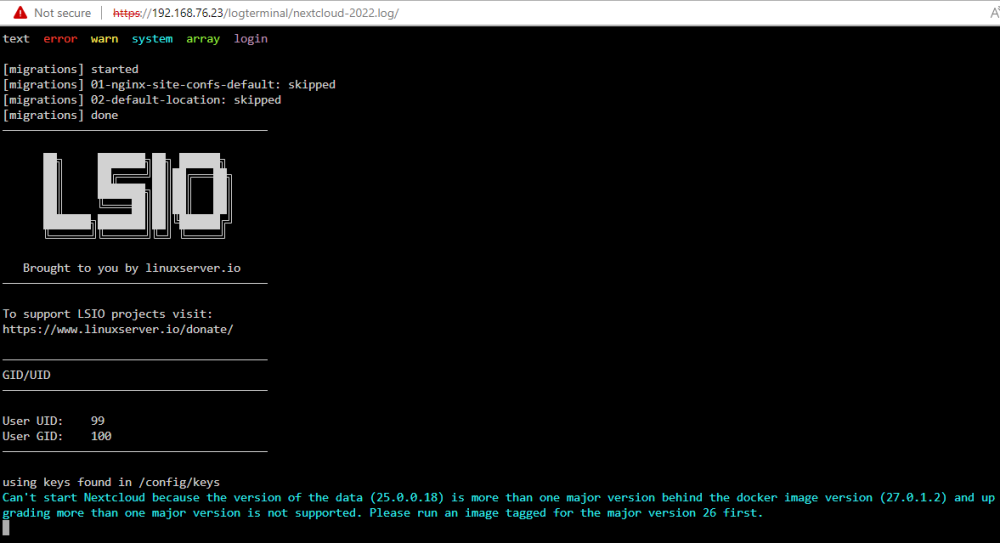
As soon as I change docker repository back to; lscr.io/linuxserver/nextcloud:latest The docker 'updates' and when I check the log file it shows; Cant start nextcloud because the version... Also when I change the repository to; lscr.io/linuxserver/nextcloud:version-26.0.2 It shows that NextCloud is running in log, well it actually DOESNT say it cant start it... so I assume its running - but I still have no Web UI ?!?!
-
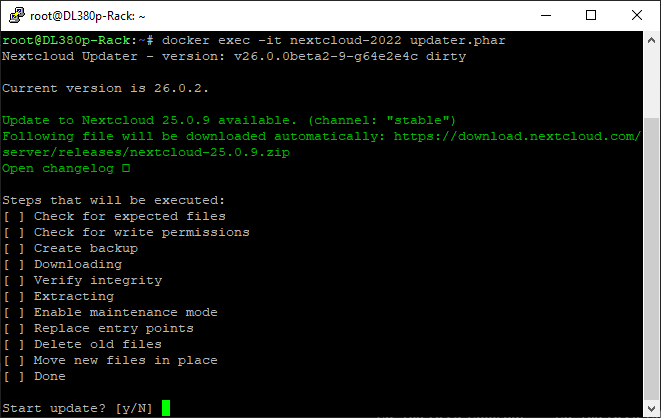
Thanks @iXNyNe OK, my docker was turned off when I changed the image, when I started it, it did an update.... then when I ran: docker exec -it nextcloud updater.phar I get: I assume I should say no to update, as its a downgrade, then change back to original image and hopefully all be good?
-
Morning all, I am hoping this is a simple fix, but I lost connection to my Linuxserver/NextCloud WebUI a few weeks ago and have only just got round to looking at it. I thought it was a proxy issue till I realised that the WebUI couldnt be accessed from the IP address either. Twice while trying to access it I noticed an update showing as available in UnRAID, so have updated it. Today I finally logged in to UnRAID to take a look at the log files and get this; I have already tried running: docker exec -it nextcloud-2022 occ update But get this error: Could not open input file: /app/www/public/occ Any pointers on how to update this as it seems that the Update facility within the UnRAID docker section is not sufficient... I dont really want to have to delete everything and start all over again as I have done this several times historically and it seems my NextCloud spends more time down than up Thanks in advance
-
OK... I thought as all mover does is moves the files, it wouldnt hurt to move them using MC... so I moved the ones which seemed stuck onto the cache disk and now it shows as all my dockers & VMs on the SSD cache And its all working perfectly again
-
Yes, it is disabled @itimpi
-
It is looking like mover has stalled moving some of my dockers over... there are a few odd files which wont move and I believe I can delete them but would like to check... I have a pihole docker which says that most files are in /mnt/user/cache, but there is one file left on disk 2 - /mnt/disk2/appdata/pihole/pihole/!macvendor.db (size 13 bytes) My Nginix Proxy Manager has a file left on disk 3 - /mnt/disk3/appdata/NginixProxyManager/!logs (size 3 bytes) In Midnight Commander the above filenames are coloured red and I am thinking mover cant move them and they may be orphaned files - can I just delete them, or should I copy them to /mnt/user/appdata? I do also have a blueiris docker, which seems to be unable to move thousands of files which are in the /mnt/disk3/appdata/blueiris/drive_c/ & /mnt/disk3/appdata/blueiris/dosdevices/ folders... this might be because the files in Nginix Proxy Manager and Pihole are stopping docker before it has completely moved BlueIris... but either way once the Nginix Proxy Manager and Pihole issue is solved - is there anything to stop me moving BlueIris' files in MC to the new SSD /appdata/ folder? Thanks
-
Ah, OK thanks @itimpi Should I then leave it as Cache: Prefer as @apandey said to set it to Cache: Only? Guessing once mover is complete, change to Cache: Only and then in future it will only use the cache disk?
-
Should I manually copy the folders & files from /mnt/user/appdata on the array to /mnt/user/appdata on the cache disk and then delete /mnt/user/appdata from the array disks?
-
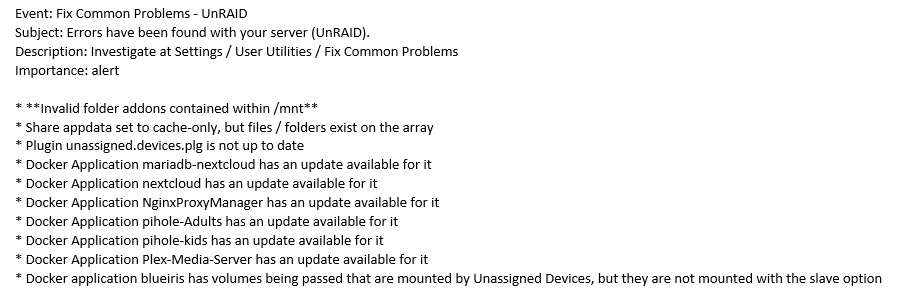
I also just received this error message from "Fix Common Problems" which seems to be related;
-
OK, I have finally added a cache disk, formatted it, stopped docker service and set the appdata share to Only:Cache - I have invoked mover, but it finishes instantly and doesnt seem to be moving. The cache disk shows 191 reads and 56 writes... but nothing more and its not going up. When I look at the appdata location it is still showing as on the array. I have attached diags - can anyone help? Thanks unraid-diagnostics-20230405-1301.zip

-
Thanks - when I move system * appdata I will obviously need to modify something in to dockers so they know where these are now located. I have about 10 dockers which will need updating... what do I need to modify with the new locations?
-
Thanks @apandey I will give this a go in the next few days and post back that it all goes OK. Should my 20Gb docker image need to be moved too as having had a search in Midnight Commander I see docker located at /mnt/disk3/system /mnt/user0/system /mnt/user/system Which I believe all are actually the same location. Thanks
-
Hi Guys I was wondering whether anyone can let me know if there is a tut on best practices to set UnRAID up. I currently have a number of dockers installed and running and have no cache drive... so /appdata etc is installed on the main array discs, which I suspect is keeping them spun up most of the time. So, I am after some pointers on how to make the system more efficient. I am guessing that I need to move my dockers onto a cache SSD and off the array. Obviously as this disk will be unprotected I imaging that it should be backed up too for redundancy. Any assistance will be gratefully appreciated... I am sure that this must have been covered before - but appreciate some help! Thanks
-
OK, I assigned the disks (except the parity) and started the array... and it all looks good, so I am happy that this is the correct method and will re-assign the parity drive now. Thanks @BRiT
-
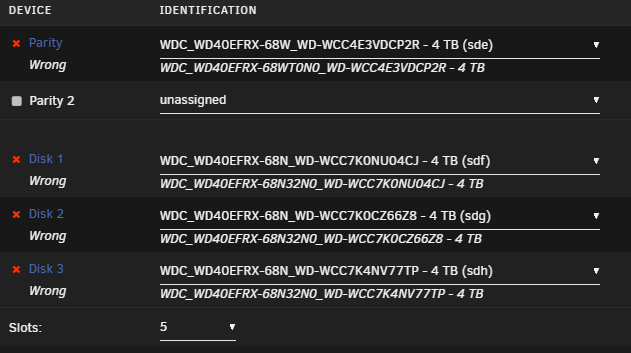
Thanks @BRiT thats good advice... I have s creen shot of the original disk assignments, so am 100% sure the disks 'will be' correctly assigned but will do that as an extra precaution... I'll just wait for any more comments before carrying out a "new config" operation. This is what the array now sees the disks as, just as an FYI...
-
Hi Guys I have moved my disks to a new server and unfortunately because I am using a different RAID card (in HBA mode), it identifies the hard disks from the array with an extra couple of characters - which means all my disks are listed as wrong. I am 99% sure that this is the correct fix, but just wanted someone to reassure me... I plan to set New Config (tools -> New Config) and "Preserve Current Assignments" to none. As far as I remember, this should allow me to assign the disks back to their correct slots and all my data should be available again - I cant remember if this forces a new parity check or not... but will, of course, make sure that the parity disk assignment is correct Any comments appreciated. Thanks
-
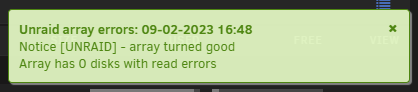
OK, rebooted after commenting out contents of smb-extra.conf and got this; Odd that after so many years smb-extra.conf could cause this, so I am not 100% sure that this was the fault but at least I am reassured that disk 3 looks OK Many thanks all.
-
OK, the extended self test is complete and says finished with no errors - see attached. So, you think I should just remove the contents from smb-extra.conf and restart the array? When I saw the errors on the HDD I was worried it was about to fail and run the risk of data loss I forgot to say that the machine is an HPE Proliant ML320e v2 which is using a P410i control card in HBA mode - this connects to the HDD cage using mini-SAS cables, so I am pretty confident its not a cable / connector issue. Thanks for all the help and advice guys unraid-smart-20230208-2225.zip
-
Odd, it looks like some sort of corruption in syslog1.txt.... if you look in syslog.txt it reads perfectly; Jan 18 08:50:11 UnRAID emhttpd: read SMART /dev/sdg Jan 18 08:50:29 UnRAID smbd[30230]: [2023/01/18 08:50:29.331627, 0] ../../lib/param/loadparm.c:801(lpcfg_map_parameter) Jan 18 08:50:29 UnRAID smbd[30230]: Unknown parameter encountered: "veto files" Jan 18 08:50:29 UnRAID smbd[30230]: [2023/01/18 08:50:29.331672, 0] ../../lib/param/loadparm.c:1841(lpcfg_do_global_parameter) Jan 18 08:50:29 UnRAID smbd[30230]: Ignoring unknown parameter "veto files" This was something to stop the SMB share filling up with .DS_Store files everytime a Mac accessed files on UnRAID... https://forums.unraid.net/topic/48257-how-to-stop-ds_store-files-and-_-files-being-created-in-shares-server-side/ The smb-extra.conf file reads perfectly in Notepad++; # Stop the annoying ._ / ._DS_Store files being written when Mac OS accesses UnRAID shares veto files = /._*/.DS_Store/ To be honest it was so long ago that I set this up, I cant remember the tutorial I followed So, will it hurt to empty (or delete) smb-extra.conf from \\xxx.xxx.xxx.xxx\flash\config\ as I have no Macs on the system now?
-
No, I haven't rebooted and the main screen still shows 34 errors... diags are attached. The extended SMART test is still running - showing at 90% complete... so when its finished I will post this too. Thanks unraid-diagnostics-20230208-1424.zip
-
Thanks for the reply @apandey I noticed the error when I logged into the UnRAID UI - there were the usual few balloons telling me that parity check had been started, then finished and there was a yellow balloon saying that there was a disk with 1 error... then when I logged into the main screen to look at the disk status' I spotted disk #3 showing 34 errors. the popup balloon didnt give any more information than that. I have just started an extended SMART test now and will check the results later. Sorry @trurl - poor terminology... I meant 'main UI'
-
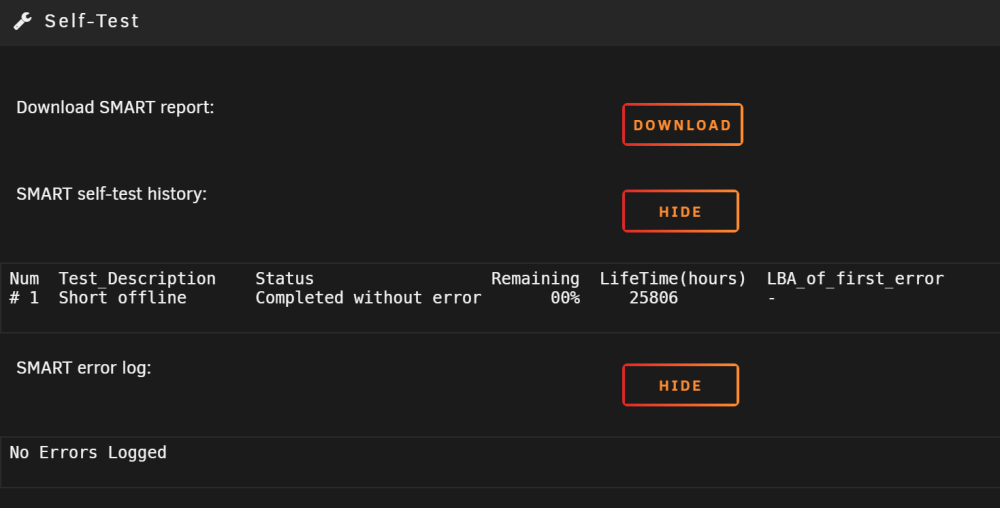
Hi all I logged in tonight and spotted that my array flagged up a disk with 1 error on 4th Feb... its now 8th Feb and on the dashboard it shows; I dont know whether its READ/WRITE errors - but have done a short SMART test which shows no errors logged; The disk shows it has been powered up for about 3 years (25806 hours), but I would expect it to last longer. I have attached the SMART report and would appreciate what your thoughts are. My immediate reaction is to replace the drive and rebuild using parity? Many thanks for any advice WDC_WD40EFRX SMART REPORT.txt

-
The SUM isn't accessible by a key stroke... it is on a USB key and needs to be booted to it. The file should be downloaded from HPE, but I think you need an active support contract to be able to download it. The file you require, I believe, is 'P35935_001_spp-2020.09.0-SPP2020090.2020_0901.114.iso' - hope this helps.
-
I believe you need to boot the machine using an HPE SUM disk (Smart Update Manager), this will allow you to get to the RAID configuration page - here you can switch the controller to HBA mode, which means all the disks will be presented to the operating system in their raw state with no hardware RAID capability. You can only access the 'confgure' page using the SUM disk, not from the IP (Intelligent Provisioning) manager. If you don't do this, you need to create a RAID0 array for each individual disk so they are presented to UnRAID. I am running some DL380 G8's, and I am 95% sure the G9's have the same setup options.
-
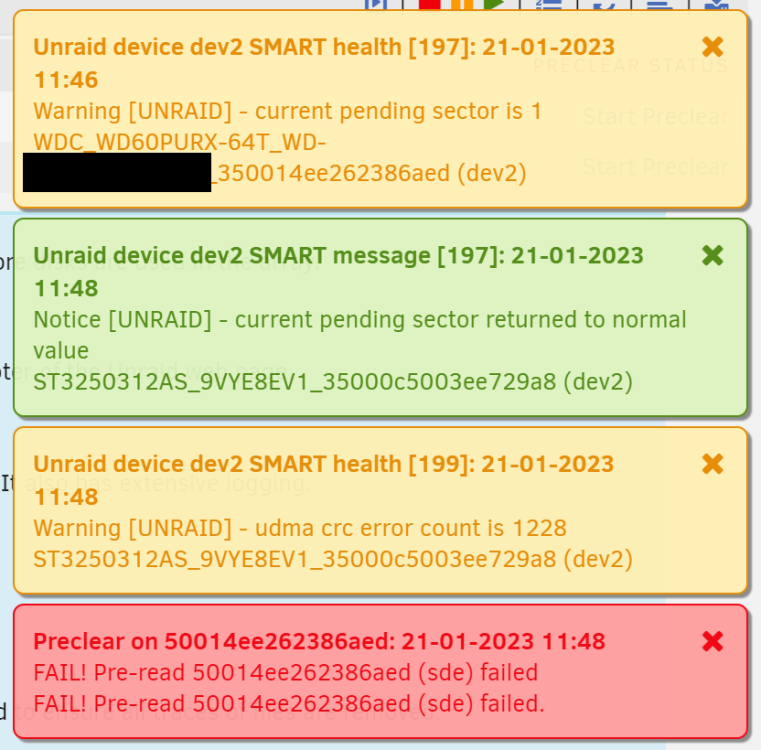
Hi All I suspect that this is not an UnRAID issue, but would like to know if anyone else has had this, or similar issues. I am currently running UnRAID (at home) in an HP ML310e v2 with 4 x 3.5" disks and it has been fine for years. So, I decided now is the time to upgrade as I need more space (Plex!!!). I bought 6 x 6Tb secondhand WD Purple disks. I have also got another identical ML310e v2 which I have removed the 2 x 5.5" DVDs and replaced with a 3 bay 3.5" disk carrier. So, I can now have 7 x 3.5" disks in total but the motherboard only had 2 SATA connectors and the onboard B120 controller only has connections for 4 disks - which meant I could only have a total of 6 disks installed. So, I installed the 6 x 6Tb disks and fired up UnRAID to preclear the disks. 5 finished fine all OK, but one was massively slower than the other 5 during the first pre-read. It also flagged up several SMART health 'pending sector' errors... so I sent it back to the seller and he shipped another. While waiting I installed a P420i RAID card and set it to HBA mode (all standard stuff as I am running DL380s with the same setup). This means I can now attach up to 8 x SATA disks - so I could install disks in all 7 caddies. When I first powered the machine up with 7 disks, it kept hanging during POST and then crashing. When I removed some of the disks it booted OK... so I assumed that the standard 350W PSU wasn't powerful enough to cope with 7 disks all spinning up at the same time during boot up. So, I ordered a Corsair HX850 850W Platinum Fully Modular Power Supply Unit. The standard 4 bay disk carrier in the ML310e has a proprietary 10 way connector to supply power to the backplane... so I modified one of the molex power cables to supply power to the HP disk backplane and it all seems to work OK. When the replacement 6Tb disk arrived, I fitted it in the newly upgraded ML310e and precleared it. Again it showed several pending sector errors, so I sent it back and the seller actually built an UnRAID machine to test the next replacement disk before he sent it (a very helpful seller ). Anyway he confirmed the new one was good and sent it to me. It arrived today, so I plugged it in and started to preclear it again for my own peace of mind and very quickly it flagged pending sectors and for the first time a complete FAIL warning - also another disk which happened to be installed at the same time flagged up a SMART error then cleared; So I began thinking that this seemed to be too much of a coincidence to have so many failed disks and the common denominator is the machine I am using to test them. So, tonight I booted UnRAID on a standard desktop PC with just the replacement 6Tb disk in and as I write this it is showing a throughput of 180Mb/s and is 7% through its pre-read with no errors (so far). So, the first thing I can imagine is that there is a power issue or a problem with the P420i RAID card. I have a spare P420i, which I will swap out next week to see if the disk is showing as clear during a preclear run... but on the PSU there is a switch which enables the 12v supply to be run as a single 12v rail or multiple 12v rail mode. Corsirs explanation is; Everything I've read says that single/multiple mode makes no difference now! Anyway - I wondered whether anyone has come across something like this before, or can offer any thoughts/advice? Thanks