





SliMat
Members
-
Joined
-
Last visited
Everything posted by SliMat
-
Welcome - I'll try to get this setup and running later this week.... or at the worst case early next week. Once its up and running I'll let you know. Do you need any array disks - or shall I just give you a clean UnRAID setup so you can set up what you want? Also - how many disks do you need in all?
-
@doron My production server which showed this problem with an HP 1.2Tb SAS disk is in a datacentre, so I can only check what the disk is from the ILO and this, I'm pretty sure, will only show the HP details and not the actual manufacturers details. So, I will try to get remote hands at the DC to physically pull out the drive which I had the issue with today and see if I have an identical one here which I can put in a sare server for you to play with. I have just logged on to the ILO of the machine in the DC and it shows as a 1.2Tb 12G 10k SAS disk... but I cant see if its WD/Seagate/Hitachi/Toshiba etc. I will set up a trial version of UnRAID and as this machine has advanced ILO you should be able to get on to the machine to do whatever you need.
-
Hi @doron I have a spare Proliant ML310e Gen8 with P420i/1Gb controller and probably have some 2.5" SAS disks - I need to look and see what manufacturer they actually are as they will be branded HP... But I was also considering buying a couple of 2Tb Seagate ST2000NX0273 Exos SAS disks (same as I have in my array on my production server) - if you want me to setup a non-production machine for you to access let me know and I will buy the Seagate disks, which I will use in my server when finished with :-)
-
Hi all, I am trying to get my power consumption down as my server has 19 SAS disks permanently spinning. So, I tried using the SAS Spindown App. I tried once before with no success - so I have now upgraded to 6.9.2 and uninstalled/reinstalled the app. I have just added another 1.2Tb SAS disk to my array, so thought before it has data on it I would set it to spindown after 15 minutes and see if it did spindown. It didnt. So, I clicked the green ball and manually set it to spindown and immediately it showed the disk in error and said content was being emulated. I couldnt spin it back up. The only way I could get it back into the array was by removing it from the array, restarting the array... stopping the array, re-introducing it and restarting the array again and letting a parity rebuild complete (well running right now). Can anyone offer any advice on why it errors the disk - obviously I am worried in case by having this installed it tries to spin disks down and then shows them as failed
-
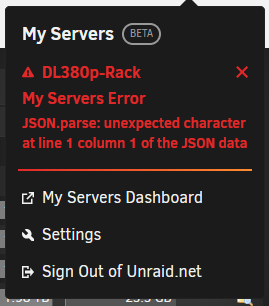
Hi All, I have just installed and set up My Servers, while it works fine it always shows an error - does anyone know how to fix this; Many thanks
-
Quick Update - during the reboot process I thought I'd play with the newly free'd up cache disk - so I re-assigned it as a cache disk then un-assigned it (again) and now it appears as assignable in the array 🙂 So... I'll keep checking for pointers on security practices. I currently have 6.8.3 installed as I was trying to use the SAS Spindown plugin which didnt work on my machine with 6.8.3... so I am going to upgrade to 6.9.2 now and play with "My Servers" too.
-
Hi @itimpi Yes, I had started to look at these and I suspect it was from when my Exchange server was hosted on UnRAID as this became compromised and it looks like someone has been attempting some sort of brute force attack - but, unless I am mistaken I dont see anything recent. I switched to Office365 in January to release me the burden of trying to maintain a creaking Exchange server 🙂 Any pointers on securing UnRAID greatly received!
-
Hi @itimpi Yes, this UnRAID server is in a datacentre - but it is behind a firewall (Mikrotik router). I do have Plex running which has serveral remote users that access it. I also have Resillo Sync running to synchronise files between two servers. I did have an Exchange Server running which was compromised as a result of a Microsoft vulnerability last November! Also running NextCloud - but this is only used by me and my brother for backing up work files. I also have a webserver/FTP server which allows suppliers to upload their price lists every hour too. I thought having the whole UnRAID box only accesible via a VPN would stop users accessing NextCloud/Plex? I'll have a read up on "My Servers" / "Wireguard" as I dont know anything about these. Would the above explain the remote access attempts you mention?
-
Hi @trurl I was wondering if the diagnostic file gave you any clues why I cant add the former unused cache disk in to the main array? Thanks
-
Thanks @trurl Attached. dl380p-rack-diagnostics-20220324-0924.zip
-
Thanks @trurl Is it best to attach the whole log zip file... or is there a specific file within the zip file to attach?
-
Hi @trurl Yes, sorry that I havent updated my sig in ages and forgot The machine is a DL380 with 25 x 2.5" SAS disk slots. Currently I have 2 x 2Tb, 5 x 1.2TB, 2 x 1Tb, 2 x 600Gb & 6 x 500Gb SAS disks. Then I also have 2 x 2Tb disks for parity. Yes, the 1.2Tb disks is a spinnig SAS disk, again another reason why I was planning to add to the array. I did explore an SSD cache disk and needed at least a 1Tb SSD as one VM alone was about 300Gb. This was my Exchnage server which is now redundant... so I may be able to get away with a smaller SSD as a cache to keep costs down. I havent looked into this recently... so might re-explore. So, in the meantime its just finding out why the 1.2Tb ex-cache disk isnt showing as available to add to the array. I did wonder if its because its formated BTRFS and not XFS... but I would expect UnRAID to identify the disk and allow a re-format.
-
Hi @JonathanM No, its not; Which is why I find it odd that its not listed as available to put in a spare slot.

-
I did look on the cache disk (before I unassigned it as cache disk) and the only folder on there was an old Plex one from when I ran Plex as a docker. It now runs in a VM. So, I deleted the redundant /appdata/plex folder and all still works... also, the server is active right now and everything is working with the cache disk removed.
-
Hi @JonathanM Yes, I configured them manually... eg; To be honest I havent noticed any real issues with performance - but to be fair I've never moved them to a cache disk to compare. I do have some spare 1.2Tb disks, so perhaps I should send them to the datacentre where my server is installed and get them to add them as I have about 5 or 6 spare disk bays - so could add them and then re-assign this 1.2Tb disk as a cache disk. From memory the reason I never used the cache disk for VMs or dockers is because of the risk of losing all if the disk failed. Thanks

-
Thanks @trurl I fitted a 1.2Tb cache disk, but have never assigned anything to it. At the moment the server is only being used for Plex, Nextcloud and a couple of webserver VMs for some WordPress websites... I retired my Exchange server and went with Office 365. However at the moment I have 14Tb of media in an 18 disk array (with 2 x 2Tb parity disks). Recently the server is down to a few Gb of space and last night I couldnt watch anything on Plex as it said that there wasnt enough disk space to convert the media. I deleted a couple of box sets and restarted it as a quick fix. So, I got to thinking that as I have a spare 1.2Tb disk assigned as a cache and not actually doing anything I would add it to the array to give me another 1.2Tb of media space. My thoughts are that if I dont knowingly have any speed issues then I obviously dont need a cache disk - especially as its been installed for a couple of years and not been used for anything! Any thoughts, comments?
-
Hi all I had a 1.2Tb cache disk which I have never used. Now my array is full and I need space I stopped the array and unassigned it as cache disk. Restarted the array and it warned me it would remove the cache disk assignment... which I did. I then expected the disk to be available to add to my array - I added an extra slot (number 19)... but the 1.2Tb disk is listed under "Unassigned Devices" and I can work out how to assign it to the array as its not listed as available to allocate to the slot. I know I am missing something simple - but can anyone offer any pointer? Thanks
-
-
Hi @SimonF I upgraded to 6.9.2 and installed this addon at the same time, so have never used it under 6.9.1 (or earlier)... so I suspect that this is the issue... thanks - I will try to find where the issue is noted and look at the bug post. I may try going back to 6.9.1 - but as this is a production machine I will have to try this late one night when I can take it offline. Thanks
-
Hi All I have an HP DL380 G8 using the P420i/2Gb controller and an array of 18 disks using a variety of manufacturers. I recently found this addon and thought it would be great as I have 18 disks permanantly spun up... so, I installed it - but none of the disks ever spin down. I have an unused cache disk, so I clicked on spin down but it shows as still spun up - log below; Apr 20 19:58:43 DL380p-Rack kernel: sd 2:0:19:0: [sdu] 2344225968 512-byte logical blocks: (1.20 TB/1.09 TiB) Apr 20 19:58:43 DL380p-Rack kernel: sd 2:0:19:0: [sdu] Write Protect is off Apr 20 19:58:43 DL380p-Rack kernel: sd 2:0:19:0: [sdu] Mode Sense: e7 00 10 08 Apr 20 19:58:43 DL380p-Rack kernel: sd 2:0:19:0: [sdu] Write cache: disabled, read cache: enabled, supports DPO and FUA Apr 20 19:58:43 DL380p-Rack kernel: sdu: sdu1 Apr 20 19:58:43 DL380p-Rack kernel: sd 2:0:19:0: [sdu] Attached SCSI disk Apr 20 19:58:43 DL380p-Rack kernel: BTRFS: device fsid 12ff0c5a-8607-4875-93b9-c90cb75a3929 devid 1 transid 42 /dev/sdu1 scanned by udevd (2160) Apr 20 19:59:08 DL380p-Rack emhttpd: EG001200JWJNQ_WFK27GGJ_35000c500bc3cdd27 (sdu) 512 2344225968 Apr 20 19:59:09 DL380p-Rack emhttpd: import 30 cache device: (sdu) EG001200JWJNQ_WFK27GGJ_35000c500bc3cdd27 Apr 20 19:59:09 DL380p-Rack emhttpd: read SMART /dev/sdu Apr 20 19:59:27 DL380p-Rack emhttpd: shcmd (107): mount -t btrfs -o noatime,space_cache=v2 /dev/sdu1 /mnt/cache Apr 20 19:59:27 DL380p-Rack kernel: BTRFS info (device sdu1): enabling free space tree Apr 20 19:59:27 DL380p-Rack kernel: BTRFS info (device sdu1): using free space tree Apr 20 19:59:27 DL380p-Rack kernel: BTRFS info (device sdu1): has skinny extents Apr 20 19:59:27 DL380p-Rack kernel: BTRFS info (device sdu1): creating free space tree Apr 20 19:59:27 DL380p-Rack kernel: BTRFS info (device sdu1): setting compat-ro feature flag for FREE_SPACE_TREE (0x1) Apr 20 19:59:27 DL380p-Rack kernel: BTRFS info (device sdu1): setting compat-ro feature flag for FREE_SPACE_TREE_VALID (0x2) Apr 20 20:51:34 DL380p-Rack emhttpd: spinning down /dev/sdu Apr 20 20:51:34 DL380p-Rack SAS Assist v0.85: Spinning down device /dev/sdu Apr 20 20:51:38 DL380p-Rack emhttpd: read SMART /dev/sdu Apr 20 20:56:31 DL380p-Rack emhttpd: spinning down /dev/sdu Apr 20 20:56:31 DL380p-Rack SAS Assist v0.85: Spinning down device /dev/sdu Apr 20 20:56:35 DL380p-Rack emhttpd: read SMART /dev/sdu I have seen varying reports of disk incompatibility... but can anyone confirm if this works with the P420, or have I done something wrong? Thanks
-
OK - I worked it out... because I was pointing the new installation to the original /mnt/user/nextcloud/ share on UnRAID - I had renamed all my original users folders so that as I added the users back in, it wouldnt delete their original data. However, I started with a test user account from the original installtion, but didnt rename the users data folder as I was going to test it. So, when I entered the original test users details, Nextcloud was trying to create a user folder - but couldnt create it as there was already a user folder there with the same name. So, I changed the test users data folder name (like all the others) and then Nextcloud was able to create the user folder in the new installation and I am now copying their data back into the newly created folders. 🙂
-
Hi all, I had issues with my original Linuxserver Nexcloud docker after trying to update from v17 to v20 - so today I deleted my mariadb and my original nextcloud docker and started again. I also deleted the /appdata/mariadb/ and /appdata/nextcloud/ folders, so it really is a clean install. Anyway, after recreating the MySQL database and reinstalling NextCloud 20.0.6 all was good. I set up SMTP and then tried to recreate my first user and this is where the problem starts. As soon as I try to add a user I get an error - An error occured during the request. Unable to proceed. Bad request Has anyone else had this error or know how I might be able to fix this? Thanks
-
I thought I would bump this as its been several months and I am still having this problem. I upgraded my licence to Pro a few nights ago and replaced my server with a newer DL380 with 18 HDDs - everything works, but just frustrating that this machine lists all the dockers as "Version not available" while my HP Microserver works fine? I have read a few more cases of this problem with other users - so can anyone offer any thoughts on how to fix it? At the moment I have to force an update on all the dockers for it to show "up to date" but a short while later they all say "not available" again 😞
-
I have just done another test using a completely unedited .ovpn file... sudo openvpn --config "UK London.ovpn" And get an error - "Options error: Unrecognized option or missing parameter(s) in UK London.ovpn:15: compress (2.3.10)" I realise that in the .conf file you created from the PIA supplied .ovpn file it has an option "compress" which in your modified file you change to "comp-lzo"... but it certainly looks like there is an incompatibility between the currently supplied .ovpn files from PIA and OpenVPN 😞
-
@SpaceInvaderOne Hope you are safe and well at the moment. As usual, thanks for all your work and great tuts... but I have been trying to set up a Virtual VPN router following this tut, but am failing at the last hurdle. I believe that PIA have changed their systems and killed being able to connect Binhex Privoxy - which in turn has killed Sonarr/Radarr... hence deciding to try and set up a VPN router VM to use. Anyway, every time I try to test the connection I get a " TLS Error: TLS key negotiation failed to occur within 60 seconds (check your network connectivity)" message. I have checked that the VM has access to the internet 🙂 - I tried using a different endpoint, but get the same error. I am using Ubuntu 16.04, so I could follow your instructions. But having spent two days on this I was wondering if anyone could give me any pointers... or perhaps theres a newer tut for 18.04 or 20.04 which I have missed? Any help really appreciated...



