





NLS
Members
-
Joined
-
Last visited
Everything posted by NLS
-
Hi Patrick, I am curious about a few things... For example, how will this react if the destination server is offline (this is a real case, as the container on host, starts much earlier than the VM that hosts the destination mail server). Does it retry? Is this configurable? Also, in the destination server, does this actually look like it was sent originally to that server? Also can it be done to work with more than one accounts? (both source and destination)
-
OK installed the latest version. 1) I wish I could set the trigger of cache empty percentage to 0% (to always use mover) instead of just 5%. Just 5% actually covers me ok, but still my OCD says there should be a "disable this filter" setting (aka 0%). 2) Remove empty folders doesn't work. It actually not only left my empty share folder in my cache after mover run, but also 16 empty subfolders!
-
OK I am confused. Didn't see anything in first page or FAQ. Can someone reply and tag me? I have a Mover Tuning by Squid with last version being last year? (this is the one I have installed) And then there is a different one, that updated like 50 days ago, that refers to this same thread, but is not made by Squid? Is this a replacement and I should remove the old and get this?
-
Rebooting the servers seems to have resolved things as I (half) expected. Yet it would be more useful if we found the cause, because it is a case that can lead to an unstable system.
-
I know it is just an option, this is not something I say for UNRAID, this is something for zfs and the love it gets (which sometimes reaches quite dogmatic fanboyism - this is a general comment not for this forum). I technically understand (I am in IT for 30 years) zfs feature set (at least in theory), yet sometimes the complexity of doing something simple is many many times and in most cases, unneeded. There are no hardware issues.
-
Yeah, I don't think there is a corruption issue, this is a rather fresh and quality M.2 that works fine otherwise. This is a matter of FS robustness. It kind of scares me that we didn't find a solution, now that UNRAID embraces ZFS more and more. This is the second time I have a zfs issue, last time was with a proxmox server. I understand how "more modern" this fs is, but...
-
...this doesn't say much about zfs and its supposed robustness and self healing abilities eh?
-
Correct. It was one of my first experiments if you see above. Also I want to stress for the nth time, this is the first time it occurs to me also, after several months that I switched my cache to zfs (I did it very soon after UNRAID allowed for that - because I thought it would be cool to have at least one zfs back then). What got me more scared was this latest incident where I could create the folder but I couldn't write to it even after I destroyed the dataset and redid it and it still failed. That's a first. I somehow believe it will correct itself after reboot (which I won't be able to do for at least 30 more hours), but if it doesn't, I might need to somehow "cure" this zfs device or in the end, turn it back to another file-system (which would be painful).
-
...and a more interesting experiment I did just now. I wanted to write a small file to another share I haven't touched for a long time, named "programs". I created a subfolder in it, using Windows Explorer. It created the subfolder fine. Checking in UNRAID file explorer, I see a folder "programs" in cache disk and the subdirectory inside. BUT WHEN I TRY to write a file in that folder, no go!!! It created the folder, but couldn't write the file. I then did the same experiment (without deleting the folders): zfs destroy cache/programs ...this as expected destroyed also the folder I created inside, so I don't see it in Windows Explorer any more. Now I create that folder again... It creates it. I try to write file in the folder... NO GO AGAIN! Damn that is weird.
-
OK I did this then. I tried to cd to /mnt/cache/emulation even BEFORE doing the "destroy" - it said no such file or directory. I then did the destroy command, it didn't output any error (or anything) - took a few seconds. Then I did again cd to /mnt/cache/emulation which again of course as expected, said no such file or directory. After I did these, I tried to write to Q:\emulation (which should create the folder in cache)... It wrote it! I then did the same to another share that failed earlier today, "generic". I tried to see the directory /cache/generic ...it wasn't there. I did zfs destroy cache/generic. I then tried to write to Q:\generic and it properly created the folder in cache and write the file! So, the question is why those orphan zfs datasets? I should do that for all my shares? This is definitely weird and MAYBE there should be a check mechanism within UNRAID for that.
-
Will this affect my moves happening between other disks in the same share? (not cache) If not, I will try this tomorrow, thanks.
-
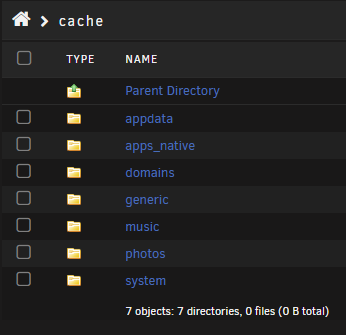
I have no knowledge of zfs (I need to do some reading some time), so I don't even know what you mean. No I didn't do anything in between. Probably just the retries of the OS to write to share. Meanwhile: ...this is how my cache disk looks right now. "generic" I created manually because else I couldn't write to the share "music" got created automatically when I wrote to the share (but showed empty in Double Commander, at least it showed ok in UNRAID file manager - could be a different issue) "photos" got created automatically and worked ok "emulation" as you can see is not there - to be honest I don't remember if I deleted it with all the experiments, but I did create it manually to write to it Let me point out once again, that my cache is zfs for a few months already and UNRAID is many years that I have it, yet this happened now. I didn't have the issue before. Folders where created automatically on cache when needed and mover used to remove them after they were empty (although I think mover MIGHT not delete them even if empty for quite some time - not sure if there is a change in mover or an issue, but wasn't a real issue anyway). If we can find the issue before I reboot the server in 2-3 days (after my manual "intra-array" shifts are done) it would be great as it may help identify a real problem in UNRAID. This definitely doesn't look normal. Now that UNRAID moves to full zfs support with 7.0, I might just revert my cache to another filesystem and not follow the trend. Unnecessary complexity. (and I know how strong many people seem to love zfs - but I guess, to each their own)
-
output.txt
-
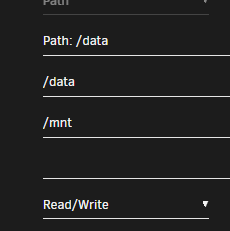
I will change it if after reboot I still doesn't work as expected, but as I said, it was like that for years and didn't notice an issue before. According to this: https://docs.docker.com/engine/storage/bind-mounts/#configure-bind-propagation I am correct now.
-
For the diagnostics, I tried to copy a tiny text file from my desktop to a share. chuck-to-check.txt to Q:\photos IT WORKED! I know for a fact that in cache, there was no folder "photos" before and now there is. So this worked as expected. I opened the file fine and then deleted it. Then I tried to do the same to share emulation. This folder also doesn't exist in cache (I deleted it before). chuck-to-check.txt to Q:\emulation failed. Of course I am still doing huge moves in DoubleCommander (TBytes, that take several hours, between disks for folders and files that belong to share "emulation" - but not in the folders that are actually in the queue to move). Again: I tried to write to "emulation" but NOT in the folders that are moving. Also before, another folder ("generic") that was not part of the huge move, also I failed to write to it. Until I manually created the folder in cache. Note that all shares (I will recheck) have between 1GB and 30GB "floor" and all involved disks have more than enough (and remember cache itself has 700GB free). I somehow feel that after all the moves I need to do finish and I do an extra reboot on the server, things will be fixed - still I think we need to know what is the issue right now. @JorgeB I attach diags. quasar-ultima-diagnostics-20241010-1520.zip
-
WIll do and revert later. Erm you are right, I meant primary cache, secondary array. ...Double Commander was always like that (for years) and I never had an issue.
-
Thanks. I did. The files were mere kilobytes after all. It wasn't that. Today something else weird happened, which seems to be related. I just wrote a file to another share (as small mp3) from Windows. It didn't error out. I see the file in windows explorer in the share and I can even play it. This share is configured to be primary array, secondary cache, move cache to array. Well... I CANNOT PHYSICALLY FIND IT! I see it in windows explorer in the proper path (Q:\music\_CLEAN_UP). In Double Commander in cache the copy (from Windows) DID create a "music" folder, but it is empty (!?). I refreshed many times. In Double Commander in ANY of the disks it could possibly move the file, it is not there! (folder is not empty though, it has an older file, which resides in array) In UNRAID file manager, I checked both "SHARES" (folder music\_CLEANUP) and "MAIN" tab. The file IS physically in cache (in music\_CLEAN_UP) as expected! I can see that the folder (and subfolder) belong to "nobody", which I believe is expected behavior and full rw permissions. Why double commander doesn't show the file or the subfolder that is in it? It uses normal Linux calls to retrieve the directory (being a container within UNRAID). Very weird behavior and I cannot reboot the server for at least 2-3 days more, in case this corrects itself. EDIT: After I successfully edited the file in music, I tried to move it to other share (also cache to array type). It didn't allow me, with the same error as in OP. It only worked after I manually created the other share's folder in cache. (then it had no problem creating the subfolder structure in it)
-
My cache is an M.2 disk, working fine for a long time. It is ZFS formatted (which I slowly but surely regret). I don't think it is a hardware issue, and UNRAID doesn't report one. I am doing some other (huge) file transfers between other disks in the array (not cache). Think of some UNBALANCE work, but manually using DoubleCommander. I did some moves out of cache yesterday (to within the array), because I didn't want to wait for mover and it was some tiny files. I also tried to delete some empty folders from cache (remaining from moving the contents). System (tried both DoubleCommander and UNRAID file manager) didn't seem to delete them (!), but without an error! Today, the folders where missing though. It is like ZFS had that in some queue and finally did it. Now I am trying to copy a couple of tiny files to my UNRAID from my PC. Files that belong to a share that is configured cache->disk whatever. It fails! In UNRAID log it writes: Oct 9 23:56:48 quasar-ultima shfs: /usr/sbin/zfs create 'cache/emulation' 2>&1 (a few times) And it did NOT create that folder! I tried moving a folder (with a single file) from array to cache from DoubleCommander. It worked fine. Then I deleted the file from cache, again just fine. But I stopped being able to write to array and looks like the intermediate step of going first to cache is the issue. (but I cannot be sure as I don't have a share that doesn't use the cache OR direct access to array disks from my PC) ZFS bar in UNRAID dashboard, reports "82% 4.80GB". I've seen that bar full in the past, yet no issue to write on my cache. Cache also hosts a working VM and many containers. Everything works. Any ideas? EDIT: I did find a share that is not using the cache at all and indeed I could write there. So it is indeed some fresh issue possibly with ZFS or cache access over LAN? (I didn't make any changes) EDIT #2: OK a breakthrough! I created the share folder manually in cache (the folder that also exists in array and has TB of content). After I did that, I COULD write in the share (and I mean 2-3 folders deep in the share)! In other words it COULD create subfolders within the cache share folder to put the file in the proper path. I never had this issue before in the years I use UNRAID (including with ZFS cache, maybe more than a year). If a share folder was not also present in cache, UNRAID just created it. How did this stop? Also (it can be related), the issue of moving folders OUT of cache. When I moved a complete share folder from cache to array, the folder (as expected) was in the end removed from cache. Now it just stays there (but empty). I ignored this as a trivial issue. But now this is weird. Now I need to make ALL my shares also in my cache disk, to be able to write to UNRAID from LAN. Any ideas???
-
Rather simple option. Some of us have physically the parity disk(s) on top of array, others at the bottom. Would be nice if we could allow this to show on GUI (a simple toggle possibly).
-
OK this probably sounds stupid, esp. from someone that has UNRAID for more than 10 years... I have a "bootblocks" empty share in my UNRAID. I don't remember at what point this was created or why. Can someone help? What might need that share? (to see if I actually need it) It might be something I used to have and don't have any more.
-
My UNRAID disks spin down when not in use (this works fine). Also for my monthly parity check, smaller disks spin down after their size "mark" passes. i.e. In an array with a mix of 4TB disks and 8TB disks, the 4TB disks spin down after 50% of parity check. Even ALL disks spin down if parity happens to be larger than the largest data disk and the check goes in the area where only parity size is. (I had a 10TB parity with 8TB data disks, pending further disk swaps) Why this doesn't happen with parity rebuild? Since the smaller disks do not need to be accessed further, why keep them spinning? I have an 18TB parity, with a mix of 4TB and 8TB data disks (yes pending more swaps after rebuild) and I am now at 55% (so OVER 8TB mark) and ALL disks (4TB and 8TB) are still spinning. I would say this is a bug.
-
This nerd* thing keep getting deprecated sucks.
-
Wow. We are getting older. I started using it more than 15 years ago. I think I had 2-3 320GB disks in a case. I then built the case I am still (!!!) using, although all the guts changed more than once. It is a midi case, that the whole face is removed and I fitted 3 x 4x3.25" enclosures (with individual 120cm fans). Since my needs grew and we were before "plugins" and "containers" era, I left it for a few years for some Windows based solutions, SBS etc. Then returned, to see a much better, much more complete solution (actually exceeding what I expected) - and my license still working (ok why wouldn't it). I don't think I can move away from UNRAID any time soon. Now with ZFS implemented and U arrays optional (I will never stop using them, I love the flexibility AND portability) it really has nothing to fear in comparison with "heavier" NAS software names. Keep up the good work guys.
-
It is just a "follow" on that being a file. I use the path you propose for more than a year, so you do it also, don't worry about it.
-
But this is dead I think. The one working now is binhex-crafty-4.


