






cybrnook
Members
-
Joined
-
@Rysz thank you for taking over and maintaining NUT on unraid for us. It's been a critical part of my installation for years, and I know it's a thankless job on your side that I just depend on...... I saw your notice yesterday, and wanted to ask with that transition to Fedora coming up, are you aware of a new NUT package that will be available after the transition? Or will it be a loss for the time being, until someone else wants to pick it up and run with maintaining a plugin for unraid on Fedora?
-
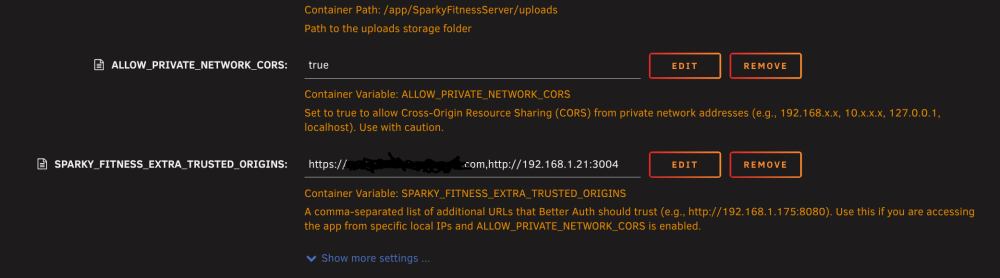
@[email protected] I wanted to add that with the initial setup, I am hosting my sparky instance behind a cloudflare tunnel, so I can get to it both locally at home using IP's or externally using my CF domain. In order for this to work, there is another variable for the BE Server that very much compliments the NETWORK_CORS value we added, and it's SPARKY_FITNESS_EXTRA_TRUSTED_ORIGINS, which allows us to add comma sperated domains where the backend auth system will allow authentication. If you'd like, I can create a PR for this to be added to the default template, just let me know.
-
I've had one in my unraid system for about a year and it's been fine. Very easy to take it for granted :-) And I bought about ~40 more when they were at $3 a pop and haven't had an issue with any of them. Got one for Ventoy, one for general stuff, give them away as stocking stuffers :-)
-
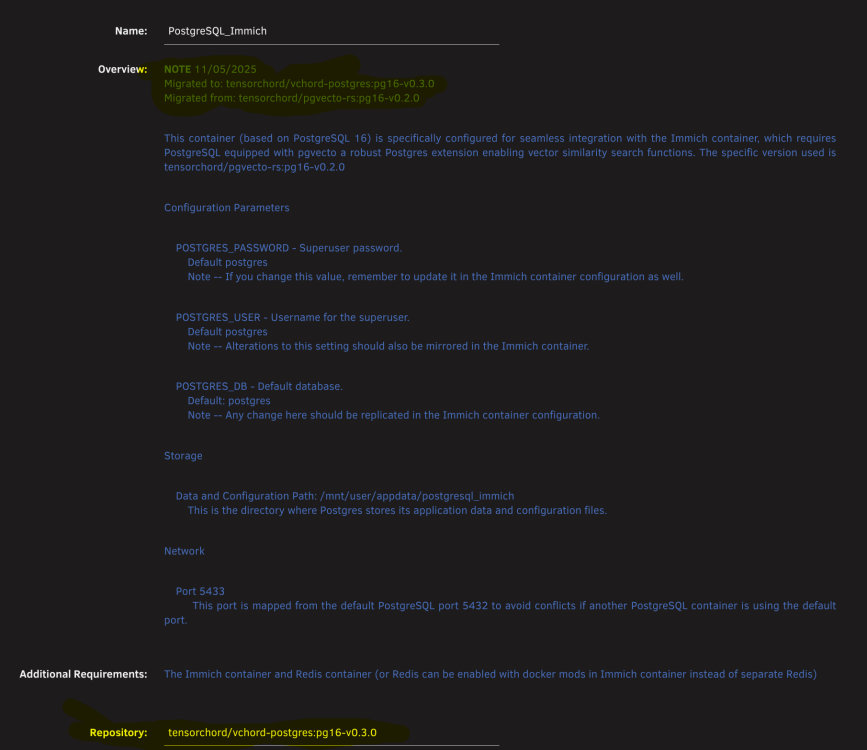
Was in the same boat end of last year. I made a note for myself in the docker template: NOTE 11/05/2025 Migrated to: tensorchord/vchord-postgres:pg16-v0.3.0 Migrated from: tensorchord/pgvecto-rs:pg16-v0.2.0 And it looks like I just changed the repo to: tensorchord/vchord-postgres:pg16-v0.3.0
-
@[email protected] , wanted to thank you for publishing the templates for the Sparky Fitness frontend and backend. I just went through an installation and came out the other end successful after working with CodeWithCJ. I think we identified an issue in the template for the front end. Your template has the backend port defaulted to 3004 in the Frontend template (at least your sample default value is 3004), when in fact it seems it should be 3010: Between that and then setting force email to "true" in the backend, everything else seemed to be good to go. Here is the convo between the dev and I: https://github.com/CodeWithCJ/SparkyFitness/issues/2082 Also, I had to add "ALLOW_PRIVATE_NETWORK_CORS" to "true" as a value in the Backend template in order to allow connections from my local network (192.68.1.0/24 for example).


-
Yeah, seems on this new listing the floor is $3.50.
-
I've bought way more of these than I need at the moment, but at the price it's a no brainer. I will say, seller typically auto accepts offers of $3.
-
Also confirming I am using a B50, and it's working fine as of RC1 (and now also on RC2). At least for VM rendering using VirtIO(3D) as well as transcoding against docker containers. I am guessing user is assuming it will just work. You still need to do the basics of passing /dev/dri through as a device to your containers.
-
I think the below is what you were asking. fTPM is TPM built into the CPU (AMD)
-
I believe it represents the versions of "Connect" that is installed on the Unraid box, at least last reported. Checking mine, I am on the latest version "2025.12.19.2020" and in Connect mine is also showing as blank. Perhaps a bug in the current version.
-
Apologies, marking this as solved for anyone else maybe having this issue. Seems it's an issue with the "ZFS Master" plugin and the latest releases of unraid. @Iker Removing ZFS master allows the "main" tab to function properly again. Noticed someone else now also mentioned this in the ZFS Master thread: https://forums.unraid.net/topic/122261-plugin-zfs-master/page/28/#findComment-1584670 Again, sorry for the noise but will leave this for anyone else maybe seeing the same thing. @Squid Plugin might need to be marked as broken for the time if it's no longer being supported, which seems it may be the case.
-
@elibosley noticed an issue with connect (tested on Chrome and Brave) that when the connect icon is pressed while on the "Main" tab it disappears and the formatting in the header seems to shift a bit. If I switch to any other tab (Dashboard or Shares) clicking the Connect icon work as expected. Uploading a video to show what I am seeing. I first noticed this on 7.2.0, but could have been there longer, and have since upgraded to 7.2.2 and seems to have been there over the past few Unraid connect releases as well, before and after USB backups not working as expected. Unraid_Connect_Button_Main.mp4
-
Backup issue has been solved in the latest version of unraid connect.
-
Not trying to be difficult on my part by any means, but can you confirm this is actually an acknowledged issue? I saw you mentioned in the other thread that you "think" it was, but that was a few a weeks ago. Just doing my part reporting issues.....
-
Like I mentioned in my first post, "similar to this, but not quite exactly matching". I am not stating that backups are not happening, which is what is being said there. Two different issues.....






