





opentoe
Members
-
Joined
-
Last visited
Everything posted by opentoe
-
That will flash the H310 with Dell's IT firmware, which does work. I eventually re-flashed them using the LSI P20 firmware because of talk about queue depth. Dell's IT firmware supposedly uses a much lower queue depth, like 25 and LSI uses 600. What this does to performance, I did not notice so I left my H310's with the LSI. Maybe if I had an all SSD system there would have been performance differences but with an all mechanical system I didn't see any difference at all. I used a bootable USB stick using the utility rufus. Then I copied the Dell's IT firmware and multiple versions of the LSI IT firmware onto the USB stick. This gave me the ability to try different versions of the sas2flsh utility if it didn't work. I remember having to use an older version of sas2flsh when it came up with a manufacturer error. The older sas2flsh utility let me bypass and continue the flash while the newer one just errored out and exited. I also did all this on a different computer and was not my unraid box. It is a basic two year old Dell machine that had a couple PCI-E slots available.
-
I got myself a managed VPS account. You also can get an un-managed for much less, but I paid the little extra for the managed. Slapped on cpanel/WHM and now I can add any domain I need to along with other functions like setting up forums, shopping carts, whatever comes to mind. I do have a Gmail account, but the spam just gets out of control. With my personal account on my VPS I have spam prevention options. I also provide email addresses for family members ( over 10 of them ) that are used daily. All have webmail options and also can be used with Outlook/Thunderbird. I share the cost of the VPS with my Dad. Since I use the VPS for other functions the price is well worth it. Be careful, lots of SMTP servers get blacklisted very quickly and the ISP couldn't care at all. I found a very good VPS host which manages their network very good and never had issues. Going on 3+ years already. Lowendbox is a site you can shop for a VPS. I also have tried most of the "free" SMTP mail relays/sites out there and always had some kind of issue, so I just stuck with what worked for me. Good luck!
-
Can you remotely log into the shell and try to shutdown from there?
-
Power down all your VM's and/or dockers then try a shutdown again. If you have lots of them running might take a little bit to isolate which one is hanging it up.
-
The package manager isn't very smart. The old under installed just means Perl is already installed but not by NerdPack. What version unRAID are you on? Older versions had Perl. It might also be left over from another plugin if you uninstalled it. You could deselect it. Apply. Reselect. Apply. As long as is selected it will be installed on server start up. I did install Perl manually before NerdPack. I turned OFF then applied, then turned it back ON and applied as you suggested and now it says up-to-date. Thanks.
-
mc (Midnight Commander) has been part of unRAID as long as I have been using it, at least since v4.7 Ah yes. I never could remember if it was already included or not. Thanks.
-
I tried both and could not find any performance difference with Unraid, still ended up using the LSI firmware just in case. I initially went for the Dell firmware since it was official and supported by Dell and didn't want to deal with any cross-flashing. I never did any performance comparisons. I use two Dell cards. Flashed both with the Dell IT firmware from Dell's website and ran the system for a few weeks. Then I read LSI's firmware has a much more higher queue depth. Out of curiosity I flashed the same cards to the LSI firmware and was going to do some quick performance tests but never got around to doing them. The only perspective I have is using the system for a few weeks with the Dell IT firmware then switching to the LSI. I did not notice any difference in performance under regular use. So, to be on safe side I just left the cards with the LSI firmware installed. I did update my original post with this information, but that was months ago. Just to be on the safe side whoever is just starting out and needs to flash a card I would go with the LSI firmware. I'm using the latest LSI firmware from the Avagotech's website. P20.00.04.00. Released 09/22/2014. Maybe one day I'll do some performance comparisons between the two firmware's but it would be at the very bottom of my list.
-
I can't seem to update PERL. It indicates an update is ready but nothing happens. Am I supposed to do anything at this point? Also, can MC (master commander) be added? I can't remember if I installed that manually or it is already part of unraid. Thanks for the NP.

-
I did not understand I had to install CrashPlan also. Thanks man Problem solved! (well at least the first one… ) Haha! So ture I got this working now, but do the desktop docker need to run all time since I have used it to set up crashplan, or can I stop it and only run the Crashplan docker? The main Crashplan docker will run all by itself using the default settings. If you need to make any changes then just turn on the desktop part, connect to the main Crashplan docker, makes your changes and then shut down the desktop part.
-
Fstrim won't work, you'll get fstrim: /mnt/cache: FITRIM ioctl failed: Input/output error Confirmed. I tried it manually on an unassigned drive and no good. I'm not educated enough to know what happens when no TRIM is supported but if users are running VM's and dockers on SSD's with no TRIM support maybe they will notice performance decreases or longevity of the drives. root@SUN:/mnt# fstrim /mnt/ssd840 fstrim: /mnt/ssd840: FITRIM ioctl failed: Operation not supported root@SUN:/mnt#
-
First confirm your SSD has TRIM support: hdparm -I /dev/sdX Look for: * Data Set Management TRIM supported (limit 8 blocks) If it does your possibly using an HBA that doesn't support FSTRIM, e.g., LSI9211-8i. If the SSD drive supports TRIM and the controller card does not will it still function because the SSD drive itself supports it natively? EDIT: If the mega raid SAS 2008 chipset doesn't support TRIM via passthru I assume that would be lots of users.
-
He has other products from Hong Kong, but this one is coming from the US. Depends where you are located. http://www.ebay.com/itm/New-IT-Mode-LSI-9211-8i-SAS-SATA-8-port-PCI-E-6Gb-Card-Bulk-packing-US-Seller-/291641245650?hash=item43e72c3fd2:g:xrgAAOSwZ1lWcy3~ Seems to have very good reviews. He most likely flashed the card himself, I've never seen a RAID card sell flashed to IT mode. He is using version P19, which has said to work fine. I'm using the later version P20 and have seen rare posts about that not being a stable version but I never had issues. And the picture shows both size brackets, so that will cover both size cases.
-
Check this post from the support pages at CrashPlan: http://support.code42.com/CrashPlan/4/Backup/Backing_Up_A_Windows_Network_Drive With version of Crashplan 4.3 and later, they made some changes to work with Windows 10 better and indicate you can backup network drives if you install the app PER USER. But then you will need a license for each PER USER installation. Since I already pay for the FAMILY account I didn't want to try it out. If what they are saying indeed works and you have a license you could either go two ways. Install the docker and then install the client and make sure you select PER USER or remove the docker entirely and just install on Windows server/client PER USER and select your shared drives. I would need a PER USER license to see it in action, don't have one. Maybe someone can confirm? I've done the hard links "solution" and it was a pain in the neck. I had to keep fooling around with the task to get it working properly. "CrashPlan App Version 4.3 And Later For the CrashPlan app version 4.3 and later, you can install the CrashPlan app per user. This installation allows you to add the mapped drive to your backup file selection just as you would any other drive. If the CrashPlan app is already installed for everyone on your computer, you can completely uninstall the CrashPlan app and reinstall per user instead."
-
I used a small form factor Dell 790 desktop. It had two PCI-E slots in it. When I used slot 2 the USB stick wouldn't boot. I moved the card to slot 1 and then could boot to the USB stick. That was an easy one. Other situations will be different and you may need to visit the BIOS. Can go into the BIOS of your mainboard and turn off or de-select what you want to boot. NOTE: IF YOU GO INTO THE BIOS MAKE SURE YOU SAVE YOUR CURRENT SETTINGS IF NEEDED FOR LATER.
-
You'd think the process would be identical for every H310 card I had. That wasn't the case. Sometimes I had to use different versions of the sas2flsh utility and some wouldn't take the ROM BIOS back on. Then had to be worked with for a while to get it back on. Not really needed, but some users wanted it there. I could have 10 H310 cards all in IR mode and I'd guess I would need to use three difference techniques to flash them all to IT mode. I also only used DOS mode. Rufus. I'll input if help is needed.
-
Note: I just noticed the version went from 4.5.0 to 4.5.2. Time for a page of queries.
-
I usually update all my current plugins I have, should we now be looking at the info file to see if it is for a future release of unRaid and won't work? I just don't want to break a plugin that is working already. The plugin works on the current version of unRAID, only the new feature doesn't, which means you can't reposition the Stats menu yet... Gotcha bonienl! Thanks for clarification.
-
I usually update all my current plugins I have, should we now be looking at the info file to see if it is for a future release of unRaid and won't work? I just don't want to break a plugin that is working already.
-
I picked up 3x Supermicro SAS2LP-MV8 cards for US$200 off eBay. I see no difference in performance compared to my LSI card, and the Supermicros use less power. You shouldn't see any difference in performance, except maybe when doing a parity check. I know there has been progress in adding more fine-tune settings to disk settings but don't remember if it entirely has been resolved with those drivers. I didn't realize your mainboard had three PCI-E slots.
-
Did you also flash the BIOS or just the firmware? Glad to hear you got it going!
-
I loved using the Crashplan Docker, since it was all new to me, but then just got old dealing with client/server connection issues. I had the resources to whip up an Ubuntu VM and install Crashplan. Just needed to make my user shares visible within the VM and been problem free since then. It behaves normally and updates when it needs to. To access the gui I just log into the VM and load Crashplan. I may revert back to the Docker once it doesn't need constant attention. I never liked Code42's idea on not being able to backup network paths. We all find ways around it so I just chose the easiest path for me.
-
Need to post questions like that in the Storage Controller Devices area. http://www.avagotech.com/products/server-storage/host-bus-adapters/sas-9211-8i#overview Is this a card you already own and want to use it with unraid? And I never knew SMF would allow someone's username to be a smiley. Ha!
-
The plugin works with cache disks only. The command is stored in the file /config/plugins/dynamix/ssd-trim.cron on your flash device. You can edit the file, but since this file is auto-generated all manual changes will be lost once an update from the GUI is done. I currently copy my ftp's configuration in the GO file, so on every boot the vsftpd.conf is always configured for me. We could do the same for this maybe? I'd rather not have to manually edit anything and have unraid work out of the box for my specific needs, but as we get to that point a few manually edits need to be done I guess. By the way, I did install this plugin and that files doesn't exist. I also checked the folder dynamix.ssd.trim and other folders as well. I do not run a cache drive, so maybe the plugin installs but doesn't create the associated files? I also believe I have remnants of older NerdPack source files and other plugins that haven't removed entirely. Starting to look like a mess in the config folder, but I don't know what's dependent on what, so everything stays now.
-
Thanks for the explanation. I finally got my lazy ass to map where are the drives are in the bays. Since one of my Western Digital drives is not in the smartdatabase, is there a way I can add it manually to the code/file where the info is saved on the USB stick? It is just missing the manufacture. I have submitted it several times but I guess they don't want to add it.
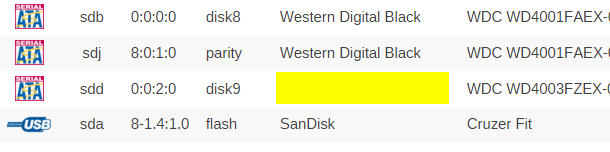
-
The mainboard does have 2 PCI-E slots, had the room for two controllers to handle 16 drives. It was just out of curiosity on why that card was chosen. I think switching over to a Norco style case was one of the best upgrades I did. Physical drive management is a breeze, no messing around with cables, drive identification is very easy and cooling is top notch. I have yet to put it in the closet, but it's quiet enough there is really no need. A couple fake plants from Walmart will help.


