





johnieutah
Members
-
Joined
-
Last visited
Everything posted by johnieutah
-
Seems to be working fine. One thing, I am wondering if the music source config path needs to be read/write. I would imagine by default read should be sufficient right? Hopefully this update will fix my problem of the current playlists never seeming to be correct whenever I restart my server, it always seems to have forgotten what I was listening to last session. Thanks again.
-
Thanks. Will try this out tonight and provide feedback.
-
Hi @dlandon what do these 2 lines mean exactly? Previously the playlist folder was a variable (along with the music source) that could be set... Just need to know as I do not want to loose my playlists. Also, by upgrade is performed on every startup, does this mean that each time docker is started, this docker will attempt to pull the latest LMS nightly build or stable release or something?? Thanks.
-
This is great, I noticed the other day LMS went to 7.9.0 and was looking at a way of updating my current LMS docker. Is there a migration process from the Gfjardim's LMS docker container? Thanks once again
-
Thanks for all that! Very helpful. So basically this is too much for my requirements for the time-being.
-
I started playing around with this last night, but had trouble finding out exactly how to use this plugin to simply back-up only the USB boot drive . It keeps asking for a source to be defined. If I may offer some critique, the UI for this plugin is a bit of dogs dinner I'm not sure what is possible and what is not, for example the above - is it even possible? Is it not possible to separate input fields and labels up a little or have a simple/expert mode? Or better, a step-through... (I'm waiting for the hate from the power users )
-
Is this the correct place to post about issues with the shutdown buttons? I'm getting a 404 since the 6.3.1 update, but the shutdown does appear to work...
-
@Squid. You mentioned being able to view the log output from previous script runs. How do I view this? What is written to the log? - is it a full capture of the command line output? (would be great). Thanks.
-
This is a great plugin, been after something like this for a while as I loathe going to the command line So many thanks to Squid. A couple of suggestions: Minor: I've noticed the output doesn't seem to support UTF-8 chars, not sure if this is due to the plugin, the browser, the way the plugin captures the output etc... Major: It would be great to be able to manage scripts from the plugin page, i.e. create, edit and delete in a simple form. I know this has been suggested, but this would really make this an all-in-one solution IMO
-
I use the Krusader docker: http://lime-technology.com/forum/index.php?topic=40355 This will give you a "regular" file explorer and works well IMO. There is one (major) problem at the moment and that is that docker won't see any drives mounted, so you'll need to restart the docker service so that you can access any attached drives mounted through Unassigned Devices. Of course, if you just want to move things around the regular unraid drives, this is no problem. Also take a look at Dolphin, offers a similar experience.
-
So I installed this plugin but have yet to use it. So as I see it, this is some sort of warning system that 'bitrot' has occurred. Question, how likely is this to happen? Is it more prevalent in HDDs rather than SSDs? If a file has "bitrot", would it be completely unreadable? Just wondering as I don't have the means to have everything from my Unraid server backed up... Thanks.
-
Nice
-
It appears that Windows adds a signature to a drive it formats and Linux does not create that same signature. Windows knows that a disk has been formatted by another OS. If you want to use a ntfs disk in Windows and unraid, you will have to partition and format it in Windows. It can then be mounted by UD and Windows. Thanks for the confirmation and info!
-
@dlandon, a question about using UD for formatting external devices. I used this feature yesterday to format an old laptop drive in NTFS. I then backed up a load of data from the server on to it. Plugging the hard drive in to windows 10 laptop however, the drive did not show up in My Computer. Looking in Drive Management just showed the drive as being there but not assigned any drive letter or having a defined file system. I then re-formatted in NTFS and then re-copied everything over from the server. Just wondering how UD is formatting drives in NTFS and if this is some different form of the file system which isn't 100% windows compatible or something?!? Thanks.
-
I think you are working too hard. Why not just plug in the drive and let the script run and take care of things? I use the following in my scripts and rsync just copies over the changed files and removes any deleted files. The drive I am using is used for a variety of purposes and I simply don't want a load of backups to take place every time it is plugged in. Just a personal preference I guess, but it would be nice to have a manual / automatic switch on the UI. Thanks for the example script, and I like the idea of viewing log output. It would definitely be a great addition, maybe keep the last 5 logs or something for furture reference.
-
I have a question regarding scripting support. I currently have some rsync scripts that I manually run once every now and then to an external USB drive (the drive is not plugged in all the time). What I would like to do is select a script to run from a dropdown ("back-up pics", "back-up music" etc...) rather than connecting with Putty and doing everything over the command line. Is this possible or do scripts only run automatically on being mounted or on a cronjob? Would be nice to see the output of the script, e.g. for my jobs, I like to see the output of the rsync, how many files were copied, total size etc... Thanks for the support.
-
I am loving the powerdown "system" buttons. Exactly what I was after, work a treat in conjunction with the powerdown plug-in. Cheers.
-
Many thanks for the replies and links, I understand it much better now.
-
Yeah I guess my question is, whether removing the jumper will somehow change the firmware permanently, or if I can simply replace the jumper and reformat in ReiserFS should I ever need to put the drive back in to an Unraid 5 server.
-
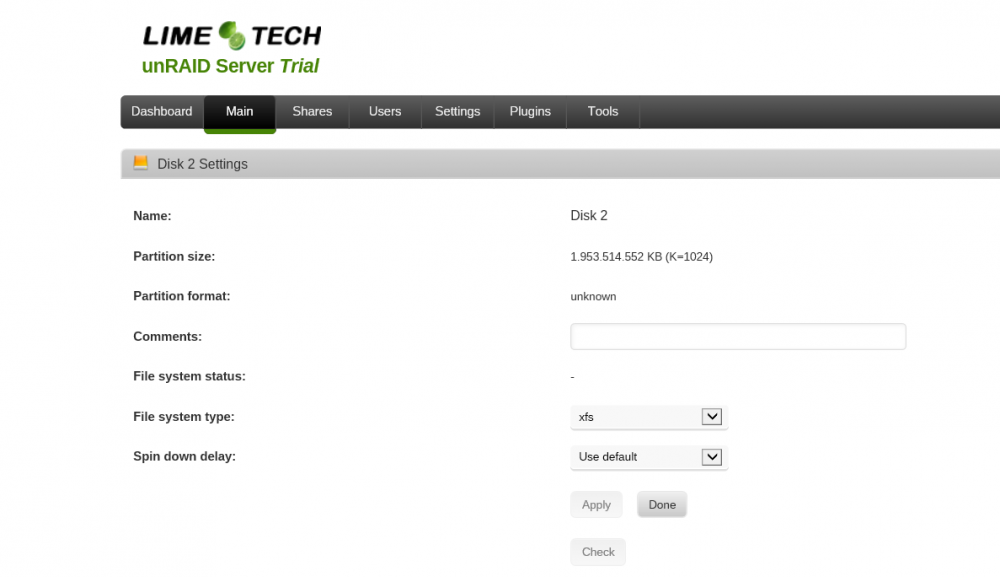
Update on this. I just whipped the jumper off and chucked the WD20EARS in to my Unraid 6 build. I am seeing a partition format as "unknown" and no way to set aligned or not (see pic). I'm guessing this is all in order and I can go ahead and reformat as XFS. If necessary, will Unraid 5 then read this disk ok later on - assuming I reformat as ReiserFS? Thanks.
-
Cheers mate
-
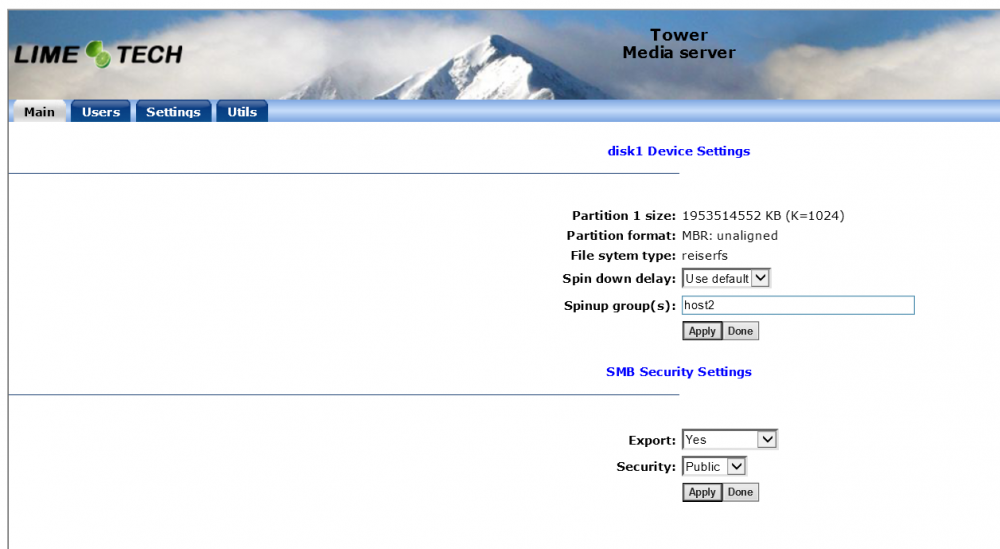
Sorry for all the questions, but what was the original reasoning for needing the jumper on WD EARS drives, something to do with Unraid not supporting advanced format drives right? So now Unraid 6 supports these larger drives, I can remove the jumper, use the default 4k-alignment... do I need to preclear again, or will a simple reformat in XFS take care of things? Edit: I've noticed on my old Unraid 5 server, the alignment was set to "unaligned" (with the jumper). Thanks once again.
-
If you remove the jumper on the HDD, you need to reformat the drive and consequently loose all data. Performance wise it doesn't matter whether the jumper is used or not. So to be clear, I should remove the jumper and then reformat in XFS for Unraid 6? Thanks. I will be reformating in XFS anyway... I am just wondering if I will need to watch out for anything in the setting up of the new unraid 6 server, 4k alignment or something?!? Just want to be 100% sure this weekend. Thanks. The default partition format is set to MBR 4K-aligned (unless you have changed it), if you remove the jumper and reformat the disk, it will be done with the correct setting.
-
If you remove the jumper on the HDD, you need to reformat the drive and consequently loose all data. Performance wise it doesn't matter whether the jumper is used or not. I will be reformating in XFS anyway... I am just wondering if I will need to watch out for anything in the setting up of the new unraid 6 server, 4k alignment or something?!? Just want to be 100% sure this weekend. Thanks.
-
Since I would be upgrading with everything "fresh" so to speak, should I make any changes to a jumpered WD20EARS drive that I have?

