





ljm42
Administrators
-
Joined
-
Last visited
Everything posted by ljm42
-
I'm glad you are back up and running! As you saw, Unraid Connect needs a working Internet connection, so if there are issues at the OS level those have to be resolved before Unraid Connect can work. Pretty cool that ChatGPT was able to help you out
-
The unraid-api logs are limited to using 10mb of RAM so they alone should not be filling up your log space. In a future release we are going to reduce that even further. If you are still having this issue, first ensure you have the latest version of the Unraid plugin installed. Then go to Settings -> Management Access -> Unraid Connect and follow the instructions in the "Download unraid-api Logs" area to send the logs to support.
-
The webgui has blocked iframes for some time now. In 6.12 or with the Connect plugin installed, there is an exception to allow connect.myunraid.net to iframe it. There isn't a config option to allow other websites to iframe it.
-
Thanks for including diagnostics, but troubleshooting in this thread is very difficult as there is a lot going on. Please start a new thread with all the details and diagnostics in General Support. Thanks!
-
Please start a new thread in General Support. The announce post is fine for basic questions but troubleshooting with multiple back and forths is very difficult here.
-
We'll need your diagnostics.zip to check. See earlier in this thread for details.
-
OK I see the issue @moosedookie. The nginx config is listening on wg0 but not br0: listen 10.253.0.1:14443 ssl http2; # wg0 It should be listening on both, like this: listen 192.168.33.134:14443 ssl http2; # br0 listen 10.253.10.1:14443 ssl http2; # wg0 we are looking for the cause
-
@moosedookie at a terminal window, what do you get when you type: /etc/rc.d/rc.nginx status
-
No, you are using custom ports Try these urls: * http://192.168.1.12:8081 * https://192.168.1.12:8443
-
Right. If the web server isn't running then you either need to connect a keyboard/monitor to the system, or you can use SSH (if you previously enabled that on Settings -> Management Access). Either of those methods will give you command line access to the server, where you can run "diagnostics"
-
Thanks for the diagnostics. Please open a web terminal SSH to the server, or connect a keyboard and monitor and run this, then copy/paste the results back here: cat /etc/nginx/conf.d/servers.conf
-
Please see my comment here, the webgui cannot run on port 445 https://forums.unraid.net/topic/140510-complete-webui-breakage-after-6120-update/#comment-1271735
-
glad you got it working!
-
BTW, Unraid 6.12.0 includes the fix for 'newperms'
-
Oh of course : ) Sorry for making you do it the hard way @craigr
-
nginx: 2023/06/15 10:08:43 [emerg] 3876#3876: bind() to 127.0.0.1:445 failed (98: Address already in use) nginx is unable to start SSL on port 445. When picking custom ports for things, it is best to use high numbers (over 1000, less than 64,000) that will never conflict with built-in ports. I'd recommend carefully editing config/ident.cfg on your flash drive and changing: PORTSSL="445" to something higher, like: PORTSSL="3443" (assuming that isn't in use by a Docker container) Once that is done you may be able to get the webgui by typing: /etc/rc.d/rc.nginx reload Or it may take a reboot.
-
The file is in the config folder on the flash drive, called vfio-pci.cfg You can try editing it, but it is probably easiest to take a screenshot of Tools -> System Devices, delete the file, reboot, and re-setup Tools -> System Devices
-
Sign in using the physical keyboard/monitor, type 'diagnostics' and note where it saves the file on the flash drive. Then upload that zip file to a new thread in general support (doing back and forth support in a release thread is confusing, it helps to have a separate thread)
-
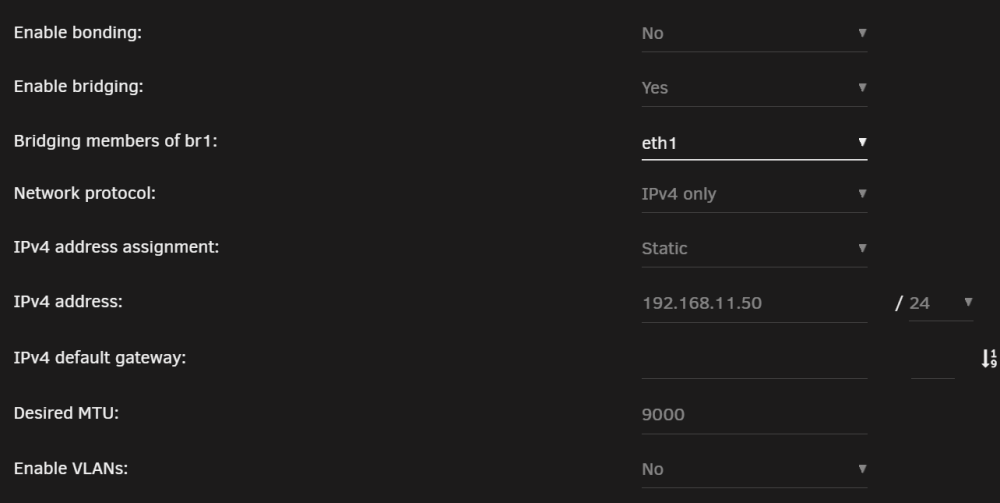
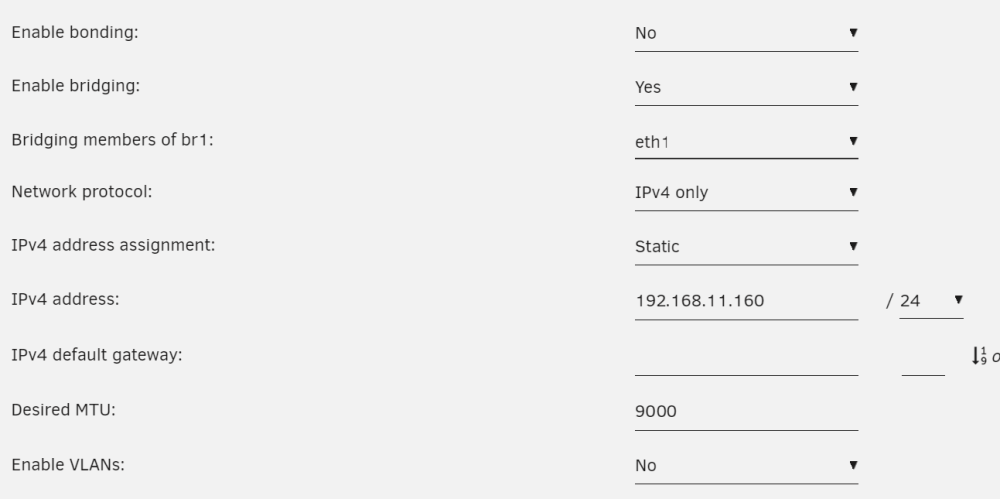
This can definitely work. So eth0 on each server should be connected to your normal switch. If eth0 on both is 10g and you have a 10g switch then I wouldn't bother with the steps below. But if one or both servers can't connect to the main network at 10g then the steps below will let the two servers talk to each other at 10g while still using eth0 to talk to everything else. Direct connect the 10g nics on each server and statically assign them to a new subnet with unique IP addresses and no gateway. In my case, my eth0 IPs were: server1: 192.168.10.50 server2: 192.168.10.160 So I made my direct-connected 10g eth1 IPs: server1: 192.168.11.50 server2: 192.168.11.160 so it would be easy to keep them straight. I generally say to avoid jumbo frames, but since this subnet will *only* have these two computers on it, as long as you change the MTU of both to 9000 then jumbo frames should give a small speed boost. It is critical that every computer on this network have the same MTU. When connecting between the systems it is *important* to use the IP addresses on this subnet and not a name like "tower". You want to be sure the servers actually talk over this network.
-
Let's see if this helps... This is the url to your Unraid webgui: https://ip-dashed.hash.myunraid.net:port This is the url to your docker container's webgui: https://myip:port/somepassboltgeneratedhash They are not related in any way. The certificate used for the Unraid webgui has no bearing on the certificate used for the docker container. Since you are having issues with the Passbolt container, I'll recommend that you ask your questions in the support thread for that container: https://forums.unraid.net/topic/119569-support-smartphonelover-passbolt/ The folks there will be the most knowledgeable about how to configure SSL for that container.
-
Please upload your diagnostics.zip file (from Tools -> Diagnostics)
-
FCP is reporting general networking issues (and a couple of other potential problems): Jun 2 15:47:01 Tower root: Fix Common Problems Version 2023.04.26 Jun 2 15:47:01 Tower root: Fix Common Problems: Error: Unable to communicate with GitHub.com Jun 2 15:47:01 Tower root: Fix Common Problems: Other Warning: Could not check for blacklisted plugins Jun 2 15:47:01 Tower root: Fix Common Problems: Error: Share games is identically named to a disk share Jun 2 15:47:02 Tower root: Fix Common Problems: Other Warning: Mover logging is enabled Jun 2 15:47:03 Tower root: Fix Common Problems: Warning: Legacy PCI Stubbing found Jun 2 15:47:03 Tower root: Fix Common Problems: Other Warning: Could not perform unknown plugins installed checks Being unable to connect to Unraid Connect is another symptom, it is not the cause. I moved this to general support because I don't see the issue, hoping to get more eyes on it.
-
Not sure which container you are using, but I'll mention that I've been testing the figro/unraid-cloudflared-tunnel container and haven't had any issues like this
-
Not sure what you mean by this, the only user that can login to the webgui is `root` If you are able to login locally as root then I can't think of any reason why the same password would fail when logging in remotely. Please attach your diagnostics.zip file (from Tools -> Diagnostics), maybe there will be some clues in the log
-
Are all the servers on the same network? Or is there something different about the network of the one that can't connect, like a firewall that could be blocking outgoing communication? Even if it is the same network, is there a firewall that could be blocking communication for this one server?






