





bally12345
Members
-
Joined
-
Last visited
Everything posted by bally12345
-
Thanks for update, set the value to "no" and can now open the gui again. Only getting around 8MB/s down but better than nothing
-
Hi recently radarr has been replacing movies from x264 to x265, checked in total 111 movies are now x265. Not issue for me but have some family users on plex who have issues. I have now added x265, x.265, h265 and h.265 tags in must not include which will stop any more movies being changed. Is there a way for radarr to now re-scan for x264 format or do I have to delete the files then search for missing?
-
Thanks for the reply, that;s annoying but also not too much of an issue. You don't happen to know how I can fetch the --subtitles?
-
Hi used this for the first time, only needed a single show but for some reason its downloaded 1280x720. Anyway to force Full HD or 4K if available? I would like to know where I can add the following --tvmode=best --subtitles or equivalent too if possible
-
Removed the plugin and using their CLI and getting expected results. With the plugin no matter what version of the script I used I was only getting around half the speed. Speedtest by Ookla Server: Virgin Media ISP: Virgin Media Latency: 7.30 ms (3.51 ms jitter) Download: 384.10 Mbps (data used: 526.9 MB) Upload: 36.07 Mbps (data used: 19.1 MB) Packet Loss: Not available.
-
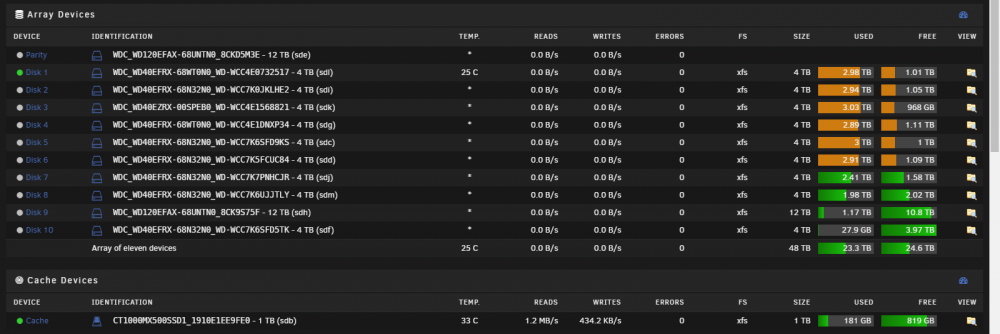
I am currently at 48TB on array, I have WD Green I will eventually replace and a spare bay if a decent deal comes up on another 12TB WD Red.
-
It is working fine on 8080 I will just my other container to run on 8081
-
I deleted the container, used fresh template and changed the port, that worked. However no my 3 APs are showing as adopting. All my other settings are there the SSIDs and network override etc.
-
Sorry this might be a dumb question but how do I change this to run on port 8081 instead of 8080 root@localhost:# /usr/local/emhttp/plugins/dynamix.docker.manager/scripts/docker run -d --name='unifi-controller' --net='host' -e TZ="Europe/London" -e HOST_OS="Unraid" -e 'UDP_PORT_3478'='3478' -e 'TCP_PORT_8081'='8081' -e 'TCP_PORT_8443'='8443' -e 'TCP_PORT_8880'='8880' -e 'TCP_PORT_8843'='8843' -e 'UDP_PORT_10001'='10001' -e 'TCP_PORT_8081'='8081' -e 'PUID'='99' -e 'PGID'='100' -v '/mnt/user/appdata/unifi-controller':'/config':'rw' 'linuxserver/unifi-controller:latest' e44d6242138caecf565bd71a9dccdb07bb1318026ab66105a5f7caf348bf2879 The command finished successfully! When the docker starts it looks like it still pointing to 8080 [s6-init] making user provided files available at /var/run/s6/etc...exited 0. [s6-init] ensuring user provided files have correct perms...exited 0. [fix-attrs.d] applying ownership & permissions fixes... [fix-attrs.d] done. [cont-init.d] executing container initialization scripts... [cont-init.d] 10-adduser: executing... ------------------------------------- _ () | | ___ _ __ | | / __| | | / \ | | \__ \ | | | () | |_| |___/ |_| \__/ Brought to you by linuxserver.io We gratefully accept donations at: https://www.linuxserver.io/donate/ ------------------------------------- GID/UID ------------------------------------- User uid: 99 User gid: 100 ------------------------------------- [cont-init.d] 10-adduser: exited 0. [cont-init.d] 20-config: executing... [cont-init.d] 20-config: exited 0. [cont-init.d] 30-keygen: executing... [cont-init.d] 30-keygen: exited 0. [cont-init.d] 99-custom-scripts: executing... [custom-init] no custom files found exiting... [cont-init.d] 99-custom-scripts: exited 0. [cont-init.d] done. [services.d] starting services [services.d] done. Port 8080 not available
-
192.168.10.2 (using vpn to connect to unraid) I know this is a lazy way to fix but I just deleted the image and appdata, did a fresh pull and config and its working
-
192.168.1.3 web port is set to 8080 but think it was previously 8081. I tried changing it but no luck. The weird thing its actually downloading but cant access the webgui
-
Hi could I get some fresh eyes on this, I have been unable to access the container since upgrading cache drive. I moved all appdata from cache back to cache. Container starts and log shows: ErrorWarningSystemArrayLogin Created by... ___. .__ .__ \_ |__ |__| ____ | |__ ____ ___ ___ | __ \| |/ \| | \_/ __ \\ \/ / | \_\ \ | | \ Y \ ___/ > < |___ /__|___| /___| /\___ >__/\_ \ \/ \/ \/ \/ \/ https://hub.docker.com/u/binhex/ 2020-01-18 10:38:25.827252 [info] System information Linux ed2a560652cb 4.19.94-Unraid #1 SMP Thu Jan 9 08:20:36 PST 2020 x86_64 GNU/Linux 2020-01-18 10:38:26.060532 [info] PUID defined as '99' 2020-01-18 10:38:26.320064 [info] PGID defined as '100' 2020-01-18 10:38:26.535793 [info] UMASK defined as '000' 2020-01-18 10:38:26.652919 [info] Permissions already set for volume mappings 2020-01-18 10:38:26.784143 [info] VPN_ENABLED defined as 'yes' 2020-01-18 10:38:26.914572 [info] OpenVPN config file (ovpn extension) is located at /config/openvpn/France.ovpn 2020-01-18 10:38:27.125198 [info] VPN remote line defined as 'remote france.privateinternetaccess.com 1198' 2020-01-18 10:38:27.293232 [info] VPN_REMOTE defined as 'france.privateinternetaccess.com' 2020-01-18 10:38:27.485757 [info] VPN_PORT defined as '1198' 2020-01-18 10:38:27.685965 [info] VPN_PROTOCOL defined as 'udp' 2020-01-18 10:38:27.782987 [info] VPN_DEVICE_TYPE defined as 'tun0' 2020-01-18 10:38:27.862066 [info] VPN_PROV defined as 'pia' 2020-01-18 10:38:28.015148 [info] LAN_NETWORK defined as '192.168.1.0/24' 2020-01-18 10:38:28.140962 [info] NAME_SERVERS defined as '209.222.18.222,84.200.69.80,37.235.1.174,1.1.1.1,209.222.18.218,37.235.1.177,84.200.70.40,1.0.0.1' 2020-01-18 10:38:28.247178 [info] VPN_USER defined as 'REMOVED' 2020-01-18 10:38:28.343682 [info] VPN_PASS defined as 'REMOVED' 2020-01-18 10:38:28.426859 [info] VPN_OPTIONS not defined (via -e VPN_OPTIONS) 2020-01-18 10:38:28.520395 [info] STRICT_PORT_FORWARD defined as 'yes' 2020-01-18 10:38:28.608559 [info] ENABLE_PRIVOXY defined as 'yes' 2020-01-18 10:38:28.707584 [info] WEBUI_PORT defined as '8080' 2020-01-18 10:38:29.038008 [info] Deleting files in /tmp (non recursive)... 2020-01-18 10:38:29.238038 [info] Starting Supervisor... 2020-01-18 10:38:32,519 INFO Included extra file "/etc/supervisor/conf.d/qbittorrent.conf" during parsing 2020-01-18 10:38:32,524 INFO Set uid to user 0 succeeded 2020-01-18 10:38:32,607 INFO supervisord started with pid 6 2020-01-18 10:38:33,640 INFO spawned: 'start-script' with pid 163 2020-01-18 10:38:33,668 INFO spawned: 'watchdog-script' with pid 164 2020-01-18 10:38:33,673 INFO reaped unknown pid 7 2020-01-18 10:38:33,721 DEBG 'start-script' stdout output: [info] VPN is enabled, beginning configuration of VPN 2020-01-18 10:38:33,724 DEBG 'watchdog-script' stdout output: [info] qBittorrent config file already exists, skipping copy [info] Removing session lock file (if it exists)... 2020-01-18 10:38:33,725 INFO success: start-script entered RUNNING state, process has stayed up for > than 0 seconds (startsecs) 2020-01-18 10:38:33,726 INFO success: watchdog-script entered RUNNING state, process has stayed up for > than 0 seconds (startsecs) 2020-01-18 10:38:34,268 DEBG 'start-script' stdout output: [info] Default route for container is 172.17.0.1 2020-01-18 10:38:34,292 DEBG 'start-script' stdout output: [info] Adding 209.222.18.222 to /etc/resolv.conf 2020-01-18 10:38:34,303 DEBG 'start-script' stdout output: [info] Adding 84.200.69.80 to /etc/resolv.conf 2020-01-18 10:38:34,314 DEBG 'start-script' stdout output: [info] Adding 37.235.1.174 to /etc/resolv.conf 2020-01-18 10:38:34,345 DEBG 'start-script' stdout output: [info] Adding 1.1.1.1 to /etc/resolv.conf 2020-01-18 10:38:34,365 DEBG 'start-script' stdout output: [info] Adding 209.222.18.218 to /etc/resolv.conf 2020-01-18 10:38:34,381 DEBG 'start-script' stdout output: [info] Adding 37.235.1.177 to /etc/resolv.conf 2020-01-18 10:38:34,400 DEBG 'start-script' stdout output: [info] Adding 84.200.70.40 to /etc/resolv.conf 2020-01-18 10:38:34,416 DEBG 'start-script' stdout output: [info] Adding 1.0.0.1 to /etc/resolv.conf 2020-01-18 10:38:34,879 DEBG 'start-script' stdout output: [info] Docker network defined as 172.17.0.0/16 2020-01-18 10:38:34,894 DEBG 'start-script' stdout output: [info] Adding 192.168.1.0/24 as route via docker eth0 2020-01-18 10:38:34,902 DEBG 'start-script' stdout output: [info] ip route defined as follows... -------------------- 2020-01-18 10:38:34,905 DEBG 'start-script' stdout output: default via 172.17.0.1 dev eth0 172.17.0.0/16 dev eth0 proto kernel scope link src 172.17.0.3 192.168.1.0/24 via 172.17.0.1 dev eth0 2020-01-18 10:38:34,906 DEBG 'start-script' stdout output: -------------------- 2020-01-18 10:38:34,934 DEBG 'start-script' stdout output: iptable_mangle 16384 2 ip_tables 24576 5 iptable_filter,iptable_nat,iptable_mangle 2020-01-18 10:38:34,935 DEBG 'start-script' stdout output: [info] iptable_mangle support detected, adding fwmark for tables 2020-01-18 10:38:35,176 DEBG 'start-script' stdout output: [info] iptables defined as follows... -------------------- 2020-01-18 10:38:35,186 DEBG 'start-script' stdout output: -P INPUT DROP -P FORWARD DROP -P OUTPUT DROP -A INPUT -s 172.17.0.0/16 -d 172.17.0.0/16 -j ACCEPT -A INPUT -i eth0 -p udp -m udp --sport 1198 -j ACCEPT -A INPUT -i eth0 -p tcp -m tcp --dport 8080 -j ACCEPT -A INPUT -i eth0 -p tcp -m tcp --sport 8080 -j ACCEPT -A INPUT -s 192.168.1.0/24 -i eth0 -p tcp -m tcp --dport 8080 -j ACCEPT -A INPUT -s 192.168.1.0/24 -d 172.17.0.0/16 -i eth0 -p tcp -j ACCEPT -A INPUT -p icmp -m icmp --icmp-type 0 -j ACCEPT -A INPUT -i lo -j ACCEPT -A INPUT -i tun0 -j ACCEPT -A OUTPUT -s 172.17.0.0/16 -d 172.17.0.0/16 -j ACCEPT -A OUTPUT -o eth0 -p udp -m udp --dport 1198 -j ACCEPT -A OUTPUT -o eth0 -p tcp -m tcp --dport 8080 -j ACCEPT -A OUTPUT -o eth0 -p tcp -m tcp --sport 8080 -j ACCEPT -A OUTPUT -d 192.168.1.0/24 -o eth0 -p tcp -m tcp --sport 8080 -j ACCEPT -A OUTPUT -s 172.17.0.0/16 -d 192.168.1.0/24 -o eth0 -p tcp -j ACCEPT -A OUTPUT -p icmp -m icmp --icmp-type 8 -j ACCEPT -A OUTPUT -o lo -j ACCEPT -A OUTPUT -o tun0 -j ACCEPT -------------------- 2020-01-18 10:38:35,191 DEBG 'start-script' stdout output: [info] Starting OpenVPN... 2020-01-18 10:38:35,605 DEBG 'start-script' stdout output: Sat Jan 18 10:38:35 2020 WARNING: file 'credentials.conf' is group or others accessible Sat Jan 18 10:38:35 2020 OpenVPN 2.4.8 [git:makepkg/3976acda9bf10b5e+] x86_64-pc-linux-gnu [SSL (OpenSSL)] [LZO] [LZ4] [EPOLL] [PKCS11] [MH/PKTINFO] [AEAD] built on Jan 3 2020 Sat Jan 18 10:38:35 2020 library versions: OpenSSL 1.1.1d 10 Sep 2019, LZO 2.10 2020-01-18 10:38:35,638 DEBG 'start-script' stdout output: Sat Jan 18 10:38:35 2020 NOTE: the current --script-security setting may allow this configuration to call user-defined scripts 2020-01-18 10:38:35,659 DEBG 'start-script' stdout output: [info] OpenVPN started 2020-01-18 10:38:35,693 DEBG 'start-script' stdout output: Sat Jan 18 10:38:35 2020 TCP/UDP: Preserving recently used remote address: [AF_INET]194.187.249.179:1198 Sat Jan 18 10:38:35 2020 UDP link local: (not bound) Sat Jan 18 10:38:35 2020 UDP link remote: [AF_INET]194.187.249.179:1198 2020-01-18 10:38:35,910 DEBG 'start-script' stdout output: Sat Jan 18 10:38:35 2020 [9ca054a0b76deeb31203586eb3930595] Peer Connection Initiated with [AF_INET]194.187.249.179:1198 2020-01-18 10:38:37,004 DEBG 'start-script' stdout output: Sat Jan 18 10:38:37 2020 TUN/TAP device tun0 opened Sat Jan 18 10:38:37 2020 /usr/bin/ip link set dev tun0 up mtu 1500 2020-01-18 10:38:37,019 DEBG 'start-script' stdout output: Sat Jan 18 10:38:37 2020 /usr/bin/ip addr add dev tun0 local 10.27.10.6 peer 10.27.10.5 2020-01-18 10:38:37,024 DEBG 'start-script' stdout output: Sat Jan 18 10:38:37 2020 /root/openvpnup.sh tun0 1500 1558 10.27.10.6 10.27.10.5 init 2020-01-18 10:38:37,053 DEBG 'start-script' stdout output: Sat Jan 18 10:38:37 2020 Initialization Sequence Completed 2020-01-18 10:38:37,214 DEBG 'start-script' stdout output: [info] Port forwarding is enabled [info] Checking endpoint 'france.privateinternetaccess.com' is port forward enabled... 2020-01-18 10:38:37,227 DEBG 'start-script' stdout output: [info] Attempting to curl https://www.privateinternetaccess.com/vpninfo/servers?version=82... 2020-01-18 10:38:37,829 DEBG 'start-script' stdout output: [info] Curl successful for https://www.privateinternetaccess.com/vpninfo/servers?version=82, response code 200 2020-01-18 10:38:38,027 DEBG 'start-script' stdout output: [info] PIA endpoint 'france.privateinternetaccess.com' is in the list of endpoints that support port forwarding 2020-01-18 10:38:38,030 DEBG 'start-script' stdout output: [info] List of PIA endpoints that support port forwarding:- [info] ca-toronto.privateinternetaccess.com [info] ca-montreal.privateinternetaccess.com [info] ca-vancouver.privateinternetaccess.com [info] de-berlin.privateinternetaccess.com [info] de-frankfurt.privateinternetaccess.com [info] sweden.privateinternetaccess.com [info] swiss.privateinternetaccess.com [info] france.privateinternetaccess.com [info] czech.privateinternetaccess.com [info] spain.privateinternetaccess.com [info] ro.privateinternetaccess.com [info] israel.privateinternetaccess.com [info] Attempting to get dynamically assigned port... 2020-01-18 10:38:38,056 DEBG 'start-script' stdout output: [info] Attempting to curl http://209.222.18.222:2000/?client_id=443498638210d5b73c330bdb47e6e09fd08528bc14bb9935d93b7915ffbf4333... 2020-01-18 10:38:38,840 DEBG 'start-script' stdout output: [info] Curl successful for http://209.222.18.222:2000/?client_id=443498638210d5b73c330bdb47e6e09fd08528bc14bb9935d93b7915ffbf4333, response code 200 2020-01-18 10:38:38,944 DEBG 'start-script' stdout output: [info] Successfully assigned incoming port 47470 2020-01-18 10:38:38,949 DEBG 'start-script' stdout output: [info] Checking we can resolve name 'www.google.com' to address... 2020-01-18 10:38:39,006 DEBG 'start-script' stdout output: [info] DNS operational, we can resolve name 'www.google.com' to address '216.58.213.4' 2020-01-18 10:38:39,012 DEBG 'start-script' stdout output: [info] Attempting to get external IP using Name Server 'ns1.google.com'... 2020-01-18 10:38:39,192 DEBG 'start-script' stdout output: [info] Successfully retrieved external IP address 194.187.249.179 2020-01-18 10:38:39,371 DEBG 'watchdog-script' stdout output: [info] qBittorrent listening interface IP 0.0.0.0 and VPN provider IP 10.27.10.6 different, marking for reconfigure 2020-01-18 10:38:39,385 DEBG 'watchdog-script' stdout output: [info] qBittorrent not running 2020-01-18 10:38:39,395 DEBG 'watchdog-script' stdout output: [info] Privoxy not running 2020-01-18 10:38:39,396 DEBG 'watchdog-script' stdout output: [info] qBittorrent incoming port 6881 and VPN incoming port 47470 different, marking for reconfigure 2020-01-18 10:38:39,397 DEBG 'watchdog-script' stdout output: [info] Removing session lock file (if it exists)... 2020-01-18 10:38:39,401 DEBG 'watchdog-script' stdout output: [info] Attempting to start qBittorrent... 2020-01-18 10:38:40,294 DEBG 'watchdog-script' stdout output: [info] qBittorrent process started [info] Waiting for qBittorrent process to start listening on port 8080... 2020-01-18 10:38:40,634 DEBG 'watchdog-script' stdout output: [info] qBittorrent process listening on port 8080 2020-01-18 10:38:40,874 DEBG 'watchdog-script' stdout output: [info] Attempting to start Privoxy... 2020-01-18 10:38:41,924 DEBG 'watchdog-script' stdout output: [info] Privoxy process started [info] Waiting for Privoxy process to start listening on port 8118... 2020-01-18 10:38:42,012 DEBG 'watchdog-script' stdout output: [info] Privoxy process listening on port 8118 I tried removing the container and adding it fresh but still no access to webgui also checked port allocation and nothing appears to be clashing... Docker command root@localhost:# /usr/local/emhttp/plugins/dynamix.docker.manager/scripts/docker run -d --name='binhex-qbittorrentvpn' --net='bridge' --privileged=true -e TZ="Europe/London" -e HOST_OS="Unraid" -e 'VPN_ENABLED'='yes' -e 'VPN_USER'='REMOVED' -e 'VPN_PASS'='REMOVED' -e 'VPN_PROV'='pia' -e 'VPN_OPTIONS'='' -e 'STRICT_PORT_FORWARD'='yes' -e 'ENABLE_PRIVOXY'='yes' -e 'WEBUI_PORT'='8080' -e 'LAN_NETWORK'='192.168.1.0/24' -e 'NAME_SERVERS'='209.222.18.222,84.200.69.80,37.235.1.174,1.1.1.1,209.222.18.218,37.235.1.177,84.200.70.40,1.0.0.1' -e 'DEBUG'='false' -e 'UMASK'='000' -e 'PUID'='99' -e 'PGID'='100' -p '6881:6881/tcp' -p '8080:8080/tcp' -p '8118:8118/tcp' -v '/mnt/user/Downloads/data/':'/data':'rw' -v '/mnt/user/appdata/binhex-qbittorrentvpn':'/config':'rw' 'binhex/arch-qbittorrentvpn' 735626c32186a1a76155f608d423e15e7be0c52ec15833dbb871edc41e3db64a The command finished successfully! supervisord.zip Have also download latest opvn files from PIA and added not use ipv6
-
Finally got around to reinstalling this again today but not getting more than 8MB/s down... Was getting 0MB/s first and getting stuck in Stalled state but that was quickly fixed by correcting my mappings. I had mapped to /mnt/user/Downloads/data/incomplete When it should have been just /data/incomplete/ I will check PIA to see if there's another set of ovpn files I can use as I downloaded TCP strict set. Hopefully I can get faster download using VPN anything around 20MiB/s will be fine. Sent from my SM-G973F using Tapatalk
-
I did do this and worked initially then same thing. Eventually gave up and disabled using torrents all together and removed container. Will have a look again later and see if I can get it working Sent from my SM-G973F using Tapatalk
-
Also now running 48GB ECC DDR3 doubled it a few weeks ago but no seen it go over 50% used lol... I have Plex Transcoding to RAM Single Win10VM with max 16GB assigned Might have a play with some other VMs but cant see myself ever need anymore.
-
In that case il probably just switch back to binhex-delugevpn [emoji106] Sent from my SM-G973F using Tapatalk
-
Ahh that's why it probably stopped working for me! I didn't re-enable each time. Switched to qbit for now but might move back to deluge... Tried to setting to TCP only as suggested and that works fine get around 20MiB/s Instead of using the built in VPN I am now using Binhex-privoxy docker and will manually set each app to use it Sent from my SM-G973F using Tapatalk
-
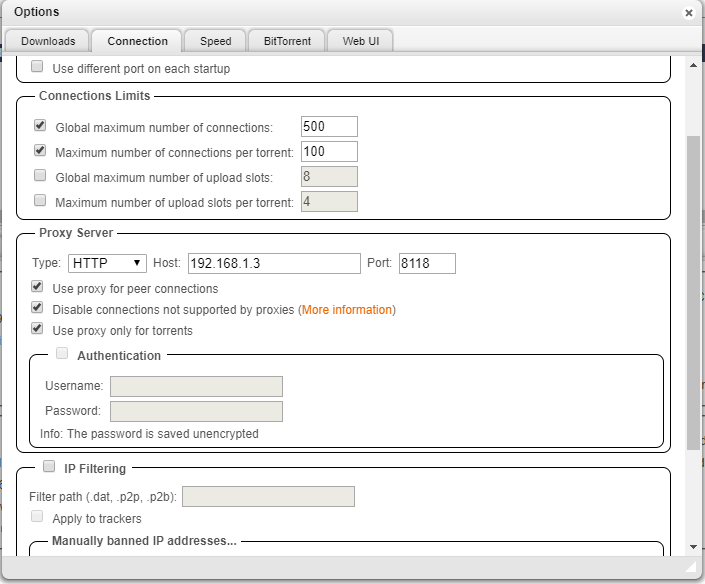
https://forums.unraid.net/topic/44109-support-binhex-delugevpn/?do=findComment&comment=725104 Installed itconfig Plugin and disabled enable_incoming_utp and enable_outgoing_utp I have tried enabling Proxy Settings in qBit through Tools > Options [Connections] / Proxy Server But the max download speed I can get is around 2MiB/s Remove those settings and I can download 45MiB/s
-
I did temporarily fix it in deluge using the itconfig plugin and disabling tcp udp upload but don't know if it works anymore Sent from my SM-G973F using Tapatalk
-
I was having issues again with this and deluge pia vpn (France) maxing out around 1Mb/s I have just installed binhex-privoxy and going to try just using this minus vpn and enter proxy settings instead. Sent from my SM-G973F using Tapatalk
-
Many thanks, saved me tons of space. will keep these safe as they come in very handy. I am pretty sure Radarr doesn't download smaller versions if you change profile or the cutoff.
-
Remove the whole folder, or just delete the mkv/mp4 etc then I can run the cleanup script. Either way no rush. Just helps to recover some valuable space. Many thanks Sent from my SM-G973F using Tapatalk
-
Is there a quick way to modify the script to remove movies over 20GB have a whole load of high bitrate 1080p movies that are just too large for my liking. Sent from my SM-G973F using Tapatalk
-
Ended up filtering movies in Plex by Resolution then manually deleted the 4K versions if there is just a single file in the folder plex removes the folder but if there's any extra files like subs or nfo it deletes the movie file and leaves the folder. This cleanup script has done a brilliant job [emoji106] Hopefully Radarr will detect the missing 4K movies and download using 1080p profile. Sent from my SM-G973F using Tapatalk
-
36 folders removed very pleased was expecting a lot more they were mainly duplicates that were removed from plex but the folder remained on share. Is there a way to change it so I can delete folders larger than say 20gb? When I moved to Radarr I didnt set my profiles correctly and got loads of 4k version I dont actually need.

