





bally12345
Members
-
Joined
-
Last visited
Everything posted by bally12345
-
I had a little play around but for some reason the adapter is detected in unraid but the blue activity light does come on. Tried the same adapter in my Vu+ Zero enigma2 box and the blue light comes on fine. Sent from my SM-G991B using Tapatalk
-
Unable to plugin directly due to size and vga plug next to it. Tried another shorter extension cable but same. Anyone able to recommend a dual or greater pci card for dvbt2 but must be low profile to fit in 2u chassis Sent from my SM-G991B using Tapatalk
-
Yep I am using one! You might be right... Will try plugging directly into back of server.
-
Hi it was showing as connected but after reboot it disappeared. Then after another reboot came back. I think it is a faulty device now. It is probably about 8years old and happen to find it again last week so thought I would try it.
-
Quick one from me, all of a sudden the lsio tvheadend container refuses to connect and I get the following in my logs Apr 19 17:36:54 Server kernel: mediasrv[26610]: segfault at 4 ip 0000000000418457 sp 0000146db352f0f8 error 4 in mediasrv[405000+3c000] likely on CPU 0 (core 0, socket 0) is this driver related or container issue? Tried again with binhex container and same Apr 19 17:56:29 Server emhttpd: cmd: /usr/local/emhttp/plugins/sundtek-driver/include/install.sh binhex-tvheadend Apr 19 17:56:30 Server kernel: process 'e72a9e0ac073aef54ee2c88eb355e1f7bed5fc3aa8941b46831b1b2445b34d97/tmp/.sundtek/chk64bit' started with executable stack Apr 19 17:56:34 Server kernel: docker0: port 9(vethac0d4c3) entered disabled state Apr 19 17:56:34 Server kernel: vethfa70f9d: renamed from eth0 Apr 19 17:56:34 Server avahi-daemon[10418]: Interface vethac0d4c3.IPv6 no longer relevant for mDNS. Apr 19 17:56:34 Server avahi-daemon[10418]: Leaving mDNS multicast group on interface vethac0d4c3.IPv6 with address fe80::9488:3cff:fe05:b643. Apr 19 17:56:34 Server kernel: docker0: port 9(vethac0d4c3) entered disabled state Apr 19 17:56:34 Server kernel: device vethac0d4c3 left promiscuous mode Apr 19 17:56:34 Server kernel: docker0: port 9(vethac0d4c3) entered disabled state Apr 19 17:56:34 Server avahi-daemon[10418]: Withdrawing address record for fe80::9488:3cff:fe05:b643 on vethac0d4c3. Apr 19 17:56:34 Server kernel: docker0: port 9(veth60ddc49) entered blocking state Apr 19 17:56:34 Server kernel: docker0: port 9(veth60ddc49) entered disabled state Apr 19 17:56:34 Server kernel: device veth60ddc49 entered promiscuous mode Apr 19 17:56:34 Server kernel: docker0: port 9(veth60ddc49) entered blocking state Apr 19 17:56:34 Server kernel: docker0: port 9(veth60ddc49) entered forwarding state Apr 19 17:56:35 Server kernel: eth0: renamed from vethb74e2d7 Apr 19 17:56:35 Server kernel: IPv6: ADDRCONF(NETDEV_CHANGE): veth60ddc49: link becomes ready Apr 19 17:56:36 Server avahi-daemon[10418]: Joining mDNS multicast group on interface veth60ddc49.IPv6 with address fe80::6cf1:a5ff:fe73:2a6a. Apr 19 17:56:36 Server avahi-daemon[10418]: New relevant interface veth60ddc49.IPv6 for mDNS. Apr 19 17:56:36 Server avahi-daemon[10418]: Registering new address record for fe80::6cf1:a5ff:fe73:2a6a on veth60ddc49.*. Apr 19 17:56:37 Server kernel: mediasrv[11875]: segfault at 4 ip 0000000000413bd7 sp 000014c46bdfcc88 error 4 in mediasrv[400000+69000] likely on CPU 11 (core 10, socket 1) Apr 19 17:56:37 Server kernel: Code: 89 70 20 48 89 50 28 31 c0 c3 48 89 70 30 48 89 50 38 31 c0 c3 66 66 66 66 66 2e 0f 1f 84 00 00 00 00 00 48 8b 87 c0 c5 00 00 <8b> 40 04 c3 0f 1f 44 00 00 48 8b 87 c0 c5 00 00 8b 00 c3 66 0f 1f
-
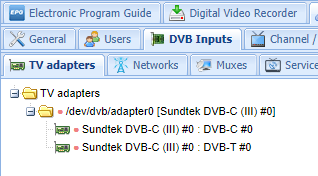
Hi started again from fresh it is now working!! Many thanks
-
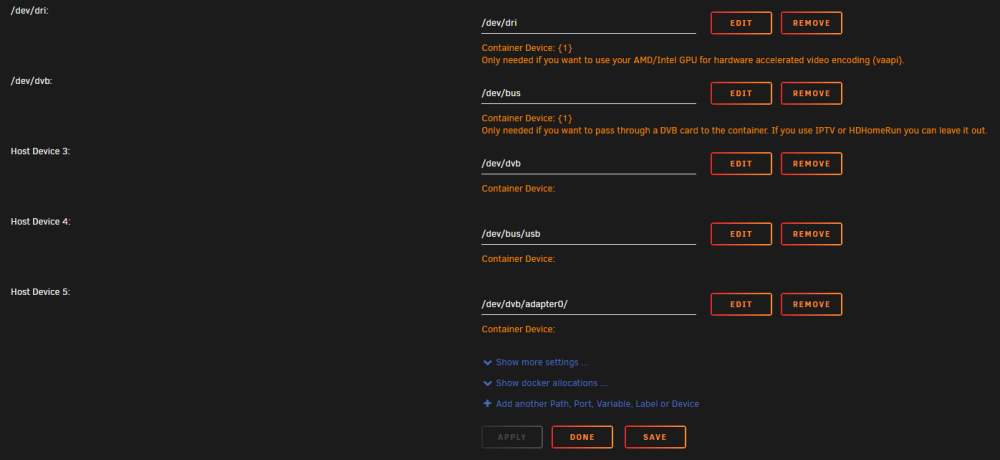
Unfortunately it didnt work, just tried with LSIO too but same. Nothing showing. Tried adding adapter0 too which is showed on the driver plugin page
-
No in fact I read you need to have that but not sure how you have both if im honest
-
Hi I am using Sundtek usb dvbt/c dongle single tuner and seem to have some issues with getting it detected. I have installed both dvb-drvers and sundtek-driver plugins and the adapter is detected and showing as Detected Adapters: adapter0 Set Extra Parameters: to "--device=/dev/bus/usb" and added extra path as suggested However it is still not showing up in binhex-tvheadend as a tuner. Do I need to delete one of the driver plugins or am I missing another step? Have rebooted server after driver install. server-diagnostics-20230419-1135.zip lsusb.txt dmesg.txt

-
Very odd the support threads for drives suggest using /dev/bus/usb but it still not being detected within the docker. However is shown as adapter1 in the sundtek driver page. Have rebooted each time after installing dvb-drivers
-
I am using the Sundtek Driver plugin I will try dvb-driver plugin instead
-
Hi All How do I define extra parameter I tried --device=/dev/dvb however that is not a valid node. I have a Sundtek USB DVBT2/C tuner Apr 19 10:04:34 Server kernel: usb 2-2: new high-speed USB device number 7 using ehci-pci Bus 002 Device 007 Port 2-2ID 2659:1401 Sundtek MediaTV Digital Home III (EU) After installing the driver it says ATTENTION: Please don't forget to pass through the device: /dev/bus/usb --device=/dev/bus/usb However it is still not detected.
-
Hi guys, probably a really dumb question but I have never used rclone before. Followed spaceinvaders video on youtube from 6 years ago and setup onedrive, mounted and can view using SMB. However if I understand this correctly, this is just direct mapping the drive. Similar to the onedrive app... What I am actually after is onedrive back up to my array. Is this possible...? Assuming I would need to create another separate script to copy /mnt/disks/onedrive to /mnt/user/shares/onedrive weekly?
-
Yep that's good to know. Pretty sure anything that lives on cache drive is also backed up on array but will double check [emoji106] Sent from my SM-G991B using Tapatalk
-
Got this warning notification around midnight. Event: Unraid Cache disk SMART health [202] Subject: Warning [sERVER] - percent lifetime remain (failing now) is 100 Description: CT1000MX500SSD1_1910E1EE9FE0 (sdb) Importance: warning Had a quick check and everything seems OK but is it time to to replace the SSD? Sent from my SM-G991B using Tapatalk
-
Anyone know what the limitations are for syncing with gphotos? I get HTTPError: 429 Client Error: Too Many Requests for url: If I do another scan will it resume where it left off or start all over again?
-
Silly me... Moved token to Storage folder and it now works. Was definitely long winded having to run python on Windows to get it work as a work around but it did work. Could someone help with a user bash script that can run once week? Sent from my SM-G991B using Tapatalk
-
I am having exact issue by the looks of it, had to run virtual python instance and change execution policy but finally got to The authentication flow has completed. You may close this window. But when I go back to unraid and run gphotos-sync /storage I still get need to authorise Where does .gphotos.token go? In the Unraid app data folder? I currently have it in same folder of client_secret.json
-
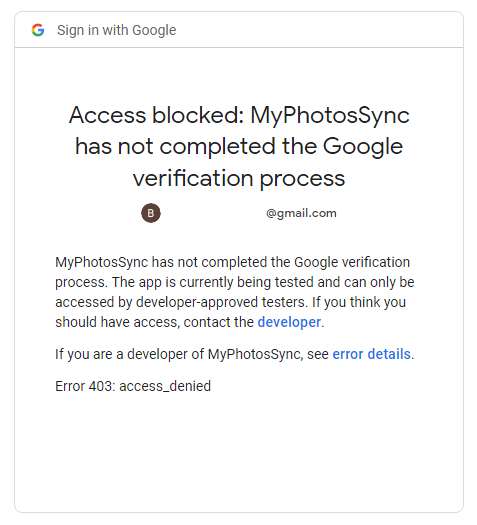
Hi All, I am trying to setup gphotos-sync but seem to come across this error. I believe I have setup oauth correctly but think its to do with the consent screen. Update. Published app after clicking the link and authorising it tries to go to localhost:8080
-
All sorted Server: Notice [SERVER] - Parity-Sync finished (0 errors) Duration: 1 day, 7 hours, 7 minutes, 46 seconds. Average speed: 107.1 MB/s Will RMA that other drive.
-
Popped another new 12tb hdd in and going to send other one back. Parity build will take day and half so will update on Friday. Sent from my SM-G991B using Tapatalk
-
Parity finished last night. Server shut down for now. Need to go into office today so will not be able to do anything now until tonight or tomorrow! Atleast il save some money on electricity [emoji23] Sent from my SM-G991B using Tapatalk
-
Looks like the drive has dropped offline altogether. Got a feeling its faulty drive. Iv ordered another drive from amazon so will wait for parity to complete before stopping array. From previous attempts when using as disk4, pretty sure at stopping array it will show as not there and after reboot it will show up as unassigned disk. Parity build is only 12.3% at moment Total size: 12 TB Elapsed time: 5 hours, 41 minutes Current position: 1.47 TB (12.3 %) Estimated speed: 76.4 MB/sec Estimated finish: 1 day, 14 hours, 16 minutes
-
Should I cancel parity as it says its still running before running extended smart? Also hdd from wd my book wouldn't be an issue? Never had issue with shucked drives before. Sent from my SM-G991B using Tapatalk
-
I can order another 12tb drive right now from amazon and have it tomorrow afternoon but assuming will need to create new config anyway? Sent from my SM-G991B using Tapatalk


