





JonathanM
Moderators
-
Joined
-
Last visited
Everything posted by JonathanM
-
I'm unclear how this version is implemented, but some versions only write the signature after the last pass is successful.
-
Reboot and check the contents of disk10, there may be files in lost+found, but hopefully nothing important.
-
Remove the -n and run again.
-
check filesystem
-
Run the GUI disk check on disk 10 and paste the results here.
-
Do all the individual disks appear to have the expected content? Perhaps one of them is corrupted, causing the mounts to not populate.
-
The emulated disk is being emulated from parity. What you see is what would be rebuilt on another disk. Normally when a disk is detected as new and set to be cleared, it shows up with a blue square, at least on current versions. You didn't mention that, which struck me as strange. Once a disk is cleared, data recovery from the physical disk is practically impossible. That's why I was hoping against hope that parity wasn't changed since the incident, as the clearing process is normally done to AVOID the need to update parity when adding a new disk. Before you throw in the towel I'd at least let the check run to completion.
-
The p1 bit was added sometime after 6.9.2 That version is VERY old, IIRC around 4 years ago. It's tough to offer good support on such an old version.
-
Pretty sure the array must be stopped to change it.
-
If the file system type is set as Auto, and it can't figure out what type it was, it won't offer an option. Set the file system type to XFS and the check filesystem section should show up.
-
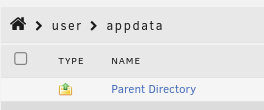
I find the Dynamix File Manager to be less intuitive than some alternatives, to get to the same point you show in your krusader screenshot, click on the house in the upper left after you open one of the shares or disks in the file manager. I'm not aware of a direct shortcut to that view.
-
They are also not typically running software that chokes if the file wasn't closed during backup. Many consumer level software packages behave poorly if the recovered file is in a state that indicates it's currently in use.
-
That's a container, which can be a little strange when working with files sometimes. Take a look using mc in the console.
-
Did you run the check from the GUI or at the command line? It's easy to get wrong at the command line. It is the emulated disk (red X instead of green dot) that you are checking, correct? When was your last parity check that completed with zero errors?
-
Why is the 1st prereq to setting up a self hosted instance to get a login to their site? Is the self hosted still reliant on their service?
-
Do you have backups of all the important data? Moving stuff around like this is one of the riskiest things you can do, it's all too easy to accidentally delete stuff. If not, I recommend NOT removing any of the old drives, instead be patient and add drives to Unraid as you have the resources, and make copies instead of moving.
-
That makes me think something went terribly wrong. I hope you have good backups, sounds like parity may not be valid with that disk. Hopefully it's still valid from before the disk dropped.
-
Two devices set for redundancy (RAID1) will have the usable capacity of the smaller device and the write speed of the slower one. Mismatched devices will work with those caveats.
-
ZFS is probably a safer choice than BTRFS for pool drives. Just don't use ZFS in the parity array for now.
-
If you want to, you could physically disconnect that disk, then when Unraid is started it will show what is emulated by parity. Be aware that doing that will put you in a riskier spot, if one of your other disks fails you would be at a greater risk of losing both drives. Just be very very sure you remove the correct disk, and once you remove it, don't put it back in the system until the emulated disk slot has a repaired filesystem. That way if the emulated disk is also corrupt, you at least get another shot at fixing the filesystem on the physical disk.
-
It will update the parity drive to show that the drive is blank, overwriting the corrupt filesystem with a blank one, removing any data. What you are seeing is what is on the drive, a corrupt filesystem. You need to run a filesystem check in the GUI for that drive. The drive is not disabled, it doesn't have a red X. https://docs.unraid.net/unraid-os/troubleshooting/data-recovery/#unmountable-disks https://docs.unraid.net/unraid-os/manual/storage-management/#checking-a-file-system
-
Do you currently keep physically separate up to date backups of everything important on your server?
-
look here for support
-
Probably better to do a conditional to continue when the system is responding.
-
RAID cards are not recommended, see here.

