






Pducharme
Community Developer
-
Joined
-
Last visited
Everything posted by Pducharme
-
Ok, after I did a "Force Update" (that you can access by enabling the "advanced" mode in docker page), it did the trick (needed to add the https:// too. Certificate is invalid and have to accept, but after that it was good. Looks very great !
-
did tried, but doesn't work. The port 3000 was used, so I put 3999 as the Host PORT. But it doesn't connect. is there a log to send to diagnose ?
-
Just got your App and installed the Plugin. Very nice App (using iOS version here on an iPhone 7 Plus). Here is a feature I would like to see (if it's possible on iOS) : On the VM Tab, it would be great that if we "3D Touch" a VM name, we got a menu "Connect RDP" or "Connect VNC" (depending if the VM is a Windows VM or a Linux VM). It would use the Microsoft RDP app as RDP and maybe a VNC app if it's VNC.
-
@binhex: Any progress on getting the Fuild WebUI ? Each time there is a new "update" available in my docker page for this one, I always check if you added it
-
That is an excellent news. I'll keep an eye on it
-
For me, your rTorrentVPN docker is always faster than your DelugeVPN. I like more the GUI, but honestly, I would like it even more if you add the Flood GUI, that would make it a lot more modern in my opinion. Thanks for the dockers you maintain, I know it's not an easy task!
-
For the Privoxy, me I use the Chrome Extension called "NoProxy", so I can switch on/off the Proxy with a click on the Icon if I want or don't want to browser thru the proxy.
-
Privoxy will allow you to use that docker as a "proxy" for your Web Browsing on devices on your LAN. That traffic would pass thru the VPN. To enable the use of it, you put "yes", and in your Windows/OSX/Linux browser settings, you set a Proxy that you point to your Unraid IP : 8118.
-
did you see in the other thread (rtorrentVPN) the incredible GUI for the rTorrent? (called flood). That would be very nice to have it in the rtorrentVPN docker. maybe something with a ENV VAR like RTORRENT_GUI with a "RUTORRENT" or "FLOOD" value and then you switch the GUI to FLOOD. Or, you add "ENABLE_FLOOD_GUI" = True or False... It runs using NodeJS
-
Thanks! My docker now works and connect (I realize now that i'm in the DelugeVPN thread and i'm using rTorrentVPN...by chance, the "vpn" stuff is similar !)
-
x 9999 , +1000000000000 I tried adding it, but it's over my head
-
damn it. I thought it was removed from every line! Changed, thank you.
-
Here it is : supervisord.txt
-
Damn, it was working well. Then, I saw an "update" in the Docker page on Unraid. Updated. now, it doesn't work 2016-10-28 11:00:06,250 DEBG 'start-script' stdout output: Fri Oct 28 11:00:06 2016 Socket Buffers: R=[212992->524288] S=[212992->212992] Fri Oct 28 11:00:06 2016 OPTIONS IMPORT: --ifconfig/up options modified Fri Oct 28 11:00:06 2016 OPTIONS IMPORT: route options modified Fri Oct 28 11:00:06 2016 OPTIONS IMPORT: route-related options modified Fri Oct 28 11:00:06 2016 OPTIONS IMPORT: --ip-win32 and/or --dhcp-option options modified Fri Oct 28 11:00:06 2016 ROUTE_GATEWAY 172.17.0.1/255.255.0.0 IFACE=eth0 HWADDR=02:42:ac:11:00:03 Fri Oct 28 11:00:06 2016 TUN/TAP device tun0 opened Fri Oct 28 11:00:06 2016 TUN/TAP TX queue length set to 100 Fri Oct 28 11:00:06 2016 do_ifconfig, tt->ipv6=0, tt->did_ifconfig_ipv6_setup=0 Fri Oct 28 11:00:06 2016 /usr/bin/ip link set dev tun0 up mtu 1500 2016-10-28 11:00:06,250 DEBG 'start-script' stdout output: Fri Oct 28 11:00:06 2016 /usr/bin/ip addr add dev tun0 172.21.90.123/23 broadcast 172.21.91.255 2016-10-28 11:00:06,251 DEBG 'start-script' stdout output: Fri Oct 28 11:00:06 2016 /usr/bin/ip route add 216.151.184.9/32 via 172.17.0.1 2016-10-28 11:00:06,251 DEBG 'start-script' stdout output: Fri Oct 28 11:00:06 2016 /usr/bin/ip route add 0.0.0.0/1 via 172.21.90.1 2016-10-28 11:00:06,252 DEBG 'start-script' stdout output: Fri Oct 28 11:00:06 2016 /usr/bin/ip route add 128.0.0.0/1 via 172.21.90.1 2016-10-28 11:00:06,252 DEBG 'start-script' stdout output: Fri Oct 28 11:00:06 2016 Initialization Sequence Completed
-
Thanks for the prompt reply! Was just busy pruning some unused apps but you can see I still have several forwarded ports and ranges, the only issues seem to be with the TS3 ports for some reason. Off Topic, but why Plex is a range? i just forward 32400 and it works well. Is there any benefits of using multiple ports ?
-
Woohoo! AirVPN gave me a refund I might try PIA for 1 month first, to see if it's fast enough. I have 940Mbps / 125Mbps internet. With my current VPN (free included in my Usenet sub), I max the download at 23MB/sec, Upload maybe at 1MB/sec, but i'm not "connectable". the Speedtest on the PIA website give me only about 350Mbps download on the Us-East, I wonder when using the torrent in the rTorrentVPN if I can reach that or it's a limit of the encryption at 23MB/sec (~184Mbps)...
-
should have take PIA... AirVPN seems slow and it would have been easier Paid 72$CAD for the full year
-
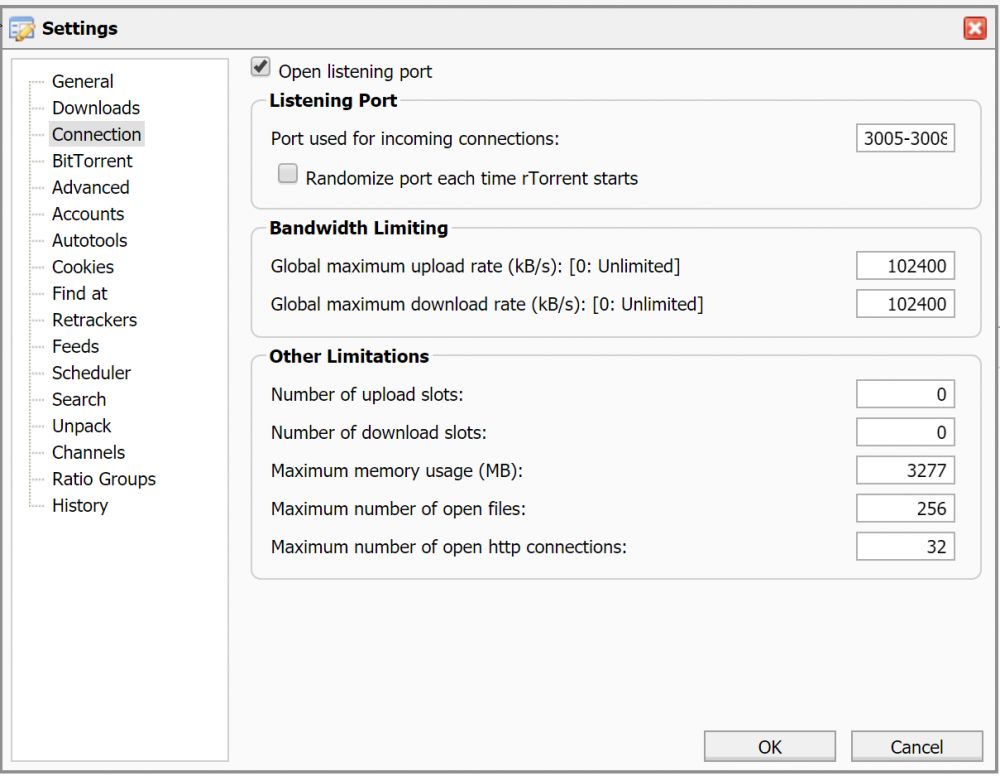
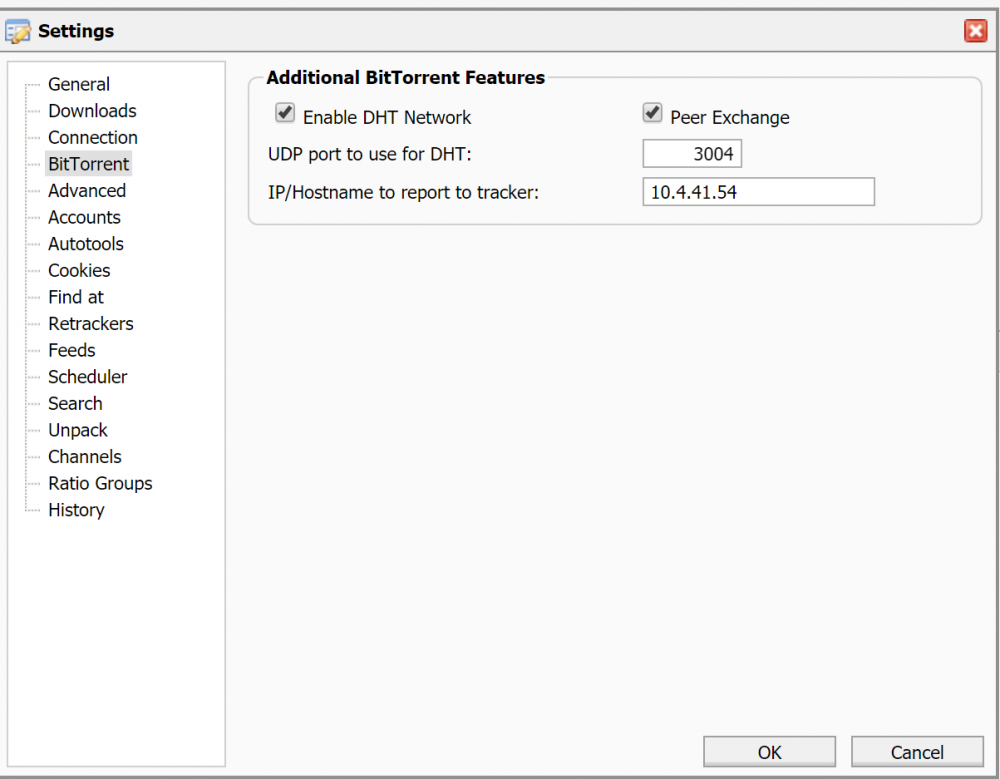
I already set in the rtorrent UI the Incoming Ports of 3004-3008. But, it is still reported as "not connectable". With PIA, you do a search and set the port. It seems that ports I set are resetted at each start of the docker (they don't stick). Is there a trick to make them stick ? Here is my settings, but if I restart the docker, they go back to default.
-
Finaly, it worked by itself. But, it's super-slow. It doesn't get pass 800KB/sec... on my previous "cheap" VPN included in my Usenet, I hit 22MB/Sec (my connexion can get 110MB/sec, it's Gigabit Internet). I thought AirVPN would be an Upgrade Also, I took AirVPN just for the sole option of the "Remote Port Forwarding" they offer. It seems that I cannot set the forwarded ports anywhere ? ex: I forwarded port 3004-3008 in AirVPN site, so those are my "incoming" ports, to be used to be "connectable" on torrent trackers. I tried setting that in the rTorrent UI, but since the iptables doesn't open them, it just don't work How can I have it working? Do I need to modify a script in the docker ? Thank you !
-
I have the same kind of thing in my Log too, and it just doesn't work. Since you knew already how to use AirVPN, can you reply my questions ? 1. Do I need to specify a User/pass or only providing the .opvpn is enough ? 2. How to tell the Docker what are the AirVPN forwarded ports ? Thanks,
-
trying to switch my rutorrentVPN from a cheap VPN (that was working, but not provide any Port Forwarding for Torrenting) to AirVPN. I have my AirVPN.opvpn file, then I remove VPN_USER and VPN_PASS, change the VPN_PORT to match the included port in the .opvpn file (443), change the VPN_REMOTE to match too. Seems the docker doesn't start OK... Any idea ? ** EDIT ** Ok, I tried starting from scratch. Still can't make it work! tried both rtorrentVPN and DelugeVPN. 1. using AirVPN, is that right I don't provide VPN_USER and VPN_PASS ? 2. How can I tell the Docker what Ports are Forwarded by AirVPN (in my case, I forward 3004,3005,3006,3007 and 3008). I suppose it need to only be added to the IPtables rules, but isn't there a Variable to edit for that ? 3. True that doesn't need to forward ports on my Router (since it's in the VPN) ?
-
Hi guys, I just updated my docker to UniFi 5.2.9 released monday. Always backup your current settings before upgrading then at first launch, restore the backup from the wizard.
-
how to get last release ? Plugins page say that version from 2016-10-02 is the latest (initial release). Also, just upgrade Unraid to 6.2.1 version that was just made available. Seems to work fine.
-
Ok, UniFi Video docker updated to 3.4.0 (latest). The UniFi docker is already at the latest 5.0.7 version since a while.
-
I had to change to lime-tech docker of PLEX Media Server because LS.io one doesn't transcode anymore for me. I even deleted the docker + image, and still, when I reinstalled it, same issue. It just give an error when need to transcode anything. Direct Play wasn't affected. Very strange Issue. I don't know if it's the update to 1.1.2.x of PLEXPass version or anything else, but moving to LimeTech official docker worked again on 1.0.3. Also, I tried using the VERSION to set it to the 1.0.3.xxxxx but even with that, when I started it, it always say "No need to upgrade" and stay on the broken version (!).


