Jorgen
Members
-
Joined
-
Last visited
Everything posted by Jorgen
-
I don't see qemu mentioned in the release logs, does that mean it is staying on v9.2.3? I was hoping for an update to 10.0 or higher 🤞
-
After running the UPT/Q35 setup for a while as a daily driver now, I and seeing some issues. The occasional screen flickering is back, mainly in apps that use the camera, like Teams and Google Meet. But also VS Code and Postman seem to be affected. This flickering only appears after half a day of uptime and gets progressively worse after that. When the flickering starts happening, sometimes the network also starts to become unreliable, dropping in and out. So maybe this is not ready for prime time yet, but I'll keep using it and troubleshoot the issues as they come up.
-
After some hardware changes, the default 'hostdev0' alias name we use in the qemu:override section got claimed by another hostdev device. And the VM failed to start. Looking into the use of alias names in libvirt, we really should be setting a manual alias for the igd device and use that in the qemu:override section. There are some rules to follow, though. From https://libvirt.org/formatdomain.html#devices Which means we should change the igd hostdev block to: <hostdev mode='subsystem' type='pci' managed='yes'> <driver name='vfio'/> <source> <address domain='0x0000' bus='0x00' slot='0x02' function='0x0'/> </source> <alias name='ua-igd'/> <rom file='/mnt/cache/domains/iGPU_ROM_files/igd_rpls.rom'/> <address type='pci' domain='0x0000' bus='0x05' slot='0x00' function='0x0'/> </hostdev> and the qemu:override to: <qemu:override> <qemu:device alias='ua-igd'> <qemu:frontend> <qemu:property name='x-igd-opregion' type='bool' value='true'/> <qemu:property name='x-igd-gms' type='unsigned' value='2'/> </qemu:frontend> </qemu:device> </qemu:override>
-
It would be good if we could set a manual override for the guest address for hostdevs from the UI form view. Or at least prevent the form view from removing manual address edits done in the XML view. Even better if the form view could help you identify and pick a free address somehow. Maybe it's an edge case, but I'm specifically thinking about iGPU address handling for Q35, as described here: Bonus request: being able to set hostdev alias names in the form view. They also get removed if added via XML and then the VM is edited in the form view.
-
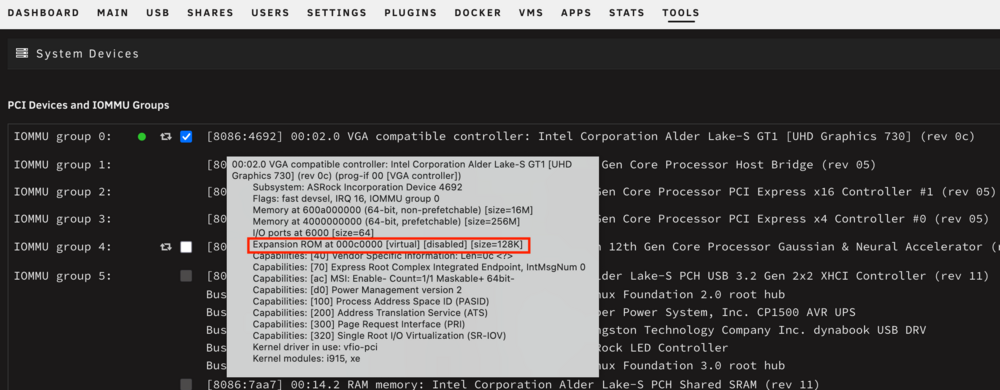
Updated instructions for OVMF and Q35There has been some recent development on the QEMU side for IGD passthrough. Updated official instructions with much clearer explanations: https://github.com/qemu/qemu/blob/master/docs/igd-assign.txt Updated code released in QEMU v10.0.2 for better handling of legacy mode for newer Intel generations: https://gitlab.com/qemu-project/qemu/-/issues/2586 Note that Unraid 7.1.4 is on QEMU v 9..x.x so we might have to wait a bit... After looking into this, there are improvements to be made to the IGD passthrough with screen output. We need to ensure QEMU is not using "legacy mode" for the IGD device, and instead, we want to use UPT mode (universal passthrough). UPT means much less reliance on the vbios rom file. Instead the guest VM is reading more of the required info from the host. The drawback is that displaying the boot screen in OVMF is not supported. We only get screen output once the guest VM has booted and loaded the display driver. For this to work, the host must expose the opregion data to the guest. And to do that, we need to: Set the IGD as the primary adapter in the host bios and boot Unraid in EFI mode To check if both of these requirements are satisfied, go to Tools/System Devices and hover over the IGD. There must be an "Expansion ROM" entry, or UPT mode will not work. See screenshot below for an example. Remap the IGD address on the guest side so that it is NOT the default 00.02.0 (as that will trigger the legacy mode) This has to be done in the VM XML editor. The UI form view will change it back to the default when saving. Simply pick a free bus number for the device in the XML, in the example below I'm using bus 5: domain='0x0000' bus='0x05' slot='0x00' function='0x0' <hostdev mode='subsystem' type='pci' managed='yes'> <driver name='vfio'/> <source> <address domain='0x0000' bus='0x00' slot='0x02' function='0x0'/> </source> <alias name='hostdev0'/> <rom file='/mnt/cache/domains/iGPU_ROM_files/igd_rpls.rom'/> <address type='pci' domain='0x0000' bus='0x05' slot='0x00' function='0x0'/> </hostdev> That's it. All the other steps are still required, and we still need to use the rom file and add the qemu:overrides. This should be a better config for using Q35 and we get rid of these lines in the VM log, which has to be a good thing: IGD device 0000:00:02.0 cannot support legacy mode due to existing devices at address 1f.0 emu-system-x86_64: vfio: Cannot reset device 0000:00:1f.3, no available reset mechanism.
-
Sigh, never mind, there was another rogue VM running that I didn't notice at first...
-
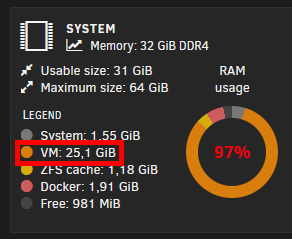
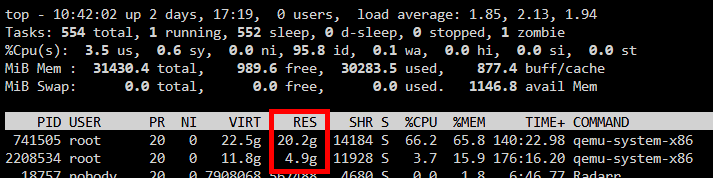
Can someone help me understand what the "extra" memory is used by/for when comparing the VM memory usage on the unraid dashboard, with the configured memory allocation in the (only) running VM, please? Dashboard usage: VM memory configuration: 20480 MB = 19.073486 GiB, so what is the "extra" 4.9 GiB used for? I can see it reported in top as used by qemu, so I assume some kind of hypervisor overhead? It just seems a bit high in this case, so I'm wondering if there's anything I can do to reduce it? What influences the size of this "extra" memory usage? I only have one VM running for these screenshots.

-
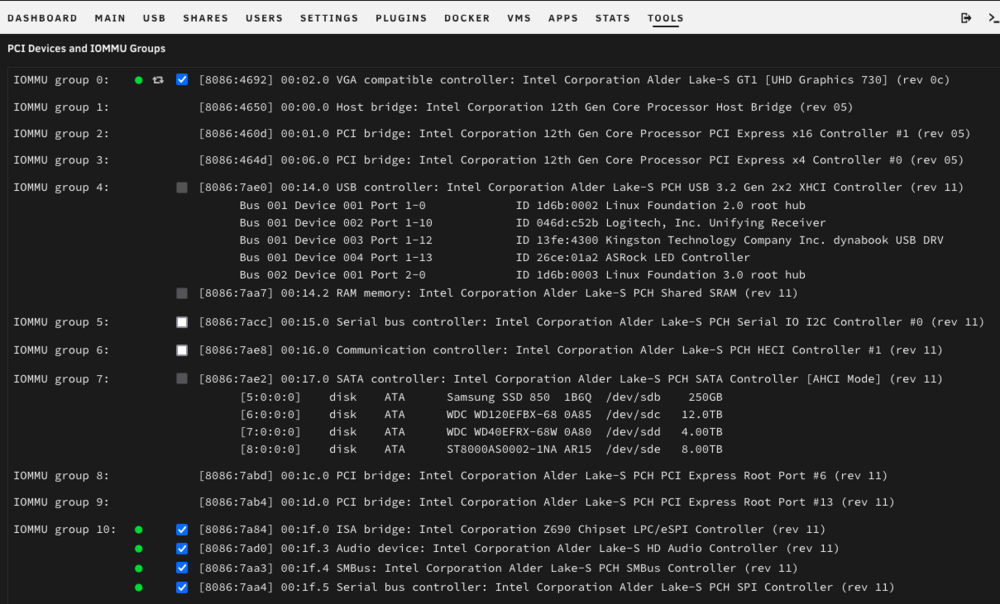
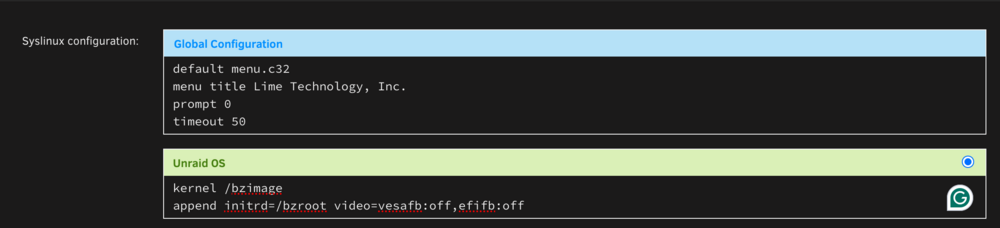
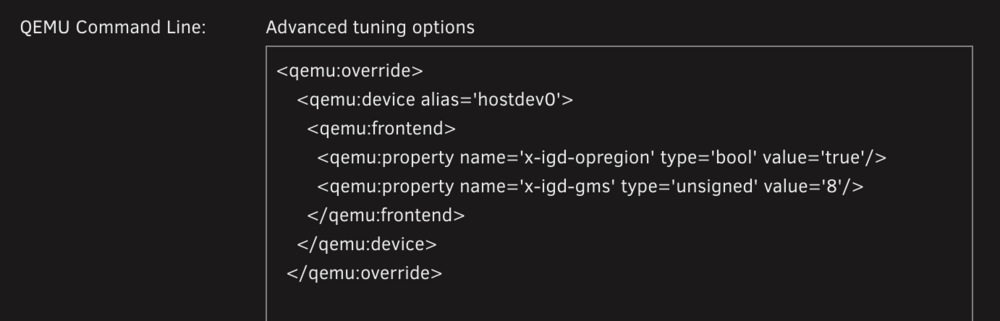
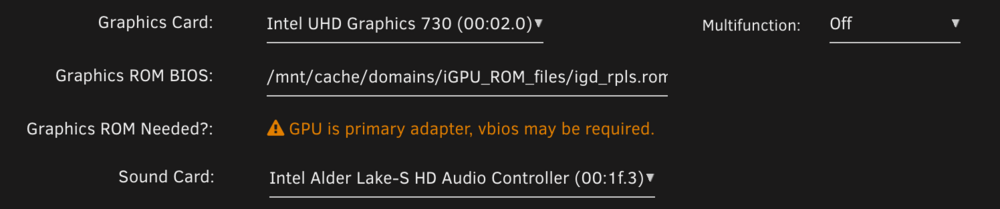
Host BIOS settings that MIGHT be relevant (example from ASRock Z690M-ITX/ax, i5-12400): VT-d: Enabled Primary graphics adapter: Onboard (i.e. the iGPU is the primary adapter) Above 4G Decoding: Enabled C.A.M. Clever access memory: Enabled SR-IOV support: Enabled (probably not required) Share Memory: 64M (DVMT pre-allocated) NOTE: 64MB DVMT matches 'x-igd-gms' value='2' in the qemu overrides later. It can be increased but it must match between BIOS settings and qemu override. The 'value' integer is a multiplier for "32M". So if you set DVMT to 128M, set value=4, etc. IGPU Multi-monitor: Enabled Unraid Syslinux configuration Add video=vesafb:off,efifb:off to Syslinux.conf VM configuration Download the "combined" ROM file igd_rpls.rom from the GitHub repo https://github.com/gangqizai/igd/tree/main/2in1_rom and save it to the domains share. I used /mnt/cache/domains/iGPU_ROM_files/ Bind the iGPU and optionally the soundcard (and the rest of the devices in the same iommu group in my case) to VFIO in Tools/System devices Plug monitor into iGPU HDMI and/or DP ports Reboot unRAID Create a new Windows VM with NoVNC graphics card, CPU host passthrough, i440fx-9.2 and Seabios (for Q35 and OVMF, see next post) Install Windows with NoVNC, install standard virtio drivers Shut down VM Add iGPU as a second graphics card for the VM in UI editor Add intel soundcard in UI editor (optional) Start VM Confirm iGPU is visible in Windows device manager Download and install Intel iGPU driver (I used https://www.intel.com/content/www/us/en/support/detect.html). This process might require a reboot. Shut down VM Remove NoVNC from VM in UI editor Still in the VM UI editor Select the iGPU as the primary graphics card For Graphics ROM BIOS, select igd_rpls.rom from step 1 For Sound Card, select the Intel audio controller (optional) Save changes, but don't start the VM yet In the VM UI editor, add this block of code to the QEMU Command Line field IMPORTANT: the x-igd-gms value must match what you set the DVMT to in the host BIOS. 64MB DVMT matches 'x-igd-gms' value='2'. The 'value' integer is a multiplier for "32M". So if you set DVMT to 128M, set value=4, etc. <qemu:override> <qemu:device alias='hostdev0'> <qemu:frontend> <qemu:property name='x-igd-opregion' type='bool' value='true'/> <qemu:property name='x-igd-gms' type='unsigned' value='2'/> </qemu:frontend> </qemu:device></qemu:override> Example where I have set DVMT to 512M in BIOS Start the VM and enjoy monitor output from the iGPU!
-
I had a look at this error, and I think you either need to update to the latest unraid version for a newer kernel, OR reduce the RAM allocation for the VM. For the latter, see here (but I wouldn't start messing with hugepages, ignore that section) https://seanthegeek.net/posts/fix-for-vfio-gpu-passthrough-vfio-map-dma-failed-errors-in-truenas-proxmox-unraid-qemu/ For your audio issue, you could try forcing the sound card to have the same address in the VM as it does on the host. I know passing through previous generations of intel iGPU and sound card required them to be at the expected address in teh VM, maybe that still applies? That's a manual XML edit though, and you will likely get conflicting use of the same address, plus other errors that needs to be worked through: </hostdev> <hostdev mode='subsystem' type='pci' managed='yes'> <driver name='vfio'/> <source> <address domain='0x0000' bus='0x00' slot='0x1f' function='0x3'/> </source> <alias name='hostdev1'/> <rom file='/mnt/user/domains/iGPU_ROM/gen12_gop.rom'/> <address type='pci' domain='0x0000' bus='0x00' slot='0x1f' function='0x3' multifunction='on'/> </hostdev>
-
Not sure what the problem is, sorry. My understanding is that audio should work with this method. I don't personally use audio over HDMI as my monitors have no audio out capabilities... :) There is a method of using a "combined" ROM file so you only need to assign it to the iGPU, not the sound card part. Maybe that would help? See here for instructions: https://forums.unraid.net/bug-reports/stable-releases/712-vm-intel-gpu-passthrough-to-monitor-stopped-working-r3855/#findComment-34189
-
Sorry I have only ever used Intel systems, so I have no idea. However, this thread says it's possible to dump the VBIOS ROM file you need, and also has step-by-step instructions to follow for a non-unraid system.. I don't know if this works or is safe to do, so use your own judgement: https://www.reddit.com/r/VFIO/comments/16mrk6j/amd_7000_seriesraphaelrdna2_igpu_passthrough/
-
I don’t know about patching qemu, but I’ve managed to run a Win10 VM with Q35 and standard unraid 7.1.2. I have a newer IGD version though, HD730. I also get the warning about the existing device at 1f in the logs BUT it still works. I know this doesn’t help you, just adding a data point. I would also be very interested in getting MacOS running with IGD passthrough so will be watching this topic!
-
Sounds like your LAN_NETWORK option is not set correctly, see Q4 here for a start on how to configure it: https://github.com/binhex/documentation/blob/master/docker/faq/vpn.md
-
Just got this working with Q35 on Unraid 7.1.2 too! Additional steps: Addded video=vesafb:off,efifb:off to Syslinux.conf Set DVMT to 128M in BIOS For VM settings: Machinetype = Q35-9.2: <type arch='x86_64' machine='pc-q35-9.2'>hvm</type> Same custom rom files for Intel integrated GPU and soundcard: <hostdev mode='subsystem' type='pci' managed='yes'> <driver name='vfio'/> <source> <address domain='0x0000' bus='0x00' slot='0x02' function='0x0'/> </source> <rom file='/mnt/cache/domains/iGPU_ROM_files/gen12_igd.rom'/> <address type='pci' domain='0x0000' bus='0x00' slot='0x02' function='0x0' multifunction='on'/> </hostdev> <hostdev mode='subsystem' type='pci' managed='yes'> <driver name='vfio'/> <source> <address domain='0x0000' bus='0x00' slot='0x1f' function='0x3'/> </source> <rom file='/mnt/cache/domains/iGPU_ROM_files/gen12_gop.rom'/> <address type='pci' domain='0x0000' bus='0x07' slot='0x01' function='0x0' multifunction='on'/> </hostdev> Same qemu overrides, but x-igd-gms set to 4 to align with DVMT in BIOS: <qemu:override> <qemu:device alias='hostdev0'> <qemu:frontend> <qemu:property name='x-igd-opregion' type='bool' value='true'/> <qemu:property name='x-igd-gms' type='unsigned' value='4'/> </qemu:frontend> </qemu:device> </qemu:override> Getting complaints about legacy mode not supported (which is expected for Q35), but it still works. 2025-05-25T00:17:58.100378Z qemu-system-x86_64: -device {"driver":"vfio-pci","host":"0000:00:02.0","id":"hostdev0","bus":"pcie.0","multifunction":true,"addr":"0x2","romfile":"/mnt/cache/domains/iGPU_ROM_files/gen12_igd.rom","x-igd-opregion":true,"x-igd-gms":4}: IGD device 0000:00:02.0 cannot support legacy mode due to existing devices at address 1f.0 2025-05-25T00:17:58.307272Z qemu-system-x86_64: vfio: Cannot reset device 0000:00:1f.3, no available reset mechanism. 2025-05-25T00:17:58.548189Z qemu-system-x86_64: vfio: Cannot reset device 0000:00:1f.3, no available reset mechanism.
-
Some related topics. Looks like things are progressing upstream, and we might be able to use Q35 without custom VBIOS soon? GitHubqemu/docs/igd-assign.txt at master · qemu/qemuOfficial QEMU mirror. Please see https://www.qemu.org/contribute/ for how to submit changes to QEMU. Pull Requests are ignored. Please only use release tarballs from the QEMU website. - qemu/qemuhttps://gitlab.com/qemu-project/qemu/-/issues/2586 https://patchew.org/QEMU/[email protected]/[email protected]/ https://patchew.org/search?q=project%3AQEMU+vfio%2Figd https://lore.kernel.org/all/[email protected]/ https://forum.proxmox.com/threads/ugreen-dxp4800-igpu-99-success-win-server-2025.163149/#post-753351 https://eci.intel.com/docs/3.0/components/kvm-hypervisor.html#passthrough-kvm-graphics-device
-
Just updated to Unraid 7.1.2 and this is still working. UPDATE: After a few days of daily use, I'm sometimes getting the old flickering screen issue again, but only in Teams.
-
9 hour memtest, 6 passes, no errors. That's the longest I can do, need to bring the server online again. After reboot, segfault error again. This is the only mention of any segfault in the logs.:

-
Ok will run memtest later and report back. I was just reporting it as it’s the exact same error message as post above mine.
-
I'm just adding that I'm also getting an inotify segfault after upgrading to 7.0.1 today (and a plugin update). Happens on plugin start, and also plugin restart as shown here:

-
Just confirmed this is still working well after the upgrade to Unraid v 7.0.0. Nice to see the new QEMU Commandline section and all other additions to the VM manager form view, great stuff @SimonF!
-
Thanks @JorgeB will try that!
-
My oldest SSD seems to have finally given up the ghost. It passes a short SMART test, but the Extended test always fails in the first 10%. With read errors, if I have interpreted the SMART report correctly (attached). It was mounted via unassigned devices and had no important data on it, so I'm not worried about data loss. Just want to know if it's definitely bound for the scrap heap or if anything can be done to give it a second lease of life? I think it's over 10 years old, and it has served me well so not really holding my breath here... tower-smart-20241205-1118.zip
-
Those ports are not used for the torrent port forwarding. The input/outport ports are used to allow traffic in or out of the container outside the VPN tunnel. Required for scenarios where other containers are sharing the same docker network, but I don’t think that applies to you. I think you would be much better off using one of the VPN enabled torrent dockers from Binhex instead, rather than trying to use the proxy function of privoxy.
-
Disk errors gone after cable reseating and reboot, 26 hours parity rebuild completed without errors. Phew.
-
Thanks! Having more power outages, will let that settle down before proceeding. Server is currently off after power cut. Need to get that UPS....