DanielCoffey
Members
-
Joined
-
Last visited
Everything posted by DanielCoffey
-
Thank you, I will do that. It may take a while to reproduce but I will run the log server until then.
-
I have been having infrequent issues with my server apparently dropping off the network or being inaccessible from a browser and having to be shut down by its own power switch and wondered whether I am developing a hardware issue with it. I would appreciate some advice. Specs in my signature. Because the server is infrequently used for Plex once every day or two it spends a lot of time asleep to save power. I send it a Magic Packet using a WakeOnLAN tool to wake it up, check the Plex docker is active (it sometimes isn't - I suspect Plex timeout issues) and use it to watch a film. This always works without issue. Some time after the film is finished I open a browser on my main desktop or tablet and request it Sleep again. Most of the time it works exactly as expected (c. 90%). Occasionally the browser fails to present the server's GUI. The server is still visible on the Router list of devices connected but nothing will access the server. I have to go over to it and press the Power button to make the device perform a shut down. On a reboot it works perfectly... till next time. Until today. Today the quick press of the power button did nothing. No drive activity, nothing happening at all. I had to press and hold to force the PSU to shut down. Does this sound like a hardware issue to you? The motherboard perhaps? I do have a monitor I can connect to it for diagnosis if needed. Might there be logs stored in the Flash drive about possible causes?
-
@Revan335If you click the little "!" next to the 6.10.1 version number on teh Update page of the GUI it says...
-
Remember that your Parity drive must always match (or exceed) the capacity of the largest data drive and as you increase the size of the largest drive in the array, the time to perform a Parity Check increases. To give a data point, 8Tb drives take around 16h for a Parity Check and it is fairly linear with drive size.
-
Since this is a Release Announcement thread, you mightl have a better chance of getting help if you raise a new thread in either the General Issues or KVM forums.
-
Thank you - I will be able to follow that. If I get into difficulty I will come back and ask.
-
I am currently set up with a pair of 512Gb SSDs in a btrfs cache pool and I would like to know the smoothest way of moving over to a single M.2 SSD, preferably without having to redo my Docker settings if possible. Mt Forum Signature is up to date. I do understand that I should run Mover first. Thank you.
-
VERSION : 6.8.1 ISSUE : UI on Dashboard page - "thumb down" dropdown menu for SMART options cannot see last menu item and cannot scroll down to it. BROWSER : Firefox 72.0.1 (64-bit) I had several CRC errors on my first cache device which displayed the yellow "error" thumb down icon. When I clicked on the error thumb to reveal the Attributes/Capability/Identity and Ignore (or cancel?) menu, the final menu item was not visible even when I scrolled the window down as far as possible. The last Ignore (or Cancel?) option was tucked behind the menu footer. I was able to just click on the top bit of the menu item to activate it and clear the errors but I feel the text should have been displayed. See attached images for the UI issue and active Plugins nas-plex-diagnostics-20200117-1949.zip
-
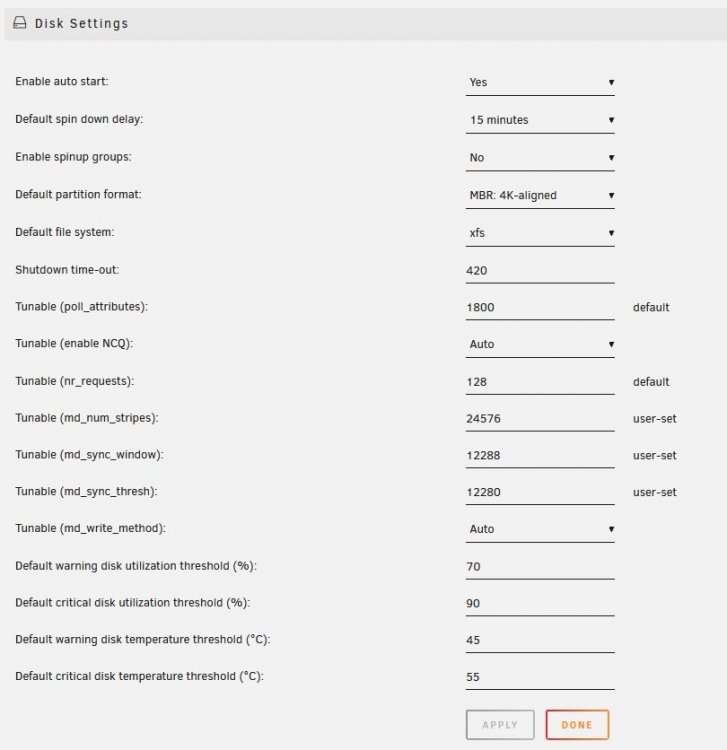
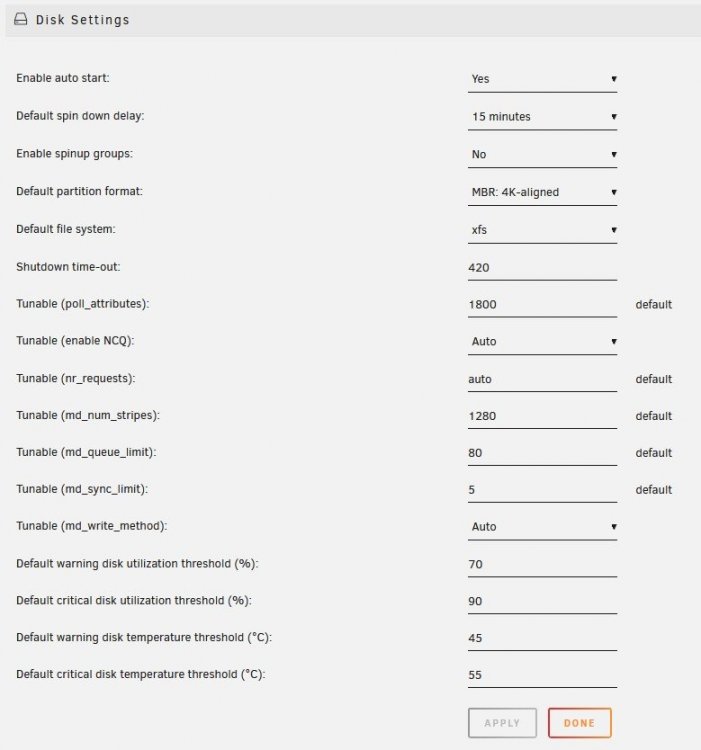
I have just tried 6.8.0-rc1 to compare its parity checks to both 6.7.2 and the Tunables script since my array is very straightforward and the result is interesting and shows there is still room for improvement. The first thing I did before upgrading from 6.7.2 was reset all the Disk Settings tunables back to default (including nr-requests which defaults to auto now). My array is 2x WD Red 8Tb dual parity and 6x WD Red 8Tb data with 2x 512Gb SSD for cache. 6.7.2 default - 17h15 to 17h30 6.7.2 tunables - 15h30 6.8.0-rc1 default - 16h45 I have added a screenshot of the 6.7.2 Tunables and also 6.8.0-rc1 default values for comparison and I think there is still scope for improvement. I suspect that on my server we could find up to an hour in there that could be tuned out.
-
Here's a tip based on personal experience... make sure the array is not due to go to sleep while the Preclear is running. In my case it watched the array for 30 minutes, decided all was quiet, ignored the unassigned devices and shut down. Oh poop! Time to start over I guess. EDIT : well colour me impressed! When I woke the array, the Preclear docker simply resumed from where it had left off and was up and ticking by the time I reopened the WebUI.
-
That is just what I needed, thank you. So just as with other Dockers, we can close the Docker window and the process inside it will carry on running. We can pop back later and reopen the WebUI and take a fresh peek at how it is getting on. Once it is completely finished we are free to stop the Docker if we want. Cheers.
-
Please excuse the possibly idiot question but can I close the Docker command prompt window while the preclear is running (like you could with Screen) or must it remain open in order for the script to continue? On an 8Tb drive it will of course need to run for quite a while and this was not mentioned in the FAQ.
-
There we go - tidied up my post. I will be rerunning the script soon as I have swapped one WD Red 8Tb out of the array was it is behaving oddly on shutdown and the DiskSpeed docker showed it had odd behaviour and performance. Sadly WD are being very slow to acknowledge my Warranty case so I may have to escalate it on Monday.
-
It seems to be there now...
-
I can answer the last part... no, you don't have to set Tunables to default before using the tool. The first test is performed using "current". It then takes a peek at "default". Only then does it start probing the possible values that may affect the performance. If you want to set the values back to Default at any time, simply go to the Disk Settings page and delete the value in the fields that say "User Defined" and hit Apply. It will automatically reset them to Default for you.
-
I agree the speed is odd but it is the one disk that seems to trigger the hard lock on power down or sleep. It is outside the array now and undergoing a full SMART test. My other Unassigned 8Tb is back in the array undergoing a rebuild.
-
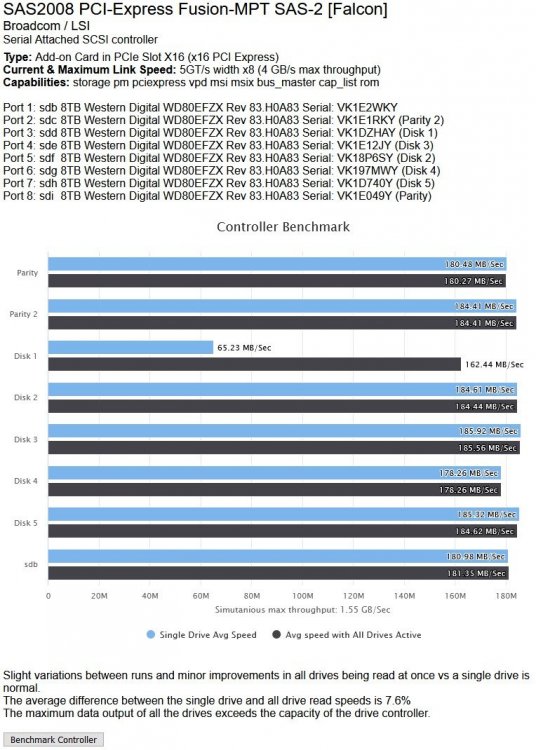
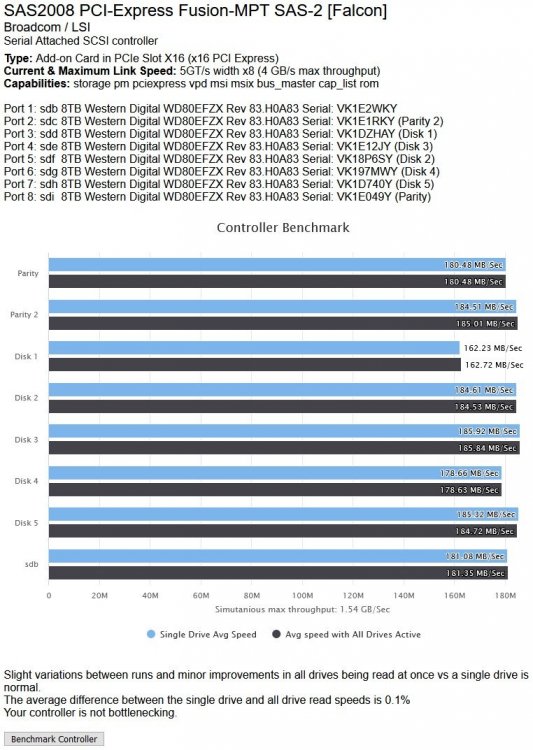
I have run multiple tests, yes. The really low result was a one-off and the c.162Mb/s was its regular result which coincides with the highest speed I can get on the beginning of a parity check. I don't think my 8 drives are even close to saturating the 9201-8i I have as it allows 4Gb/s transfer and the eight drives are less than half of that. I will be pulling that drive today anyway once the rebuild completes and I can write to the array again.
-
The problem is that the server locks up on about every four shutdowns/sleeps and drops Parity 1 and Disk 1 every time. I was looking for anomalies and spotted that Disk 1 stood out under the DiskSpeed tests. I have my own thread started about the dropouts and have added the DiskSpeed results to it.
-
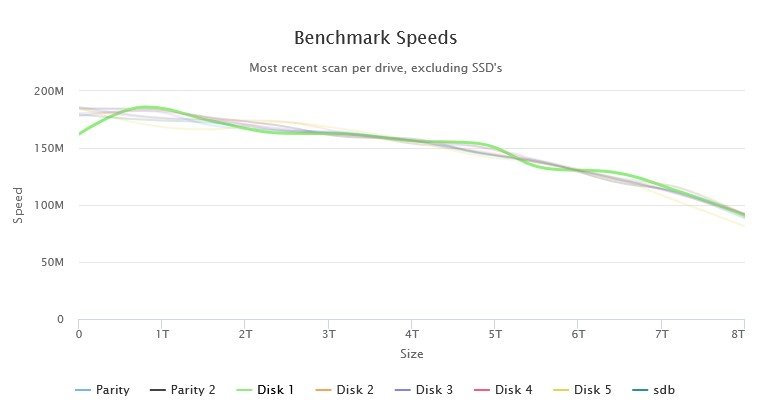
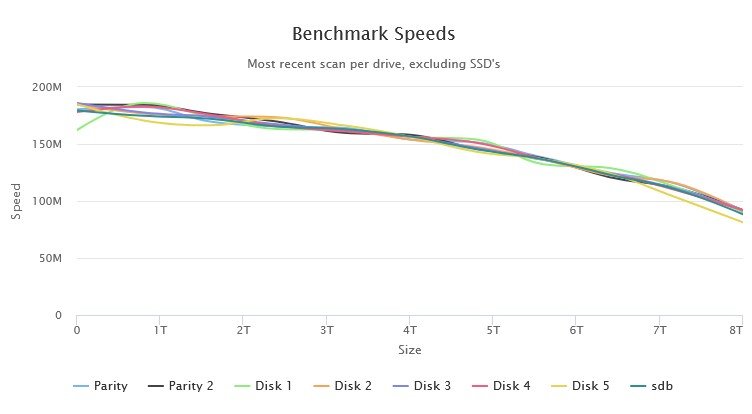
Hmm... do I need to be concerned about Disk 1 in this array? All drives are 8Tb WD Reds of the same age... It has a consistent slow spot at the start of its platters and more wobbles than the rest of the disks. In addition when I benchmarked the controller, the first run through showed a VERY low result for it (so much so that DiskSpeed thought the controller was saturated). I redid the Benchmark and the result is consistent between tests now. I have also attached the Quick SMART for that drive. WDC_WD80EFZX-68UW8N0_VK1DZHAY-20190820-1724.txt
-
Yes it will. Parity has to match or exceed the largest data drive, so a 10Tb Parity would be the smallest you should use.
-
WD Reds are designed for continuous use. I too have had a WD Red 8Tb be RMAd on first use. The SMART stats showed terrible issues. Decide how important it is for you to have the array available because if you just throw the untested drive in, write to it and then discover it was bad, you may have array downtime while the issue is fixed, especially if you did not have Parity yet. I would agree with the preclear test times of about 20 hours as my 8Tb Reds take 17h30 for a parity check.
-
Version 4.1 Beta 2 Xtra Long Test completed... XtraLongSyncTestReport_2019_08_13_0625.txt
-
My server is back up (17h45m for a rebuild of two drives) so here is the Short v4.1 BETA 2 test result. An Xtra-Long test is now started. ShortSyncTestReport_2019_08_13_0616.txt
-
Ugh - brought my server up this morning and it has dropped two disks (Parity 1 and Data 1 - probably loose cable). I'll have to rebuild Parity before running the script. I'll report back when that is done.
-
My non-nvme server is available for a long test too once you do. I am in the UK timezone so probably won't spot the new version till later but I'll keep an eye open.